
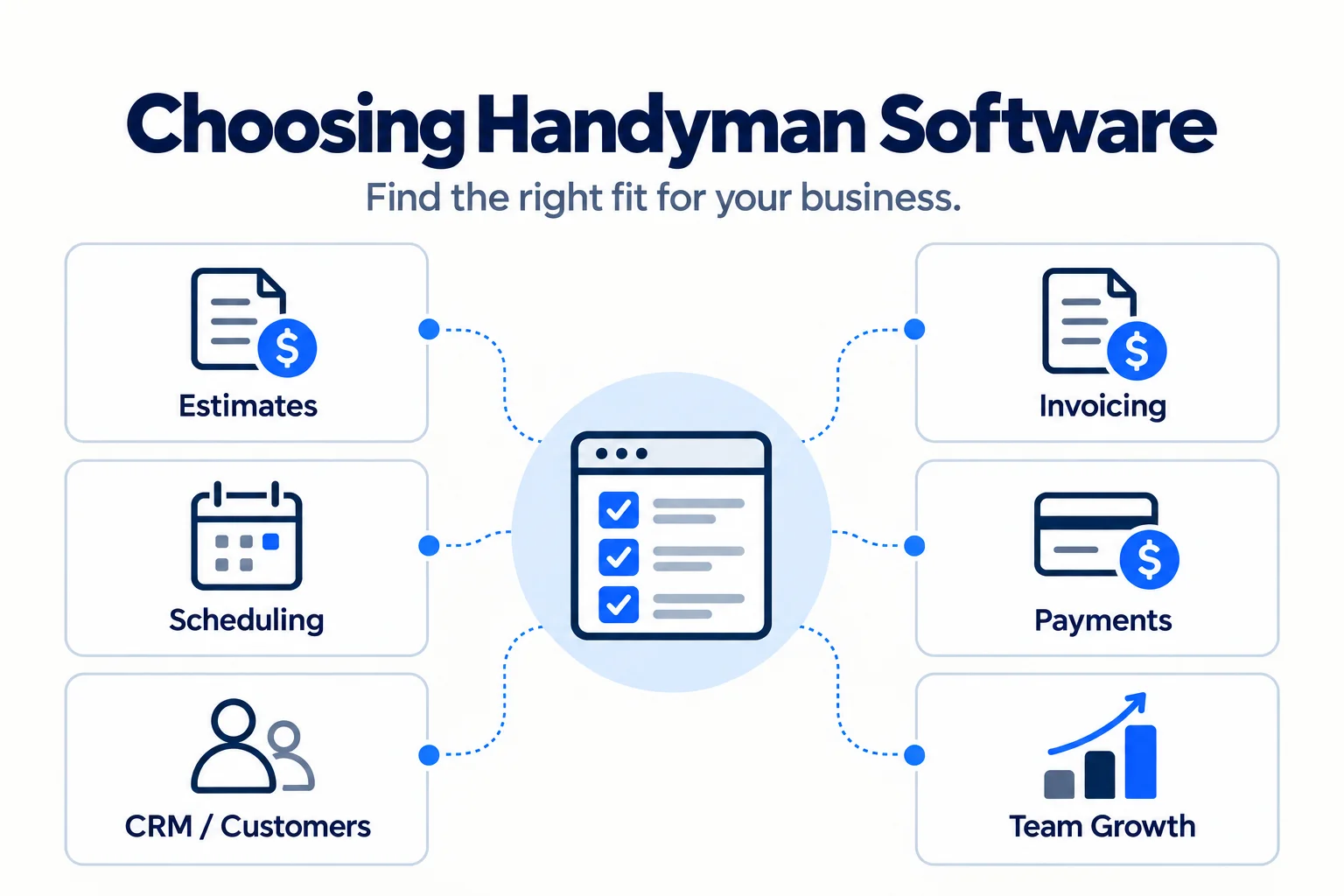
Handyman software can be as simple as a tool for creating estimates and invoices or as broad as a field-service platform that connects scheduling, dispatch, CRM, payments, communication, and team management. The right choice depends less on who has the longest feature list and more on how your business actually works, how many people need access, and how much operational complexity you need to manage.
Choosing between seemingly similar platforms gets difficult quickly. Two products may both advertise scheduling, for example, while one is designed around a solo operator’s calendar and another provides dispatch boards, routing, technician permissions, and team-wide visibility.
The same differences show up in customer communication, mobile workflows, integrations, included users, paid add-ons, and pricing. A solo handyman who mainly needs professional estimates and faster invoicing may get more value from a lightweight contractor tool. A growing company coordinating several technicians may need a true field-service management system.
Home Service Fit evaluates these products using current official product information and publicly available documentation. We do not claim hands-on testing unless explicitly stated, and affiliate relationships do not determine which products we recommend.
Looking for a deeper evaluation of a specific platform? Browse our home service software reviews. If you are choosing between two products, see our side-by-side software comparisons.
Best Handyman Software at a Glance
These are use-case recommendations, not a universal numerical ranking. A product listed first is not automatically better for every handyman business.
- Jobber — Best overall for most small handyman businesses: A strong balance of quoting, scheduling, CRM, job management, invoicing, payments, and tools that can support a business as it adds employees.
- Housecall Pro — Best for growing teams and dispatch: A stronger fit when scheduling technicians, dispatching jobs, routing, and keeping an expanding team coordinated become major operational problems.
- QuoteIQ — Best for handyman owner-operators wanting an all-in-one system: Home-service-focused software with estimating, invoicing, CRM, scheduling, payments, and a growing set of automation tools.
- ServiceM8 — Best free starting point: One of the most notable options for very small businesses because it currently offers a genuine free plan with field-service functionality, although its Apple-first approach matters.
- Joist — Best for estimates and invoices: Particularly suitable when quoting, contractor documents, invoicing, and payments matter more than advanced multi-technician dispatch.
- Kickserv — Best for small teams wanting straightforward FSM with bundled users: Its core plans include multiple users, making the pricing structure worth considering for small crews.
- Markate — Best for owner-operators wanting CRM and customer follow-up tools: Combines everyday service operations with lead management, automated follow-ups, and repeat-customer marketing.
- Workiz — Best for phone-heavy service teams and integrated communications: Particularly relevant when calls, messages, scheduling, and field operations need to connect in one system.
- FieldPulse — Best for customizable growing-team workflows: A configurable option for businesses that need more control over scheduling, work orders, workflows, reporting, and team processes.
- ServiceTitan — Best for larger, more complex operations: The most operations-heavy platform on this shortlist and a better fit once the business needs substantially deeper dispatch, reporting, pricebook, and management capabilities.
Handyman Software Comparison
| Software | Best for | Business size fit | Pricing approach | Main strength | Main limitation | Trial/demo |
| Jobber | Balanced all-in-one management | Solo to growing small teams | Core currently $49/mo monthly or $29/mo billed annually for 1 user; higher plans and team sizes cost more | Connects most of the customer and job lifecycle | Can be more software than a basic estimate-and-invoice workflow needs | 14-day free trial |
| Housecall Pro | Dispatch and growing teams | Solo to multi-tech teams | Basic currently $79/mo monthly or $59/mo billed annually for 1 user; Essentials includes 5 users | Strong scheduling, dispatch, routing, and team coordination | Costs and complexity rise as more advanced team functionality is needed | 14-day free trial |
| QuoteIQ | Owner-operators wanting an all-in-one home-service system | Solo to small/growing teams | Essentials $29.99/mo for 1 user or $25/mo equivalent billed annually; higher plans add users/capabilities | Broad home-service workflow in one product | Some advanced functions and higher user counts require higher plans; usage-based elements can add cost | 14-day free trial |
| ServiceM8 | Low-cost field-service starting point | Solo and very small teams | Free: 1 user/30 jobs per month; Starter: $29/mo with unlimited users/50 jobs per month | Genuine field-service functionality at a low starting cost | Full mobile experience remains Apple-first; Android app is more limited | Free plan + 14-day trial |
| Joist | Estimates and invoices | Solo and owner-operated businesses | Basics currently starts at $10/mo; annual discount available; Run adds job organization/scheduling at a higher price | Simple contractor-focused quote-to-payment workflow | Less dispatch-centered than full FSM platforms | 14-day free trial |
| Kickserv | Small teams wanting bundled users | Small to growing teams | Start $60/mo for 5 users; Run $119 for 10; Scale $199 for 20; annual plans save 20%. Flex remains available at $19/mo for 3 users | Multiple users included in published plans | Advanced dispatch/reporting capabilities are tier-dependent | 30-day free trial |
| Markate | CRM and customer follow-up | Owner-operators and small teams | $49.95/mo monthly or $39.95/mo equivalent billed annually; employee access $5/employee/mo | Operations plus lead/customer follow-up | Paid features and employee access can raise total cost | 14-day free trial |
| Workiz | Phone-heavy service teams | Growing to larger teams | Standard, Pro, and Ultimate use request pricing; Genius communication products are sold separately | Connects FSM workflows with an integrated communications ecosystem | No simple public entry price; communication add-ons increase total cost | Demo available |
| FieldPulse | Configurable team workflows | Growing teams | Custom, seat-based pricing | Configurable workflows, dispatch, reporting, and field operations | Buyers must contact sales to establish actual cost | Demo/custom quote |
| ServiceTitan | Complex operations | Larger/more operationally complex service businesses | Custom per-technician/request pricing | Deep dispatch, pricebook, reporting, and operational controls | Likely excessive for many solo operators and very small crews | Personalized demo |
Pricing and product details were checked against official vendor sources on September 3, 2026. Prices and features can change.
How We Selected and Evaluated Handyman Software
We looked at each product through the workflow of a real small handyman business rather than trying to reward the platform with the most features.
That means considering:
- fit for a solo owner-operator versus a team;
- estimating and quoting;
- scheduling and job management;
- invoicing and payments;
- CRM and customer history;
- mobile usefulness;
- iPhone, iPad, Android, and web compatibility where relevant;
- setup and day-to-day complexity;
- customer communication;
- relevant integrations;
- pricing and users included;
- what is included in the base subscription versus paid add-ons;
- how cost changes as more people need access;
- scalability;
- meaningful limitations.
We also consider whether one platform can replace several disconnected tools without creating more complexity than the business actually needs.
Official vendor documentation is our primary source for product facts, especially pricing, plan names, trials, compatibility, and integrations. This is a curated shortlist, not an exhaustive map of every field-service platform available, and affiliate commissions do not determine inclusion or placement.

10 Best Handyman Software Options for 2026
Jobber: Best Overall for Most Small Handyman Businesses
Best for: Small handyman businesses that want a balanced system covering most of the customer and job lifecycle.
Overview: Jobber combines CRM, quoting, scheduling, job management, invoicing, payments, customer communication, and mobile access in one platform. Its handyman-specific product documentation also emphasizes keeping client history, quotes, jobs, invoices, and billing records connected rather than spread across separate tools.
Key capabilities: Professional quotes, online booking, scheduling, client records, job details, invoices, online payments, customer portals, mobile workflows, automation on higher plans, and an app marketplace. Jobber’s iOS and Android apps support field workflows, and QuickBooks Online synchronization is available on qualifying plans.
Strengths: Its biggest advantage is balance. A company can start with relatively straightforward customer and job management and continue using the same system as scheduling, automation, team coordination, and profitability tracking become more important.
Main limitations: A solo handyman who only needs estimates, invoices, and basic customer records may not use enough of Jobber to justify moving beyond a lighter contractor tool. Some meaningful capabilities are also plan-gated.
Pricing: Core currently costs $49 per month with no commitment or $29 per month when billed annually and supports one user. Team pricing increases by plan and user count.
Verdict: Jobber is our strongest balanced recommendation for a typical small handyman business, but not automatically the best fit for the simplest solo workflow.
Read our full Jobber review for a deeper look at features, limitations, user feedback, and business fit.
Housecall Pro: Best for Growing Teams and Dispatch
Best for: Handyman businesses where coordinating multiple workers is becoming harder than doing the actual admin.
Overview: Housecall Pro covers estimates, invoicing, payments, CRM, scheduling, dispatch, online booking, routing, and team operations. Its handyman product specifically supports real-time scheduling, crew updates, route planning, customer reminders, estimates, invoicing, and mobile access.
Key capabilities: Scheduling and dispatch, quotes, invoices, payments, customer management, online booking, route sequencing, employee GPS capabilities on qualifying plans, and QuickBooks Online synchronization on Essentials and above. The mobile app is available for both iOS and Android.
Strengths: Housecall Pro becomes especially compelling when the owner can no longer keep a growing field team coordinated from a personal calendar, text threads, and memory. Routes and dispatch-oriented tools address a different level of operational complexity from basic scheduling.
Main limitations: That same team-management depth can be unnecessary for a solo handyman with predictable jobs and no dispatch problem.
Pricing: Basic currently costs $79 monthly or $59 per month billed annually for one user. Essentials is $189 monthly or $149 billed annually and includes five users; additional-user and add-on costs should be checked before scaling.
For a deeper look at its features, limitations, user feedback, and business fit, read our Housecall Pro review.
Our Housecall Pro pricing guide breaks down the current plans, included users, add-ons, and payment fees in more detail.
If Jobber is also on your shortlist, see our Jobber vs Housecall Pro comparison.
Verdict: Choose Housecall Pro over a lighter product when dispatch and team coordination are becoming core operational requirements.
QuoteIQ: Best for Handyman Owner-Operators Wanting an All-in-One System
Best for: Solo operators and small home-service businesses that want estimates, CRM, scheduling, invoicing, payments, and newer automation tools together.
Overview: QuoteIQ is unusually relevant to this audience because it is built around home-service workflows rather than being adapted from generic project-management software. Its current Essentials plan already includes estimating, invoicing, scheduling, payments, CRM-oriented functions, and a defined allowance of AI credits.
Key capabilities: Estimates, invoices, customer management, scheduling, payment collection, photo/job documentation, online booking on higher tiers, two-way SMS, job costing, QuickBooks synchronization, route optimization, dispatch, and other features depending on plan. QuoteIQ continued adding capabilities through summer 2026, including proposals and e-signatures.
Strengths: QuoteIQ can make sense for an owner-operator who wants more than a basic estimating app but is not yet looking for the heavier operational footprint associated with larger FSM systems.
Main limitations: The product becomes materially more expensive as more users and advanced operational capabilities are required. Some communication/AI usage can also have usage-related costs, so the subscription price is not the only number to inspect.
Pricing: Essentials is $29.99 per month for one user, or $25 per month equivalent when billed annually. Higher plans increase included users and functionality. A 14-day free trial is currently available.
For a closer look at its CRM depth, plan limits, user feedback, and data portability, read our QuoteIQ review.
Verdict: QuoteIQ is one of the more interesting fits for a handyman owner-operator who wants a broad home-service workflow without immediately moving into a dispatch-heavy platform.
ServiceM8: Best Free Starting Point
Best for: Solo operators and very small businesses that want actual field-service functionality while keeping initial software costs low.
Overview: ServiceM8 stands out because its current US pricing includes a real Free plan: one user, up to 30 jobs per month, and 10 AI uses per day. Starter costs $29 per month, allows unlimited users, and raises the job allowance to 50 per month.
Key capabilities: Jobs, scheduling, quotes, invoices, customer information, job documentation, payments, recurring-job functionality, and accounting integration with QuickBooks Online and Xero are part of the broader ServiceM8 ecosystem. Paid tiers are primarily differentiated by job volume rather than simply charging per user.
Strengths: That pricing model can be attractive to a small crew because Starter and above currently include unlimited users. It gives a new handyman business room to adopt an integrated job workflow before paying for a large FSM subscription.
Main limitations: Device compatibility is the major consideration. ServiceM8 remains Apple-first. Its full-featured experience is optimized for iPhone and iPad, while ServiceM8 Lite for Android is designed mainly around core field tasks. Android workers can see schedules and job details, update jobs, use checklists, take photos and notes, and even generate quotes and invoices, but the Android experience does not match the full iOS product.
Pricing: Free for one user and 30 jobs per month; paid US plans currently start at $29 per month.
Verdict: ServiceM8 is a compelling low-cost entry point—provided its job-volume model and Apple-first ecosystem fit your team.
Joist: Best for Estimates and Invoices
Best for: Handymen whose workflow is centered on quotes, invoices, payments, and contractor documents.
Overview: Joist remains easier to think of as contractor estimating and invoicing software than as a dispatch-first FSM platform, even though the product has expanded considerably. It supports estimates, invoices, payments, customer records, work orders, mobile/web access, and progressively deeper business tools across its plans.
Key capabilities: Pro adds unlimited documents and clients plus work orders. Elite adds change orders and reporting. The newer Run plan goes further by letting contractors organize jobs, schedule visits, and connect those jobs to estimates, invoices, and clients.
Strengths: Joist makes sense when the operational problem is paperwork rather than technician dispatch. A handyman can build a more professional estimate-to-payment workflow without immediately adopting a system designed for a multi-crew service company.
Main limitations: Run closes some of the gap with FSM products, but Joist is still a lighter fit when compared with platforms built around complex scheduling, dispatch, routing, permissions, and multi-technician coordination.
Pricing: Basics is currently shown from $10 per month, Pro at $17, Elite at $32, and Run at a current introductory monthly price of $70. Annual billing discounts are available. Joist no longer offers its old permanent free plan, but a 14-day trial remains available.
Verdict: If estimates, invoices, payments, and job organization matter more than sophisticated dispatch, Joist deserves serious consideration.
Kickserv: Best for Small Teams Wanting Straightforward FSM With Bundled Users
Best for: Small handyman teams that want field-service basics without paying for each user separately from the first seat.
Overview: Kickserv provides CRM, scheduling, estimates, jobs, invoices, payments, customer communication, mobile apps, time tracking, and QuickBooks integration within a relatively straightforward FSM structure. Its handyman product specifically emphasizes estimates, jobs, scheduling, payments, and customer communication from the field.
Key capabilities: Start includes five users, customer-engagement tools, time and expense tracking, reports, and QuickBooks Online integration. Run expands to ten users and adds dispatch mapping, GPS check-ins, custom fields, custom reports, and other operational controls. Scale includes 20 users.
Strengths: The bundled-user structure is the differentiator. A five-person business should compare the total subscription against competitors that advertise a lower solo starting price but charge materially more once several employees need access.
Main limitations: Do not confuse bundled users with “best value” in every scenario. A solo owner may have little reason to pay for unused seats, and some of the more useful dispatch capabilities require Run or higher.
Pricing: Start is $60 per month for five users, Run $119 for ten, and Scale $199 for 20, with 20% savings advertised for annual subscriptions. The still-available Flex option costs $19 per month for three users and provides a more limited workflow.
Verdict: Kickserv is worth comparing when you already have a small crew and included-user economics matter as much as the headline starting price.
Markate: Best for Owner-Operators Wanting CRM and Customer Follow-Up Tools
Best for: Owner-operators and small service businesses that want day-to-day operations plus stronger lead and repeat-customer follow-up.
Overview: Markate covers jobs, scheduling, estimates, invoices, payments, customer communication, and employee access, but its distinctive angle is what happens before and after the job. The product includes lead/opportunity management and offers marketing automation for follow-up, re-engagement, email, SMS, and other campaigns.
Key capabilities: CRM, lead pipeline, automated follow-ups, estimates, jobs, scheduling, invoices, payments, customer reminders, email/SMS communication, employee management, and optional sales/marketing features.
Strengths: For a handyman who generates plenty of inquiries but loses track of unclosed estimates or past customers, Markate may solve a broader problem than job administration alone. It connects service delivery with lead follow-up and repeat-business workflows.
Main limitations: Its headline base subscription does not represent every possible cost. Employee access is billed separately, and some lead-generation, AI, and marketing capabilities are paid features. For example, Markate currently lists employee app access at $5 per employee per month and separately prices certain lead-management features.
Pricing: $49.95 per month when paid monthly or $39.95 per month equivalent when billed annually. A 14-day free trial is available.
Verdict: Markate is more compelling for its CRM and follow-up combination than simply for having a relatively accessible base price.
Workiz: Best for Phone-Heavy Service Teams and Integrated Communications
Best for: Growing handyman businesses where calls, messages, lead handling, scheduling, and field operations increasingly need to work together.
Overview: Workiz combines core FSM functions—jobs, scheduling, estimates, invoices, client management, payments, reporting, automations, and QuickBooks synchronization—with a broader communications ecosystem. That makes it particularly relevant when a growing company is struggling with missed calls or disconnected conversations.
Key capabilities: Standard includes scheduling, jobs, estimates, invoices, client management, online payments, reports, five automations, and QuickBooks integration. Pro adds more automation and AI-oriented lead/scheduling tools, while Ultimate adds capabilities such as service plans, inventory, sales proposals, equipment tracking, and additional operational tools.
Strengths: Workiz’s most distinctive use case is communication. Genius Phone brings calls, texts, and emails into the Workiz ecosystem, while Genius Answering can handle inbound communications and scheduling. This can reduce the need to keep a separate phone stack disconnected from the FSM.
Main limitations: Those Genius products should not be mistaken for standard-plan inclusions. Workiz explicitly identifies Genius Phone, Genius Answering, and Genius Marketing as separately sold add-ons. Core plan pricing is also request-based, which makes quick like-for-like cost comparisons difficult.
Pricing: Standard, Pro, and Ultimate currently require a quote.
Verdict: Workiz becomes especially relevant when customer communication—not just scheduling—is turning into an operational bottleneck.
FieldPulse: Best for Customizable Growing-Team Workflows
Best for: Growing handyman companies that have outgrown simple scheduling and need more configurable processes.
Overview: FieldPulse combines customer management, scheduling and dispatch, work orders, estimates and invoices, mobile access, workflow automation, project management, QuickBooks synchronization, and configurable operational tools.
Key capabilities: Beyond core FSM functions, FieldPulse emphasizes custom workflows and reporting. Its current product documentation highlights more than 60 prebuilt reports alongside customizable reporting, customer portals, routing, pricebooks, job costing, and integrations.
Strengths: Configurability is the appeal. If the business has specific job statuses, dispatch processes, forms, reporting requirements, or back-office rules that no longer fit a simple field-service template, FieldPulse gives the buyer more room to shape the system around those workflows.
Main limitations: Pricing is not self-service. FieldPulse describes its model as seat-based and customizes the quote according to team size and the access each seat requires. Premium products such as its communication and AI tools may also be priced separately.
Pricing: Custom quote; no reliable public entry price is currently published.
For a deeper breakdown of how FieldPulse’s seat-based quote works, see our FieldPulse pricing guide.
Verdict: FieldPulse is a stronger candidate once customization and team-wide process control become more important than having the simplest possible system.
ServiceTitan: Best for Larger, More Complex Operations
Best for: Handyman companies with substantially more complex scheduling, dispatch, pricing, reporting, and operational-management needs.
Overview: ServiceTitan sits at the high-complexity end of this shortlist. Its core packages cover scheduling, dispatch, call booking, invoicing, and pricebook management, while higher packages add mobile estimates, payroll tools, advanced reporting, commission tracking, memberships, and other operational capabilities.
Key capabilities: Scheduling, dispatch, estimates, invoicing, mobile field workflows, pricebook, reporting, customer management, accounting integrations, and extensive operational controls. Its handyman-specific product also highlights routing, task-based scheduling, job costing, reporting, client portals, and QuickBooks integrations.
Strengths: ServiceTitan becomes relevant when a business needs a much more structured operating system rather than simply a better way to issue invoices and assign a few jobs. Its pricebook and reporting depth are examples of capabilities that matter more as operational complexity rises.
Main limitations: More capability is not automatically better. A solo handyman or very small crew may spend more effort configuring and operating the system than the workflow justifies.
Pricing: ServiceTitan does not publish fixed subscription prices. Its Starter, Essentials, and The Works packages use request pricing, described as per-technician pricing.
Verdict: ServiceTitan represents the upper end of handyman business management software here, not the default upgrade path for every growing company.
Which Handyman Software Is Right for Your Business?

If You’re a Solo Handyman
Start with the administrative work that actually consumes your time.
If most jobs are completed by you, advanced dispatch, technician permissions, and complex reporting may solve problems you do not have. Prioritize fast estimates, invoicing, payment collection, customer history, a useful mobile workflow, and a total price that makes sense for one user.
Joist is especially attractive if quotes and invoices are the center of your workflow. QuoteIQ offers a broader home-service system. ServiceM8 lowers the financial barrier substantially if its device setup fits. Markate is worth considering if customer follow-up matters. Jobber makes sense if you want a platform that can remain useful as the business grows.
If You Have a Small Handyman Team
Once several people are touching the same jobs, shared visibility becomes more important than having the cheapest individual subscription.
Look at who can see the schedule, how jobs are assigned, whether customer and job history stays centralized, how field employees update work, and how many users are included.
Jobber gives small teams a balanced workflow. Housecall Pro becomes stronger as coordination becomes more dispatch-oriented. Kickserv’s bundled-user structure can be attractive for a five- or ten-user operation. ServiceM8 is unusual because paid plans currently allow unlimited users, although job-volume limits and device compatibility still need to fit the business.
If Dispatch Is Becoming Difficult
A calendar is enough until it isn’t.
When you regularly need to decide which technician should take which job, where everyone is, how routes should be sequenced, what each person is allowed to change, and whether every job is progressing as expected, you are moving from scheduling into dispatch.
Housecall Pro is one of the clearest fits for that transition. FieldPulse is worth considering when workflows also need more customization. Jobber provides a more balanced path for companies that need team coordination without moving immediately to a heavier platform.
As operational requirements become substantially more complex, ServiceTitan enters the conversation—but complexity alone is not a reason to buy it early.
If Missing Calls Is Becoming a Problem
A growing service business can lose control when the phone system, inbox, schedule, CRM, and field-service software all live separately.
This is where Workiz has a distinct use case. Core Workiz already connects customers, jobs, scheduling, invoices, and automations. Genius Phone and Genius Answering extend that ecosystem into business calls, messaging, and automated answering.
The important caveat is cost: these Genius communication products are sold separately from core Workiz plans. Evaluate the total communications stack you would replace, not just the FSM subscription.
If You Mainly Need Estimates and Invoices
Do not buy a dispatch platform because you feel that “real” business software is supposed to have one.
For many solo handymen, the highest-value workflow is simply:
create estimate → get approval → do the job → invoice → collect payment.
Joist is the clearest example of a product built around that contractor workflow, with the newer Run plan available if job organization and scheduling become more important later.
For tools focused specifically on billing and getting paid, see our best handyman invoicing software guide.
For a deeper comparison of dedicated tools, see our guide to the best handyman estimating software.
If Keeping Software Costs Low Is the Priority
Compare the real monthly operating cost, not only the number on the pricing-page headline.
Check:
- base subscription;
- users included;
- extra-user charges;
- job or usage limits;
- paid add-ons;
- higher-plan requirements;
- payment-processing costs;
- tools you can eliminate after adopting the platform.
ServiceM8’s free plan and unusual job-volume pricing deserve attention. Joist has a low-cost entry point for document-heavy solo workflows. Markate has a moderate owner-operator price but charges separately for employees and certain features. Kickserv’s headline price is higher than some solo tools, but the bundled-user structure changes the comparison for a crew.
What to Look for in Handyman Business Software
Estimating and Quoting
A useful estimating system should let you create, revise, send, and get approval on quotes without returning to a desktop after every site visit.
For a handyman, that matters because job scope can vary dramatically—from a short punch list to a multi-day repair project. The best estimating workflow is the one that keeps labor, materials, options, photos, and customer approval organized without making a small job unnecessarily complicated.
Our handyman estimating software guide compares cost estimators, quote apps, and full field-service platforms in more detail.
Scheduling and Dispatch
These are related but not identical needs.
A solo calendar answers: What am I doing today?
A shared team schedule answers: What is everyone doing today?
A dispatch system goes further: Who should take this job, where are they, what is their route, what is the job status, and what happens when the schedule changes?
Paying for dispatch makes sense when those questions occur often enough to create real administrative friction.
If scheduling is your main problem, see our handyman scheduling software guide for a deeper comparison of calendars, booking, recurring work, travel, and routing.
Invoicing and Payments
The ideal workflow minimizes the gap between completing the work and asking for payment.
Job information should flow into the invoice without retyping the same details. From there, consider how easily you can send the invoice, take a card or other supported payment method on-site, record deposits, handle partial payments where needed, and follow up on unpaid balances.
Our handyman invoicing software guide compares dedicated invoice apps, full field-service platforms, and accounting/payment tools.
CRM and Customer History
Handyman CRM does not need to resemble enterprise sales software.
For most small operators, the useful information is practical:
- Who is the customer?
- Which property is involved?
- What work have we already done there?
- What photos, notes, estimates, and invoices belong to that customer?
- Is there an open estimate that needs follow-up?
- Is this a good past customer to contact about repeat work?
A centralized history becomes increasingly valuable as repeat customers and property-management relationships grow.
For a deeper comparison of tools built around customer records, property history, lead follow-up, and repeat work, see our handyman CRM software guide.
Mobile and Device Compatibility
“Has a mobile app” is not specific enough.
Check whether the platform works on iPhone, iPad, Android, or all three, and then check what field employees can actually do on each device.
ServiceM8 illustrates why this matters. Android workers can now use ServiceM8 Lite for a meaningful list of field tasks, but ServiceM8 still explicitly describes its full iOS app as the more capable experience.
If half your crew uses Android phones, that difference can matter more than another feature buried in a comparison chart.
Integrations
Do not choose software because it advertises the largest integration directory.
Start with the systems your business already depends on.
For many handyman businesses, accounting is the obvious example. If you use QuickBooks, verify whether the exact QuickBooks integration you need is available and whether your subscription plan includes it. Jobber, Housecall Pro, Kickserv, ServiceM8, Workiz, FieldPulse, and ServiceTitan all document accounting integrations, but the requirements differ.
Base Plans, Add-Ons, and the Real Cost as Your Team Grows
Entry pricing is useful, but it rarely tells the whole story.
Before deciding, model what the software would cost for your actual business, including:
- monthly versus annual billing;
- users included;
- extra-user fees;
- job or usage limits;
- features locked behind higher plans;
- paid communication tools;
- AI or usage-based services;
- payment-processing fees where applicable.
A $29 plan that supports one person can cost more for a five-person crew than a $60 plan that includes five users. Conversely, paying for five bundled seats makes little sense when you are working alone.
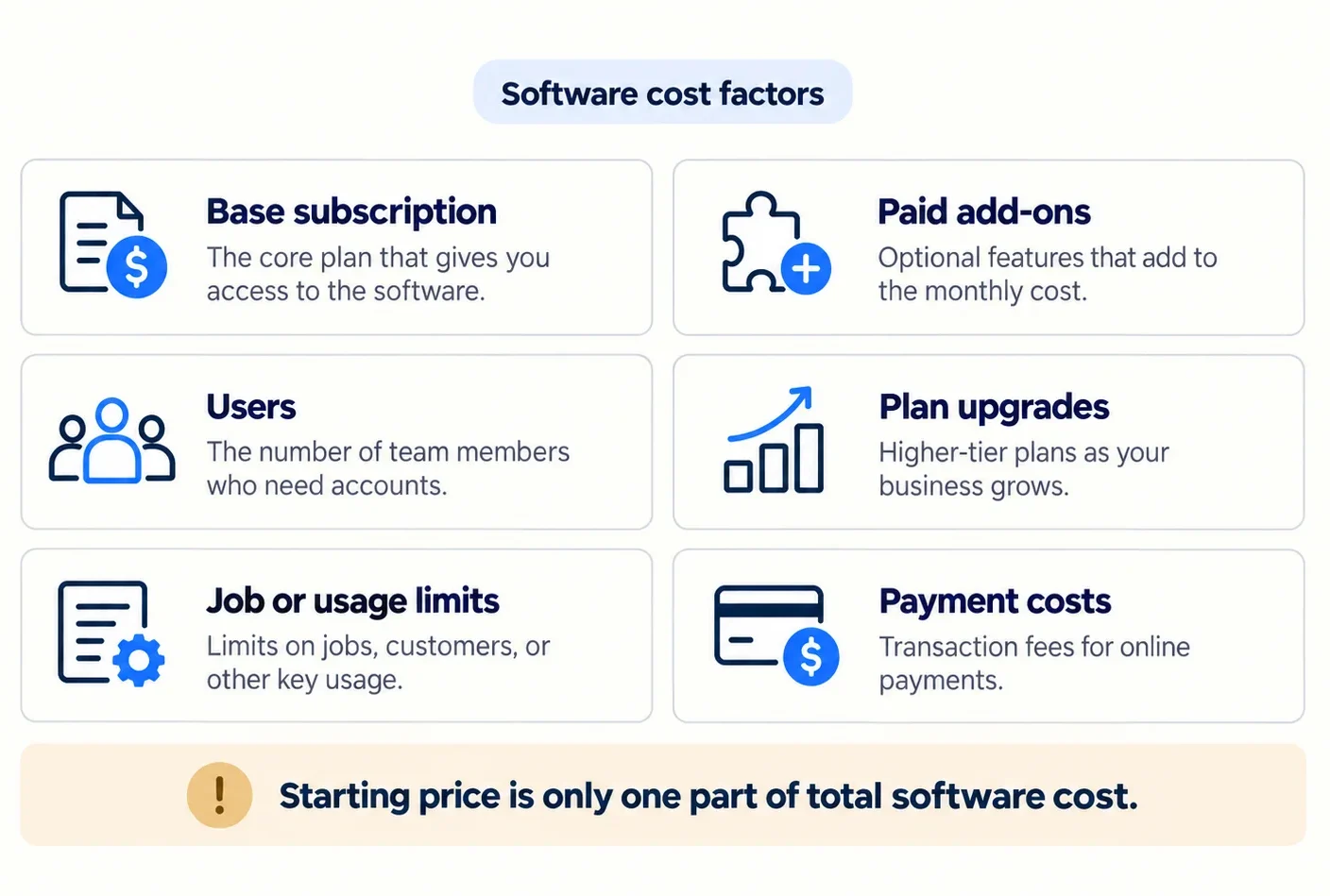
The best value is therefore not necessarily the lowest advertised price. It is the lowest practical cost for the workflow your business actually needs.
Final Recommendations
For most small handyman businesses that want one platform to cover customers, quotes, scheduling, jobs, invoices, and payments without moving immediately into enterprise-level complexity, Jobber is the strongest balanced starting point.
If your main operational pain is coordinating an expanding crew, Housecall Pro deserves a closer look because dispatch, routes, and team workflows become more central to the product’s value.
For an owner-operator who wants a home-service-focused all-in-one system, QuoteIQ is a compelling alternative. ServiceM8 is particularly attractive when initial software cost matters and its Apple-first ecosystem works for your business.
If estimates and invoices are still the main administrative problem, Joist may be a better decision than paying for functionality built around dispatch.
And if customer calls and communications are becoming as difficult to manage as the jobs themselves, Workiz has a distinct advantage because of the way its FSM platform can connect with its optional Genius communication products.
There is no single best software for every handyman business. Team size, workflow, device compatibility, and total practical cost matter more than the longest feature list.
FAQs
Is There Free Handyman Business Software?
Yes. ServiceM8 currently offers a genuine Free plan in the US with one user, up to 30 jobs per month, and a limited daily AI allowance.
Free software still needs to match your workflow. Job-volume restrictions, device compatibility, paid upgrades, and missing advanced team functionality can matter more than the $0 subscription price.
How Much Does Handyman Software Cost?
Pricing varies widely.
Simple contractor software can start in the low tens of dollars per month, while complete field-service platforms may cost substantially more or use custom pricing.
The biggest variables are:
- number of users;
- plan level;
- monthly versus annual billing;
- job or usage limits;
- add-ons;
- communication or AI services;
- payment processing.
Compare costs using your expected team size and workflow rather than comparing only each vendor’s lowest advertised price.
Do I Need Handyman-Specific Software or General Field Service Software?
Not necessarily.
A product does not need “handyman” in its name to be a good fit. What matters is whether it supports the workflow your business needs: estimates, jobs, scheduling, customer records, invoices, payments, team coordination, and any other processes you regularly manage.
Many of the strongest handyman options are broader field-service platforms used across multiple home-service trades.
Does Handyman Software Integrate With QuickBooks?
Many products do, but integration availability can depend on the product, QuickBooks version, and subscription level.
For example, Jobber documents QuickBooks Online synchronization on qualifying plans, Housecall Pro includes QuickBooks Online sync beginning with its current Essentials plan, and other products on this list also provide accounting integrations.
Verify the specific integration and plan requirement before subscribing.
Can Handyman Software Work on Both iPhone and Android?
Many platforms support both, but functionality is not always identical.
Jobber and Housecall Pro provide iOS and Android apps. ServiceM8 is the clearest example of why buyers should look deeper: it now offers ServiceM8 Lite for Android, but the company still recommends its full iOS app when users need the complete ServiceM8 mobile experience.
Check what each employee actually needs to do from the phone, not simply whether an app exists in both stores.
Can Handyman Software Handle Recurring Jobs and Repeat Maintenance?
Yes, many field-service platforms can manage recurring jobs, maintenance agreements, or service plans, although the exact functionality and plan requirement vary.
This matters for handyman companies serving landlords, property managers, commercial clients, or homeowners who regularly book seasonal maintenance and repeat property work.
Instead of creating each visit from scratch, recurring-job functionality can keep the schedule, customer history, and future work connected. Before choosing a platform specifically for this purpose, verify whether recurring work is included in your intended plan or requires an upgrade or add-on.