
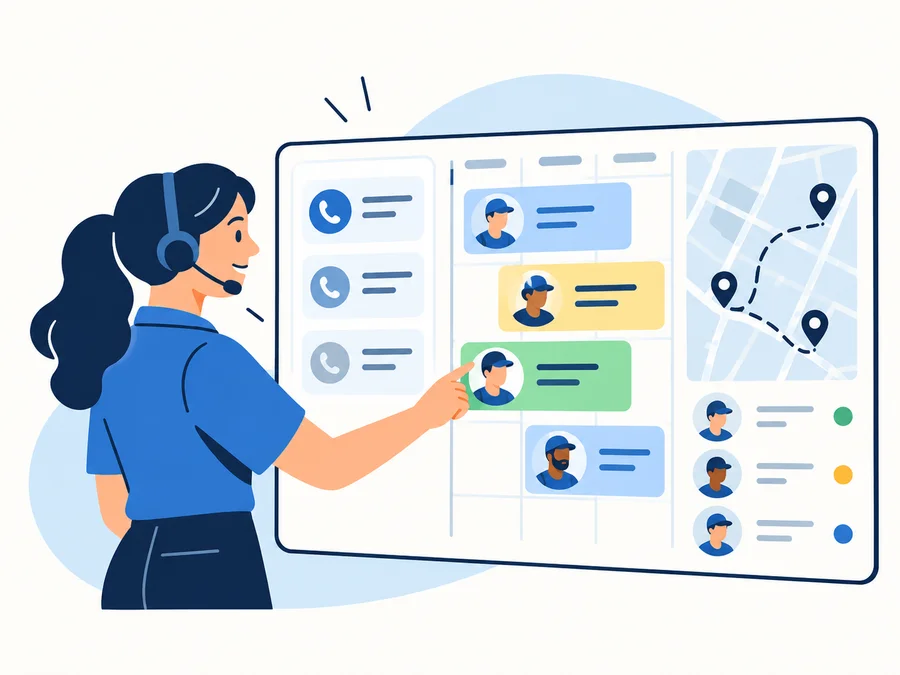
Workiz is a field-service management platform built around an unusually communication-heavy operating model.
Its strongest case is not simply that it can schedule jobs, create estimates, and send invoices. Plenty of FSM platforms do that.
Workiz becomes more interesting when this entire chain matters to the business:
lead → call/message → booking → dispatch → job → invoice
That can make it particularly relevant for home-service teams where missed calls, slow lead response, changing schedules, and customer communication create daily operational friction.
The decision is more complicated than the feature list, though. Workiz currently uses quote-only pricing, its Genius communications packaging needs careful verification, iOS and Android reviews differ substantially, and its contract terms deserve attention before committing.
Last updated: September 2026
Product, pricing, contract, mobile-app, integration, and review information last verified September 26, 2026.
On this page
- Workiz Review: Quick Verdict
- Workiz Pros and Cons at a Glance
- Is Workiz a Good Fit for Handyman Businesses?
- What Workiz Does Well
- Where Workiz Needs Careful Evaluation
- Workiz Pricing in Brief
- Workiz Reviews and User Feedback
- Workiz Risks and Practical Considerations
- What to Test During Workiz’s Free Trial
- Who Is Workiz Best For?
- Who Should Consider Another Option?
- Is Workiz Worth It? Final Verdict
- FAQs
Workiz Review: Quick Verdict
Strongest fit: Small and growing home-service businesses where lead response, calls/messages, booking, scheduling, dispatch, and customer communication are tightly connected.
More conditional fit: Solo operators, Android-heavy teams, businesses that require transparent public pricing, or buyers expecting maximum contract/downgrade flexibility.
Main strengths:
- strong scheduling and dispatch foundation;
- integrated lead and communication emphasis;
- online booking;
- estimates, invoices, payments, and customer records;
- automation across the operating workflow;
- QuickBooks Online and Desktop integration paths;
- deeper operational tools on higher plans.
Main cautions:
- Standard, Pro, and Ultimate now use Request Pricing;
- current official pricing material is ambiguous about the exact entitlement boundary between included communications capabilities and separately sold Genius products;
- advanced functionality moves up the plan structure;
- current Terms make the Sales Order and billing structure important;
- mobile review signals differ sharply between iOS and Android.
Workiz belongs on the shortlist when its communication-centered workflow solves a real operating problem—not simply because it has a long feature list.
Workiz Pros and Cons at a Glance
| Pros | Cons / Caveats |
|---|---|
| Strong scheduling, dispatch, and online booking | No public dollar pricing for current plans |
| Communication closely connected to operational workflow | Genius entitlement/add-on scope requires written verification |
| Lead handling integrated with FSM | Advanced functionality sits on higher plans/add-ons |
| Estimates, invoices, payments, and client management | Contract and downgrade flexibility require attention |
| QuickBooks Online and Desktop support | QBO and QBD do not use identical sync behavior |
| Useful automation progression | iOS and Android review signals differ materially |
| Higher-tier service plans, inventory, flat-rate tools, and API | Review platforms disagree strongly about user experience |
Is Workiz a Good Fit for Handyman Businesses?
Workiz has a dedicated handyman offering and currently positions scheduling, estimating, invoicing, routing, payments, and customer communication as part of that workflow.
That can make it a strong fit for a handyman business with several technicians and a steady flow of incoming work.
A more complex handyman operation may need to:
- respond to new leads quickly;
- book work while the customer is still on the phone;
- assign jobs by technician or service area;
- reschedule throughout the day;
- communicate arrival information;
- send estimates;
- invoice and collect payment;
- follow up with customers.
Workiz becomes more useful as those activities start functioning as one connected operating process rather than isolated tasks.
A solo operator with low lead volume may see less benefit.
If one person handles five or six jobs per week, schedules them manually, rarely receives overlapping calls, and mostly wants estimates and invoices, communication-heavy FSM functionality may add more system than the business needs.
That does not make Workiz inappropriate for a solo business. It means the owner should verify whether the actual quote reflects the amount of platform they will genuinely use.
For broader comparisons, see our handyman software guide and handyman scheduling software guide.
What Workiz Does Well
Scheduling, Dispatch, and Booking
Scheduling is at the center of the Workiz operating model.
The current platform supports job scheduling, technician assignment, service areas, recurring jobs, online booking, and field-team coordination. Workiz also positions its scheduling tools around real-time changes and dispatch needs rather than treating the calendar as a standalone appointment book.
For a busy service company, that matters when a dispatcher has to answer questions such as:
- Who is available?
- Which technician covers this area?
- Can this job move to another time?
- What work is already assigned?
- Can the customer book themselves?
- What happens after the booking becomes a job?
The value is less about having a colorful calendar and more about reducing the number of handoffs between lead intake, booking, office staff, and field technicians.
Workiz should still be tested against the company’s real dispatch complexity rather than assumed to be universally better than competing schedulers.
Lead and Customer Communication Workflow
This is where Workiz is most distinctive.
Current Pro adds Genius Leads, while the wider Workiz ecosystem also includes Genius Phone, Genius Answering, and Genius Marketing.
That gives Workiz a strong conceptual workflow:
incoming lead → conversation → booking → scheduled work → follow-up
But there is an important current packaging caveat.
The same official Pricing page:
- explicitly labels Genius Phone, Genius Answering, and Genius Marketing as sold-separately add-ons;
- while its feature-comparison matrix marks many related phone, answering, and marketing capabilities as included across Standard, Pro, and Ultimate;
- and its FAQ broadly says an integrated phone system is offered across plans.
Home Service Fit does not resolve that ambiguity by assumption.
Before buying, ask Workiz to put in writing:
- which communication capabilities are included in the quoted plan;
- whether a Genius product is required;
- any usage allowance;
- any additional phone, AI, SMS, or marketing charges.
The distinction matters because communications may be the exact reason the business is considering Workiz.
Core Job-to-Payment Operations
Underneath the communication layer, Workiz provides a solid standard FSM workflow.
Current Standard includes capabilities such as:
- jobs;
- scheduling;
- estimates;
- invoices;
- client management;
- online payments;
- service areas;
- reports;
- QuickBooks;
- five automations.
Pro expands automation and adds capabilities including performance pay, Genius Leads, Genius Scheduling, and custom reports.
Ultimate goes further with:
- service plans;
- 30 automations;
- sales proposals;
- inventory;
- flat-rate tools;
- checklists;
- multi-day jobs;
- Open API;
- equipment tracking;
- purchase orders.
That progression means Workiz can support more than a lightweight scheduling/invoicing operation.
But it also makes plan selection central to whether the product fits.
Where Workiz Needs Careful Evaluation
Pricing Is Quote-Based
Workiz no longer presents Standard, Pro, and Ultimate through fixed public dollar prices.
All three currently use Request Pricing.
That makes old articles quoting historical Workiz subscription prices unreliable for a current buying decision.
The useful question is:
Which plan and add-ons does this business actually require, and what is the complete written price?
If calls, AI answering, advanced lead management, inventory, flat-rate pricing, or other deeper capabilities matter, make sure the sales quote reflects the configuration being evaluated.
Contract and Downgrade Flexibility
Workiz’s current Terms use a 12-month Initial Term by default unless the Sales Order states otherwise, followed by automatic 12-month renewals with at least 30 days’ written non-renewal notice. Customer cancellation generally takes effect at the end of the current term, and remaining amounts under the original term remain payable.
The Terms also currently allow annual fee increases of up to 10% with advance notice.
Downgrades depend on package and billing structure:
- Default Service Packages can currently be downgraded only on calendar-monthly billing;
- annual Default packages do not have that downgrade right;
- Customized Service Packages do not have a guaranteed downgrade entitlement under the standard Terms.
That does not mean every Workiz customer has identical commercial terms.
The Sales Order controls account-specific commitments.
Before signing, verify:
- Initial Term;
- billing cadence;
- renewal date;
- non-renewal deadline;
- downgrade rights;
- add-on commitments;
- price-change language.
Mobile Experience May Depend on Platform
One of the most useful signals in current Workiz reviews is the difference between mobile platforms.
As of September 26, 2026:
- US App Store — approximately 4.6/5 from 2.2K ratings;
- Google Play — approximately 2.7/5 from 397 reviews.
Those ratings should not be averaged into one “Workiz mobile score.”
They also do not prove that iOS is universally good or Android universally bad.
But the discrepancy is large enough to matter.
If technicians depend on the mobile app all day, test Workiz on the same iPhone or Android hardware the crew actually uses, including:
- opening jobs;
- updating status;
- reviewing customer information;
- adding notes/photos;
- creating estimates/invoices;
- receiving schedule changes;
- communicating from the field.
A desktop demo cannot answer that question.
Workiz Pricing in Brief
For review purposes, the most important current pricing facts are simple:
- Standard — Request Pricing
- Pro — Request Pricing
- Ultimate — Request Pricing
Standard is the core FSM layer. Pro adds stronger automation, Genius Leads, Genius Scheduling, performance pay, and custom reporting. Ultimate adds more operational tools such as service plans, inventory, flat rate, Open API, equipment tracking, and purchase orders.
Workiz currently offers a 7-day free trial with no credit card required. Its Terms describe seven days as the default trial period unless configured otherwise and warn that a trial may not expose every feature.
Because of the current Genius packaging ambiguity, buyers should not infer exact phone/AI entitlement from the comparison grid alone.
Get the actual:
plan + add-ons + communications scope + contract terms + total price
in writing.
Workiz Reviews and User Feedback
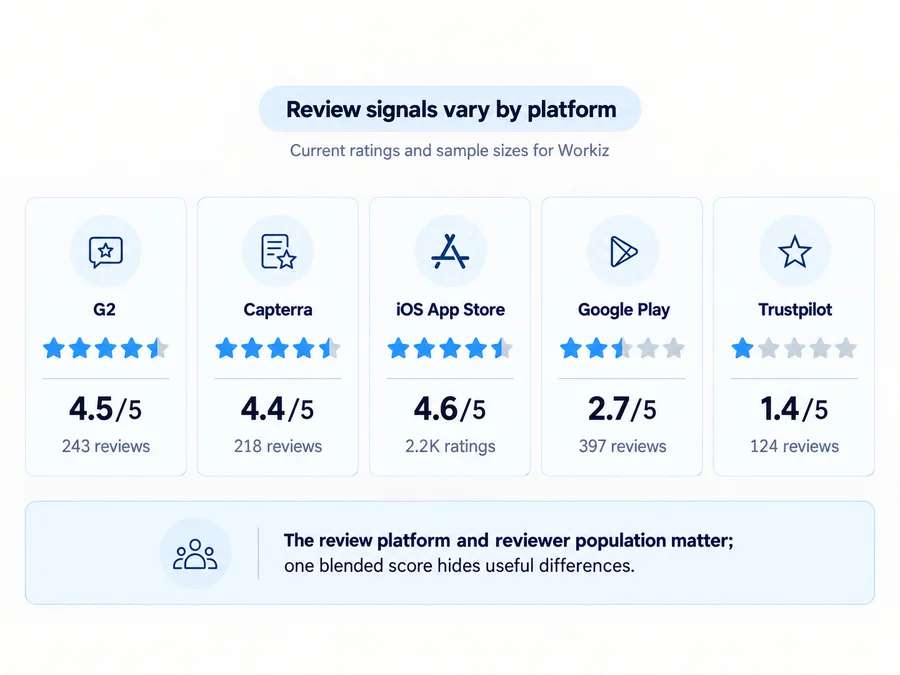
Current Workiz feedback varies substantially depending on where you look.
As of September 26, 2026:
| Review Source | Current Rating | Sample Size |
|---|---|---|
| G2 | 4.5/5 | 243 reviews |
| Capterra | 4.4/5 | 218 reviews |
| US App Store | 4.6/5 | 2.2K ratings |
| Google Play | 2.7/5 | 397 reviews |
| Trustpilot | 1.4/5 | 124 reviews |
There is no responsible reason to blend those into a single Home Service Fit score.
The reviewer populations, collection methods, platforms, devices, use cases, and sample sizes are different.
What Users Commonly Like
Recurring positive themes across current G2, Capterra, and app-store feedback include:
- organizing jobs and customer information;
- scheduling;
- estimates and invoicing;
- automation;
- bringing several daily workflows into one platform;
- customer communications;
- relative ease of learning or everyday use for some teams.
These are user-reported experiences, not independently verified performance outcomes.
A positive review about phone functionality also does not establish what today’s new customer receives in a specific plan, because current packaging can differ from historical configurations.
Complaints and Negative Signals
Current negative reviews report issues involving:
- bugs or clunky workflows;
- mobile-app problems;
- support responsiveness;
- pricing or add-on frustration;
- onboarding/implementation;
- contract or cancellation friction;
- dissatisfaction with some phone or AI experiences.
Trustpilot is particularly negative at roughly 1.4/5, but its sample is much smaller than the App Store’s and Trustpilot itself notes that the company has not invited customers recently and that the reviews may not be representative.
At the same time, G2 and Capterra are much more positive.
The disagreement itself is useful evidence.
It tells prospective buyers not to rely on one aggregate score. Test the workflows that matter most to your own team.
Workiz Risks and Practical Considerations
Data and Backups
Workiz’s current Terms explicitly say the service is not intended to operate as a data-storage or archiving product and place responsibility for maintaining backups on the customer.
Some data can be exported—for example, custom reports can be exported as PDF or CSV.
But that does not prove every:
- job;
- attachment;
- message;
- automation;
- customer relationship;
- configuration;
can be exported into one reconstructable backup.
Before relying heavily on Workiz, identify which business records need a separate retention/export process.
QuickBooks
Workiz currently supports both QuickBooks Online and QuickBooks Desktop.
The Desktop integration requires QuickBooks Desktop 2022 or later and uses Web Connector. After initial setup, ongoing QBD sync is documented as Workiz → QuickBooks Desktop.
QBO is more nuanced: the initial setup imports certain resources, while ongoing behavior varies by data type. Current documentation says invoices flow from Workiz to QBO, while some clients, items, and payments can have limited two-way behavior.
So it would be inaccurate to call Workiz’s accounting integration simply “two-way QuickBooks sync.”
Test the exact records your accountant needs.
SMS and Phone Setup
Workiz supports business texting from both local and toll-free Workiz numbers, with different registration requirements.
Local numbers used for US business texting follow A2P 10DLC registration, while toll-free numbers use a separate Toll-Free Message Verification process.
Workiz says A2P 10DLC registration may take approximately 2–3 weeks.
For toll-free texting, current verification guidance requires a genuine opt-in process with disclosures covering:
- message purpose;
- message frequency;
- message/data-rate notice;
- STOP instructions;
- Privacy Policy;
- Terms.
If phone/SMS functionality is one of the reasons for choosing Workiz, do not treat telecom setup as an afterthought.
Allow time for:
- selecting or porting the required business number;
- the appropriate local 10DLC or toll-free registration process;
- opt-in collection;
- testing;
- staff training.
This is an operational planning point, not legal advice.
What to Test During Workiz’s Free Trial
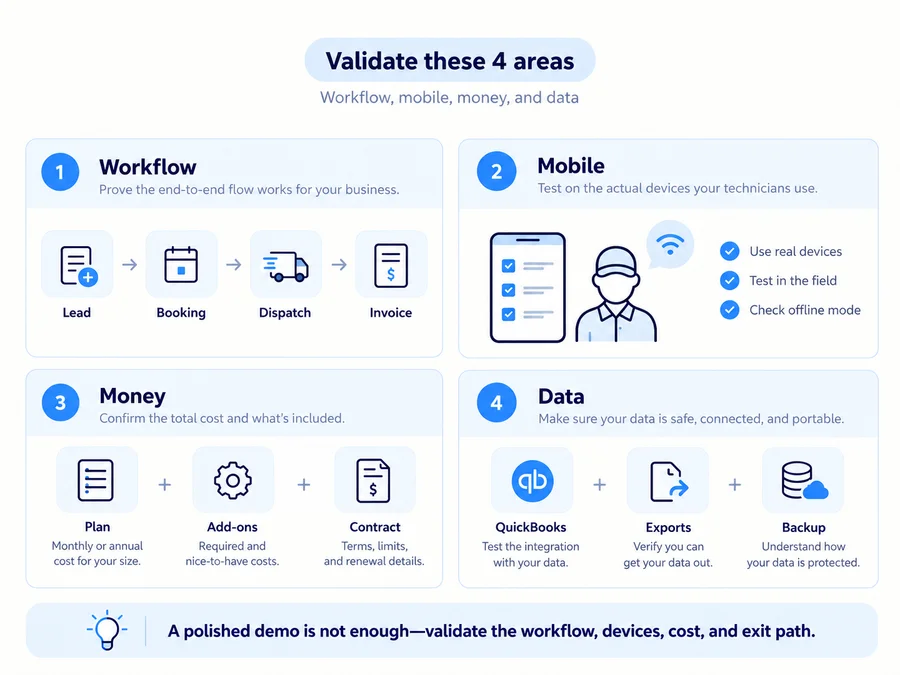
Workiz’s seven-day trial is short enough that it should be treated like a structured test, not casual software browsing.
Run one realistic workflow from beginning to end:
- Create a realistic test customer or lead.
- Book a job.
- Assign and dispatch a technician.
- Reschedule the appointment.
- Create an estimate.
- Convert the work through invoice and payment.
- Test the mobile app on the actual iPhone and/or Android devices used by technicians.
- Test online-booking rules.
- Verify the required QuickBooks workflow.
- Check which phone, messaging, AI, and Genius capabilities are actually available in the trial and proposed plan.
- Inspect relevant exports and decide how backups will be handled.
- Read the Sales Order, renewal, downgrade, and add-on terms before paying.
If communications are a major reason for choosing Workiz, focus heavily on:
incoming lead → response → booking → dispatch → customer follow-up
Also remember that current Terms say trial access may not include every feature.
So an unavailable trial feature does not necessarily mean the paid product lacks it—and a feature visible during a demo does not necessarily mean it is included in your quote.
Who Is Workiz Best For?
Workiz deserves strongest consideration from:
- small and growing home-service teams;
- businesses with several field technicians;
- call- and lead-heavy operations;
- companies where customer communication and dispatch are closely connected;
- teams that need more operational depth than a lightweight scheduling/invoicing tool;
- businesses that can justify higher-plan or communication capabilities because they solve a real daily bottleneck.
Its positioning is especially coherent when the office frequently moves work from lead intake into the schedule and out to technicians.
Who Should Consider Another Option?
Another product may fit better when:
- the business is solo or very light-use;
- transparent public pricing is essential;
- default annual commitment or downgrade limits are uncomfortable;
- an Android-heavy field team has a poor trial experience;
- communications/AI functionality adds little value;
- the company needs deeper enterprise or commercial-project capability;
- required accounting/reporting behavior does not fit Workiz.
The important point is not to reject Workiz because of one negative review or choose it because of one high rating.
Test the actual operating model.
Is Workiz Worth It? Final Verdict
Workiz makes the strongest case when communication is part of operations rather than a separate layer.
If calls, leads, booking, dispatch, job management, customer updates, and invoicing all interact throughout the day, bringing those workflows together can be genuinely useful.
But three questions determine the real fit:
- Does Workiz’s lead-to-dispatch model solve a meaningful current problem?
- Does the written quote include the necessary plan and Genius/add-on scope at an acceptable total cost?
- Do the mobile experience, QuickBooks workflow, data/backup model, and Sales Order fit how the business actually operates?
If those answers are positive, Workiz belongs on the shortlist.
If the communications layer is unnecessary—or if the required configuration, Android experience, or contract structure does not fit—another FSM may make more sense.
FAQs
Does Workiz Have a Free Trial?
Yes.
Workiz currently advertises a 7-day free trial with no credit card required. Its Terms say the default trial is seven days unless configured otherwise and that trial access may not include every feature.
Is Workiz Good for Handyman Businesses?
It can be, particularly when a handyman company has meaningful scheduling, dispatch, call, lead, booking, and customer-communication volume.
Workiz currently has a dedicated handyman offering covering those types of workflows.
Does Workiz Integrate With QuickBooks?
Yes.
Current official documentation supports QuickBooks Online and QuickBooks Desktop. The integrations do not behave identically, and ongoing Desktop sync is documented primarily as Workiz → QuickBooks.
Can You Cancel Workiz Anytime?
Do not assume immediate cancellation.
Unless the Sales Order states otherwise, current Terms use a default 12-month Initial Term, automatic 12-month renewals, and at least 30 days’ advance non-renewal notice. Customer cancellation generally becomes effective at the end of the current term.