

Last updated: September 2026
On this page
- Best Handyman Scheduling Software at a Glance
- Handyman Scheduling Software Comparison
- How We Selected and Evaluated Handyman Scheduling Software
- What Makes Handyman Scheduling Different?
- Scheduling vs Online Booking vs Dispatch: What Do You Actually Need?
- 10 Best Handyman Scheduling Software & Apps
- Which Handyman Scheduling Software Is Right for You?
- Should Handyman Customers Be Allowed to Book Jobs Instantly?
- How Much Does Handyman Scheduling Software Cost?
- Is Free Handyman Scheduling Software Enough?
- How to Test Handyman Scheduling Software Before You Pay
- FAQs
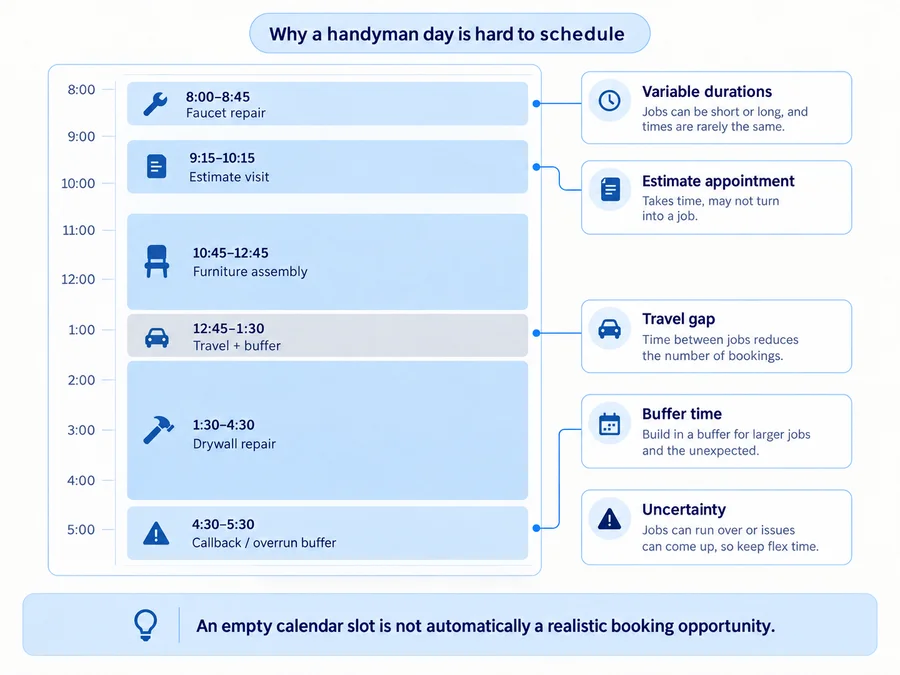
The best handyman scheduling software has to manage more than empty calendar slots. A handyman’s day might include a 45-minute repair, a one-hour estimate, a two-hour assembly job, a half-day project, travel between properties, and an unexpected callback that shifts everything after it.
The right tool therefore depends on what you actually need: a better personal calendar, controlled customer booking, recurring visits, shared team scheduling, or travel and routing support. For some solo operators, a lightweight handyman scheduling app is enough. Others need handyman booking software that lets customers request or reserve work without creating an unrealistic calendar. A growing team may need something broader that considers technician availability, location, assignments, and same-day schedule changes.
The goal is not to buy the platform with the longest feature list. It is to find the simplest scheduling system that keeps your real workday manageable.
Best Handyman Scheduling Software at a Glance
These are use-case recommendations, not an absolute #1–#10 performance ranking.
- Jobber — Best overall for balanced scheduling and business growth: Strong progression from solo scheduling to recurring work, controlled online booking, team scheduling, and higher-tier route optimization.
- Housecall Pro — Best for growing teams and customer-facing booking: Strong booking and team-calendar workflow, with route organization on Essentials and true drive-time optimization on MAX.
- FieldVibe — Best free scheduling software for a solo handyman: A genuine $0 solo plan with unlimited jobs and clients, recurring visits, work requests, and basic reminders.
- QuoteIQ — Best for handyman-specific scheduling inside an all-in-one workflow: Core scheduling begins on the entry plan, while customer self-scheduling, route optimization, route density, and dispatching unlock much higher.
- ServiceM8 — Best for mobile-first scheduling and recurring field-service work: Strong job scheduling and recurring-work tools with an unusual pricing model based partly on monthly job volume rather than paid-user seats.
- Zenbooker — Best for customer self-booking and location-aware availability: Excellent control over services, territories, intake, recurrence, and customer-facing availability, with advanced drive-time-aware booking on Enterprise.
- Workiz — Best for routing and scheduling in call-heavy service teams: Combines scheduling, dispatch, online booking, communications, service areas, routing, and newer AI-assisted scheduling.
- FieldPulse — Best for customizable team scheduling and dispatch visibility: Strong team calendar, technician-location visibility, conflict awareness, route planning, and same-day reassignment for growing crews.
- SchedulingKit — Best for photo-based booking and variable-duration jobs: A booking-first option with handyman-specific intake, flexible service durations, buffers, and a low-cost entry path.
- EZnet Scheduler — Best dedicated scheduler when you don’t need a full FSM: A scheduling-first alternative with self-booking, reminders, recurring appointments, and a usable but tightly limited free tier.
Handyman Scheduling Software Comparison
| Software | Best for | Scheduling model | Customer self-booking | Recurring jobs | Travel/routing tools | Mobile scheduling | Pricing approach | Main limitation |
|---|---|---|---|---|---|---|---|---|
| Jobber | Balanced solo-to-team growth | FSM calendar + jobs/visits | Yes; requests, assessments, or bookable jobs | Yes | Route Optimization on Connect+; booking can also use buffers/drive-time rules | Yes | Core starts at $49 flexible monthly / $29 annual-equivalent | Advanced routing and automation require higher plans |
| Housecall Pro | Growing teams + booking | FSM team calendar | Yes | Yes; Service Plans on MAX | Routes on Essentials; Optimize by Drive Time on MAX | Yes | Basic $59/mo billed annually or $79 month-to-month | True automatic route optimization requires MAX |
| FieldVibe | Free solo scheduling | Lightweight field-service calendar | Work-request capture rather than deep instant-booking controls | Yes | Basic scheduling rather than advanced optimization | Web/mobile | Solo $0; unlimited jobs and clients | Intentionally lighter than larger FSM products |
| QuoteIQ | Handyman all-in-one scheduling | Contractor FSM calendar | InstaSchedule on Elite+ | Yes | Route Optimization and Route Density on Elite+ | Yes | Essentials $29.99/mo; advanced scheduling Elite $299/mo | Entry pricing does not include the advanced scheduling stack |
| ServiceM8 | Mobile-first recurring service | Job-based field-service schedule | Yes | Yes | Dispatch map; field-oriented routing support | Strongest on iOS; Android Lite available | Free: 1 user/30 jobs; paid plans from $29 with unlimited users | Android Lite does not have full iOS feature parity |
| Zenbooker | Booking-first, location-aware scheduling | Booking + territories + provider availability | Strong | Yes | Territory controls on all plans; drive-time-aware availability on Enterprise | Mobile web app | Standard $29; Professional $79; Enterprise $149 | Advanced travel-aware slot filtering requires Enterprise |
| Workiz | Call-heavy service teams | FSM scheduling + dispatch | Yes; can enter as active jobs or pending leads | Yes | Route planning, map/GPS tools, Genius Scheduling | Yes | Current Standard/Pro/Ultimate pricing is request-based | Too much operational complexity for many solo users |
| FieldPulse | Team scheduling + dispatch visibility | Customizable FSM scheduling | Customer booking portal available | Yes | GPS visibility, dispatch map, route optimization | Yes | Custom, seat-based pricing | Harder for a solo buyer to evaluate quickly |
| SchedulingKit | Photo-based booking + variable durations | Booking-first scheduler | Yes | Pro+ | Buffers and scheduling rules rather than advanced FSM routing | Mobile-responsive | Free; Standard $12/seat monthly; Pro $20/seat monthly | Free tier is narrow; team/recurring features are Pro+ |
| EZnet Scheduler | Dedicated scheduling | Appointment/resource scheduler | Yes | Available; paid tiers expand capability | Scheduling/resource logic rather than field-service route optimization | Any-device web access | Free tier available; Basic $49.95/mo | Free tier allows only 2 appointment types and 25 clients |
Product and pricing information last verified September 2026. Plans, route tools, booking rules, and feature gates can change.
How We Selected and Evaluated Handyman Scheduling Software
We evaluated products based on how well they handle the realities of a handyman’s calendar, including:
- creating and moving appointments;
- variable job duration;
- same-day changes;
- arrival windows;
- customer booking and booking requests;
- intake questions and photo collection;
- recurring jobs;
- reminders;
- travel buffers;
- service-area controls;
- route planning and optimization;
- team assignments;
- mobile calendar access;
- schedule-change communication;
- external calendar connections;
- solo versus team fit;
- plan gates and total scheduling cost.
Official vendor documentation is the primary source for current product and pricing facts. Competitor pages, review platforms, and community discussions can help identify scheduling pain points, but they do not override current official product information.
Home Service Fit does not claim hands-on testing unless explicitly stated, and affiliate relationships do not determine inclusion, order, or recommendations.
What Makes Handyman Scheduling Different?
Handyman work does not fit neatly into a calendar built around identical 30- or 60-minute appointments.
Variable job lengths are the first problem. Replacing a faucet might take 45 minutes. An estimate visit may need an hour. Furniture assembly can take two hours. Drywall repair may consume half a day. A scheduling system needs to represent those differences instead of treating every service as the same block.
Travel makes apparently empty time misleading. A 1:00 PM opening is not truly available if the previous job ends at 12:45 across town. Buffers, address awareness, maps, drive-time limits, service areas, and route optimization can all help—but they solve different levels of the problem.
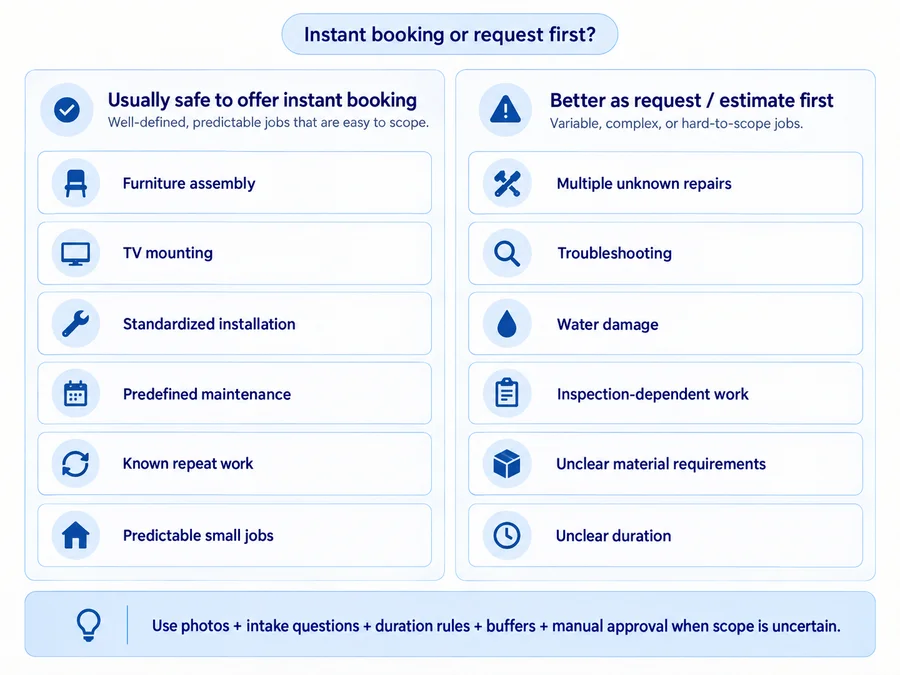
Some jobs should not be booked immediately. TV mounting or a known repeat service may be predictable enough for direct booking. “Fix several things around my house” may require photos, questions, an estimate, or manual review before the business can assign a realistic duration.
The day also changes after it begins. A customer cancels. A previous job runs long. A required material is unavailable. An urgent callback appears. Useful scheduling software should make it easy to move or reassign work and communicate the change.
Finally, some handyman businesses manage repeat property work for landlords, property managers, commercial clients, or homeowners with recurring maintenance needs. In those cases, recurrence matters—but it is not a requirement for every handyman business.
The practical rule is simple:
An open calendar slot is not automatically a realistically bookable slot.
Scheduling vs Online Booking vs Dispatch: What Do You Actually Need?
These terms overlap, but they are not interchangeable.
Scheduling is how the business controls when, where, and by whom work is performed. It includes calendar placement, duration, assignment, recurrence, and rescheduling.
Online booking is the customer-facing layer. A customer may submit a request, choose from available times, or in some systems place a confirmed appointment directly onto the calendar.
A booking request is not the same as an instant confirmed booking. That distinction matters when job scope is uncertain.
Dispatch becomes more operational. It answers questions such as which technician should go, who is available now, which job should come next, and how work should be redistributed when the day changes.
This guide covers dispatch only where it affects scheduling feasibility, technician assignment, travel, and daily calendar changes.
10 Best Handyman Scheduling Software & Apps
Jobber: Best Overall for Balanced Scheduling and Business Growth
Best for: Solo operators and small teams that want a scheduling system capable of growing into recurring work, online booking, team coordination, and route planning.
Scheduling approach: Jobber combines one-off jobs, recurring jobs, multi-visit work, day/week calendar views, mobile schedules, and customer request/booking forms.
Key scheduling features: Customers can submit requests for review or use online booking to schedule an assessment or job. Booking controls currently include earliest availability, booking intervals, fixed buffers, and drive-time limits. Jobber’s New Schedule also supports route optimization for scheduled anytime visits.
Online booking: Yes. The useful part is that Jobber does not force every form into instant booking; forms can remain requests when the work needs review first.
Pricing: Core starts at $49/month with no commitment or $29/month equivalent when prepaid annually. Route Optimization is currently available on Connect, Grow, and Plus.
Strengths: Jobber has one of the clearest progressions from basic scheduling to controlled booking, repeat work, and team routing.
Main limitations: Current Jobber documentation distinguishes New Schedule from Legacy Schedule. Older master-route workflows should not be assumed to describe every current account. Advanced route functionality also requires a substantially more expensive plan than Core.
For current plan pricing and feature gates, see our Jobber pricing guide.
For a deeper look at the platform beyond scheduling, read our full Jobber review.
Verdict: Jobber is the most balanced pick when today’s scheduling problem may become tomorrow’s broader operations problem.
Housecall Pro: Best for Growing Teams and Customer-Facing Booking
Best for: Small and growing teams that want customer booking tied closely to employee scheduling and route organization.
Scheduling approach: Housecall Pro combines web/mobile scheduling, employee assignments, recurring work, Online Booking, calendar map views, route organization, and higher-tier drive-time optimization.
Key scheduling features: Basic includes core scheduling/dispatch and Online Booking. Essentials adds Routes, which groups and sequences work through route-based scheduling. MAX adds Optimize by Drive Time, which automatically reorders a technician’s jobs using actual job locations and traffic conditions.
That distinction matters: Routes are not the same thing as automatic Route Optimization.
Online booking: Yes, including bookings from a website, direct link, and supported Google surfaces.
Pricing: Basic is currently $59/month billed annually or $79 month-to-month; Essentials $149/$189; MAX $299/$329 in the standard general pricing configuration.
Strengths: Strong fit when both the customer booking experience and technician coordination matter.
Main limitations: The automatic drive-time optimizer is currently MAX-only. Housecall Pro also has newer scheduling capabilities in rollout or early access, so not every account necessarily exposes every newer calendar control identically.
For a deeper evaluation of the full platform, see our Housecall Pro review.
For current plan costs and feature gates, see our Housecall Pro pricing guide.
Verdict: Housecall Pro makes more sense as team complexity grows, but buyers should not pay MAX pricing simply because they need ordinary route organization.
FieldVibe: Best Free Scheduling Software for a Solo Handyman
Best for: A solo handyman whose main problem is replacing personal-calendar chaos with an actual business schedule.
Scheduling approach: Lightweight field-service scheduling with one-time and recurring visits, client records, job history, work requests, and reminders.
Key scheduling features: The current Solo plan includes unlimited jobs and clients, recurring visit scheduling, manual text/WhatsApp reminders, a simple business website that can capture work requests, and a price list.
Online booking: More limited than booking-first platforms. The free website is useful for capturing work requests, but FieldVibe’s main strength is internal scheduling rather than sophisticated consumer self-booking controls.
Pricing: Solo is free forever for one user. Solo Pro is currently $20/month and adds automation and broader business functionality; Crews is $50/month with unlimited users.
Strengths: There is no need to pay for routing, dispatch, complex CRM, or a large FSM when all you need is a reliable business calendar with recurring jobs and customer history.
Main limitations: That simplicity is intentional. FieldVibe will not replace deeper route optimization, complex dispatch, or advanced booking logic for a growing multi-tech operation.
Verdict: FieldVibe is one of the best examples of why a free non-affiliate product should remain prominent when it genuinely fits the buyer’s problem.
QuoteIQ: Best for Handyman-Specific Scheduling Inside an All-in-One Workflow
Best for: Handyman businesses that want scheduling connected with estimates, customers, jobs, and payments and may later need more advanced team tools.
Scheduling approach: Core calendar and scheduling are available across the plan family, including recurring jobs, mobile access, automated reminders, and Google Calendar connectivity.
Key scheduling features: QuoteIQ’s advanced stack is much more plan-dependent. Current official pricing places InstaSchedule, Route Optimization, Route Density, and Dispatching on Elite and Max, while Pro adds On The Way text functionality.
Online booking: Customer self-scheduling through InstaSchedule is Elite+.
Pricing: Essentials starts at $29.99/month; Pro is $149.99; Elite is $299; Max $699. Annual rates are lower.
Strengths: Scheduling stays connected to the same contractor-oriented workflow used for estimating and customer/job administration.
Main limitations: The low entry price can be misleading if the reason you are choosing QuoteIQ is specifically route optimization, self-scheduling, route density, or dispatch. Those capabilities currently require Elite or higher.
For a broader evaluation of QuoteIQ beyond scheduling, read our QuoteIQ review.
Verdict: QuoteIQ is compelling when you want one handyman-oriented system, but advanced scheduling buyers should compare the Elite price, not the Essentials headline.
ServiceM8: Best for Mobile-First Scheduling and Recurring Field-Service Work
Best for: Solo operators and small service teams that live primarily in the field and want scheduling tied closely to mobile job execution.
Scheduling approach: Jobs can be scheduled to staff from the app or web, with recurring jobs able to recreate and schedule themselves over time. Online booking is part of the essential feature set.
Key scheduling features: Staff assignment, recurring jobs, booking, mobile schedules, customer notifications, and dispatch-map visibility are built into the wider field-service workflow.
Online booking: Yes. ServiceM8 can calculate service duration from fixed settings or customer answers, which is useful when job length varies.
Pricing: Free is currently $0 for one user and up to 30 new jobs per month. Starter is $29/month with unlimited users and 50 jobs; Growing $79 for 150 jobs; Premium $149 for 500; Premium Plus $349 for 1,500+.
Strengths: Paid-plan pricing does not increase simply because you add another staff login.
Main limitations: ServiceM8 remains Apple-first. ServiceM8 Lite for Android exists, but it is intended for core technician tasks and does not provide full iOS management parity. Android users can see their own scheduled work and perform field tasks, but mixed-device teams should verify their exact requirements.
Verdict: A strong mobile-first option, especially when recurring work matters and the team is comfortable with ServiceM8’s Apple-centric design.
Zenbooker: Best for Customer Self-Booking and Location-Aware Availability
Best for: Businesses where the hardest scheduling problem is letting customers book themselves without giving them unrealistic availability.
Scheduling approach: Zenbooker is booking-first. Services can have their own durations, intake questions, modifiers, recurrence rules, availability, and geographic restrictions.
Key scheduling features: Service territories can use ZIP codes, radius rules, or geofences and have different hours, services, pricing, and providers. Zenbooker can also adjust available time based on service duration and provider availability.
Customers can upload images through intake fields, submit booking/quote requests instead of confirming work immediately, and schedule recurring services.
Online booking: This is Zenbooker’s central strength.
Pricing: Standard is currently $29/month, Professional $79, and Enterprise $149. All include unlimited bookings and unlimited team-member accounts.
Travel/routing distinction: Basic territory controls are not the same as travel-aware availability. Drive Time Aware Scheduling is currently Enterprise, where Zenbooker can hide time slots that do not leave enough travel time between jobs.
Strengths: One of the strongest products here for controlled customer self-booking.
Main limitations: If the business mainly needs deep technician dispatch or complex operational job management, a fuller FSM may fit better.
Verdict: Zenbooker is particularly strong when booking policy—not back-office FSM depth—is the real scheduling problem.
Workiz: Best for Routing and Scheduling in Call-Heavy Service Teams
Best for: Teams where new work often enters through phone calls and scheduling decisions depend on availability, service area, technician skill, and location.
Scheduling approach: Workiz combines a drag-and-drop calendar, dispatching, online booking, service areas, recurring work, route planning, communications, and mobile updates.
Key scheduling features: The scheduler can assign technicians based on availability, service area, and skill set. Workiz also promotes route planning and real-time GPS visibility, while its newer Genius Scheduling is designed to suggest technicians and times based on availability, proximity, and skills.
Online booking: Yes. Businesses can let customers choose available slots and decide whether the result becomes an active job or a pending lead that the team reviews first.
Pricing: Workiz’s current public plan page lists Standard, Pro, and Ultimate but routes buyers through Request pricing rather than stable public dollar amounts.
For the full breakdown of the quote-only model, seats, Genius add-ons, billing, and contract terms, see our Workiz pricing guide.
Strengths: Scheduling, communications, calls, dispatch, and routing can operate as one system.
Main limitations: That is also why Workiz can be excessive for a one-person handyman who simply wants a cleaner calendar.
For a broader look at its scheduling, communications, mobile experience, pricing model, and contract considerations, see our Workiz review.
Verdict: Better suited to a busy inbound-service operation than a minimalist solo scheduling setup.
FieldPulse: Best for Customizable Team Scheduling and Dispatch Visibility
Best for: Growing crews that need to see technicians, workloads, job locations, conflicts, and schedule changes in one operational view.
Scheduling approach: FieldPulse uses a visual drag-and-drop team calendar paired with dispatch and location tools.
Key scheduling features: Current official documentation highlights multi-team scheduling views, conflict alerts, live schedule syncing, technician GPS locations, mobile schedule updates, map-based dispatch, and route optimization.
That is useful when a dispatcher needs to answer questions such as: Who is available? Who is closest? Which technician is already overloaded? Can this emergency call fit without breaking the rest of the day?
Online booking: FieldPulse includes customer-facing booking capabilities within its broader platform, though its strongest differentiation here is internal team visibility rather than lightweight booking-page simplicity.
Pricing: Current pricing is custom and seat-based, based on team size and required access. FieldPulse explicitly warns that third-party list prices may not reflect actual current pricing.
Strengths: Strong scheduling control for a team that has outgrown a simple shared calendar.
Main limitations: A solo operator cannot immediately see a simple public starting cost, and the platform’s depth may exceed what a small one-person business needs.
For a detailed breakdown of its custom seat-based pricing, contract terms, and quote structure, see our FieldPulse pricing guide.
For the broader product evaluation—including configurable workflows, mobile/offline use, user feedback, and operational fit—see our FieldPulse review.
Verdict: FieldPulse belongs on the shortlist when technician coordination is the scheduling problem—not merely appointment entry.
SchedulingKit: Best for Photo-Based Booking and Variable-Duration Jobs
Best for: Solo and small handyman businesses that want better customer intake and booking without immediately adopting a full FSM.
Scheduling approach: SchedulingKit is a booking-first platform. Its handyman-specific pages emphasize service categories, customer descriptions, photos, multiple job lengths, buffers, and customer-facing booking pages.
Key scheduling features: The Free plan currently includes one user, one event type, 50 monthly bookings, and one calendar connection. Standard removes booking/event limits and adds automation and broader customer tools. Pro adds team scheduling and recurring bookings.
Online booking: Strong. The product is particularly relevant when customers need to provide context before the appointment.
Photo caution: SchedulingKit’s handyman pages prominently advertise customer photo uploads, but the public pricing matrix does not clearly identify which tier gates that specific functionality. Do not assume the Free plan includes every feature shown on the industry landing page without verifying the live account configuration.
Pricing: Free $0; Standard $12/seat monthly or $10 annually; Pro $20 monthly or $16 annually. New accounts currently start with a 14-day Business trial with no card required.
Strengths: Distinct combination of intake and variable-duration scheduling.
Main limitations: The free tier is narrow, and team scheduling plus recurring bookings currently require Pro.
Verdict: A useful middle ground between a generic appointment tool and a full handyman FSM.
EZnet Scheduler: Best Dedicated Scheduler When You Don’t Need a Full FSM
Best for: Businesses saying, “Scheduling is the main problem; I don’t want to replace my whole software stack.”
Scheduling approach: EZnet is a dedicated cloud scheduler built around appointments, service types, staff/resources, self-scheduling, reminders, and recurring visits rather than a handyman-specific FSM.
Key scheduling features: Drag-and-drop appointment scheduling, adjustable durations, recurring appointments, self-scheduling, reminders, staff/resources, booking rules, and any-device access.
Online booking: Yes. The Free tier includes 24/7 website self-scheduling and email reminders.
Pricing: The current Free tier includes:
- 1 user;
- 1 resource;
- 1 staff/location;
- 2 appointment types;
- 25 clients;
- unlimited appointments.
Basic currently costs $49.95/month or $39.96/month when billed annually and materially expands capacity.
Strengths: Unlimited free appointment volume is unusually generous for a dedicated scheduler.
Main limitations: Appointment count may not be what forces a handyman to upgrade. A business offering many different services can hit the two appointment-type limit, while a growing repeat-customer business can hit the 25-client limit quickly.
Verdict: Strong when the buyer wants dedicated scheduling rather than the overhead of a complete FSM.
Which Handyman Scheduling Software Is Right for You?
If You’re a Solo Handyman Who Mainly Needs a Better Calendar
Start with FieldVibe, SchedulingKit, ServiceM8, or EZnet Scheduler.
FieldVibe has the cleanest genuinely free solo field-service scheduling path. ServiceM8 also has a permanent free solo tier but limits monthly new jobs. SchedulingKit and EZnet are more booking/scheduling-focused and have tighter free-plan structural limits.
Consider Jobber when you already know you will soon need a broader connected workflow.
For a broader comparison beyond scheduling, see our handyman software guide.
If Customers Should Be Able to Book You Online
Look first at Zenbooker, SchedulingKit, Jobber, and Housecall Pro.
The key question is whether the customer should:
- submit a request;
- book an estimate;
- choose a confirmed job time;
- or book only predefined services.
QuoteIQ can also provide deeper self-scheduling, but InstaSchedule currently requires Elite+, so the economics are very different from its entry-level pricing.
If You Manage Recurring Property or Maintenance Work
Look for Jobber, Housecall Pro, FieldVibe, ServiceM8, Zenbooker, or another product whose current recurring scheduling is verified.
Do not confuse this with recurring billing. Recurring scheduling decides when the work happens. Recurring billing decides when an invoice is created or a payment is collected.
For tools focused more heavily on billing and recurring invoicing, see our handyman invoicing software guide.
They may live in the same platform, but they are separate capabilities.
If You’re Coordinating Several Technicians
Prioritize Jobber, Housecall Pro, Workiz, or FieldPulse.
At that point, scheduling is not merely placing appointments on a calendar. You need shared visibility, assignments, mobile updates, technician location, same-day reassignment, and potentially routing.
For Housecall Pro specifically, remember: Routes ≠ Route Optimization.
A shared calendar shows who is assigned and when, but technicians also need accurate repair instructions, approved materials, photos, and open tasks. Our handyman work order software guide focuses on that field-documentation side of multi-technician coordination.
If Online Booking Matters More Than Full FSM Features
Prioritize Zenbooker, SchedulingKit, or EZnet Scheduler.
A booking-first tool can be better value when the main problem is letting customers select realistic availability, provide enough information, and receive confirmations without paying for a full CRM/dispatch/invoicing platform.
Generic appointment tools such as Calendly or Setmore can work for simple estimate visits, but they are less tailored to the variable job durations, travel, service areas, and job intake common in handyman work.
Should Handyman Customers Be Allowed to Book Jobs Instantly?
Sometimes — but not every handyman job should be instantly bookable. Instant booking works best when duration and scope are reasonably predictable.
Usually safer for instant booking:
- furniture assembly;
- TV mounting;
- standardized fixture installation;
- predefined maintenance;
- known repeat work;
- predictable small jobs.
Usually better as a request or estimate first:
- several unknown repairs;
- troubleshooting;
- water-damage investigation;
- inspection-dependent work;
- jobs with uncertain material requirements;
- jobs with unclear duration;
- “fix everything on this list” requests.
Useful booking safeguards include:
- photo uploads;
- intake questions;
- minimum notice;
- service-area rules;
- realistic duration settings;
- travel buffers;
- manual approval;
- estimate-first workflows.
For tools built specifically around quotes and job scoping, see our handyman estimating software guide.
A customer-facing booking page should make the schedule more controllable, not simply expose every empty hour to the public.
The operating principle is:
The goal is not to make every empty calendar slot bookable. The goal is to make the right work bookable without breaking the rest of the day.
How Much Does Handyman Scheduling Software Cost?
Scheduling tools fall into several different pricing models.
Free or low-cost options include FieldVibe, ServiceM8, SchedulingKit, and EZnet Scheduler. Their free tiers solve different problems: FieldVibe emphasizes solo field-service scheduling, ServiceM8 caps monthly new jobs, SchedulingKit caps bookings and event types, and EZnet limits clients and appointment types.
Fixed-subscription products include Zenbooker and QuoteIQ. The relevant cost depends heavily on which scheduling functionality you need. Zenbooker starts at $29, but drive-time-aware booking is Enterprise. QuoteIQ also starts around $30, but advanced routing and self-scheduling require Elite.
Plan/team-based FSM platforms such as Jobber and Housecall Pro become more expensive as the required plan or team configuration grows.
Quote-based platforms such as Workiz and FieldPulse require contacting the vendor for current pricing.
Real scheduling cost can depend on:
- users;
- booking or job limits;
- reminders/SMS;
- customer self-booking;
- recurring scheduling;
- routing;
- GPS;
- dispatch;
- service territories;
- automation;
- add-ons.
There is no useful universal “average monthly cost” across those different product types.
Is Free Handyman Scheduling Software Enough?
It can be.
Free handyman software can be enough for scheduling when:
- one person controls the calendar;
- monthly job volume is modest;
- sophisticated routing is unnecessary;
- reminders can remain basic;
- booking requirements are simple;
- you do not need deep integration with the rest of the business.
Paid scheduling becomes easier to justify when several technicians share the calendar, customers need controlled self-booking, communication needs automation, recurring schedules become more complex, or travel and routing begin causing operational problems.
The upgrade decision should therefore come from a limitation you are actually hitting—not from the assumption that paid software is automatically more professional.
How to Test Handyman Scheduling Software Before You Pay
Do not spend a free trial clicking randomly through the calendar.
Build one realistically messy handyman day:
- Schedule a 45-minute repair.
- Add a two-hour job at another address.
- Add one half-day project.
- Include realistic travel between them.
- Reschedule one appointment after the day begins.
- Add a recurring visit.
- Test a customer booking or request.
- Check whether buffers prevent impossible back-to-back appointments.
- Open and modify the schedule from your phone.
- If you have employees, reassign one job.
- Check what the customer sees when the appointment changes.
- Try an address near the edge of your service area.
- Keep one uncertain job as a request instead of forcing it onto the calendar.
- Write down the scheduling features you actually used.
- Confirm which paid plan includes them.
Do not use sensitive real-customer information merely for testing.
At the end, ask:
Can this software keep a realistically messy handyman day organized without creating more admin than it removes?
FAQs
What Is the Best Scheduling App for a Handyman Business?
It depends on the scheduling problem.
Jobber is the strongest balanced all-in-one choice for many solo-to-growing businesses.
FieldVibe is a strong free option for a solo handyman who mainly needs a real business schedule.
Zenbooker and SchedulingKit are stronger when customer booking is the main problem.
For growing teams needing more dispatch and technician visibility, Jobber, Housecall Pro, Workiz, and FieldPulse deserve closer comparison.
Does Handyman Scheduling Software Sync With Google Calendar?
Many products can connect with external calendars, but the integration type varies.
Before relying on it, check:
- whether the sync is one-way or two-way;
- whether it applies to individual or team calendars;
- how quickly changes appear;
- whether external busy events actually block customer booking availability;
- whether edits made in Google Calendar flow back into the scheduling platform.
For example, Zenbooker currently documents one-way calendar subscriptions, while other products have different integration models. A Google Calendar logo on an integrations page does not automatically mean full two-way scheduling sync.