

Last updated: October 2026
Pricing, plans, seats, add-ons, billing, payment, and contract information last verified October 2026.
On this page
Workiz no longer gives prospective customers a simple public price list. Its current pricing page shows three plans — Standard, Pro, and Ultimate — but each uses the same call to action: Request pricing. That makes answering “How much does Workiz cost?” less straightforward than reading a monthly number from a pricing table.
The practical Workiz cost is better understood as:
plan + seats + separately priced products + payment-related costs + billing structure + contract commitment
That distinction matters because older Workiz prices still appear on third-party sites, while the current product has a different plan structure and a growing set of Genius communications and AI products. This guide focuses on what a home-service business can verify today, which parts of a Workiz quote can change the real cost, and what to put in writing before signing.
Pricing at a Glance
Workiz currently offers three core plans:
| Plan | Public Price | Workiz Positioning | Main Upgrade Trigger |
|---|---|---|---|
| Standard | Request pricing | Growing teams | Core field-service operations |
| Pro | Request pricing | Mid-size teams | More automation, reporting, and team controls |
| Ultimate | Request pricing | Larger and multi-location teams/franchises | Advanced operational tools |
Workiz itself positions Standard for growing teams, Pro for mid-size teams, and Ultimate for larger multi-location operations and franchises. Those are vendor descriptions rather than fixed Home Service Fit recommendations.
There are four important things the public plan cards do not currently tell you:
- the base dollar price;
- how many seats your quote includes;
- the current extra-seat rate;
- the complete cost of separately billed products.
So the useful question is not simply “Which Workiz plan is cheapest?” It is: What does my complete written quote include, and what can increase the cost after the core plan is selected?
Current Workiz plans and quote-only pricing
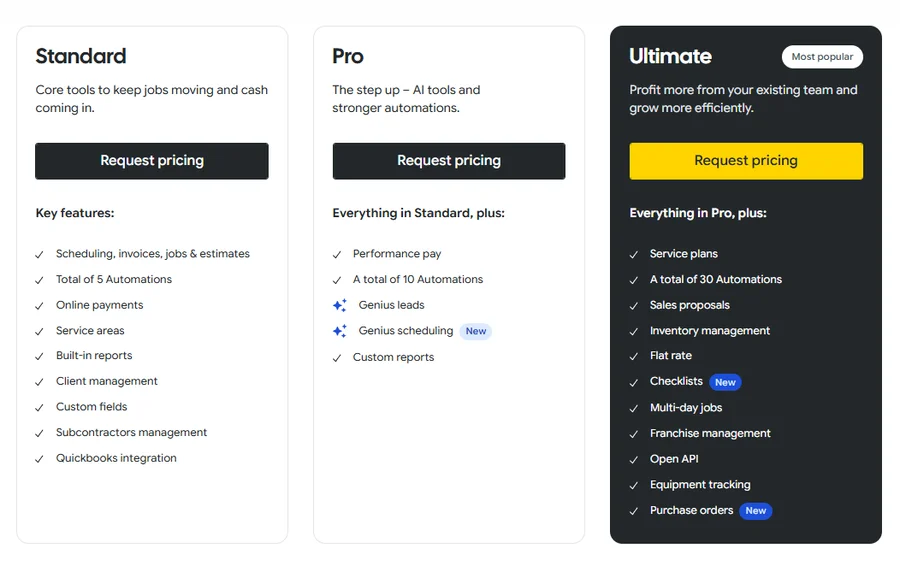
The screenshot is useful because it shows the current pricing reality directly. If you see a specific Workiz dollar amount elsewhere online, do not assume it still applies to a new account.
Why Prices Online Differ
Workiz has changed its pricing structure over time. Older articles and software directories still reference previous plan names, published monthly rates, included-user assumptions, and historical extra-user pricing. Those numbers can explain why different search results give different answers, but they do not establish what Workiz will quote a new customer today. The current official pricing page instead uses:
Standard → Request pricing
Pro → Request pricing
Ultimate → Request pricing
That is why we do not use an old published rate as a “starting price” or try to reverse-engineer a 2026 Workiz cost. For a current buyer, the Sales Order matters more than a historical rate card.
Plan Differences
Workiz includes unlimited jobs, invoices, estimates, and clients across all three current plans. The bigger differences appear in automation, team controls, advanced operations, and certain workflow tools.
Standard
Standard is the baseline Workiz tier.
Its current public plan card includes core functions such as:
- scheduling, jobs, estimates, and invoices;
- online payments;
- client management;
- service areas;
- built-in reports;
- custom fields;
- subcontractor management;
- QuickBooks Online sync;
- 5 automations.
The broader comparison table also shows functions such as recurring jobs, the client portal, price book, mobile access, and online booking within the plan structure. For pricing purposes, Standard is the reference point. The question is whether the capabilities your business actually needs force an upgrade.
Pro
Pro adds tools aimed at businesses that need more automation and stronger operational controls.
Current notable differences include:
- 10 automations instead of 5;
- Genius Leads;
- Genius Scheduling;
- custom reports;
- performance pay;
- multi-location management;
- roles and permissions management.
That means the upgrade decision is more specific than “we are a bigger company.” A better question is: Do we need the automation, reporting, scheduling, location, or permission controls that Standard does not provide? If not, moving to Pro solely because the business has added a few employees may not be the right pricing logic.
Ultimate
Ultimate adds another layer of operational tools.
Current Ultimate-only or higher-tier capabilities include areas such as:
- 30 automations;
- service plans;
- sales proposals;
- inventory management;
- flat-rate functionality;
- checklists;
- multi-day jobs;
- franchise management;
- Open API;
- equipment tracking;
- purchase orders;
- Zapier integration.
These are meaningful features for the right operation, but they should not make Ultimate the automatic “best value.” A business that does not use inventory, purchase orders, advanced integrations, multi-day workflows, or similar tools may simply be paying for depth it does not need.
How the Workiz plan features differ
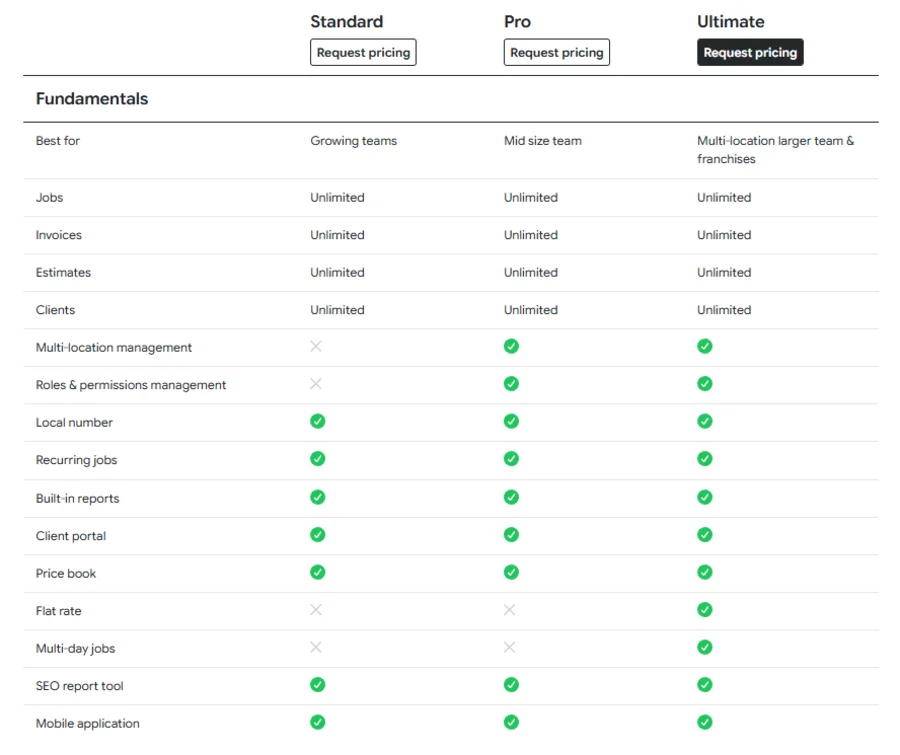
This is why plan selection should start from required workflow, not company size alone.
Seats and User Costs
Seats are one of the least visible parts of Workiz’s public pricing. Workiz’s current Help Center says each plan includes a set number of seats. You can add users at no additional cost while unused seats remain, but adding a user beyond the allowance requires purchasing another seat and increases the plan cost. The account Billing page shows both available seats and the current per-user price.
The problem for a prospective buyer is that the public pricing page does not currently state the standard seat allowance or a universal extra-seat price. That makes seat assumptions something to confirm in the quote rather than infer from older pricing articles. There is also an important difference between freeing a seat and reducing your paid seat commitment. If an employee leaves, disabling that user can make the existing seat available for another team member. But adding purchased seats increases the plan cost for the remainder of the contract, and removing users during that period does not lower the price. Seat-count adjustments are handled during the renewal process. So imagine you purchase eight paid seats but later need only six. You may be able to reuse the available seats for replacement staff, but simply deleting two users should not be treated as a mid-contract price reduction.
Before signing, ask Workiz to specify:
- how many seats the quote includes;
- the current additional-seat price;
- which user types consume seats;
- how seats can be reassigned;
- when the paid seat count can be reduced.
For a growing field-service company, that can matter as much as the plan name itself.
Genius Add-Ons
Workiz now places considerable emphasis on its Genius products.
Its current pricing page presents three separate add-ons:
- Genius Phone
- Genius Answering
- Genius Marketing
Workiz’s current Genius add-ons
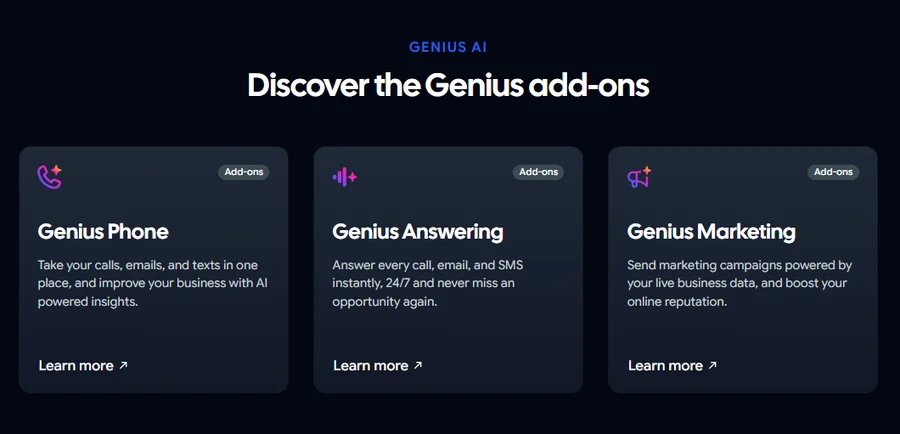
Genius Phone brings calls, texts, and email into the Workiz communication system. Genius Answering adds AI-driven customer response and job-booking functions, while Genius Marketing focuses on campaigns and reputation workflows. However, the public pricing page creates an important ambiguity. The comparison table labels the Genius sections as sold separately, while also showing many related capabilities as included across Standard, Pro, and Ultimate. Workiz’s own FAQ also says an integrated phone system is available across all plans. Those statements are not enough to calculate what a specific account receives or pays. Workiz’s billing documentation confirms that an account can contain multiple separately priced subscriptions. It gives examples such as the core Workiz plan, a phone plan, and a Genius Answering plan. Therefore, do not ask sales only: “Does my plan have phone features?”
Ask instead:
- Which Genius product is included?
- Is there a separate subscription?
- What usage is included?
- Is pricing based on users, lines, conversations, or another unit?
- What happens when included usage is exceeded?
- Does the Sales Order list that charge separately?
For example, Genius Answering plans contain a set number of AI conversations, and additional usage can apply after the included allowance is exhausted. That can affect real monthly cost even when the core Workiz subscription itself has not changed.
Payments and Extras
Subscription pricing is not the only potential Workiz cost.
Workiz Pay
Workiz Pay supports payment functions such as online payments, estimate deposits, consumer financing, card readers, and Tap to Pay. The current pricing matrix lists those capabilities across the three plans while noting that card readers are sold separately. We would not use one public percentage as a universal credit-card processing rate. If card payments are important to your business, confirm the actual processing terms offered to your account.
ACH
Workiz currently documents a 1% processing rate for ACH bank transfers in the US. ACH is available for eligible estimate deposits or invoice payments of at least $20.
There are also two smaller but pricing-relevant charges worth knowing:
- a $5 fee can apply in the documented scenario where an ACH payment begins processing after initially passing a funds check but later fails for insufficient funds;
- an ACH dispute carries a $25 non-refundable fee.
These should not dominate the software-buying decision, but they are part of the real payment economics if your business expects to use ACH heavily.
Hardware and Taxes
Card readers are sold separately, so hardware should be another explicit quote item if your technicians need physical readers. Workiz also states that subscription prices exclude applicable sales tax. The goal is not to create a giant list of edge-case fees. It is to identify costs that can sit outside the headline software subscription.
Trial and Billing
Free Trial
Workiz currently advertises a 7-day free trial with no credit card required. A trial is useful for checking workflow fit, but it should not be used as proof that every capability you see will be part of the final paid package. Before purchasing, match important trial features against the written Sales Order.
Monthly vs Annual Billing
Workiz currently markets annual subscriptions as saving $400+ compared with monthly billing. Because Workiz does not publicly show the underlying Standard, Pro, and Ultimate prices, Home Service Fit cannot independently reproduce that calculation. Treat it as Workiz’s current promotional claim, not an independently calculated saving. More importantly, Workiz’s Terms distinguish the Billing Cycle from the broader contractual Term. Billing can be structured on a calendar-monthly or annual basis depending on the Sales Order. But that does not mean a monthly invoice automatically creates a month-to-month commitment. That distinction becomes especially important in the contract section.
Contract Terms
Software price comparisons often focus on the amount charged each month. With Workiz, the contractual mechanics can be just as important.
Default Term
Unless a Sales Order says otherwise, Workiz’s current Terms set the initial term at 12 months. After that, the agreement automatically renews for successive 12-month periods unless either party provides written notice at least 30 days before the current term expires. That means: Monthly billing does not automatically mean month-to-month commitment. The Sales Order is therefore essential.
Check both:
- how often you are charged;
- how long you are contractually committed.
Those are separate fields.
Upgrades and Downgrades
Workiz distinguishes between Default Service Packages and Customized Service Packages, and the rules are not identical. For a Default Service Package, the current Terms say package downgrades are available only when the Billing Cycle is calendar monthly. Annual Billing Cycles do not have the same downgrade entitlement.
The same section says Default-package upgrades are subject to a 30-day cancellation policy and subsequent annual commitment. Unless the Sales Order says otherwise, upgrades are also generally final, non-cancellable, and non-refundable. That matters because upgrading is not necessarily just: “Add $X to my next monthly invoice.” It can affect contractual commitment too. Customized Service Packages work differently. Current Terms provide no contractual downgrade entitlement for them, while an upgrade requires a Modification Request and Workiz approval. Workiz then confirms whether it accepts the change, when it takes effect, and the revised fees.
Before upgrading mid-term, ask: Does this change only my price, or does it also change or restart my commitment?
Price Increases
Workiz also reserves the right to implement an annual fee increase of up to 10% on the anniversary of the applicable Sales Order, with at least 30 days’ written notice. That does not mean every customer’s price will rise 10% each year. It means the contract permits an increase up to that level under the stated conditions, unless the parties agree otherwise in writing. So do not treat an initial quote as permanently price-locked unless your Sales Order explicitly gives you that protection.

Compare Your Quote
Because the public site does not provide a complete dollar calculation, the most useful Workiz pricing exercise happens when you receive the written quote.
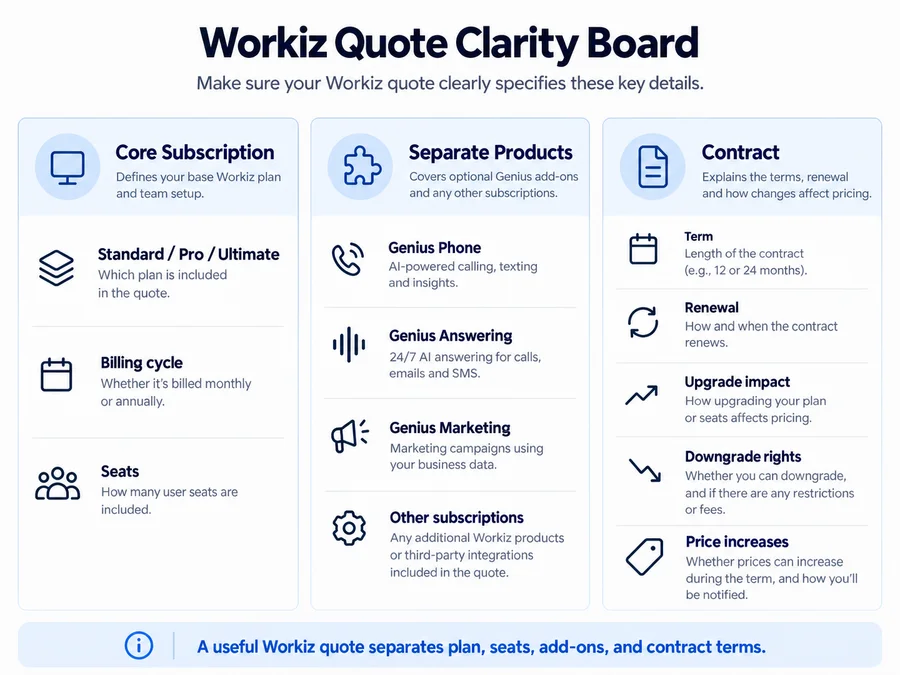
Before signing, make sure you can answer all of these:
- Which plan are we buying — Standard, Pro, or Ultimate?
- What is the base subscription price?
- Is billing monthly or annually?
- What is the contractual term?
- How many seats are included?
- What does each additional seat cost?
- How can existing seats be reassigned or reduced?
- Is Genius Phone included or separately billed?
- Is Genius Answering included or separately billed?
- Is Genius Marketing included or separately billed?
- Are there any other separate subscriptions?
- What payment-processing terms apply to our account?
- Do we need separately purchased hardware?
- What is the renewal date?
- What is the non-renewal deadline?
- What downgrade rights apply to our package?
- What price-increase language applies?
- Does upgrading the package change or restart the contractual commitment?
The final comparison should be based on your complete annualized cost and contractual exposure, not simply the amount of the first monthly invoice.
If you’re also considering Jobber, our Jobber vs Workiz comparison examines pricing transparency, contractual commitments, scheduling, dispatch, and operational fit side by side.
If Housecall Pro is also on your shortlist, our Housecall Pro vs Workiz comparison examines published subscription prices, phone add-ons, contract terms, and the workflows each platform suits best.
Is Workiz Worth It?
From a pricing perspective, Workiz becomes easier to justify when its more integrated tools replace real operational costs. A business that depends heavily on inbound calls, dispatching, multiple field users, automation, and customer communication may get more value from putting those workflows into one platform. Pro or Ultimate can also make financial sense when their gated capabilities replace manual work or separate software the business would otherwise pay for.
The argument is weaker for a solo or light-use contractor that mainly needs scheduling, estimates, invoices, and straightforward customer records.
If you’re exploring other options, compare our Workiz alternatives to see how Jobber, Housecall Pro, Service Fusion, and other competitors differ in pricing models, workflows, and team fit.
If you are still comparing broader software options for a smaller operation, see our handyman software guide.
The same applies to Genius products. An add-on that replaces an answering service, phone system, or marketing tool can have measurable value. An add-on that duplicates something you already use successfully simply makes the Workiz quote larger. So the right value question is: What specific cost or operational problem does each paid part of this quote replace?
For the broader product experience, strengths, limitations, mobile app, and user feedback, see our Workiz review.
FAQs
How Much Does Workiz Cost?
Workiz currently does not publish a standard dollar price for its Standard, Pro, or Ultimate plans. All three are listed as Request pricing, so a new customer’s actual cost depends on the written quote. Older prices found on third-party sites should not be treated as current Workiz pricing.
Does Workiz Charge Per User?
Workiz uses seats. Each plan includes a set number, and additional users beyond the available allowance can require another paid seat. The account Billing page shows available seats and the current per-user price. Disabling a user can free capacity for another user, but it does not automatically reduce the contracted seat cost.
Does Workiz Have a Free Trial?
Yes. Workiz currently advertises a 7-day free trial with no credit card required. Trial terms can change, so confirm the current offer before signing up.
Is Workiz Month-to-Month?
Not necessarily. Workiz permits calendar-monthly or annual Billing Cycles, but its standard Terms separately default to a 12-month Initial Term unless the Sales Order specifies something different. Always check both billing frequency and contract duration.
Are Workiz Phone Tools Included?
The answer depends on the exact entitlement in your quote. Workiz’s public pricing page labels Genius Phone, Genius Answering, and Genius Marketing as separately sold add-ons, while its plan matrix also marks various related capabilities as included. Ask Workiz to state the included phone functionality, separate subscription charges, usage allowances, and any on-demand costs in the Sales Order.