
Last updated: October 2026
Product, pricing, integration, and contract information last verified October 25, 2026.
On this page
Housecall Pro and Workiz both handle the essentials of running a home-service company: customer records, estimates, scheduling, jobs, invoices, and payments. Housecall Pro has a practical advantage for buyers who want to compare published subscription prices and build a residential service workflow around booking, dispatch, field documentation, and customer follow-up. Essentials provides a defined five-user configuration, while phone services and AI answering require separate buying decisions.
Workiz deserves serious consideration when incoming calls and messages are the center of daily operations. A locksmith or garage-door company that relies on rapid call intake, lead records, and dispatcher coordination may value Workiz’s communications-oriented approach, especially with Genius Phone or Genius Answering. The trade-off is a sales-led quote, separate Genius products, and contract terms that need close attention. Compare the lowest complete configuration that can manage your actual work on each system.
Quick Verdict
Housecall Pro is the clearer starting point for a residential service team that wants published one-, five-, or eight-user pricing. Its standard plans cover core scheduling and payment workflows, while Essentials adds routes, employee GPS, photo reports, and checklist automations. Integrated phones and AI answering require separate evaluation.
Workiz is a stronger candidate when phone-to-job coordination is the principal bottleneck. It documents call histories connected with customers and jobs, plus optional Genius communications and answering products. Evaluate those benefits against the complete phone, AI, seat, and contractual costs. Housecall Pro offers a 14-day no-credit-card trial; Workiz offers seven days without a card. Neither trial tells you what the subsequent paid commitment will be.
At a Glance
| Decision factor | Housecall Pro | Workiz |
|---|---|---|
| Typical bottleneck | Residential booking, dispatch, field follow-up | Calls, lead intake, communication-led dispatch |
| Public prices | Regular Basic, Essentials and Max rates published | Standard, Pro and Ultimate require quotes |
| Included team access | Basic: 1; Essentials: 5; Max: 8 | User count and charges confirmed in quote |
| Free trial | 14 days; no credit card | 7 days; no credit card |
| Phone and AI | Voice and CSR AI; separate-product terms | Genius Phone and Genius Answering sold separately |
| Dispatch | Basic dispatch; Essentials Routes/GPS; Max drive-time optimization | Dispatch and service areas; confirm tracking and routing by quote |
| QuickBooks Online | First listed on Essentials | First listed on Standard |
| Service Plans | Listed on Max; commercial conditions may apply | Listed on Ultimate; add-on activation required |
| Contract exposure | Selected monthly, annual or other term; auto-renewal and generally nonrefundable paid fees | Default 12-month initial term unless Sales Order differs; renewal and remaining-term obligations |
These are documented buying and workflow differences, not a claim that similarly named features behave identically. In particular, both vendors’ public matrices show where features are listed; they do not establish identical entitlements, pricing, or operational depth.
Pricing and Contract Commitments
Plan Prices, Seats and Trials
Housecall Pro publishes three standard packages. Regular month-to-month rates are Basic at $79 for one user, Essentials at $189 for five users, and Max at $329 for eight users; annual-billing equivalents are $59, $149, and $299 per month. Temporary signup promotions are not an ongoing-cost baseline. The Max matrix additionally lists $35 per month for an extra user, but that rate should not be projected across Basic or Essentials without checking the selected package.
For an owner coordinating several technicians, Essentials is a more meaningful baseline than comparing the cheapest advertised Basic price with a Workiz quote for a whole team. Check included users, QuickBooks, Routes, GPS, the selected trade and billing period at checkout. Our Housecall Pro pricing guide covers the full plan economics separately.
Workiz presents Standard, Pro, and Ultimate with Request Pricing rather than standard public dollar amounts. Standard includes the principal job, estimate, invoice, scheduling, and client functions; Pro adds additional automation and lead/scheduling capabilities; Ultimate expands further into sales proposals, service plans, inventory, and other operations. Workiz also advertises a seven-day trial without a credit card. Ignore outdated or third-party dollar estimates.
For an apples-to-apples comparison, ask Workiz for the actual number and type of paid users, office access, telephone numbers, included call or messaging usage, Genius add-ons, setup charges, payment costs, billing frequency, and contract duration. The phone stack and dispatch staff can materially change the quote.
Add-Ons and Exit Terms
Both platforms separate important communication products from the core field-service subscription. Workiz’s pricing matrix describes functionality within Genius Phone and Genius Answering, yet explicitly labels those product sections sold separately. A feature row marked available within a Genius package therefore does not prove that Genius comes at no extra cost with Standard, Pro, or Ultimate. Housecall Pro similarly offers Voice and CSR AI on product-specific terms. Marketing, payments, hardware, and usage may also add costs.
There is also a meaningful difference in cancellation exposure. Housecall Pro’s marketing FAQ describes no long-term contract, while its subscription terms permit month-to-month, annual, or another selected duration. Subscriptions automatically renew for a corresponding period unless ended beforehand, and paid subscription fees are generally not prorated or refunded except as expressly provided. Canceling annual billing may forfeit already-paid unused months.
Workiz’s current terms establish a 12-month initial subscription term unless the Sales Order specifies otherwise, followed by automatic 12-month renewals. Written non-renewal notice is normally due at least 30 days before the term ends. A cancellation notice generally takes effect at the end of the existing term, with prepaid fees normally nonrefundable and amounts owed for that term remaining due. Monthly invoicing does not necessarily create a month-to-month commitment. Read the actual Sales Order for any different terms; our Workiz pricing guide examines the quote and contract mechanics in greater detail.
Calls, Leads and AI Answering
Phone Workflow and Missed Calls
Consider a customer calling about a jammed garage door while the owner is already speaking to another prospect. The dispatcher needs the caller, address, service request, and next action in one record. Workiz documents a phone workflow that connects calls to existing client, lead, and job records. Its mobile phone tools also allow staff to work from a company number and associate conversations with operating records, which is relevant when a dispatcher must turn a call into scheduled work.
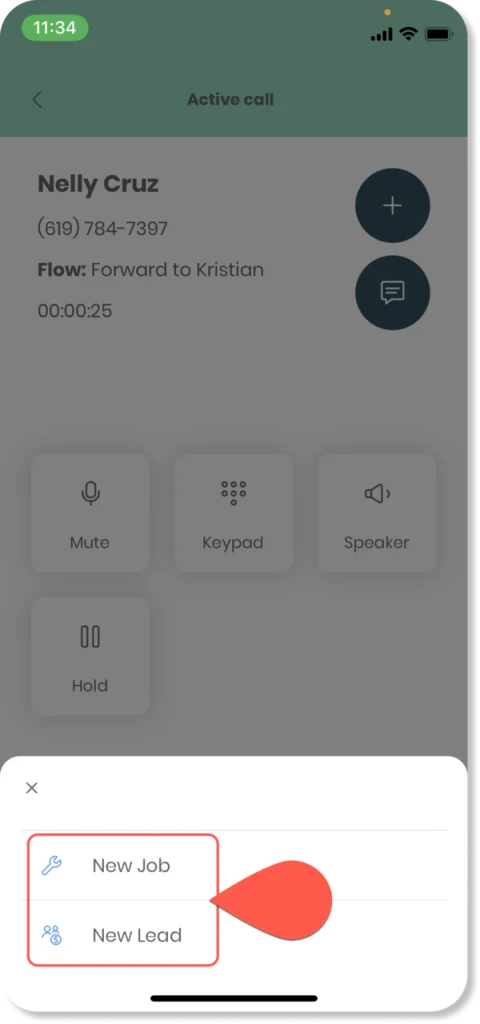
Genius Phone adds a more concentrated communications layer, including integrated calling, texting, call tracking, and AI-assisted insights. That is relevant when calls arrive while technicians are occupied. Buyers should still verify number portability, call recording and consent settings, included minutes, transfer behavior, and the exact purchased package. It does not establish guaranteed booking improvements.
Housecall Pro has a genuine phone offering too. Voice supports different purchases, including call tracking alone and a more complete VoIP-plus-call-tracking setup. Call tracking can supplement an existing system; VoIP can centralize calling within Housecall Pro. Its help documentation describes linking calls to customer records, intake forms, jobs, and lead sources. Housecall Pro cannot reasonably be described as lacking call history. Compare how each purchased phone product handles a missed call, a returning customer, and follow-up responsibility in the office.
CSR AI vs Genius Answering
Workiz Genius Answering is an optional AI communications product intended to respond to calls and inbox activity, including texts, email, web forms, and lead sources. Workiz describes features such as answering service questions, collecting details, transferring conversations, and booking work according to configured availability. Language support and escalation options may be useful to a multilingual or high-volume service desk, but exact activation, channel coverage, and handoff rules should be demonstrated in the quoted configuration.
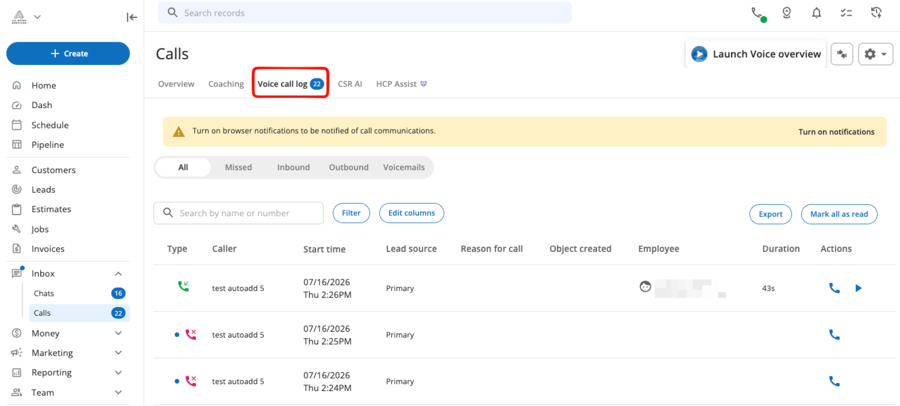
Housecall Pro CSR AI can answer customer calls, collect information, summarize interactions, and make escalation details visible through a call log. Newer setup documentation also describes job and estimate booking through configured availability, service-area, and price-book settings. Some older documentation still uses “booking coming soon” language, so buyers should inspect the live functionality in their own eligible account rather than rely on a single older help page.
There is a separate rollout caveat for messaging: Housecall Pro’s August 2026 CSR AI Text Answering documentation explicitly identifies that capability as alpha, not universally released. Its supported text conversations and booking behavior should be checked with sales or during setup. Test unclear requests, human escalation, scheduling conflicts, and booking corrections.
Dispatch and Field Work
Scheduling, Routes and Tracking
Both products can assign jobs to technicians and manage changing calendars. Housecall Pro includes scheduling and dispatch in Basic, then adds Routes, employee GPS, photo reports, and checklist automations in Essentials. These tools support reassignment, customer updates, and field documentation. They can be enough for a residential team whose immediate concern is keeping several technicians organized.
Housecall Pro’s Routes feature should not be confused with Optimize by Drive Time. Routes supports grouping and sequencing field appointments, whereas Optimize by Drive Time is a Max-only tool that reorders one technician’s daily visits using drive-time and traffic information. It does not automatically swap jobs between technicians or days. Essentials suits basic route coordination; automatic optimization requires evaluating Max.
Workiz supplies scheduling, dispatch, and service areas, with Genius Scheduling listed from Pro upward. Its wider platform also references team-location and fleet capabilities, but tracking a technician on a map and automatically optimizing a route are different operations. Ask Workiz to demonstrate the exact tracking view, dispatcher permissions, and route behavior included in the proposed tier. Test how a late job affects reassignment and customer updates.
Mobile Jobs and Job Evidence
Once a technician arrives, the office needs more than a completed calendar entry. Job details should identify the authorized task, the parts needed, what changed, and what evidence supports the final invoice. Housecall Pro’s field workflow includes job notes and core checklist functionality; its Essentials matrix adds checklist automations and photo reports with annotations. They help document extra repairs and parts.
Workiz also supports job details, customer communication, and field payments, while its public Ultimate matrix specifically lists Checklists and additional operational tools. A note or photo attached to a job should not automatically be treated as equivalent to a structured checklist, nor should Housecall Pro’s checklist automation be assumed identical to Workiz’s formal checklist features. Have a technician document a change of scope, request approval where needed, and show the office exactly what appears before billing.
For crews with inconsistent reception, evaluate connectivity behavior with the current mobile build rather than assuming every update is available offline. Both products have mobile workflows, but this comparison does not establish complete offline editing, payment processing, or synchronization parity. Test the actual field permissions.
Estimates, Payments and Accounting
Estimates and Customer Payments
Both systems support estimates, invoices, customer information, and payment collection. Housecall Pro’s Basic plan now lists a Price Book and job costing, while Essentials introduces flat-rate pricing and further office/field controls. Workiz Standard documents estimates, invoices, and online payments, and the current public plan matrix first lists Flat rate, Sales Proposals, and inventory management on Ultimate. These labels do not guarantee equivalent implementations.
Suppose a handyman quotes a faucet replacement but discovers a damaged shutoff valve when the water is turned off. The important workflow is preserving the original estimate, documenting the newly required work, getting the appropriate approval, and passing the final amounts into an accurate invoice. Both vendors should demonstrate this with the actual plan, technician role, and payment method being purchased. Verify deposit rules, financing, and processing fees separately.
For a business that mostly performs familiar one-visit repairs, HCP Essentials may provide a readily priced configuration for the field and office roles involved. Workiz may be more attractive when pricing, dispatch, and payment follow a call-center-led sales process, provided the quote includes everything needed. Neither platform’s higher tier should be chosen merely because it contains the longest feature list.
QuickBooks Integration Boundaries
Housecall Pro first lists QuickBooks Online integration on Essentials; Workiz includes it in Standard. This can affect the lowest viable package. It does not establish which integration is more comprehensive or allow either vendor to claim universal two-way synchronization.
Housecall Pro’s QuickBooks synchronization guide describes an ongoing flow that is typically Housecall Pro to QuickBooks Online for invoices, payments, customers, and supported Price Book items. Some invoice updates need a manual push, and canceled or deleted invoices in Housecall Pro must be handled separately in QuickBooks. Initial onboarding can also include data imported from QuickBooks, which should not be confused with the normal operating direction after setup.
Workiz likewise distinguishes its initial QuickBooks import from day-to-day synchronization. At first connection, clients and items can be brought from QuickBooks into Workiz. Subsequent supported operating records flow predominantly from Workiz to QuickBooks, including invoices and payment information. Workiz’s public integration materials describe this continuing direction as one-way, although different records have different handling rules. Ask both vendors to show what happens when the office edits an invoice after sending it, records a partial payment, issues a refund, or cancels a transaction.
Choose a source of truth for each record type and assign responsibility for corrections. Neither integration eliminates bookkeeping reconciliation.
Automation and Recurring Work
Automations and Feature Gates
Workiz makes its automation allowances visible: five automations in Standard, ten in Pro, and thirty in Ultimate. Pro also publicly lists Genius Leads and Genius Scheduling. Ultimate adds checklists, flat-rate pricing, inventory, service plans, sales proposals, and Open API access. Those allowances are not a performance score, nor does Housecall Pro publish a directly comparable quota.
Housecall Pro positions important capabilities differently. Its public Essentials matrix lists Checklist Automations, flat-rate pricing, and QuickBooks Online, while Max lists the Sales Proposal Tool, Recurring Service Plans, and Open API. Workiz first lists comparable named categories on different tiers. These are first public matrix appearances, not definitive promises of feature parity, inclusion without add-on fees, or the absolute first possible availability in every account.

The graphic helps reveal when an apparently inexpensive base plan needs upgrading for the buyer’s specific task. Service Plans and other advanced products may still involve separate activation or commercial conditions even where the matrix names them. Request a demo and written entitlement list.
Recurring Jobs vs Service Plans
A recurring job and a paid service plan solve different problems. A recurring job schedules another appointment—for example, replacing filters every three months. A service plan can also manage an ongoing customer agreement, included visits, and recurring billing. Businesses selling preventive maintenance should investigate the entire customer subscription workflow, not simply whether a calendar repeats an appointment.
Workiz lists recurring jobs across its plan structure, while the full Service Plans product appears on Ultimate and its help documentation requires enabling the Service Plans add-on. Housecall Pro lists Recurring Service Plans on Max, subject to any additional commercial or activation conditions in the chosen account. Ask both vendors to demonstrate plan enrollment, automatic charges, skipped visits, cancellations, and the record seen by a technician completing a covered appointment.
Which Fits Your Business?
Choose Housecall Pro When
Housecall Pro is an attractive fit for a residential service business that wants to evaluate costs before a sales conversation and needs a connected system for booking, dispatch, estimates, technician documentation, invoicing, and payment. Essentials offers a concrete five-user starting point with routes, GPS, photo reports, checklist automations, and QuickBooks Online. The broader Housecall Pro review covers its full strengths and limitations; for this comparison, the advantage is a clearly priced core workflow with known field-tool gates.
A business should still price Voice or CSR AI separately when incoming calls require more than its existing telephone setup can provide. If neither platform supports the required field process at a reasonable configured cost, the wider field of Housecall Pro alternatives may be worth comparing rather than forcing a decision between these two products alone.
Choose Workiz When
Workiz is particularly relevant when the business depends on a dispatcher rapidly turning incoming calls into booked jobs, keeping call and customer records together, and following up on missed or after-hours inquiries. That could describe a locksmith or appliance-repair team, but it could also describe a general handyman business with a phone-heavy service model. Its suitability depends on actual intake workflow, not the trade label or a fixed employee threshold.
Request a configuration with Genius Phone and Genius Answering explicitly priced if those products are the reason for choosing Workiz. Confirm user allowances, numbers and minutes, booking permissions, automations, QuickBooks access, setup, and Sales Order terms. The Workiz review provides the broader assessment of its field and communication experience, while businesses that don’t need a phone-led platform can explore Workiz alternatives suited to different operating priorities.
What to Verify Before Switching
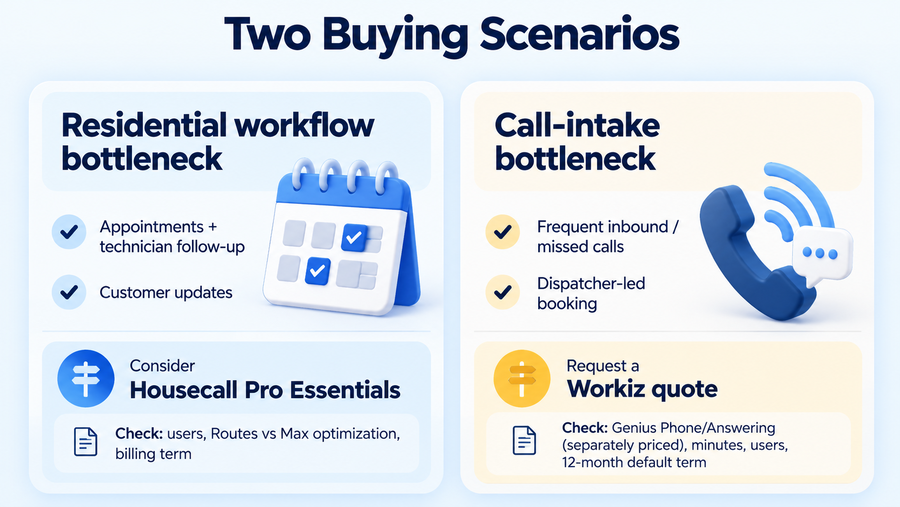
A meaningful trial or demo uses the same realistic call in both systems. Have a new customer telephone about an urgent service request, record the caller and job information, assign a technician, make a schedule change, document an additional approved repair, and prepare an invoice. Then record a payment and inspect the QuickBooks entry. Repeat the exercise with a missed call and a returning customer whose prior work should be visible. Office and field employees should each use the permissions they would have after launch.
Ask for the total configured recurring cost in writing, including users, telephone service, call or message usage, CSR AI or Genius Answering, marketing tools, payment processing, and any implementation charges. The Housecall Pro quote or checkout should show the chosen billing period; Workiz should supply the actual Sales Order. Review renewal notices and what happens when the company tries to leave mid-cycle. Unused prepaid Housecall Pro subscription fees may not be refunded, while an unexpired Workiz contractual term can leave additional amounts due even after notice is given.
For phone migration, verify main-number and tracking-number portability, communication exports, and missed-call handling during transition. Also confirm customer and job-history exports, integration setup, and who resolves accounting discrepancies. Neither a free trial nor a sales demo proves those records will transfer automatically.
Final Verdict
Housecall Pro gives a home-service buyer a clearer public cost baseline and a useful Essentials configuration for coordinating a residential field team. Its phone and CSR AI offerings make it more capable than comparisons that treat it as scheduling-only software, although those products need their own commercial review. Workiz is a serious option when calls, customer conversations, and dispatcher-led booking determine how work enters the business. Its Genius tools may support that operating model, but the quoted subscription, separate communication charges, and contractual commitment decide whether they are worth purchasing.
There is no defensible universal price winner without a comparable Workiz quote. Build the full call-to-payment workflow on each platform, compare the smallest configuration that can actually run it, and evaluate the exit terms alongside the monthly bill. A better-equipped plan has value only when its tools address work the team genuinely performs.