

Housecall Pro pricing currently starts at $59 per month when billed annually for Basic, while the same one-user plan costs $79 on a month-to-month subscription. But your actual Housecall Pro cost can depend on the plan, billing cycle, number of users, add-ons, payment processing, and applicable sales tax.
Housecall Pro currently has three standard general plans:
- Basic — 1 user;
- Essentials — 5 users;
- MAX — 8 users.
Pricing checked: September 4, 2026
The $59 starting price therefore answers only one question: what is the lowest current annual-billing rate for a one-user Basic account?
It does not tell a five-person business what it will pay, whether a sixth Essentials login is available in its account configuration, whether a feature requires MAX, or how much payment processing and optional products may add.
This guide focuses on that practical question:
What is the least expensive verified Housecall Pro configuration that actually covers your team and workflow?
Housecall Pro Pricing at a Glance
The table below uses the standard general pricing configuration displayed on Housecall Pro’s direct pricing surface during this review—not the materially different HVAC, plumbing, or electrical packages.
| Plan | Annual-billing rate | Month-to-month rate | Users included | Additional users / seat policy | Best for | Main limitation |
| Basic | $59/mo billed annually | $79/mo | 1 | No standard additional-login path shown | Solo operators | One included login and no Essentials-level team/accounting features |
| Essentials | $149/mo billed annually | $189/mo | 5 | Public pricing page currently displays $100/mo per additional user, but current Billing documentation says Additional logins are available only for MAX; verify your live account configuration | Small teams | Expansion beyond 5 users is currently inconsistent across official Housecall Pro surfaces |
| MAX | $299/mo billed annually | $329/mo | 8 | Public pricing page currently displays $75/mo per additional user; Billing documentation confirms additional logins are available on MAX | Growing teams and more advanced operations | Higher base subscription may be unnecessary if MAX-only functionality is not needed |
Pricing and plan structures can change. Home Service Fit verified these USD figures against Housecall Pro’s standard general pricing configuration on September 4, 2026. Published prices exclude applicable sales tax.
The conflicting Essentials seat information is important. The direct public pricing page currently states “Additional users $100/mo each” for Essentials, while Housecall Pro’s July 2026 Billing documentation says the Configure Plan screen makes Additional logins available only for MAX. We therefore do not treat the Essentials $100 seat as guaranteed for every account.

How Housecall Pro Pricing Works
A practical Housecall Pro cost calculation looks like this:
Plan + team configuration + billing cycle + add-ons + payment costs = actual Housecall Pro cost.
Housecall Pro is not a simple “$X per user” SaaS product.
The standard plans currently bundle:
- Basic: 1 user;
- Essentials: 5 users;
- MAX: 8 users.
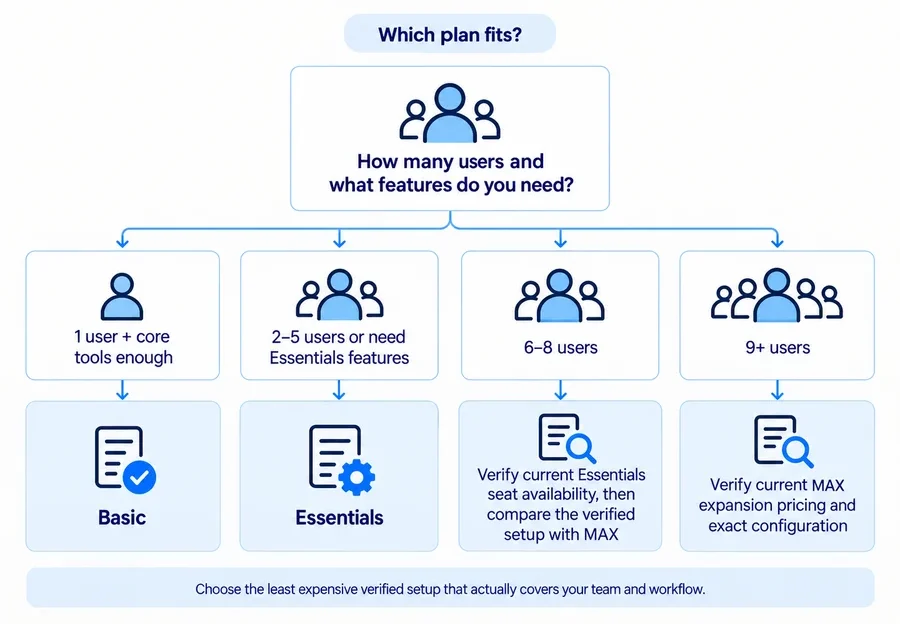
Feature requirements can also force an upgrade even when headcount does not.
A one-person business may pay for Essentials because it needs QuickBooks Online synchronization, for example. A five-person company might choose MAX because it values Sales Proposals, recurring Service Plans, route optimization, API access, or another MAX capability.
Annual vs Monthly Billing
Housecall Pro currently displays:
| Plan | Billed annually | Month-to-month | Monthly difference |
| Basic | $59/mo | $79/mo | $20/mo |
| Essentials | $149/mo | $189/mo | $40/mo |
| MAX | $299/mo | $329/mo | $30/mo |
That works out to annual subscription totals of:
- Basic: $708 on annual billing versus $948 across 12 month-to-month payments;
- Essentials: $1,788 versus $2,268;
- MAX: $3,588 versus $3,948.
The annual-billing number is a discounted monthly rate tied to annual billing, not the ordinary month-to-month price.
Housecall Pro’s marketing page emphasizes flexible cancellation, but the subscription Terms still matter. Subscriptions can be monthly, annual, or another specified term; they auto-renew unless terminated before renewal, and subscription fees generally are not prorated or refunded unless a specific exception applies.
Users Included and Additional-User Pricing
This is currently the messiest part of Housecall Pro pricing.
The standard public pricing page directly displays:
- 1 user on Basic;
- 5 users on Essentials;
- 8 users on MAX;
- $100/month per additional Essentials user;
- $75/month per additional MAX user.
However, Housecall Pro’s current Billing Help Center says the account’s Configure Plan screen offers Additional logins only for MAX plans. Housecall Pro’s own AI/reference information similarly states that additional users are available on MAX.
Because those official sources conflict, do not assume that every Essentials account can simply buy user six for $100.
MAX has the clearest currently documented expansion path. Essentials expansion should be confirmed in the exact pricing or account configuration available to your business.
Housecall Pro Plans Explained
Housecall Pro Basic: Best for Solo Operators
Best for: A genuine one-person service business that needs the core operating system but not the more advanced team features.
Users included: 1.
Important capabilities: Basic currently includes online booking, scheduling and dispatch, estimates and invoicing, payments and consumer financing access, a price book, job costing, and review-management functionality.
That is a substantial base plan. Basic should not be dismissed simply because it is the cheapest tier.
Main limitations: The biggest structural limitation is the one-user allowance. Essentials also unlocks routes, flat-rate pricing, checklist automations, photo reports and annotations, employee GPS, commissions, and QuickBooks Online synchronization.
Upgrade when: You need another login or one of those Essentials-specific capabilities badly enough to justify the price increase.
Pricing verdict: For a solo handyman who can operate comfortably without QuickBooks sync, employee features, or Essentials automation, Basic is the logical first plan to evaluate.
Housecall Pro Essentials: Best for Small Teams
Best for: Teams of up to five users or businesses that need Essentials features even with fewer people.
Users included: 5.
Important capabilities: Essentials includes everything in Basic plus routes, flat-rate pricing, checklist automation, photo reports and annotations, employee GPS tracking, commissions, and QuickBooks Online synchronization.
For many small home-service crews, the five bundled logins alone change the economics significantly compared with Basic.
Main limitations: The plan’s expansion path beyond five people is currently unclear. The public pricing page shows a $100/month extra-user rate, while the current Billing documentation says additional logins are a MAX-only option.
Upgrade when: The business exceeds the verified Essentials user configuration, or MAX-only capabilities—such as advanced Sales Proposals, recurring Service Plans, route optimization, API access, or stronger onboarding/support—justify the step up.
Pricing verdict: Essentials is likely the practical standard tier for many 2–5 person teams, but do not choose it purely because you have employees. A two-person business still needs to decide whether its required capabilities justify the jump from Basic.
Housecall Pro MAX: Best for Growing Teams and Advanced Operations
Best for: Growing teams that need more included users, advanced operational functionality, or a clear expansion path.
Users included: 8.
Important capabilities: MAX currently includes everything in Essentials plus the Sales Proposal Tool, recurring Service Plans, route optimization, open API access, dedicated onboarding, and escalated phone support.
Main limitations: MAX starts at $299/month on annual billing, so paying for it only because it has a longer feature list rarely makes sense for a small operation.
Upgrade when: Team size, MAX-specific tools, or bundled premium functionality materially changes the workflow.
Pricing verdict: MAX is most defensible when the business actually uses the capacity and operational tools it buys. It is not automatically the “best value” plan.
What Does Housecall Pro Cost for Different Team Sizes?
This section uses the same standard public pricing configuration checked on September 4, 2026. Where Housecall Pro’s own documentation conflicts with that configuration, the table flags the issue rather than pretending the answer is certain.
| Users | Available verified configuration | Annual-billing monthly rate | Month-to-month rate | Important note |
| 1 | Basic | $59 | $79 | Solo baseline |
| 2–5 | Essentials | $149 | $189 | Includes up to 5 users |
| 6 | Public page currently shows Essentials + 1 extra user | $249 | $289 | Billing Help Center conflicts with public page; verify Essentials sixth-login availability |
| 7–8 | MAX is the cleaner verified bundled configuration | $299 | $329 | Public page also displays Essentials extra seats, but account-level availability is uncertain |
| 9+ | MAX + additional login(s) | $299 + $75/user beyond 8 on checked public surface | $329 + $75/user beyond 8 on checked public surface | Confirm exact current expansion rate before purchase |
1 User
Basic is the obvious baseline at $59/month billed annually or $79 month-to-month.
A solo owner may still choose Essentials for QuickBooks Online sync, flat-rate pricing, checklist automation, or another specific feature. That is a feature decision—not a headcount decision.
2–5 Users
Essentials is currently the natural bundled configuration: five users for $149/month billed annually or $189 month-to-month.
MAX costs $150 more on annual billing or $140 more month-to-month, so the higher plan needs to earn that difference through MAX capabilities rather than simply being “more advanced.”
6–8 Users
This is where Housecall Pro’s current pricing inconsistency becomes materially important.
The direct public pricing page shows an Essentials additional-user price of $100/month. On that surface:
- six-user Essentials would be $249/month annually billed or $289 month-to-month;
- seven-user Essentials would be $349 or $389;
- eight-user Essentials would be $449 or $489.
MAX includes eight users at $299 or $329.
Under that particular public configuration, Essentials is cheaper at six users, while MAX is already cheaper at seven and eight users.
But Housecall Pro’s current account-management documentation simultaneously says additional logins are available only for MAX. Because that could affect what a buyer can actually purchase, confirm the live Essentials configuration before making a team-size decision based on those calculations.
9+ Users
MAX is currently the clearest officially supported expansion route.
The public pricing page checked for this article displays $75/month per additional MAX user beyond the included eight. That would put a nine-user configuration at $374/month on the annual-billing rate or $404 month-to-month.
However, another Housecall Pro pricing session crawled only weeks earlier displayed a different MAX extra-user figure, demonstrating why this number should not be extrapolated indefinitely. Verify your exact quote when the team exceeds eight people.
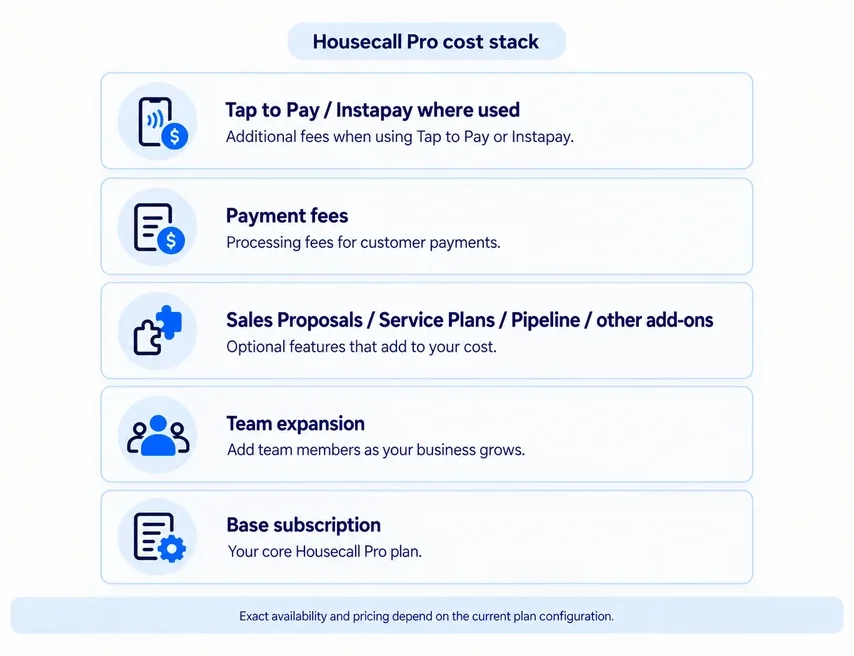
Housecall Pro Add-Ons and Other Extra Costs
The subscription price is not necessarily your complete Housecall Pro bill.
Depending on the workflow, costs can include premium add-ons, additional logins, communication products, transaction fees, and optional faster payouts.
Sales Proposal Tool
Do not confuse Housecall Pro’s standard estimates with its advanced Sales Proposal Tool.
Normal estimating is included with the Housecall Pro subscription.
The visual Sales Proposal Tool adds presentation features for side-by-side, Good-Better-Best-style options and currently costs:
- Basic: $40/month;
- Essentials: $40/month;
- MAX: included.
A handyman sending ordinary estimates does not need to pay an extra $40 simply to quote customers.
Service Plans, Pipeline, Vehicle Tracking, and Other Add-Ons
Housecall Pro’s current Billing interface identifies Service Plans, Sales Proposal, Vehicle Tracking, and Pipeline as configurable add-ons, alongside MAX additional logins.
Their use cases differ:
- Service Plans support recurring customer service/maintenance arrangements.
- Pipeline helps manage leads and sales opportunities.
- Vehicle Tracking adds vehicle-level location/operations functionality beyond employee-phone GPS.
- Sales Proposal provides the richer proposal experience discussed above.
Housecall Pro does not expose a sufficiently stable universal public dollar amount for every one of these products across the current standard configuration, so this guide does not fill those gaps with third-party prices.
Profit Rhino
Profit Rhino is a specialized pricebook product rather than a normal required Housecall Pro cost for a handyman business.
Housecall Pro currently prices Profit Rhino at $199/month and describes it as an industry-specific prebuilt pricebook product for HVAC, plumbing, drain cleaning, and electrical businesses.
A typical general handyman therefore should not add $199 to a Housecall Pro cost estimate automatically. It is relevant only when that specialized trade-oriented pricing content actually fits the business.
HCP Assist and Voice
Housecall Pro also offers communication products including HCP Assist, its call-answering service, and Voice, its business phone/call-tracking product.
HCP Assist pricing can involve a base minute plan, included minutes, overflow minutes, and overflow rates shown inside the account, so there is no responsible single universal HCP Assist price to publish here.
Voice currently documents call tracking starting at $45/month plus overages and VoIP + call tracking starting at $65/month plus overages, with different minute packages available.
These are optional communications costs, not required Housecall Pro subscription fees.
Housecall Pro Payment Processing Fees
Payment-processing charges are separate from your software subscription, and there is no single Housecall Pro payment percentage.
Current US documentation lists:
| Payment method | Current processing cost |
| Standard card via reader / Tap to Pay | 2.59% |
| Customer-entered online standard card | 2.99% |
| Manually entered, scanned, or card-on-file standard card | 3.49% |
| AmEx and commercial/business cards | 3.49% |
| ACH / bank transfer | 1% standard published rate |
| PayPal / Venmo via invoice | 2.99% |
| PayPal Pay Later | 4.99% |
| Klarna | 4.99% |
| Consumer financing | Starting at 3.9% |
| Instapay | Additional 1% on top of eligible underlying processing fee |
Tap to Pay also currently carries a $5 monthly service charge per active device that processes at least one Tap to Pay payment during the billing cycle.
The 1% ACH figure is Housecall Pro’s current standard published US rate, but payment eligibility and account conditions can vary.
Do not compare Housecall Pro with another platform using only the 2.59% headline rate if most of your customers enter cards online or you regularly key cards manually. The payment method determines the relevant fee.
Does Housecall Pro Have a Free Trial or Free Plan?
Housecall Pro currently has a 14-day free trial and does not offer a permanent free plan.
No credit card is required to start the trial. Housecall Pro’s current pricing FAQ says the trial gives full access to MAX-plan features for the 14-day period.
That creates an important buying trap.
During the trial you may use functionality such as:
- Sales Proposals;
- recurring Service Plans;
- route optimization;
- open API access;
- other MAX functionality.
If you then choose Basic or Essentials, not everything you experienced during the trial will remain available.
Before subscribing, make a short list of the trial features you actually used and verify which paid plan contains them.
Housecall Pro Cancellation, Renewal, and Refund Terms
Housecall Pro’s marketing page says it does not require long-term contracts and describes cancellation as simple, but the legal and billing mechanics are more nuanced.
Current Terms state that:
- subscription periods may be month-to-month, annual, or another specified duration;
- subscriptions automatically renew unless terminated before renewal;
- subscription fees generally are not prorated or refunded;
- cancellation does not automatically create a refund for the unused portion of a paid term.
Housecall Pro currently directs paid-account cancellation requests through Support/Billing rather than providing a simple self-service cancellation button. Its current Billing documentation says the Billing team follows up on cancellation requests and that the account owner may need to speak with a representative before cancellation or billing changes are completed.
Housecall Pro’s pricing FAQ says plan downgrades take effect at the end of the current monthly or annual billing period.
The Billing Help Center also documents a 30-day money-back guarantee only when that guarantee was specifically offered at signup and recorded on the account. It is therefore not appropriate to treat it as a universal refund policy for every signup.
Which Housecall Pro Plan Should You Choose?
If You’re a Solo Operator
Start with Basic if:
- one login is enough;
- core scheduling and dispatch are sufficient;
- normal estimates and invoices cover the workflow;
- integrated payments and price book meet your needs;
- you do not require Essentials-only capabilities.
A solo business can reasonably choose Essentials if, for example, QuickBooks Online sync or flat-rate pricing is essential.
The important principle is to upgrade for a required capability—not because Essentials has more bullets on the pricing page.
If You Have 2–5 Users
Essentials is the natural bundled-user starting point.
At $149/month billed annually or $189 month-to-month, it includes five users along with meaningful team capabilities such as routes, GPS, checklist automation, photo reports, commissions, and QuickBooks Online synchronization.
Compare MAX only if MAX-specific functionality adds enough value to justify another $150/month on annual billing.
If You Have 6–8 Users
Do not rely on a generic per-seat rule.
The public pricing page currently displays an Essentials extra-user option, but the Billing Help Center says additional logins are MAX-only.
That means your decision should be:
- Check whether your exact Essentials purchase/account flow currently permits additional users.
- If it does, calculate the verified Essentials configuration.
- Compare that complete total with MAX.
- Consider MAX features independently of seat price.
On the public pricing surface checked for this article, six-user Essentials is still cheaper than MAX, while seven- and eight-user Essentials become more expensive. But treat that as a current pricing-page scenario, not a permanent universal rule.
If You Have More Than 8 Users
Start with MAX and get the exact expansion configuration.
The public page currently shows $75/month per extra MAX login, but Housecall Pro’s own recent pricing surfaces have exposed different extra-user rates. Larger teams should therefore confirm the live number rather than extrapolate an old price indefinitely.
Is Housecall Pro Worth the Cost?
Housecall Pro can offer good practical value when a business genuinely wants to consolidate:
- CRM/customer records;
- scheduling and dispatch;
- estimates and invoices;
- payments;
- price books;
- customer communication;
- job costing;
- team management;
- QuickBooks integration;
- operational automation.
For a broader comparison of platforms, see our handyman software guide.
If Jobber is the other platform on your shortlist, see our Jobber vs Housecall Pro comparison.
The value proposition becomes weaker when a solo operator does not need broad field-service functionality, when one required feature forces a costly plan upgrade, or when several add-ons materially increase the final subscription.
Payment economics matter too. A business running substantial card volume should consider its expected transaction mix rather than treating processing fees as an afterthought.
For a broader evaluation beyond plans and fees, read our full Housecall Pro review.
When Should You Consider a Housecall Pro Alternative?
Consider another platform when the lowest Housecall Pro plan containing a business-critical feature exceeds your budget, when the current user configuration does not fit your team economically, or when several paid add-ons turn a reasonable base price into a much larger total.
A simpler product can also be a better fit for a solo operator who mainly needs estimates, invoices, and basic customer records rather than full scheduling and dispatch.
Likewise, another FSM may structure team pricing or integrations in a way that better matches your business.
Do not switch based only on a cheaper “starts at” number. Compare the complete configuration you would actually buy.
If you are comparing other platforms, see our guide to the best Housecall Pro alternatives.
If Jobber is the main alternative under consideration, see our Jobber pricing guide for a detailed cost breakdown.
FAQs
How Much Does Housecall Pro Cost Per Month?
Standard Housecall Pro pricing currently starts at:
- Basic: $59/month billed annually or $79 month-to-month — 1 user;
- Essentials: $149/month billed annually or $189 month-to-month — 5 users;
- MAX: $299/month billed annually or $329 month-to-month — 8 users.
Add-ons, additional users where available, payment fees, and sales tax can increase the total.
Does Housecall Pro Charge Per User?
Not as one universal per-user subscription.
Housecall Pro uses plan-based pricing with users bundled into the standard tiers: one on Basic, five on Essentials, and eight on MAX.
Additional-user availability and rates should be verified against the current live configuration because Housecall Pro’s official public pricing and Billing documentation currently disagree about Essentials expansion.
What Percentage Does Housecall Pro Take From Payments?
There is no single percentage.
Current standard rates include 2.59% for standard cards accepted through a reader or Tap to Pay, 2.99% when a customer enters a standard card online, 3.49% for manually entered/card-on-file standard cards, and 1% for standard ACH payments. Other payment types have different rates.
Does Housecall Pro Have a Free Plan?
No permanent free plan is currently advertised.
Housecall Pro instead offers a 14-day free trial with no credit card required, currently providing access to MAX functionality during the trial.
Can You Cancel Housecall Pro Anytime?
You can request cancellation, but that does not mean every remaining paid subscription period is automatically refunded.
Housecall Pro subscriptions can be monthly or annual, automatically renew unless terminated before renewal, and fees generally are not prorated or refunded except where specific terms or an eligible offer provide otherwise.
Paid-account cancellation is currently handled through Housecall Pro’s Support/Billing process rather than a simple self-service cancellation button.
How Many Users Are Included With Housecall Pro?
The current standard pricing structure includes:
- Basic: 1 user;
- Essentials: 5 users;
- MAX: 8 users.
For additional users, check the exact current account/pricing configuration. MAX has the clearest documented expansion path, while current official Housecall Pro sources conflict about Essentials extra-login availability.
If estimating is your main priority, compare these plans with the options in our handyman estimating software guide.
If team size is driving your scheduling needs, compare the broader options in our handyman scheduling software guide.