

Last updated: October 2026
Product and feature information last verified October 10, 2026.
On this page
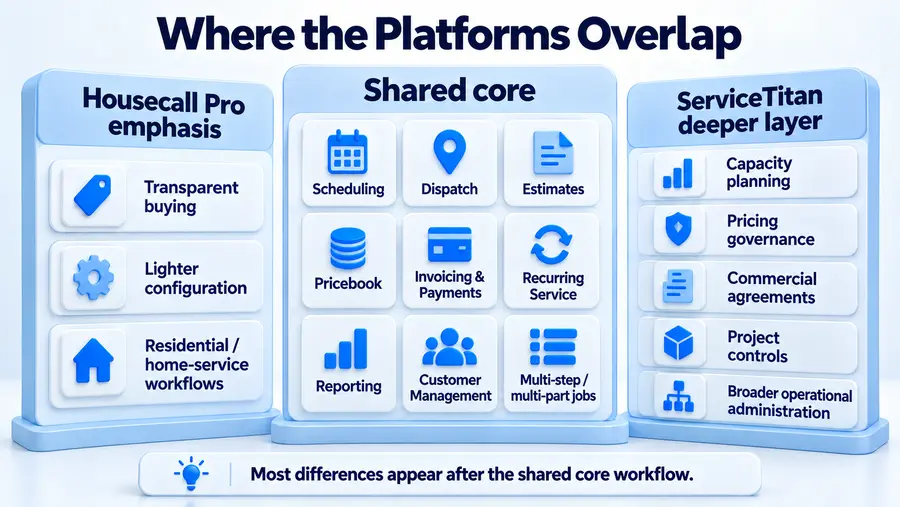
ServiceTitan and Housecall Pro overlap far more than a simple “advanced software vs basic software” comparison suggests.
Housecall Pro now supports substantial scheduling and dispatch workflows, Routes, higher-tier drive-time optimization, a Price Book, flat-rate pricing, sales proposals, Service Plans, reporting, business-unit visibility, multi-day work, job segments, and Progress Invoicing. ServiceTitan covers much of the same core territory but can extend further into capacity management, pricing governance, commercial Service Agreements, construction/project financials, retainage, RFIs, change-order administration, and other deeply structured operating processes.
So the useful question is not: Which platform has more features? It is: Does Housecall Pro already cover the complexity this business actually has, or have its operational requirements become deep enough to justify the additional structure of ServiceTitan?
ServiceTitan vs Housecall Pro at a Glance
| Decision Area | Housecall Pro | ServiceTitan |
|---|---|---|
| Buying model | Public pricing + 14-day self-serve trial | Per-technician model + Request Pricing + personalized demo |
| Scheduling | Scheduling, dispatch, Routes, higher-tier drive-time optimization | Scheduling/dispatch + deeper configurable capacity management |
| Estimates | Price Book, flat-rate pricing, estimates and sales proposals | Core Pricebook, estimates and deeper pricing workflows; optional Pricebook Pro |
| Recurring revenue | Recurring Jobs + Service Plans | Residential Memberships + commercial Service Agreements |
| Reporting | Dashboards, reports, saved/custom views, business-unit visibility | Reporting connected to a broader operating and financial structure |
| Commercial/project depth | Multi-day jobs, segments, business units, Progress Invoicing | Project Financials, Service Agreements, retainage/pay applications, RFIs and change-order workflows |
| Adoption | Easier to inspect and trial before purchase | More structured sales, implementation and configuration process |
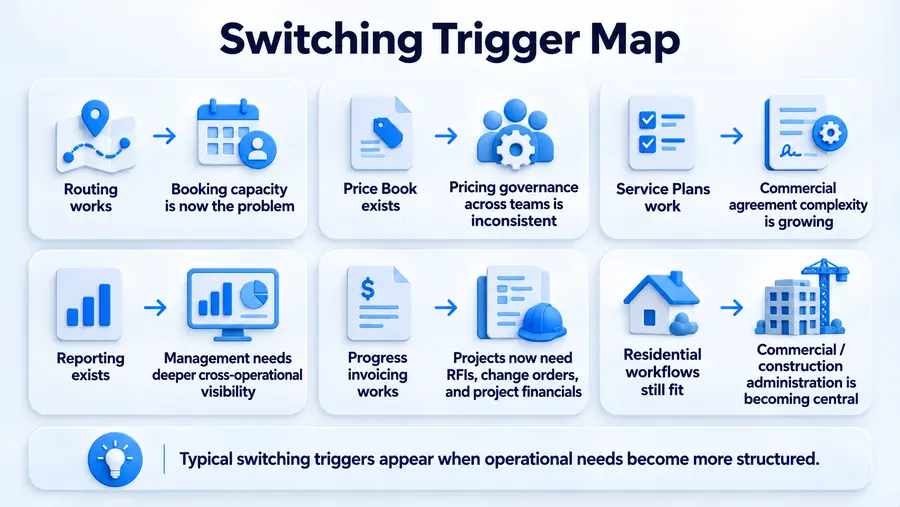
Housecall Pro is the stronger fit when its current home-service stack already handles scheduling, sales, recurring work, reporting, multi-stage jobs, billing, and customer management at the depth the company needs. ServiceTitan becomes more compelling when the business has a specific operational bottleneck that requires deeper structure: booking capacity, cross-team pricing governance, formal commercial agreements, project financials, construction administration, or more interconnected operational management. That distinction matters more than company size.
Pricing and Buying Model
The first clear difference appears before either platform is implemented. Housecall Pro makes its buying model relatively easy to inspect. Its current public offer uses Basic, Essentials, and MAX plans, displays public pricing, and provides a 14-day free trial with no credit card required. Its current pricing FAQ also says customers are not required to enter a long-term contract. Exact pricing can vary with billing cycle, number of users, industry/package configuration, and promotions, so there is little value in duplicating the entire current pricing matrix here.
Our detailed Housecall Pro pricing guide handles the plan and cost mechanics separately.
ServiceTitan takes a more sales-led approach. Its public pricing page currently lists Starter, Essentials, and The Works, describes pricing as per technician, and uses Request Pricing rather than displaying a standard dollar amount. The public flow asks buyers for details such as industry, technician count, area of focus, and job focus before a personalized demo.
That means ServiceTitan pricing has to be evaluated from the actual configuration and written quote rather than from unofficial third-party per-tech estimates.
The practical difference is transparency before purchase:
Housecall Pro lets a buyer inspect the likely subscription structure and try the product with less sales involvement. ServiceTitan requires a more customized buying process. That does not prove Housecall Pro will always be cheaper. Without a real ServiceTitan quote for the same business and requirements, a universal price comparison would be guesswork.
Scheduling, Routing and Capacity
Both platforms now provide meaningful scheduling and dispatch capability. Housecall Pro supports technician assignment, calendar scheduling, route-based work organization, and dedicated Routes. Routes can group work by territory, recurring pattern, crew, or another logistical structure rather than requiring every job to be organized around an individual employee. Its newer Optimize by Drive Time capability goes further. On the relevant MAX configuration, Housecall Pro can reorder an individual technician’s scheduled jobs for the day using real locations and traffic conditions to reduce drive time. Jobs can also be locked when their scheduled time should not move.
The limitation is important. Optimize by Drive Time does not automatically:
- move jobs to another day;
- reassign work to another technician;
- solve broader booking-capacity decisions.
It optimizes the order of jobs already assigned to a technician on that day. ServiceTitan’s distinction is therefore not simply “it has routing too.”
Adaptive Capacity is designed around whether the business has capacity to accept work under its operating rules. Current documentation describes capacity based on technician availability and eligibility, existing scheduled work, business hours or shifts, zones, business units, job types, thresholds, and configurable strategic rules. ServiceTitan also explicitly states that account configuration is required for Adaptive Capacity. It should not be treated as something every account automatically receives or needs.
So the operational distinction is: Housecall Pro can optimize how assigned work moves through the day. ServiceTitan becomes more distinctive when the office needs to govern how much work can be booked, under what constraints, and with which available resources.
Estimates, Price Book and Sales
Neither platform should be reduced to a basic quote builder. Housecall Pro has a current Price Book for organizing services and pricing, plus flat-rate functionality that can incorporate labor rates, material markups, and service pricing. It also supports estimate and proposal templates and a Sales Proposal workflow for presenting multiple options to customers. That means a home-service company can already create a repeatable selling process inside Housecall Pro rather than letting every technician invent pricing and proposals independently.
ServiceTitan’s public packages also include the core Pricebook, with estimates connecting services, materials, equipment, invoicing, and field-sales workflows. One important distinction is terminology.
ServiceTitan’s normal Pricebook is not the same thing as Pricebook Pro. Pricebook Pro is a separate Pro Product requiring its own subscription/access and adds resources such as prebuilt service/material/equipment content and additional pricing-management capabilities.
So a buyer should not compare: Housecall Pro Price Book vs ServiceTitan Pricebook Pro as though Housecall Pro has no equivalent core pricing system. Both products can standardize estimating and field selling. ServiceTitan becomes more interesting when pricing itself has become a deeper management system—when the company wants more structured governance across teams, services, materials, equipment, pricebook administration, and sales processes.
The question is not whether both can create an estimate. It is: How much control does management need over the way pricing and selling are standardized throughout the organization?
Service Plans and Recurring Revenue
Housecall Pro also should not be dismissed as lacking serious recurring-service functionality. Its current Service Plans can be sold to customers from their profiles, support planned visits, and connect to recurring billing and renewals. Housecall Pro also has a dedicated Service Plans dashboard showing plan status, recurring revenue, billing activity, and unscheduled visits, plus Service Plan reporting by period, plan name, revenue, and employee.
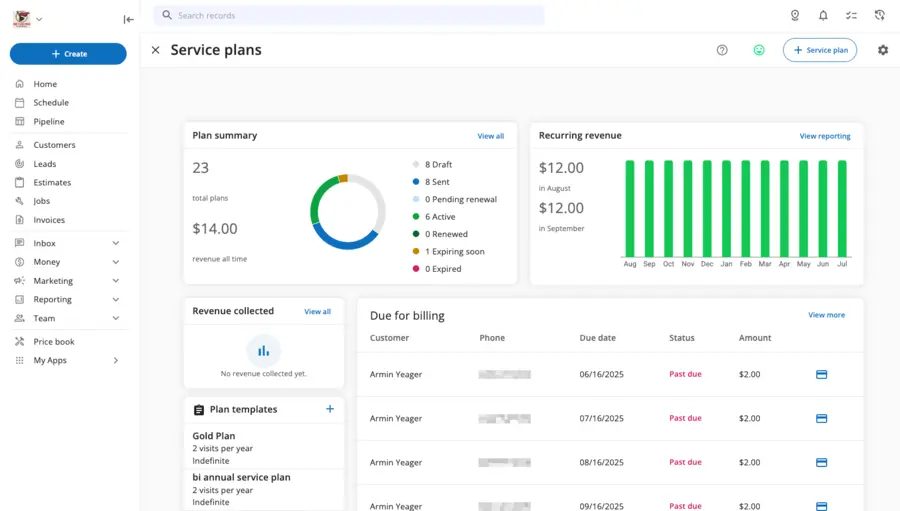
For many residential home-service businesses, that can already be enough to run a meaningful maintenance or recurring-revenue program. ServiceTitan separates recurring-service administration more explicitly by business model. Memberships are geared toward residential service, while Service Agreements are designed for more formal commercial arrangements. Current documentation distinguishes commercial agreements through elements such as custom scope, equipment-specific coverage, different billing arrangements, documentation/e-sign workflows, and configurable renewal behavior. ServiceTitan also supports manual and automatic recurring billing for memberships and service agreements.
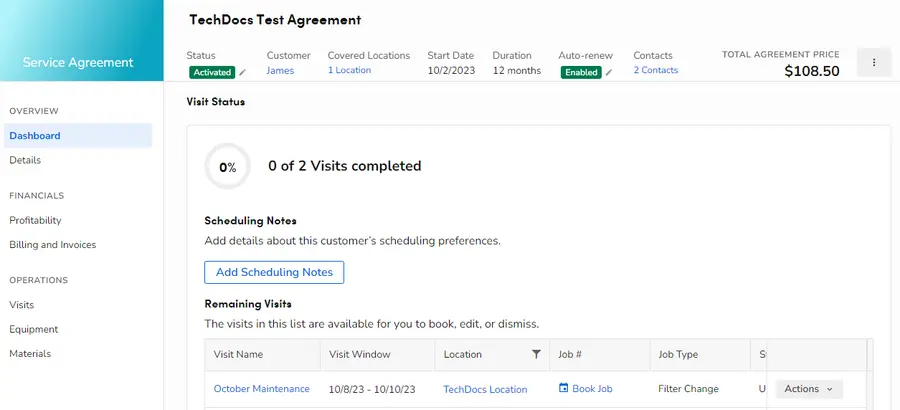
Therefore, the comparison is not: Housecall Pro has recurring jobs; ServiceTitan has real recurring revenue. A better distinction is: Housecall Pro already supports a substantial residential Service Plan workflow. ServiceTitan becomes more differentiated when recurring revenue requires deeper commercial-agreement, equipment, accounting, billing, and administrative structure.
Reporting and Operational Control
Housecall Pro reporting is also deeper than many older comparisons imply. Its current documentation describes up to 40 out-of-the-box reports, along with filters, saved reports, sharing, scheduling, exporting, and configurable dashboards. Dashboard cards can be rearranged and displayed as tables or charts. Business Units can also be used to segment reporting across different parts of an organization, with dedicated reports and filters for revenue, profitability, estimate conversion, and other metrics. Service Plans have their own reporting suite as well. Calling Housecall Pro reporting “basic” would therefore be misleading. ServiceTitan’s advantage is more about how reporting connects to the broader operating model. Its platform can connect reporting with dispatch and capacity, Pricebook activity, technician performance, payroll/commissions, memberships, sales, accounting, and broader residential/commercial operations. The public package structure also places progressively deeper reporting capabilities higher in its tiers.
That additional breadth only matters when management will actually use it. A company whose Housecall Pro dashboards, Business Units, Service Plan reports, and operational reports already answer its management questions may gain little from migrating solely because another platform has more reportable dimensions.
The useful decision point is: Does management need reporting tied to a more configurable and interconnected operating system—or does the current reporting environment already support the decisions the business actually makes?
Commercial & Project Depth
This is one of the clearest areas where stale comparisons can misrepresent Housecall Pro. Housecall Pro already supports work more complex than a one-day residential service call. Current documentation includes:
- multi-day appointments under one job;
- Segments for separate phases or visits;
- separate scheduling and invoicing within segments;
- recurring jobs;
- business-unit workflows;
- Progress Invoicing for staged billing.
Progress Invoicing can break a larger job into invoices based on either a percentage or a fixed amount of the total. Current documentation notes that if the setting is not available in an account, the user should contact Housecall Pro support for access. So it would be inaccurate to frame this comparison as:
Housecall Pro = simple invoices
ServiceTitan = progress billing
ServiceTitan’s distinction appears further into formal project administration. Current ServiceTitan documentation supports Project Financials with budget, actual costs, contract value, billed amounts, margins, earned revenue, cost-to-complete, and related project metrics. Account configuration is required for Project Financials, and some forecasting elements have additional access/configuration requirements.
For construction-oriented workflows, ServiceTitan also documents:
- Applications for Payment and continuation sheets;
- retainage;
- RFIs;
- Change Order Requests;
- structured project change administration.
These capabilities are particularly relevant to residential or commercial construction workflows, and current documentation repeatedly notes configuration/access requirements. They should not be interpreted as universally active for every ServiceTitan customer.
That gives us a more accurate comparison: Housecall Pro can already manage multi-stage work and staged customer billing. ServiceTitan becomes more distinctive when projects require formal project financials, retainage/payment applications, RFIs, change-order administration, and deeper construction controls.
Setup and Administration
The two products also ask different things from a buyer during adoption. Housecall Pro’s current model is comparatively straightforward to evaluate:
- public plan structure;
- visible pricing;
- a 14-day self-serve trial;
- direct sign-up;
- onboarding/support that varies with plan and configuration.
That does not mean every Housecall Pro implementation is effortless. A company still needs to configure its Price Book, employees, scheduling, customer records, reporting, Service Plans, and other workflows. But the buying process creates a relatively low-friction way to determine whether the software fits. ServiceTitan’s current onboarding documentation describes a more structured three-stage journey:
- Pre-Implementation
- Implementation
- Go Live
Its setup can involve company structure, employees and technicians, operational settings, accounting, dispatch, call-center workflows, data, training, and other configuration decisions. There is no responsible universal “30-day,” “90-day,” or other implementation timeframe that applies to every ServiceTitan customer, and this comparison does not assume one.
Heavier implementation is also not inherently bad. The relevant question is whether the business has enough operational complexity to benefit from configuration—and someone internally who can own the decisions that configuration requires.
Which Platform Fits Your Workflow?
Housecall Pro Is a Stronger Fit When
Housecall Pro is easier to defend when its existing workflow already solves the business’s real problems. That can include situations where:
- public pricing and a self-serve trial are useful during evaluation;
- existing scheduling and Routes handle dispatch well;
- MAX route optimization solves the drive-time problem;
- Price Book, flat-rate pricing, and sales proposals provide enough pricing structure;
- Service Plans cover the recurring-revenue model;
- Housecall Pro reporting and Business Units already answer management questions;
- multi-day appointments, segments, and Progress Invoicing handle larger jobs;
- there is no clear operational requirement for deeper capacity, commercial-agreement, or construction administration.
In other words, Housecall Pro should not be replaced merely because the company grew. Our full Housecall Pro review covers the broader product experience separately, but for this comparison the key issue is whether the platform has actually become the bottleneck. If the answer is no, moving to a more configurable system can create work without solving a meaningful problem.
ServiceTitan Is a Stronger Fit When
ServiceTitan becomes more defensible when the limitation is depth rather than basic feature availability. Examples include:
- booking capacity itself has become difficult to govern;
- technician eligibility, zones, business units, or capacity rules need deeper control;
- pricing must be governed more tightly across teams and service categories;
- recurring revenue increasingly depends on formal commercial agreements;
- management needs broader operational and financial visibility across interconnected systems;
- commercial Service Agreements are central to the business;
- construction workflows require project financials, retainage, pay applications, RFIs, or formal change-order administration;
- several departments or business units need a more structured operating model;
- the organization has internal ownership for implementation, configuration, and ongoing process discipline.
The last point matters. A business can genuinely need the deeper capabilities discussed in our ServiceTitan review and still struggle to extract value if nobody owns the operating processes behind them.
Do Not Decide by Headcount Alone
A technician count is an easy comparison rule, but it is not a reliable buying rule. Consider two businesses. A 12-person residential service company may already run well in Housecall Pro. Its Routes work, Service Plans fit its recurring model, the Price Book is standardized, reporting answers management questions, and Progress Invoicing handles the larger jobs it performs. That company does not automatically need ServiceTitan because it reached 12 employees.
Meanwhile, a smaller contractor may deal with strict technician eligibility, complex booking capacity, commercial agreements, multiple business units, formal project controls, RFIs, retainage, and dedicated operations staff. That business may have a much stronger reason to evaluate ServiceTitan despite having fewer technicians.
The migration trigger is therefore: a real operational bottleneck—not a company-size milestone.
FAQs
Is ServiceTitan More Expensive Than Housecall Pro?
Housecall Pro is easier to price before contacting Sales because it publishes plan pricing publicly. ServiceTitan currently uses per-technician Request Pricing and does not display one standard public dollar amount. Sources: Housecall Pro Pricing and ServiceTitan Pricing. That makes it reasonable to say Housecall Pro has greater upfront pricing transparency. It is not enough evidence to publish a universal claim that ServiceTitan costs a certain multiple more than Housecall Pro.
Does Housecall Pro Have Route Optimization?
Yes. Housecall Pro currently offers Optimize by Drive Time on its relevant MAX configuration. It can reorder an assigned technician’s jobs within the same day to reduce travel using job locations and traffic conditions. It does not automatically move jobs to another day or reassign them to another technician, so it should not be confused with ServiceTitan’s broader capacity-management workflows.
Does Housecall Pro Have Service Plans?
Yes.
Housecall Pro supports Service Plans with planned visits, recurring billing/renewal workflows, a dedicated dashboard, and Service Plan reporting.
ServiceTitan becomes more differentiated when recurring revenue requires deeper commercial Service Agreement administration.
Does Housecall Pro Support Progress Invoicing?
Yes. Housecall Pro currently supports Progress Invoicing, allowing a larger job to be billed in stages using fixed amounts or percentages. That should not be confused with the broader construction administration ServiceTitan can support around pay applications, retainage, project financials, RFIs, and change-order workflows.
When Should You Move From Housecall Pro to ServiceTitan?
Consider ServiceTitan when a specific limitation in Housecall Pro has become operationally important—for example:
- booking-capacity management;
- stricter pricing governance;
- formal commercial Service Agreements;
- deeper cross-operational reporting;
- project financials;
- RFIs/change-order administration;
- retainage or payment-application workflows;
- the need for a more structured multi-department operating system.
Do not migrate simply because the company crossed a particular technician or revenue threshold.