

Last updated: October 2026
Product and review information last verified October 10, 2026.
On this page
ServiceTitan Review at a Glance
ServiceTitan is a broad field-service operating platform for residential and commercial contractors. Its strongest case is not that it can schedule jobs, build estimates, or send invoices—many FSM products can do those things. Its value comes from how deeply it can coordinate dispatch, pricing, recurring-service programs, reporting, field execution, and management processes across the business.
That depth is also the main reason buyers should evaluate it carefully.
ServiceTitan currently offers Starter, Essentials, and The Works, with public pricing described as per-technician and each package using Request Pricing rather than a visible standard dollar amount. The current buying flow centers on a personalized demo.
The platform is most defensible when dispatch capacity, standardized field selling, memberships or service agreements, operational reporting, and technician workflows are genuine management problems. It is less compelling when a business mainly needs a calendar, quotes, invoices, payments, and basic customer records.
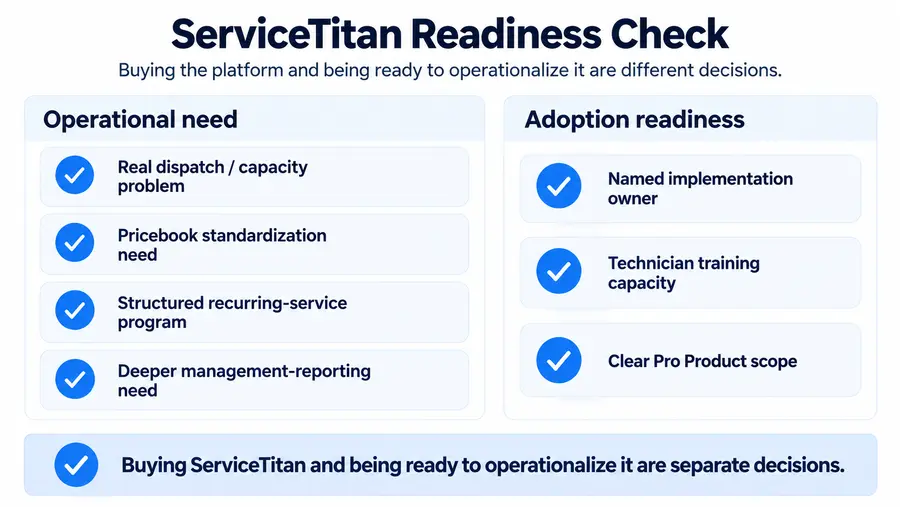
Implementation matters just as much as feature availability. ServiceTitan can provide unusually deep operational structure, but someone inside the company still has to configure, own, train, and use that structure. So the useful question is not “How many technicians make ServiceTitan worth it?” It is: Does this business have enough operational complexity—and enough process maturity—to turn ServiceTitan’s depth into useful daily systems?
What Is ServiceTitan?
ServiceTitan is an all-in-one field-service platform designed to connect office and field operations across residential and commercial service businesses. Its scope includes:
- customer and CRM workflows;
- call booking;
- scheduling and dispatch;
- estimates and Pricebook;
- invoices and payments;
- technician mobile workflows;
- memberships and commercial Service Agreements;
- dashboards and reporting;
- accounting integrations;
- customer communication;
- optional Pro Products.
Current ServiceTitan documentation organizes these capabilities as connected operating areas rather than isolated point tools. That breadth is what materially separates ServiceTitan from a lightweight scheduling or invoicing application. A simpler FSM may primarily help a contractor record what happened: a customer called, a job was booked, the technician completed it, and an invoice was sent. ServiceTitan can go much further into how the business wants those processes governed—which jobs should be booked, which technician should receive them, how estimates should be structured, how recurring programs are administered, and what managers should measure afterward.
That distinction is central to this review.
ServiceTitan Pros and Cons
| Pros | Cons / Caveats |
|---|---|
| Deep scheduling and dispatch workflows | Requires meaningful setup and configuration |
| Structured Pricebook and estimating processes | Learning curve extends beyond individual tasks into company-wide process design |
| Memberships and commercial Service Agreements | Current public pricing is quote-based rather than transparently dollar-priced |
| Strong dashboards, scorecards, and management visibility | Optional Pro Products add another layer to package evaluation |
| Connected office-to-field workflows | User reviews report mixed experiences with bugs, updates, and support |
| New Field Mobile App with meaningful offline capability | Current mobile platform is still transitioning from legacy functionality |
| Broad optional Pro ecosystem | Platform depth may be unnecessary for simpler businesses |
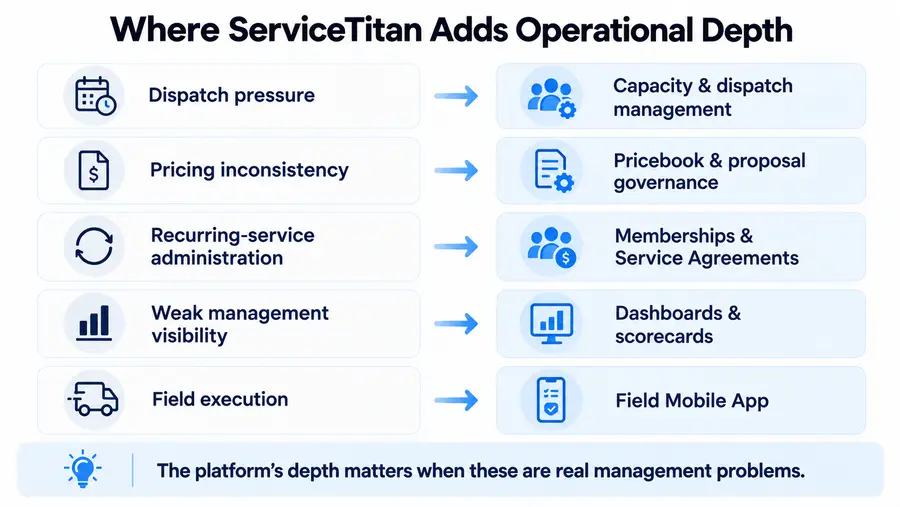
ServiceTitan’s strengths are primarily about operational control. Dispatchers can manage more than a basic calendar; managers can standardize pricing and monitor performance; recurring-service programs can be formalized; and office and field workflows can share one operating system.
The cautions are different from simply saying the product is “expensive” or “hard to use.”
Pricing is a commercial fact: standard public dollar rates are not currently displayed. Complexity is a fit question: a business may be able to perform an individual task easily while still finding company-wide configuration demanding. And complaints about pricing, bugs, or support are user sentiment—not universal product facts.
Where ServiceTitan Is Strongest
Dispatch and Capacity Management
ServiceTitan’s dispatch value is not simply that an office can put appointments on technicians’ calendars.
Its current Daily and Weekly Dispatch Board supports technician schedules, job appointments, dispatch actions, progress tracking, and job-detail management in one operational view.

That matters when dispatch becomes a management problem rather than an administrative task.
A business may need to know:
- which technicians are actually available;
- whether a day is under- or over-capacity;
- which skills or zones constrain assignment;
- where unassigned work can fit;
- how changing demand should affect booking decisions.
Adaptive Capacity goes further by calculating availability from technician hours, existing work, job requirements, skills, zones, and configurable rules. Current documentation says account configuration is required before using it.
The practical value is that dispatch and bookable capacity can become managed systems, rather than relying entirely on an experienced dispatcher’s memory. But not every contractor needs that depth. A five-person company with predictable appointments may gain less than another five-person company dealing with emergency calls, multiple service areas, specialist skills, and a constantly moving schedule.
Pricebook and Field Sales
The core ServiceTitan Pricebook can organize services, materials, and equipment, while estimates and proposal templates can standardize how technicians present options. Current documentation supports multi-option proposal workflows such as Good / Better / Best, using proposal and estimate templates built from Pricebook items.
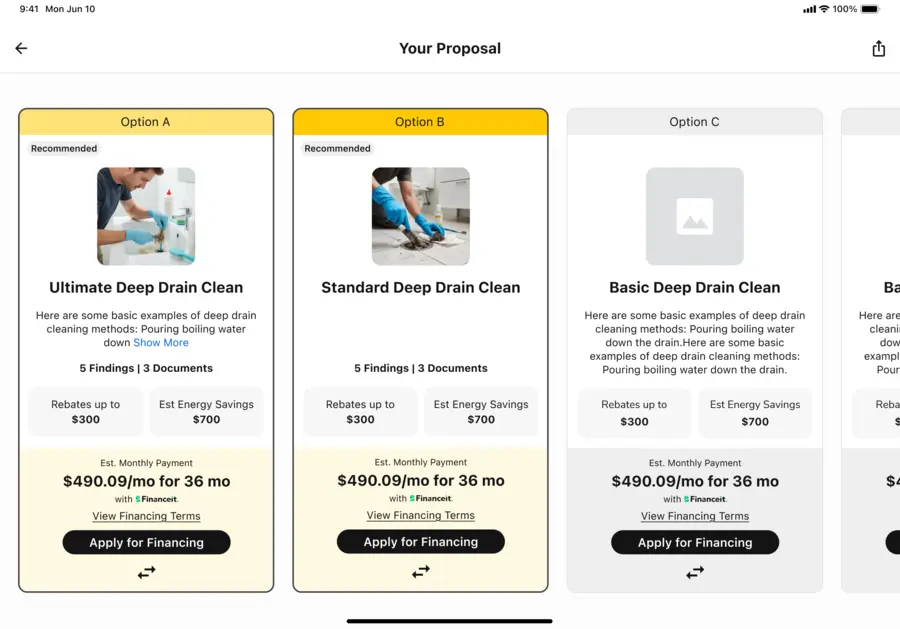
That is useful when pricing consistency is itself an operational problem. For example, a growing company may want technicians to:
- quote the same work consistently;
- follow approved service and equipment structures;
- present standardized upgrade options;
- reduce one-off field pricing decisions;
- follow a repeatable sales process.
A contractor that simply needs a fast quote builder may not require that level of governance. It is also important not to confuse core Pricebook functionality with Pricebook Pro. Pricebook is part of the standard package structure, while Pricebook Pro is one of ServiceTitan’s separate Pro Products.
Memberships and Service Agreements
Recurring revenue is another area where ServiceTitan’s depth becomes easier to justify when the company treats recurring service as a formal program. Current documentation distinguishes Memberships for residential service from Service Agreements for commercial service. Both can support recurring billing, renewal workflows, and scheduled service, while commercial Service Agreements can add elements such as equipment-specific coverage and more formal contract administration. ServiceTitan also supports manual or automatic recurring billing based on configured billing rules. This does not mean a simpler FSM cannot schedule recurring jobs. The distinction is that ServiceTitan becomes more useful when recurring service needs to be administered as a business program—with defined plans, billing schedules, renewals, covered equipment, reporting, and ongoing follow-up.
Reporting and Marketing Visibility
ServiceTitan’s current dashboards and scorecards cover areas such as:
- revenue trends;
- call-booking efficiency;
- technician performance;
- sales metrics;
- memberships;
- productivity;
- customer satisfaction.
Managers can use dashboards and technician scorecards to move from simply storing operational data to actively monitoring KPIs. This depth is valuable when those metrics actually drive management decisions. A company whose owner mainly wants to know “What jobs are today?” and “Who still owes us money?” may not benefit from a much deeper reporting environment. Marketing can also extend further through Marketing Pro, but that is a separate Pro Product rather than something every core package automatically includes. ServiceTitan currently positions Marketing Pro alongside Contact Center Pro, Scheduling Pro, Dispatch Pro, Fleet Pro, Field Pro, and Pricebook Pro as premium automation products layered on the core platform.
Field Mobile App
The mobile story needs particular care in 2026 because ServiceTitan is transitioning away from the older ServiceTitan Mobile experience. The newer ServiceTitan Field Mobile App is a full-scale native rebuild of the legacy technician application. It is designed for iOS, iPadOS, and Android phones and tablets, and ServiceTitan says some legacy functionality is still being rebuilt into the newer app.

That means an old complaint about ServiceTitan Mobile should not automatically be treated as a review of the current Field Mobile App. Offline capability is also more nuanced than “works offline” or “doesn’t work offline.” Current detailed documentation says important workflows can work offline, including:
- job-status updates;
- time tracking;
- notes;
- customer signatures;
- photos and media;
- much of the estimate workflow;
- many forms and checklists.
Changes can save locally and sync after connectivity returns. But some areas still require connectivity. Current examples include purchase orders, customer financing, contracts, inventory availability, and loading dynamic pricing rates. Payment collection and some invoice functionality are only partially offline. So the Field Mobile App now has meaningful offline capability—but buyers should not assume every technician workflow works the same way without internet.
Risks and Practical Considerations
Implementation and Configuration
ServiceTitan requires more than purchasing access and creating employee logins. Its current onboarding documentation organizes implementation into three stages:
- Pre-Implementation
- Implementation
- Go Live
Setup can involve company settings, employees, operations, accounting, data, dispatch, and other workflow decisions. That is important because much of ServiceTitan’s potential value depends on configuration quality. A sophisticated Pricebook does not help if pricing ownership is unclear. Capacity management does not help if job durations, technician eligibility, or operating rules are configured poorly. Reporting is less useful if business units and source data do not reflect how management thinks about the company. There is no responsible universal implementation timeline or setup fee to publish here. The better buyer question is: Who inside the company will own these decisions before, during, and after go-live?
Pricing and Add-On Scope
ServiceTitan currently publishes Starter, Essentials, and The Works, describes pricing as per-technician, and uses Request Pricing instead of visible standard dollar rates. Separate Pro Products can add another layer to the configuration.
That makes the full written quote more important than any unofficial “per technician” number circulating on third-party sites. Our detailed ServiceTitan pricing guide goes further into package scope, add-ons, services, usage costs, and contract terms, but the key point for this review is simpler: evaluate the complete configuration the business actually needs, not a hypothetical headline rate.
Learning Curve and Process Ownership
Current user reviews show the tension between depth and complexity. Positive ServiceTitan product reviews frequently mention scheduling, dispatch, customer history, organization, reporting, broad all-in-one coverage, and helpful account or support experiences. Negative reviews report implementation difficulty, configuration burden, update-related friction, workarounds, support inconsistency, and challenges getting full value from the platform.
The most useful framing is not simply: “ServiceTitan is hard to use.” A technician may learn a specific workflow quickly while the organization still struggles to configure the system well. ServiceTitan can be easy to perform a task in and difficult to operationalize across an entire company at the same time. That makes internal process ownership a buying consideration, not just a training issue.
Mobile Transition
The newer Field Mobile App should be evaluated as a current product transition rather than as a static continuation of the legacy app. Official documentation says ServiceTitan is still rebuilding some legacy functionality into the newer Field experience. Current app-store feedback also shows that transition is not invisible to technicians.
Recent iOS reviews include users who say the newer experience has improved—particularly on tablets—but still want workflow fixes, alongside others reporting freezes, lag, connectivity problems, missing legacy behavior, or extra steps. Google Play reviews similarly include complaints around crashes, loading, refresh behavior, and reliability.
Because lifetime store ratings include older versions of the same listing, buyers should not interpret the aggregate score as a clean rating of only the latest 2026 build. The practical response is to test:
- the devices technicians actually carry;
- real forms and photos;
- estimates;
- weak-signal conditions;
- offline behavior;
- the specific legacy workflows the team still relies on.
What ServiceTitan Users Say
Current independent review sources do not tell one simple story.
As of October 10, 2026:
| Source | Current Snapshot |
|---|---|
| G2 — ServiceTitan product | 4.4/5 · 377 product reviews |
| Capterra | 4.3/5 · 341 reviews |
| Trustpilot | 4.0/5 · 421 reviews |
| iOS ServiceTitan Field | 3.5/5 · 5.2K ratings |
| Google Play ServiceTitan Field | 3.1/5 · 632 listing reviews; 533 in the phone review panel |
Sources: G2, Capterra, Trustpilot, Apple App Store, and Google Play. Ratings and counts verified October 10, 2026.
G2’s broader ServiceTitan seller profile currently contains roughly 659 reviews because it includes other ServiceTitan-owned products, including FieldRoutes. The ServiceTitan product review page itself shows 377. Those numbers should not be confused.
Likewise, Capterra, GetApp, and Software Advice are all part of Gartner Digital Markets and can expose overlapping review pools, so they should not be presented as three independent sentiment datasets.
Across ServiceTitan product reviews on G2, Capterra, and Trustpilot, recurring positive signals include:
- broad operational coverage;
- scheduling and dispatch;
- customer/job history;
- reporting and organization;
- customization;
- helpful CSM or support relationships for some customers.
Recurring negative reports include:
- onboarding and configuration effort;
- cost or add-on frustration;
- bugs and update friction;
- workflows that require workarounds;
- variable support experiences;
- difficulty extracting value from all available functionality.
These themes are reflected in current ServiceTitan product reviews rather than inferred from G2’s broader seller-level aggregate.
The mobile stores deserve separate treatment because they reflect technician-facing experience. The newer Field app currently sits below the broader desktop/product review averages, and recent dated reviews show both improvement and continuing transition friction.
There is no useful reason to average these five sources into one Home Service Fit score. They measure different populations and different parts of the ServiceTitan experience.
Who ServiceTitan Fits Best
Stronger Fit Signals
ServiceTitan becomes easier to justify when several of these conditions are true:
- dispatch or capacity is genuinely difficult to manage;
- pricing and field selling need standardization;
- memberships or service agreements are strategically important;
- management depends on dashboards and scorecards;
- marketing attribution affects spending decisions;
- field workers need connected office-to-technician workflows;
- several office roles require formal workflows or permissions;
- the company has someone who can own implementation, configuration, training, and process discipline.
A business does not need every condition. Nor is there a magic number of technicians that turns these needs on. Operational maturity matters more.
Small-Business Fit
ServiceTitan explicitly markets to small and midsize contractors, so describing it as “enterprise-only” would be inaccurate. A small business can still be operationally complex. Six field workers covering multiple zones, a dispatcher, a CSR, standardized proposals, recurring memberships, and management reporting can create more process complexity than a larger company with straightforward work and informal operations. The reverse is also true. A larger business may still prefer a lighter system if its workflow is simple and it does not intend to manage capacity, Pricebook governance, recurring programs, or reporting in much depth. This is the same underlying distinction that matters when evaluating Jobber vs ServiceTitan: the decision is not merely smaller company versus larger company, but a lighter buying/configuration model versus a more structured operating platform.
ServiceTitan for Handyman Businesses
ServiceTitan now has a dedicated handyman software offering covering areas such as estimating and proposals, scheduling and routing, invoicing, mobile field workflows, customer communication, reporting, job-costing visibility, and accounting-related operations. That does not mean every handyman company needs it. ServiceTitan becomes more plausible for a handyman operation when the business has:
- multiple field workers;
- real dispatch complexity;
- a need to standardize estimates and Pricebook usage;
- recurring service programs;
- meaningful reporting requirements;
- office and field processes that need tighter coordination.
For a solo handyman or a very small crew mainly looking for quotes, scheduling, invoices, and payments, much of that operating depth may remain unused. In that case, the broader handyman software market provides lighter options designed around simpler workflows.
When Simpler Software Fits Better
A simpler FSM may make more sense when:
- basic scheduling and invoicing are the main needs;
- the owner performs most office administration;
- capacity management is not a real problem;
- there is no formal recurring-service program;
- reporting needs remain straightforward;
- nobody has time to own implementation and configuration;
- many advanced ServiceTitan capabilities would sit unused.
That is not a criticism of ServiceTitan. It is a utilization problem. Buying a deep system without the operational need or internal capacity to use it can turn potential flexibility into unnecessary process overhead. Buyers in that position should compare ServiceTitan alternatives against the workflows they actually need rather than looking for another platform with an equally long feature list.
What to Test in a Demo
ServiceTitan’s current public buying journey emphasizes a personalized demo, which makes the demo useful only if it reflects how the company actually works. Do not spend the entire session watching idealized feature tours. Ask the vendor to demonstrate realistic workflows:
- Build and dispatch a real day of jobs. Use your trade mix, zones, technicians, arrival windows, and emergency-work patterns.
- Show how capacity affects booking. If Adaptive Capacity matters, ask what must be configured first.
- Build a real estimate from the Pricebook. Use your own type of service or project.
- Present multiple proposal options if Good / Better / Best selling is relevant.
- Create or manage a Membership or Service Agreement if recurring revenue is part of the business.
- Use the current Field Mobile App on the same phones or tablets your technicians carry.
- Remove connectivity. Ask what still works, what partially works, and what stops.
- Build the dashboards management would actually review, rather than accepting a generic dashboard tour.
- Show accounting data flow if QuickBooks or another integration is business-critical.
- Identify which demonstrated capabilities belong to the base package and which require a Pro Product or separate configuration.
- Clarify implementation ownership. Who handles data migration, Pricebook setup, accounting configuration, dispatch rules, and staff training?
- Review the complete written quote and order terms before committing.
The purpose of the demo is not to prove that ServiceTitan has many features. It is to prove that the specific operational workflows you plan to pay for work the way your company needs them to work.
FAQs
Is ServiceTitan Worth It?
It can be when the business will actively use its deeper dispatch, Pricebook, recurring-revenue, reporting, and field-management capabilities. ServiceTitan is harder to justify when the primary requirements remain basic scheduling, estimates, invoices, payments, and customer records. There is no responsible technician or revenue cutoff that determines value for every contractor.
Is ServiceTitan Good for Small Businesses?
Yes, it can be. ServiceTitan explicitly targets small and midsize contractors in addition to larger organizations. The more useful fit criteria are operational complexity, office capacity, recurring-service requirements, reporting needs, pricing standardization, and readiness to implement the platform properly.
Is ServiceTitan Good for Handyman Businesses?
It can be. ServiceTitan has a dedicated handyman product offering, but the strongest fit is likely where a handyman business has meaningful dispatch, pricing, reporting, recurring-service, or multi-worker complexity. For simpler operations, lighter handyman software may provide the required workflow with less configuration.
Does ServiceTitan Have a Mobile App?
Yes. ServiceTitan now has the newer Field Mobile App, a native rebuild designed for iOS, iPadOS, and Android phones and tablets. Important technician workflows have offline support, but not every function works without connectivity. Current documentation identifies online-required or partially offline areas including purchase orders, financing, contracts, inventory availability, dynamic pricing, and portions of payment/invoice workflows.
Does ServiceTitan Offer a Free Trial?
ServiceTitan’s current public buying flow emphasizes Request Pricing and a personalized free demo, rather than a standard self-serve free trial. That does not prove ServiceTitan could never offer another evaluation arrangement through Sales. It simply describes the current public acquisition path.