

The best ServiceTitan alternative depends on how much of the ServiceTitan operating stack your business actually needs to replace.
Some smaller residential teams want to simplify. Others still need serious dispatch, reporting, communications, and job-management depth. Commercial contractors may need more specialization rather than a lighter FSM.
Home Service Fit compares current official vendor pricing and product documentation and does not treat unofficial ServiceTitan per-technician estimates as product facts.
Last updated: September 2026
Product, pricing, contract, and migration information last verified September 19, 2026.
Best ServiceTitan Alternatives at a Glance
| Alternative | Best For | Pricing Model | Main Reason to Consider | Main Trade-Off |
|---|---|---|---|---|
| Housecall Pro | Residential teams wanting a simpler mainstream FSM | Public tiered pricing | Broad residential workflow with transparent pricing | Does not recreate ServiceTitan’s full enterprise/operational stack |
| Jobber | Smaller teams prioritizing simplicity and public pricing | Public tiered pricing | Clean CRM → quote → schedule → job → invoice workflow | Advanced marketing, phone, reporting, and larger-operation depth differ |
| FieldPulse | Growing teams that still want configurable operations | Custom seat-based quote | More operational depth than lightweight SMB tools | Pricing remains sales-led/custom |
| Service Fusion | Teams where unlimited-user economics matter | Flat-rate plans with unlimited users | User count does not increase the base subscription | Higher base price; add-ons and plan gates still matter |
| Workiz | Call- and communication-heavy service businesses | Request pricing | Strong phone, lead, communication, and FSM ecosystem | Still quote-led; communications products can add cost/complexity |
| FieldEdge | Established HVAC, plumbing, and electrical teams | Request pricing | Mechanical-service depth, agreements, flat-rate pricing, QuickBooks | Another sales-led platform with its own contract/implementation model |
| QuoteIQ | Solo and small contractors wanting a lower-cost entry point | $29.99–$699 public tiers | Low-cost contractor CRM/FSM starting point | Intentional downshift from ServiceTitan’s depth |
| Kickserv | Budget-conscious small teams with predictable user bundles | $60 / $119 / $199 tiers | Clear included-user bundles | Lighter reporting, communications, and enterprise capability |
| ServiceTrade | Commercial mechanical, fire, and inspection service | Custom pricing by technician count + suite | Strong commercial equipment, deficiency, and recurring-service focus | Not primarily a cheaper SMB alternative |
| BuildOps | Commercial contractors running service and projects | Custom pricing | Commercial service + projects + procurement/job financials | Another high-complexity platform rather than a simplification |
ServiceTitan itself currently uses Starter, Essentials, and The Works with per-technician, request-based pricing. ServiceTitan does not publish a universal dollar rate, so this article does not calculate percentage savings against third-party price estimates.
Why Businesses Look for a ServiceTitan Alternative
There are legitimate reasons to compare alternatives without assuming ServiceTitan is inherently too expensive or too complex.
Pricing Transparency
ServiceTitan publicly identifies its packages and per-technician pricing model but requires a quote for actual pricing. That makes it harder to compare total cost before speaking with sales.
A business may prefer software where the starting plan, user limits, and billing structure are visible upfront.
Business Complexity Has Changed
A company can grow into ServiceTitan—and later realize it no longer needs every layer it once valued.
A smaller or simplified operation may primarily need:
- customers;
- scheduling;
- dispatch;
- estimates;
- invoices;
- payments;
- basic automation.
Choosing a less complex platform can be an intentional operating decision, not automatically a downgrade.
You Need a Different Operating Model
Some businesses are not looking for “less ServiceTitan.” They want a different structure.
Examples include:
- unlimited-user pricing;
- phone-first operations;
- stronger commercial equipment/service workflows;
- project-heavy commercial work;
- simpler owner-operated processes.
Contract or Renewal Timing
The economics of switching also depend on the agreement already in place.
ServiceTitan’s current Terms do not say every customer universally has a 12-month contract. If an Order Form or another written agreement exists, that document controls the term. If the current Terms are the only agreement, subscriptions are month-to-month with at least 30 days’ written non-renewal notice. Ending a committed term early can trigger a fee equal to the remaining payments.
So review the actual Order Form before treating a lower alternative price as immediate savings.
First Decide What Kind of ServiceTitan Replacement You Need
This decision is more useful than starting with a list of product names.
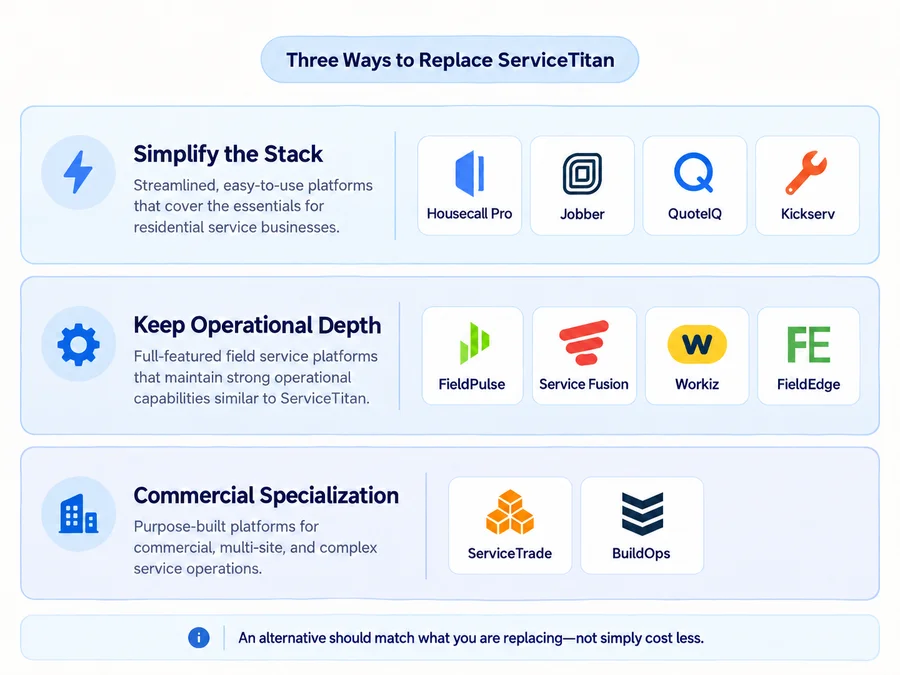
Simplify the Stack
Choose this lane when your operation mainly revolves around:
customer → estimate → schedule → job → invoice → payment
Typical candidates:
- Housecall Pro;
- Jobber;
- QuoteIQ;
- Kickserv.
These platforms can deliberately reduce complexity for residential or smaller home-service teams.
The point is not that fewer capabilities are inherently better. It is that unused operational depth can create unnecessary software, training, and process overhead.
Keep More Operational Depth
Choose this lane if you still need substantial FSM capability around:
- dispatch;
- configurable team workflows;
- communications;
- job costing;
- inventory;
- reporting;
- larger office/field teams.
Typical candidates:
- FieldPulse;
- Service Fusion;
- Workiz;
- FieldEdge.
These are closer to replacing a meaningful portion of ServiceTitan’s operational role rather than simply stripping the stack down.
Move Toward Commercial Specialization
Some businesses searching for ServiceTitan competitors do not actually need another residential-first FSM.
Commercial contractors may care more about:
- equipment/assets;
- deficiencies;
- inspections;
- recurring commercial agreements;
- project financials;
- procurement;
- RFIs/change orders;
- multi-location operations.
For that buyer, ServiceTrade or BuildOps may be more relevant than a cheaper residential tool.
Choose the replacement lane before choosing the product.
How We Selected the Alternatives
Home Service Fit evaluated these products using:
- current official pricing;
- vendor product documentation;
- Help Centers;
- current Terms where relevant;
- current US SERP expectations;
- fit for small and growing US home-service businesses.
We compared replacement depth, pricing model, team structure, core field-service workflow, operational gaps, and switching complexity.
We do not claim hands-on testing, and affiliate economics do not affect product inclusion, order, Best For labels, criticism, or recommendations.
10 Best ServiceTitan Alternatives
Housecall Pro: Best for Residential Teams That Want a Simpler Mainstream FSM
Housecall Pro is one of the clearest downshift options for residential service teams that still want an integrated FSM.
Current general pricing is:
- Basic — $59/month billed annually or $79 monthly, 1 user;
- Essentials — $149/month billed annually or $189 monthly, 5 users;
- MAX — $299/month billed annually or $329 monthly, 8 users.
A 14-day free trial is currently available with no credit card required.
It covers scheduling, dispatch, estimates, invoices, booking, payments, and customer communication in a more transparent public pricing model.
The trade-off is replacement depth. Do not assume Housecall Pro automatically recreates every ServiceTitan reporting, marketing, call-center, commercial, or advanced operational workflow.
For a deeper evaluation, read our full Housecall Pro review and Housecall Pro pricing guide.
Jobber: Best for Smaller Teams Prioritizing Simplicity and Public Pricing
Jobber is a strong fit when the business mainly wants customer management, scheduling, quoting, invoicing, payments, and automation without ServiceTitan-level operational complexity.
Current annual starting rates include:
- Core — $29/month;
- Connect — from $99/month for one user, with team pricing increasing by size;
- Grow — from $149/month for one user;
- Plus — from $399/month.
Jobber also offers monthly structures and a 14-day trial with no card.
Its strength is a relatively clear small-business workflow and visible plan structure.
The trade-off is that ServiceTitan users relying heavily on deeper call-center, marketing, pricebook, advanced reporting, or enterprise-style operations should map those dependencies explicitly before moving.
For more detail, see our full Jobber review and Jobber pricing guide.
FieldPulse: Best for Growing Teams That Still Want Configurable Operations
FieldPulse makes more sense when the goal is not to strip the operation down too far.
Its current pricing is custom and seat-based, with pricing affected by team setup, seat access, and optional premium products. FieldPulse does not publish universal per-seat rates.
The platform is relevant for growing companies that still need depth around:
- configurable workflows;
- job/project management;
- scheduling and routing;
- job costing;
- inventory;
- customer sites;
- fleet/assets;
- reporting.
The trade-off is that moving from ServiceTitan to FieldPulse does not necessarily solve the desire for simple pricing transparency. Both require more buyer diligence than a straightforward SMB plan page.
For a deeper breakdown of its seat-based pricing, quote structure, and contract terms, see our FieldPulse pricing guide.
Service Fusion: Best for Teams Where Unlimited-User Economics Matter
Service Fusion stands out because all three current plans include unlimited users.
Current pricing is:
- Starter — $245 month-to-month or $208/month equivalent annually;
- Plus — $382 or $325 annually equivalent;
- Pro — $627 or $533 annually equivalent.
Annual pricing is charged as one annual payment at signup. Service Fusion also currently advertises month-to-month availability with no contract requirement.
For a business where technician and office-user growth is a major cost concern, that model is worth comparing with ServiceTitan’s per-technician structure.
The platform covers scheduling, dispatch, estimates/jobs, invoices, payments, QuickBooks, and other FSM functions.
The trade-off is that unlimited users does not automatically mean cheaper. The required plan, add-ons, and missing ServiceTitan functionality still determine total replacement cost.
Workiz: Best for Call- and Communication-Heavy Service Businesses
Workiz is particularly relevant when calls, messages, lead intake, and customer communications are major operating bottlenecks.
Its current Standard, Pro, and Ultimate plans all use Request pricing. Standard includes the main FSM layer—scheduling, jobs, estimates, invoices, client management, payments, reports, and QuickBooks—while Pro and Ultimate add stronger automation and operational functionality.
Workiz also sells communication products such as:
- Genius Phone;
- Genius Answering;
- Genius Marketing.
That can create a strong phone-first alternative for service businesses where incoming demand management matters as much as dispatch.
The trade-off is that Workiz is still a quote-led ecosystem. Do not treat it as an automatic pricing-transparency improvement or reuse older public Workiz dollar rates.
FieldEdge: Best for Established HVAC, Plumbing, and Electrical Teams
FieldEdge is more specialized than the lighter residential alternatives in this list.
Its current packages are:
- Select;
- Premier;
- Elite;
and all use Request Pricing.
Current official package documentation includes two mobile licenses on Select, four on Premier, and six on Elite. The product emphasizes dispatch, booking, service agreements, flat-rate pricing, QuickBooks integration, reporting, and established multi-truck operations.
That makes FieldEdge especially relevant for HVAC, plumbing, and electrical companies that still want mechanical-service depth rather than a simplified handyman-style FSM.
The trade-off is that this is another sales-led product. FieldEdge does not offer a self-serve free trial and says downgrades occur at the end of the current contract period.
Do not call it universally cheaper without comparing a real quote.
QuoteIQ: Best for Solo and Small Contractors Wanting a Lower-Cost Entry Point
QuoteIQ represents a more deliberate downshift.
Current pricing is:
- Essentials — $29.99/month, 1 user;
- Beginner — $74.99, 2 users;
- Pro — $149.99, 4 users;
- Elite — $299, 10 users;
- Max — $699, unlimited users.
For a solo or very small contractor, it can cover customers, estimates, scheduling, invoices, payments, and contractor-oriented workflows at a much lower published entry point than many large FSM platforms.
But the correct comparison is not QuoteIQ Essentials versus the entire ServiceTitan stack.
QuoteIQ should be treated as an intentional simplification unless the business’s needs genuinely fit its higher plans.
If ServiceTitan is currently supporting deep reporting, call-center operations, complex memberships, marketing, or enterprise workflows, map those gaps before moving.
For a deeper look at QuoteIQ’s plans, CRM depth, user feedback, and limitations, read our QuoteIQ review.
Kickserv: Best for Budget-Conscious Small Teams With Predictable User Bundles
Kickserv gives small teams unusually clear user bundles.
Current plans are:
- Start — $60/month for 5 users;
- Run — $119 for 10 users;
- Scale — $199 for 20 users.
Annual subscriptions currently save 20%, and all three plans advertise 30-day free trials.
For a smaller service company, that can be attractive when the primary workflow is:
- customer management;
- jobs;
- reminders;
- time and expense tracking;
- QuickBooks;
- basic dispatch.
The trade-off is operational depth.
Kickserv is a lighter system than ServiceTitan and should not be presented as a full replacement for advanced reporting, marketing, call-center functionality, or complex enterprise operations.
That lighter scope is not necessarily a weakness—it can be the reason a smaller business chooses it.
ServiceTrade: Best for Commercial Mechanical, Fire, and Inspection Service
ServiceTrade belongs in a different replacement lane from Jobber or QuoteIQ.
Its current pricing is custom and built primarily around technician count plus suite. The current suites are Select, Premium, and Enterprise, and ServiceTrade includes unlimited office users while technician/mobile economics drive much of the pricing structure.
The platform is especially relevant for businesses centered on:
- commercial equipment;
- recurring service contracts;
- deficiency capture;
- fire protection;
- mechanical service;
- inspections;
- commercial customer portals.
That can make it a better operational fit for commercial contractors than moving down to a residential-first FSM.
The trade-off is that ServiceTrade is not primarily a “cheap ServiceTitan alternative.” It is another specialist commercial operating platform, so buyers should compare workflow fit rather than headline cost.
BuildOps: Best for Commercial Contractors Running Both Service and Projects
BuildOps is another specialist option for contractors whose ServiceTitan replacement must support both field service and substantial project work.
Its current pricing is customized around factors including:
- crew size;
- trades;
- field and office users;
- modules;
- integrations.
BuildOps currently states that plans include core dispatching, scheduling, quoting, invoicing, reporting, and mobile field access, while proposals are tailored to the contractor’s operation.
It becomes especially relevant when the business needs:
- commercial service;
- job/project financials;
- procurement;
- change orders;
- RFIs;
- project job costing;
- larger commercial workflows.
The trade-off is obvious: BuildOps is not a simplicity product.
For a smaller residential company trying to reduce platform overhead, it may move in the wrong direction. For a commercial contractor, however, that extra project depth may be exactly the point.
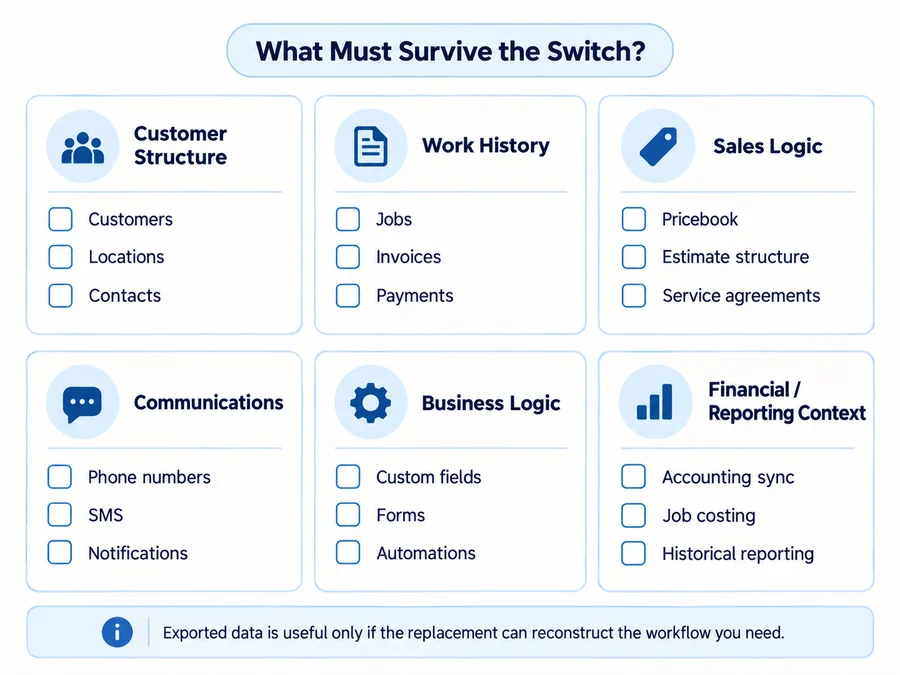
What You May Need to Replace When Leaving ServiceTitan
Do not compare alternatives from a generic feature checklist.
First identify which parts of ServiceTitan are load-bearing in your current business.
Core Operations
Inventory:
- scheduling;
- dispatch;
- customers and locations;
- estimates;
- invoices;
- payments.
Sales and Pricebook
Check:
- Pricebook structure;
- estimate templates;
- memberships/service agreements;
- financing;
- sales workflows.
Communications
Document:
- call booking;
- business phone numbers;
- SMS;
- customer notifications;
- any call-center workflows.
Management and Business Logic
Also consider:
- payroll/commission processes;
- reporting;
- marketing attribution;
- custom forms/workflows;
- multi-location logic;
- accounting relationships.
A less expensive alternative can become operationally expensive if the business has to rebuild several of these pieces through separate systems.
Before You Switch: ServiceTitan Contract and Data Checklist
Read Your Actual Order Form Before Planning the Exit
Do not assume ServiceTitan universally uses one contract term.
The current Terms were updated September 16, 2026.
They state:
- if an Order Form or other written agreement exists, the term stated there governs;
- if the Terms are the only agreement, the subscription is currently month-to-month;
- Terms-only subscriptions require at least 30 days’ written notice of non-renewal;
- early termination of an actual committed term can require a termination fee equal to the remaining payments.
Before comparing switching savings, confirm:
- current term;
- renewal date;
- notice requirement;
- remaining committed fees;
- separate subscriptions/add-ons.
The Order Form is the source of truth for your actual commercial commitment.
Export Important Data While You Still Have Access
ServiceTitan supports multiple specific exports rather than one simple “everything” file.
Current documentation includes, for example:
- customer list exports to Excel;
- Pricebook XLSX exports;
- service-agreement exports;
- customer/location report exports.
Inventory what the replacement needs to reconstruct:
- customers and locations;
- job history;
- Pricebook;
- memberships/service agreements;
- invoices/payment history;
- custom fields/forms;
- attachments/photos;
- accounting relationships;
- reporting history.
Exportable does not mean automatically importable with the same relationships or workflow.
Do Not Wait Until Long After Cancellation for Data
ServiceTitan’s current Terms say it will make commercially reasonable efforts to provide Customer Data after termination upon request, subject to restrictions and possible service fees.
However, ServiceTitan is not required to retain Customer Data for more than 60 days after termination. The formal export may be delivered in Microsoft SQL backup formats such as .BAK, .MTF, or another format selected by ServiceTitan.
That is not the same thing as receiving a clean Jobber or Housecall Pro import file.
Plan data extraction before terminating access.
Plan Phone and SMS Cutover Separately
Phone numbers and messaging configuration should not be treated like ordinary CRM fields.
Before switching:
- confirm ownership and portability of each number;
- ask both vendors about porting timelines;
- do not cancel the old phone service before the port completes;
- document SMS registrations and consent workflows;
- verify the destination vendor’s current A2P setup.
If the new platform uses Twilio for new API-based A2P 10DLC registration, Twilio now requires valid public Privacy Policy and Terms & Conditions URLs for new campaign submissions.
Do not assume this exact registration workflow applies to every alternative.
When Staying on ServiceTitan May Be Smarter
Switching is not automatically an improvement.
Staying may make more sense when:
- dispatch and reporting are deeply embedded;
- the Pricebook is central to sales;
- memberships/service agreements are heavily used;
- call-booking and communications workflows are mature;
- the team already works efficiently in ServiceTitan;
- the actual Order Form economics remain acceptable;
- replacing ServiceTitan would require several disconnected products;
- migration and retraining risk is larger than the problem you’re trying to solve.
The important question is:
Are you paying for unused complexity, or actively getting value from that complexity?
If the business genuinely uses ServiceTitan’s deeper operational stack, removing those capabilities simply to reach a lower advertised starting price can create more fragmentation and administrative work.
Which ServiceTitan Alternative Should You Choose?
Use the operating problem—not a generic ranking—as the filter.
Simpler residential FSM: Housecall Pro.
Simplicity + public pricing: Jobber.
Configurable operational depth: FieldPulse.
User count is driving cost: Service Fusion.
Calls and communications are the bottleneck: Workiz.
Established HVAC, plumbing, or electrical operation: FieldEdge.
Solo or very small contractor: QuoteIQ or Kickserv, depending on required depth.
Commercial service, fire, inspections, or equipment-heavy work: ServiceTrade.
Commercial projects + service: BuildOps.
The right ServiceTitan alternative preserves the parts of your current operating system you genuinely depend on while removing the cost, complexity, pricing model, or workflow mismatch that made you search for a replacement.
If no alternative improves that balance after migration, training, add-ons, and lost functionality are included, staying on ServiceTitan may be the safer decision.
FAQs
What Is the Closest Alternative to ServiceTitan?
There is no universal closest alternative.
For a simpler residential service operation, Housecall Pro or Jobber may cover the essential workflow with less platform depth.
For businesses that still need deeper FSM operations, FieldPulse or FieldEdge may be more relevant.
For commercial service and project-heavy contractors, ServiceTrade or BuildOps are more specialized options.
Is There a Cheaper Alternative to ServiceTitan?
Several alternatives publish relatively low entry prices, including Jobber, Housecall Pro, QuoteIQ, and Kickserv.
But ServiceTitan currently uses request pricing, so there is no responsible universal percentage-savings calculation without the buyer’s actual ServiceTitan Order Form.
Compare the actual current ServiceTitan commitment with the actual replacement configuration, including add-ons and migration costs.
Can You Cancel ServiceTitan at Any Time?
It depends on the agreement.
If an Order Form or another written agreement exists, the term stated there governs.
If ServiceTitan’s current standard Terms are the only agreement, the subscription is month-to-month with 30 days’ written non-renewal notice.
If you end an existing committed term early, current Terms say the termination fee can equal the remaining payments.
Can You Export Your Data From ServiceTitan?
Yes, ServiceTitan supports multiple specific exports, and current Terms also provide a post-termination Customer Data Export process.
But an export does not guarantee another FSM can recreate every relationship, attachment, workflow, configuration, or historical report.
Plan the ServiceTitan export and destination-platform import together, ideally before termination.