

QuoteIQ is a contractor-focused CRM and field-service platform with a genuinely accessible $29.99 starting plan. For a solo handyman or small home-service business, its core customer, estimating, scheduling, invoicing, and payment workflow can cover a lot without starting at the price of a larger FSM.
The important question is not whether QuoteIQ has enough features overall. It is whether the plan containing the workflow your business actually needs still makes QuoteIQ a good fit.
Last updated: September 2026
Product, pricing, and review information last verified September 19, 2026.
QuoteIQ Review: Quick Verdict
Best fit: Solo handyman businesses, owner-operators, and small service companies that mainly need customers, estimates, internal scheduling, invoices, payments, and contractor-specific tools inside one system.
More conditional fit: Teams that need business calling/texting, QuickBooks Online, customer self-booking, route optimization, GPS, a visual sales pipeline, or deeper team operations. Those capabilities sit higher in the current plan structure.
Main strengths:
- low-cost solo entry;
- contractor/home-service orientation;
- strong estimate-to-payment workflow;
- transparent public pricing and user limits;
- contractor-specific measurement and photo tools;
- web, iOS, and Android access;
- broad all-in-one scope.
Main cautions:
- meaningful operational features are distributed across several tiers;
- AI and some communications draw from IQ Credits;
- current bulk exports cover only part of the data stored in QuoteIQ;
- third-party B2B review samples are still relatively small.
QuoteIQ can therefore be very compelling for the right owner-operator. Its value becomes less obvious when the business needs enough Pro or Elite functionality that the buying decision is no longer really about a $29.99 product.
QuoteIQ Pros and Cons at a Glance
| Pros | Cons / Trade-Offs |
|---|---|
| Low-cost $29.99 solo entry | Major operational features require Pro or Elite |
| Strong estimating and invoicing foundation | No permanent free plan for new customers |
| Contractor-specific measurement and documentation tools | IQ Credits create a usage layer for AI and communications |
| Scheduling and payments integrated with customer records | Some important operational data cannot currently be bulk-exported |
| Web, iOS, and Android access | QuickBooks Online requires Pro+ and syncs one way |
| AI features included through plan credit allocations | Rapid product changes can make older third-party reviews stale |
| Public pricing with clear user limits | Customer self-booking, routing, GPS, and Pipelines begin much higher than Essentials |

Is QuoteIQ a Good CRM for Handyman Businesses?
Yes—but “CRM” describes two different levels of customer management inside QuoteIQ.
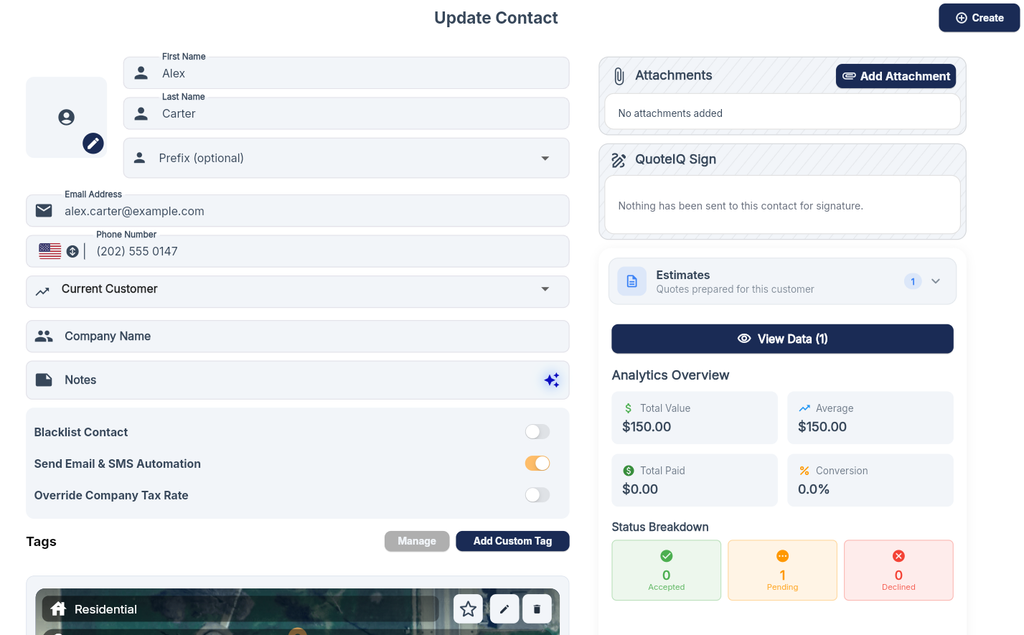
Core Customer and Job CRM
For many solo handyman businesses, the lower-tier CRM may already be enough.
QuoteIQ can keep customer and job activity connected through:
- contact records;
- lead-source information;
- estimates;
- invoices;
- scheduling;
- job information;
- payments;
- related customer history.
That matters because a solo service business often does not need a complex enterprise sales CRM.
The useful question may simply be:
When this customer calls again, can I see who they are, what I quoted, what work was scheduled, and what they paid?
QuoteIQ’s lower tiers can solve that type of CRM problem while keeping the customer record connected to the quoting and billing workflow.
For a broader comparison of customer-management tools, see our handyman CRM software guide.
Sales Pipeline CRM Is a Higher-Tier Capability
That core customer CRM should not be confused with QuoteIQ’s Pipelines & Deals system.
Pipelines & Deals adds a visual sales process with:
- deals;
- stages;
- drag-and-drop progression;
- probabilities;
- weighted opportunity values;
- revenue forecasting.
It currently begins on Elite, with Max adding unlimited pipelines.
That distinction changes the CRM buying decision substantially.
Essentials at $29.99 and Elite at $299 solve different CRM problems.
A solo handyman may need strong customer records, estimates, scheduling, and invoices without needing a formal deal pipeline at all.

What QuoteIQ Does Well
Estimate-to-Invoice Workflow
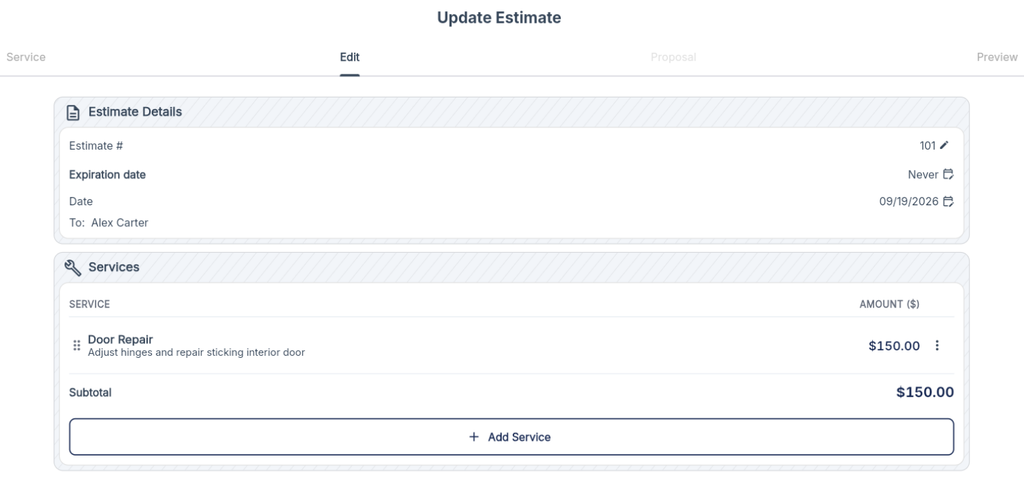
QuoteIQ’s strongest practical case is the ability to keep the commercial workflow connected.
A typical handyman job can move through:
customer → estimate → scheduled job → invoice → payment
without requiring a separate quoting app, calendar, and invoice system.
The core plans include multiple estimate formats, invoicing, a Price Book, internal scheduling, online payments, and recurring invoice/subscription functionality. That makes QuoteIQ particularly relevant for an owner who wants to stop rebuilding the same customer and pricing information in several apps.
For handyman work, where one customer may request several small tasks on one visit, a flexible estimate builder is often more valuable than a long list of generic CRM features.
For dedicated comparisons, see our handyman estimating software guide and handyman invoicing software guide.
Contractor-Specific Tools
QuoteIQ also differentiates itself with features aimed specifically at field-service contractors rather than generic small businesses.
Current examples include tools such as:
- MapMeasure Pro;
- property measurement and map access;
- QuoteIQ Cam;
- photo and inspection documentation;
- expense tracking;
- AI-assisted workflows;
- review-management tools.
These capabilities will not matter equally to every handyman.
Remote property measurement, for example, is more useful for exterior, property-based, or measurement-heavy services than for someone primarily doing indoor punch-list jobs.
Photo documentation, however, can be useful across a wider range of handyman work—especially when estimates, before/after evidence, or customer communication depend on visual records.
The useful question is not whether these tools exist.
It is whether they replace something the business would otherwise pay for or manage separately.
Scheduling, Communications, and Customer Workflow
QuoteIQ includes internal scheduling and calendar functionality from the lower tiers.
That is different from customer self-booking.
Current dedicated QuoteIQ documentation places InstaSchedule, its customer-facing self-booking system, on Elite and Max. Customers can book against real-time availability once that higher-tier capability is enabled.
That distinction matters because broad feature lists can make “scheduling” and “online booking” sound interchangeable.
They are not.
QuoteIQ’s communications layer also becomes materially stronger on Pro.
ClientHub currently provides a dedicated business number for in-app calling and texting on Pro, Elite, and Max. Messages and calls use the same IQ Credit pool that also powers AI functionality.
So a solo owner who only schedules work internally has a very different plan requirement from a business that wants:
- a dedicated business number;
- centralized SMS;
- calling;
- customer self-booking;
- more automated communication.
For a broader look at scheduling options for small service businesses, see our handyman scheduling software guide.
Where QuoteIQ Falls Short or Needs Careful Evaluation
The Entry Price Does Not Unlock the Whole Product
Essentials at $29.99 is a real operating plan, not merely a contact database.
But several important transitions happen higher up the ladder.
Current buying-relevant gates include:
- Beginner: measurement/photo tools, expense tracking, and additional contractor functionality;
- Pro: ClientHub calling/texting, automation, job costing, and QuickBooks Online;
- Elite: customer self-booking, route optimization, EmployeeHub/GPS, Pipelines & Deals, inventory, and automated review outreach.
That means the best pricing question is not:
“Does QuoteIQ start at $29.99?”
It is:
“What is the lowest QuoteIQ plan that supports the workflow I will actually use?”
IQ Credits Add a Usage Layer
Every current QuoteIQ plan includes IQ Credits.
These credits power AI functionality, and Pro+ ClientHub communication also draws from the shared credit allowance.
Current paid-plan allocations increase by tier, and unused credits do not roll over into the next billing cycle. QuoteIQ also sells one-time top-ups when a business needs more before the next reset.
That does not make IQ Credits a hidden fee. They are clearly part of the current plan structure.
But they create a usage dimension that matters differently depending on the buyer.
A handyman who mostly uses customers, estimates, scheduling, and invoices may barely notice the system.
A business that relies heavily on:
- AI calls;
- AI-assisted workflows;
- SMS;
- MMS;
- business calling;
should watch its actual credit consumption during the trial and early paid use.
Data Portability Is a Real Exit-Planning Consideration
QuoteIQ provides bulk exports, but the current export scope does not cover everything stored inside the platform.
Current bulk exports include seven categories:
- Taxes Collected;
- Estimates;
- Payments Received;
- Profit & Loss;
- Expenses;
- Customers;
- Invoices.
Current documentation says the standard bulk export does not include several important operational categories, including:
- Services / Price Book;
- jobs, appointments, or schedule history;
- ClientHub texts and call logs;
- photos, documents, and inspection forms;
- notes;
- tags;
- lead-source data.
Export access also currently requires an active subscription.
This is best treated as an exit-planning issue, not as a claim of “vendor lock-in.”
An all-in-one platform should be evaluated both by what it stores for you today and what you can take with you later.
QuickBooks Is Pro+ and One-Way
QuoteIQ’s current QuickBooks integration begins on Pro.
The dedicated current workflow documentation describes the integration as:
QuoteIQ → QuickBooks Online
with QuoteIQ acting as the system of record.
Customers, estimates, invoices, services/Price Book data, and payments can flow into QuickBooks Online, but edits made directly in QuickBooks do not flow back into QuoteIQ.
That means a business should decide upfront which system owns the operational records.
QuoteIQ currently supports QuickBooks Online, not QuickBooks Desktop, for this integration.
Do not choose Pro merely because a pricing comparison says “QuickBooks integration.” Confirm that the one-way operating model fits how your bookkeeper or accountant actually works.
QuoteIQ Pricing: Which Tier Changes the Fit?
The full pricing analysis belongs in the dedicated pricing guide. For this review, the important issue is where the product changes character.
| Plan | Monthly Price | Users | Main Buyer Transition |
|---|---|---|---|
| Essentials | $29.99 | 1 | Core solo CRM/FSM: customers, estimates, invoices, calendar, payments |
| Beginner | $74.99 | 2 | Adds contractor-oriented measurement, photo, expense, and documentation tools |
| Pro | $149.99 | 4 | Adds ClientHub communications, automation, job costing, and QuickBooks Online |
| Elite | $299 | 10 | Adds self-booking, routing, GPS/team tools, Pipelines, inventory, and deeper automation |
| Max | $699 | Unlimited | Larger-team / highest-tier operation |
Annual billing currently provides roughly two months free compared with paying monthly.
This is why the entry price alone is not enough to judge QuoteIQ.
For one owner who mainly needs estimates, scheduling, invoices, and payments, $29.99 may accurately represent the product they need.
For another business, QuoteIQ does not become the right operating system until Pro or Elite.
QuoteIQ Reviews and Complaints: What Current Users Say
QuoteIQ has a somewhat unusual review-evidence profile.
Its mobile-app samples are much larger than its traditional B2B software-review samples.
As of September 19, 2026:
- Apple’s US App Store shows roughly 4.7/5 from about 3.4K ratings;
- Google Play shows roughly 4.4/5 from about 1.2K reviews;
- Capterra shows 5.0/5 from only 6 reviews;
- G2 currently has just 1 review.
That means the app stores provide a much larger signal, while Capterra and G2 are too small to treat as broad user consensus.
What Users Commonly Like
Positive themes across current reviews include:
- estimates, scheduling, and invoicing in one system;
- contractor/home-service orientation;
- professional-looking quotes;
- mobile convenience;
- keeping several business functions in one platform;
- responsive or helpful support in some reviews.
These are reported user experiences, not independently verified performance outcomes.
Complaints and Negative Signals
Current negative evidence includes reports of:
- bugs or glitches;
- update-related issues;
- occasional loading or workflow friction;
- an initial learning curve because of the breadth of features;
- isolated setup or support problems.
One recent G2 review is sharply negative about setup/support and bugs, but it is currently the platform’s only review. Conversely, the six Capterra reviews are entirely positive.
Neither tiny sample justifies a universal conclusion.
The better interpretation is:
There are credible negative signals worth testing, but the third-party complaint evidence is still too limited and uneven to conclude that QuoteIQ is broadly buggy or has broadly poor support.
Who Is QuoteIQ Best For?
Solo Handyman or Owner-Operator
QuoteIQ is particularly compelling when the core workflow is:
- customers;
- estimates;
- internal scheduling;
- invoices;
- payments.
That buyer can use a meaningful amount of the platform without immediately paying for team-oriented tools.
Small Contractor Benefiting From Property and Photo Tools
Beginner becomes more interesting for contractors who regularly use:
- remote/property measurement;
- photo documentation;
- inspection-style workflows;
- expense tracking;
- richer contractor documentation.
These features are more valuable when they replace genuine field or admin work rather than simply adding more buttons.
Small Team Wanting More in One Platform
Pro or Elite can make sense when the higher-tier features replace separate software.
For example, a business may decide that ClientHub, automation, job costing, QuickBooks, routing, GPS, customer self-booking, or a sales pipeline justify moving upward.
At that point, compare QuoteIQ as a $149.99 or $299 operating system, not as a $29.99 app.
Who Should Consider Another Option?
QuoteIQ may be a weaker fit when:
- route optimization is essential but Elite pricing is unattractive;
- the business needs highly portable operational history;
- QuickBooks Desktop is non-negotiable;
- heavy AI/communications usage makes the credit model undesirable;
- the company needs a mature enterprise implementation ecosystem;
- several must-have features push the required plan high enough that other FSM platforms become equally relevant.
The goal is not to force QuoteIQ into every handyman workflow.
If the required plan no longer provides a clear operational or economic advantage, compare broader alternatives.
For a broader comparison of field-service options, see our handyman software guide.
What to Test During QuoteIQ’s 14-Day Free Trial
QuoteIQ currently offers a 14-day trial, but a credit or debit card is required.
Use those two weeks to recreate your actual operating workflow rather than browsing features randomly.
Test this sequence:
- Create or import a realistic test customer.
- Build your real handyman service list or Price Book.
- Create a multi-task estimate.
- Convert it into a scheduled job.
- Complete the invoice and payment workflow.
- Test photo/documentation tools if they matter to your work.
- If considering Pro, test ClientHub and your expected QuickBooks Online workflow.
- If considering Elite, test routing, customer self-booking, EmployeeHub/GPS, and Pipelines.
- Run the available exports and inspect exactly what is—and is not—in the files.
- Use the AI and communication tools you would realistically depend on and watch IQ Credit consumption.
There is an important trial rule.
Current QuoteIQ documentation says changing plans during the trial ends the trial and immediately bills the card for the newly selected plan. You also receive only one trial per account.
So start the trial on the tier closest to the production setup you genuinely expect to buy.
Do not casually start on one tier and move between plans simply to explore them.
Is QuoteIQ Worth It? Final Verdict
QuoteIQ deserves close consideration for solo and small contractor businesses that want an integrated quote-to-payment workflow plus contractor-specific tools without starting at the price of a larger field-service platform.
Its strongest case is not that it offers everything for $29.99.
It is that the $29.99 Essentials plan can already cover a legitimate owner-operator workflow.
The decision becomes more conditional as the business needs:
- ClientHub communications;
- QuickBooks;
- customer self-booking;
- route optimization;
- GPS/team management;
- visual Pipelines;
- larger-team operations.
Those needs move the practical comparison toward Pro, Elite, or Max.
At that point, also consider QuoteIQ’s one-way QuickBooks model, IQ Credit usage, and current export limitations.
The right question is therefore not:
“Is $29.99 cheap?”
It is:
“What does the QuoteIQ plan containing my actual workflow cost, and am I comfortable with its data, credit, and integration model?”
For the right owner-operator, the answer can still be very compelling.
FAQs
Does QuoteIQ Have a Free Plan?
Not for new customers.
QuoteIQ currently offers a 14-day free trial, and a credit or debit card is required to begin it.
Older reviews or videos mentioning a permanent free tier may describe an earlier version of the product.
Is QuoteIQ a CRM?
Yes.
QuoteIQ includes core customer/job CRM functionality on its lower tiers, connecting customers with estimates, scheduling, invoices, payments, and related operational information.
Its more advanced visual Pipelines & Deals sales CRM is different and currently begins on Elite.
Can You Export Your Data From QuoteIQ?
Partially.
QuoteIQ currently bulk-exports selected customer and financial categories, but several operational records—including jobs/schedule history, ClientHub communications, photos/documents, notes, tags, lead-source data, and Services/Price Book—are not currently included in the standard bulk export.
Is QuoteIQ Good for a Solo Handyman Business?
It can be.
Essentials can fit a solo handyman whose main needs are customers, estimates, internal scheduling, invoices, and payments.
The decision changes if the business needs Pro or Elite functionality such as ClientHub, QuickBooks Online, routing, GPS, Pipelines, or customer self-booking.