

QuoteIQ currently costs $29.99 to $699 per month across five public plans.
But the lowest advertised price is not always the useful buying number.
The practical QuoteIQ cost depends on:
- how many users need access;
- which workflow features force an upgrade;
- how heavily the business uses IQ Credits;
- optional services or additional businesses;
- payment-processing and financing costs.
A useful way to think about it is:
plan tier + required users/features + IQ Credit usage + optional services/additional businesses + payment costs = practical QuoteIQ cost
This guide focuses on the first plan that actually supports the business, rather than assuming the cheapest tier is automatically the best value.
Last updated: September 2026
Pricing, plan limits, IQ Credit rules, billing terms, and extra-cost information last verified September 26, 2026.
On this page
- QuoteIQ Pricing at a Glance
- How QuoteIQ Pricing Actually Works
- QuoteIQ Plans Explained
- Costs Beyond the Base QuoteIQ Subscription
- QuoteIQ Free Trial: Important Billing Rules
- Monthly vs Annual Billing, Cancellation & the Price-Lock Question
- Which QuoteIQ Plan Makes Sense for Your Business?
- Is QuoteIQ Worth the Price?
- FAQs
QuoteIQ Pricing at a Glance
| Plan | Monthly | Annual | Users | IQ Credits / Month | Main Upgrade Reason |
|---|---|---|---|---|---|
| Essentials | $29.99 | $299.99/year | 1 | 500 | Core estimating, invoicing, payments, and internal scheduling |
| Beginner | $74.99 | $749.99/year | 2 | 1,500 | Measurement, photo/documentation, expense, and field tools |
| Pro | $149.99 | $1,499.99/year | 4 | 3,000 | ClientHub, automation, Client Portal, job costing, QuickBooks Online |
| Elite | $299 | $2,990/year | 10 | 5,000 | InstaQuote, customer self-booking, routing, pipelines, inventory, EmployeeHub |
| Max | $699 | $6,990/year | Unlimited | 8,000 | Unlimited users, crew/sales management, multi-business tools, AI Website Builder |
QuoteIQ currently positions annual billing as 12 months for the price of 10, or two months free. Annual plans are paid upfront.
How QuoteIQ Pricing Actually Works
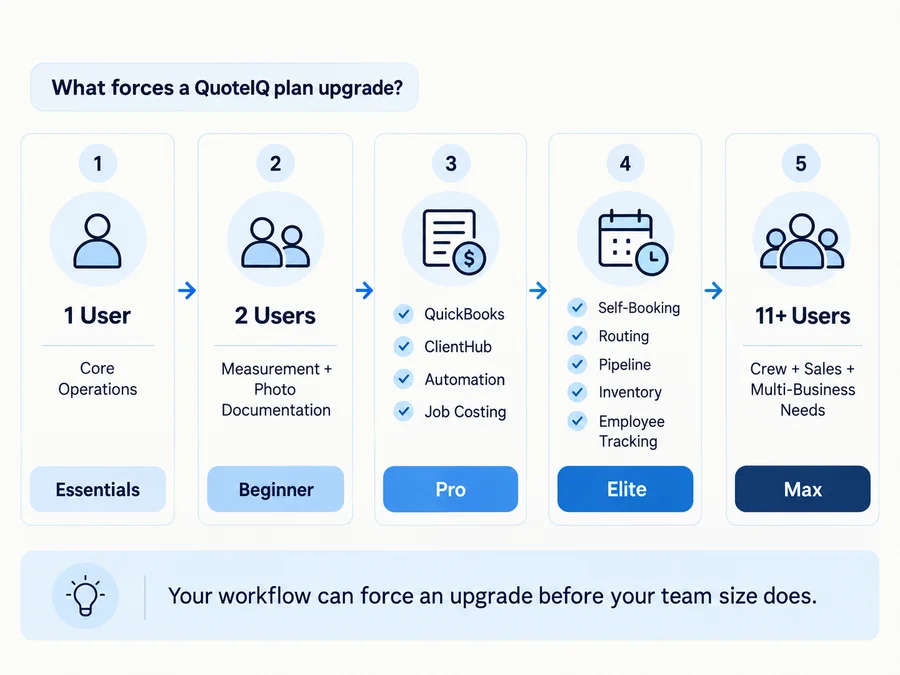
User Limits Can Force the Upgrade
QuoteIQ does not currently use conventional per-seat pricing where a customer stays on the same plan and simply pays for another login.
Instead, users are bundled into each tier:
- Essentials — 1 user
- Beginner — 2 users
- Pro — 4 users
- Elite — 10 users
- Max — unlimited users
If a fifth person needs a login, Pro is no longer enough; the next tier to evaluate is Elite.
If the business needs more than 10 users, Max becomes the relevant tier.
There are currently no normal à-la-carte extra-user fees inside those tiers.
That makes user count a genuine pricing trigger.
A $149.99 Pro subscription may be enough for a four-person operation, while adding one required user can move the business into a $299 Elite plan—even if it does not need every Elite feature.
That tier jump is not inherently good or bad. It is simply how QuoteIQ packages access.
For comparison, Projul uses flat-rate annual plans without ordinary per-seat fees, although access can still vary by tier; see our Projul pricing guide.
Feature Gates Can Matter More Than Team Size
Headcount is only one upgrade trigger.
A two- or three-person business can need Pro or Elite because of workflow.
Current Pro-and-above capabilities include:
- ClientHub calling and texting;
- email/text automation;
- Client Portal;
- Website Contact Forms;
- Job Costing;
- QuickBooks Online integration.
Current Elite-and-above capabilities include:
- InstaQuote;
- InstaSchedule/customer self-booking;
- route optimization;
- pipelines;
- inventory;
- EmployeeHub;
- GPS/time tracking;
- team communication and permissions.
This creates an important distinction:
internal scheduling is not the same thing as customer self-booking.
Essentials includes an internal calendar. Current dedicated QuoteIQ documentation places InstaSchedule/customer-facing booking on Elite and Max.
The broader pricing comparison currently contains a few inconsistent generic self-scheduling rows, so businesses relying on that capability should confirm entitlement before checkout rather than assuming the Client Portal on Pro includes full InstaSchedule functionality.
AI Is Included, but Usage Is Metered
All five plans include AI functionality through IQ Credits.
Current monthly allocations are:
- Essentials — 500
- Beginner — 1,500
- Pro — 3,000
- Elite — 5,000
- Max — 8,000
Unused credits do not roll over. If the balance reaches zero, credit-consuming functionality becomes unavailable until the next reset or until more credits are purchased.
So:
AI included ≠ unlimited AI usage.
QuoteIQ Plans Explained
Essentials — $29.99/Month
1 user · 500 IQ Credits
Essentials is the entry tier for a solo operator mainly needing:
- estimates;
- invoices;
- internal scheduling;
- online payments;
- customer records;
- basic CRM/operational tools.
The annual price is currently $299.99.
For a one-person home-service business, that can cover a large part of the basic quote-to-payment workflow.
The main limitation is what happens as the business becomes more operationally complex.
Essentials does not give a second user, and capabilities such as MapMeasure Pro, QuoteIQ Cam, ClientHub, Job Costing, QuickBooks Online, and customer self-booking sit higher in the plan ladder.
It does include internal scheduling, but not InstaSchedule customer self-booking.
For more estimating-focused options, see our handyman estimating software guide.
Beginner — $74.99/Month
2 users · 1,500 IQ Credits
Beginner is less about team management and more about adding field and documentation tools.
Current notable additions include:
- MapMeasure Pro;
- QuoteIQ Cam;
- expense tracking;
- advanced analytics;
- inspection/photo documentation;
- contract attachments;
- mass invoicing.
That can make Beginner more relevant for a two-person operation whose estimating process depends on measurements, property documentation, photos, or expense tracking.
It does not yet include the main Pro communications/accounting layer.
So if QuickBooks, ClientHub, automation, Job Costing, or the Client Portal is required, Beginner is not the final pricing number even if two users are enough.
Pro — $149.99/Month
4 users · 3,000 IQ Credits
Pro is the main small-business operational step up.
Current Pro features include:
- ClientHub calling/texting;
- email and text automation;
- Client Portal;
- Website Contact Forms;
- Job Costing;
- QuickBooks Online integration;
- On The Way customer notifications.
For a small team, these capabilities can matter more than the jump from two to four users.
For example, a two-person company that depends heavily on QuickBooks Online or job-level profitability may need Pro even though Beginner already covers its headcount.
One important caveat: the Client Portal does not automatically mean full customer self-booking. Current dedicated documentation places InstaSchedule on Elite and Max.
For broader customer-management options, see our handyman CRM software guide.
Elite — $299/Month
10 users · 5,000 IQ Credits
Elite is where QuoteIQ moves into broader team and customer self-service operations.
Current major upgrade triggers include:
- InstaQuote;
- InstaSchedule/customer self-booking;
- Route Optimization;
- Pipelines;
- Inventory;
- EmployeeHub;
- GPS tracking;
- Time Tracker Pro;
- mass text/email campaigns.
The key freshness point is the user allowance.
Current primary pricing shows 10 users, not seven, and the monthly price is $299, not the older $249.99 figure still visible on some outdated QuoteIQ and third-party surfaces.
For a growing home-service business, Elite may be triggered by team size—but just as often it will be a workflow requirement such as self-booking, routing, inventory, or employee tracking.
Max — $699/Month
Unlimited users · 8,000 IQ Credits
Max removes the user ceiling and adds the most organization-level functionality.
Current differentiators include:
- unlimited users;
- crew management;
- Sales Team Tracker;
- unlimited pipelines;
- AI Website Builder included;
- four additional businesses;
- Dedicated Account Manager/priority support.
Max should not automatically be described as economical just because users are unlimited.
A business should generally have a real reason to evaluate it, such as:
- more than 10 required users;
- multiple crews;
- sales-team management;
- multi-business requirements;
- Max-only functionality.
Costs Beyond the Base QuoteIQ Subscription
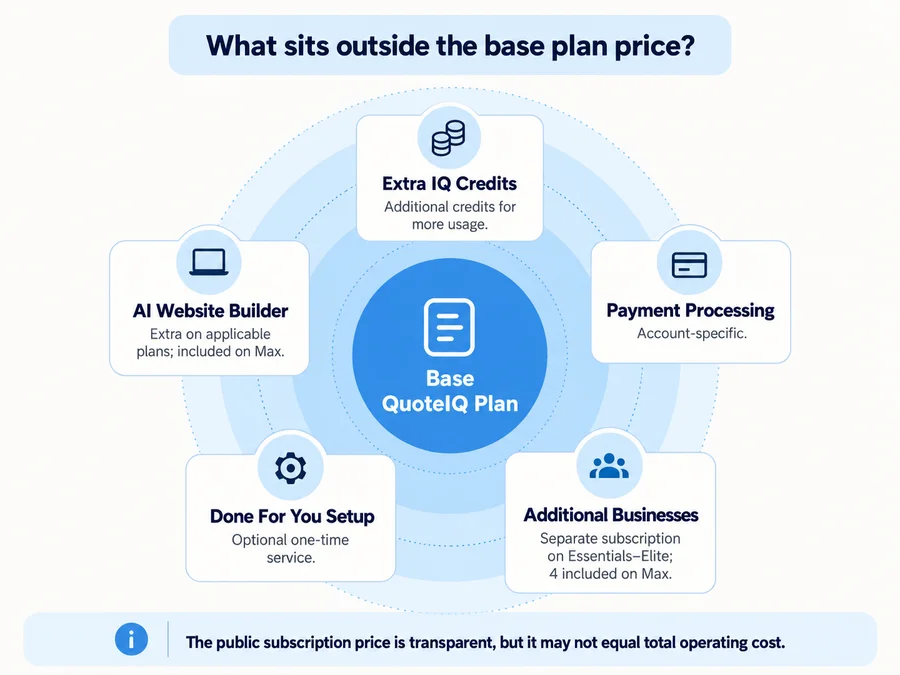
Extra IQ Credits
Each paid plan includes a recurring allocation, but additional credits can be purchased.
Current one-time packs are:
- 2,500 IQ Credits — $25
- 5,000 — $50
- 10,000 — $100
- 25,000 — $250
Different features consume credits at different rates.
For example, Virtual Call Team currently uses 125 IQ Credits per minute and also has a separate cash usage component. QuoteIQ’s current Help Center also documents automatic call-balance recharging, including a $25 recharge when the call balance falls below the configured threshold.
Current official documentation is not perfectly consistent about the exact cash rate after the first minute, so it is safer to verify the active calling rate inside the account or directly with QuoteIQ before using it for cost planning.
Do not treat included IQ Credits as covering the full cash cost of Virtual Call Team usage.
Other current usage examples include:
- Proposals — 100 IQ Credits per estimate on Essentials, Beginner, and Pro;
- Proposal credit charges are currently waived on Elite and Max;
- ClientHub SMS — 4 IQ Credits;
- MMS — 5–10 IQ Credits;
- inbound ClientHub calls — 5 IQ Credits per minute;
- outbound ClientHub calls — 7 IQ Credits per minute.
This makes AI and communication economics highly usage-dependent.
A light user may never buy a credit top-up.
A business heavily using calls, proposals, AI estimates, automations, or other metered functions can burn through the same plan allocation much faster—and some services can add cash usage on top of credit consumption.
There is no useful universal “monthly AI cost.”
Optional Services and Add-Ons
Current additional costs include:
AI Website Builder — $34.99/month
It is an add-on for Essentials through Elite and is included on Max.
Done For You — $299.99 one-time
Current documentation describes migration/setup assistance including data import, price book work, and a one-on-one setup session.
Done For You Plus — $999.99 one-time
This adds broader operational setup such as automation, templates, inventory, roles/permissions, training, and priority support, and is designed primarily for Pro and above.
Additional Businesses
Essentials through Elite can add another business as a separate subscription at the plan selected for that business.
Max currently includes four additional businesses at no extra subscription charge.
So additional businesses are not universally an extra cost; the answer depends on the primary plan.
Payment Processing and Consumer Financing
Do not assume a single public card-processing percentage applies to every account.
QuoteIQ’s current terms and payment documentation indicate that processing and platform fees can vary based on factors including:
- payment method;
- account configuration;
- processor requirements;
- risk profile;
- dispute history;
- transaction volume.
Consumer Financing is currently available across all plans with no separate QuoteIQ subscription charge, but BNPL/provider transaction fees can still apply and vary by account.
Verify the actual payment rate inside the account before treating the subscription price as the full cost of collecting customer payments.
QuoteIQ Free Trial: Important Billing Rules
QuoteIQ currently offers a 14-day direct free trial.
A valid credit or debit card is required to start it. If the trial is not cancelled before expiry, the selected subscription converts to paid billing.
There are two important details that are easy to miss.
First, every trial currently starts with 250 IQ Credits, regardless of whether the user chooses Essentials, Beginner, Pro, Elite, or Max.
The normal plan allocation begins when the paid subscription starts.
Second, changing plans during the trial is not simply a way to explore another tier.
Current QuoteIQ guidance says that either an upgrade or downgrade during the 14-day trial ends the trial and bills the card immediately for the new plan.
It does not start another free trial.
That creates a practical rule:
Choose the plan you actually want to evaluate before starting the trial.
If QuickBooks is essential, starting on Essentials and planning to “try Pro later” can prematurely end the free period.
Similarly, a company specifically evaluating InstaSchedule should consider testing Elite rather than a lower plan that cannot demonstrate that workflow.
App Store or Google Play subscriptions can follow the applicable store’s billing and cancellation process rather than QuoteIQ’s direct subscription flow.
Monthly vs Annual Billing, Cancellation & the Price-Lock Question
Monthly Billing
QuoteIQ currently markets its direct plans as:
- month-to-month;
- no long-term contract;
- cancel anytime.
Current Terms say cancellation stops future renewal but does not terminate the already-paid period. The customer retains access until that period ends.
That gives monthly customers relatively straightforward renewal-cycle flexibility.
Annual Billing
Annual pricing is financially different.
The annual amounts are paid upfront:
- Essentials — $299.99
- Beginner — $749.99
- Pro — $1,499.99
- Elite — $2,990
- Max — $6,990
The discount is effectively two months free compared with paying monthly.
Current Terms say annual payments are generally:
- prepaid for the full term;
- non-refundable;
- not eligible for mid-term proration or partial refund.
If an annual customer cancels, access continues through the prepaid term rather than producing a refund for unused months.
So:
“No contract” does not make annual billing financially equivalent to month-to-month cancellation.
What About QuoteIQ’s Price-Lock Guarantee?
There is a current official-source conflict worth understanding.
QuoteIQ’s Pricing page and Help Center currently promote a Price-Lock Guarantee, describing active subscribers as keeping their existing subscription rate while the subscription remains active.
However, the current Terms also reserve QuoteIQ’s right to change subscription pricing and say changes to an active subscription can take effect at a future billing cycle with notice.
Those statements do not align perfectly.
Home Service Fit would therefore not promise that a customer’s rate is legally guaranteed forever.
If long-term grandfathered pricing materially affects the purchase decision, ask QuoteIQ to confirm the account-specific protection in writing and keep that confirmation with the subscription records.
Which QuoteIQ Plan Makes Sense for Your Business?
A simple way to narrow the choice is to start with the first tier that supports both headcount and must-have workflow.
Solo operator needing estimates, invoices, payments, and internal scheduling:
Start by evaluating Essentials.
Two-person team needing measurement and stronger photo/documentation tools:
Evaluate Beginner.
Small team needing QuickBooks Online, ClientHub, automation, Client Portal, or Job Costing:
Evaluate Pro.
Business needing customer self-booking, routing, pipelines, inventory, or employee/GPS tracking:
Evaluate Elite.
More than 10 users, multiple crews, sales management, or meaningful multi-business needs:
Evaluate Max.
The core rule is:
Choose the lowest tier that supports the business’s actual user count and must-have workflow.
Do not pay for Elite or Max simply because they contain more features.
Likewise, do not anchor on $29.99 Essentials when the business cannot realistically operate without a Pro or Elite capability.
If scheduling is your main requirement, compare options in our handyman scheduling software guide.
Is QuoteIQ Worth the Price?
QuoteIQ’s $29.99 Essentials entry point can be attractive for a solo operator, especially because estimating, invoicing, internal scheduling, payments, and AI access are available at the entry tier.
But the meaningful value comparison should happen at the plan the business actually needs.
A company requiring QuickBooks Online, ClientHub, automation, or Job Costing is evaluating $149.99 Pro, not $29.99 Essentials.
A company requiring customer self-booking, inventory, routing, or EmployeeHub is evaluating $299 Elite.
And a large team may be evaluating $699 Max.
Then add expected IQ Credit usage, payment fees, optional setup, website tooling, and multi-business requirements.
For the broader product evaluation—including user feedback, CRM strengths, limitations, and handyman fit — see the QuoteIQ review.
FAQs
How Much Is QuoteIQ Per Month?
Current monthly pricing is:
- Essentials — $29.99
- Beginner — $74.99
- Pro — $149.99
- Elite — $299
- Max — $699
The actual plan depends on users and required features.
Does QuoteIQ Charge Per User?
Not through ordinary extra-seat pricing.
Current plans bundle 1, 2, 4, 10, and unlimited users respectively. If the business exceeds the allowance, it currently needs to evaluate a higher plan rather than adding a conventional paid seat.
Which QuoteIQ Plan Includes QuickBooks?
Current QuickBooks Online integration starts on Pro and is also included with Elite and Max.
Which QuoteIQ Plan Includes Online Booking?
Current dedicated documentation places InstaSchedule customer self-booking on Elite and Max.
Lower tiers include internal scheduling, while Pro includes the Client Portal and service-request functionality.
Does QuoteIQ Have a Free Trial?
Yes.
The current direct trial lasts 14 days and requires a valid credit or debit card.
Changing plans during the trial currently ends the trial and starts billing immediately for the new plan.