

The best Service Fusion alternative depends on the specific problem you are trying to solve.
Service Fusion’s current flat-rate plans include unlimited users, which can become economically attractive as a team adds technicians, dispatchers, office staff, and managers. A competitor with a much lower starting price is therefore not automatically the cheaper replacement.
Businesses usually look elsewhere because they want lower small-team costs, different customer or mobile workflows, stronger phone and lead handling, different QuickBooks behavior, deeper operations, or commercial project capabilities.
The goal is to fix that problem without accidentally giving up a Service Fusion advantage the business still depends on.
Last updated: September 2026
Product, pricing, accounting, contract, and migration information last verified September 26, 2026.
On this page
- Best Service Fusion Alternatives at a Glance
- Before You Switch, Identify the Problem Service Fusion Is Not Solving
- How We Selected These Alternatives
- 9 Best Service Fusion Alternatives
- The Biggest Pricing Trap When Leaving Service Fusion
- Before You Leave Service Fusion, Check These Four Things
- When Staying With Service Fusion May Make More Sense
- Which Service Fusion Alternative Should You Choose?
Best Service Fusion Alternatives at a Glance
| Alternative | Best For | Pricing Model | Why Consider It | Main Trade-Off |
|---|---|---|---|---|
| Jobber | Smaller teams wanting simpler software and public pricing | Public tiered/user pricing | Low solo entry, clean service workflow, transparent plans | Cost rises with required plan, users, and add-ons; no QBD parity |
| Housecall Pro | Residential teams prioritizing customer experience and booking | Public tiered pricing | Strong booking, scheduling, payments, customer workflow | Included-user limits and add-ons matter as teams grow |
| FieldPulse | Growing teams wanting more configurable operations | Custom seat-based pricing | Deeper configurable jobs, projects, sites, costing, and operations | Gives up Service Fusion’s simple flat unlimited-user economics |
| Workiz | Phone- and lead-heavy service businesses | Request pricing | Strong call, lead, messaging, and automation ecosystem | Quote-led; Genius products can add another cost layer |
| FieldEdge | Established QuickBooks-centric HVAC, plumbing, and electrical teams | Request pricing | QBO + QBD support with mechanical-service depth | Quote-led and not automatically simpler or cheaper |
| Kickserv | Small teams wanting predictable user bundles | $60 / $119 / $199 public tiers | Clear 5/10/20-user packaging | Lighter inventory, communications, and operational depth |
| ServiceM8 | Low-cost Apple-first teams | Job-volume pricing; unlimited users on paid plans | Very low entry with unusual unlimited-user model | Apple-first; Android experience is more limited |
| ServiceTitan | Businesses moving up to deeper operations | Per-technician, custom quote | Deeper reporting, memberships, marketing, and revenue operations | Complexity, implementation, and quote-based commitment |
| BuildOps | Commercial contractors combining service and projects | Custom pricing | Commercial projects, procurement, RFIs, financials, job costing | High-complexity commercial platform, not a simple downshift |
For context, Service Fusion currently publishes:
- Starter: $245/month month-to-month or $208/month equivalent billed annually;
- Plus: $382/month or $325/month equivalent annually;
- Pro: $627/month or $533/month equivalent annually.
All three currently include unlimited users. Annual pricing saves 15% and is charged as one annual payment at signup.
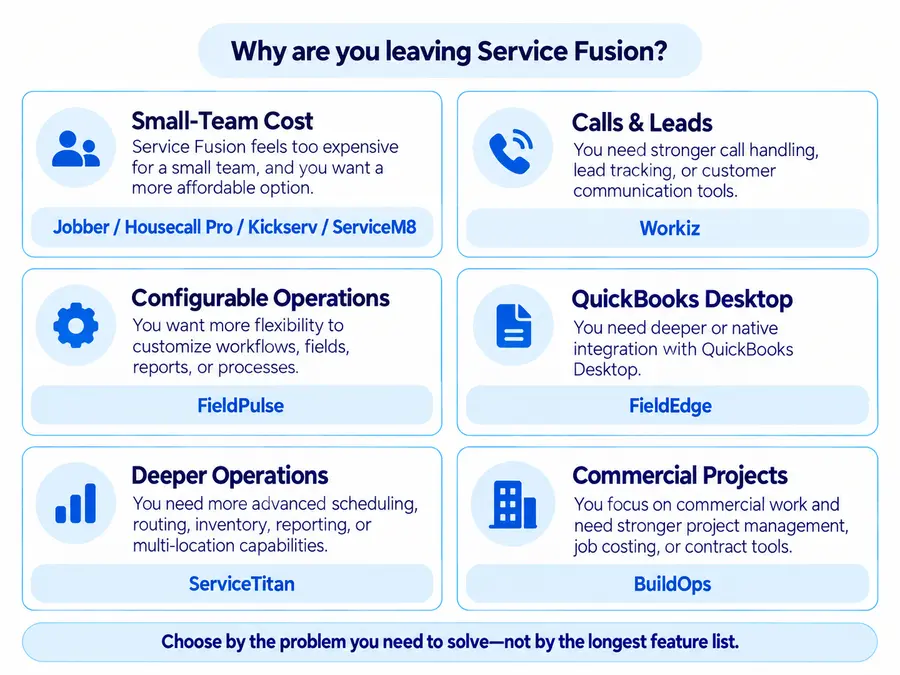
Before You Switch, Identify the Problem Service Fusion Is Not Solving
Starting with product names makes it easy to replace Service Fusion with something cheaper on paper but worse for the actual business.
Start with the trigger.
Your Team Is Too Small for the Flat Base Price
A solo operator or very small crew may not receive enough value from a $245 monthly Starter base when products such as Jobber, Housecall Pro, Kickserv, or ServiceM8 offer lower entry points.
But compare the required configuration, not just entry prices.
If the business grows from two people to eight, a user-based competitor can produce very different economics.
Calls and Lead Handling Are the Bottleneck
Consider Workiz when the problem is not basic scheduling or invoicing but:
- missed calls;
- lead capture;
- rapid booking;
- customer texting;
- communication automation.
You Need More Configurable Operations
Consider FieldPulse if Service Fusion feels insufficiently configurable for a growing company’s sites, projects, job costing, inventory, routing, or custom workflows.
QuickBooks Desktop Is Load-Bearing
This dramatically narrows the shortlist.
Service Fusion currently supports both QuickBooks Online and QuickBooks Desktop. If QBD is central to accounting, confirm the replacement’s actual Desktop workflow before switching.
FieldEdge is particularly relevant here.
You Need a Deeper Revenue and Operations Platform
ServiceTitan represents an upshift rather than simplification.
You Run Commercial Service and Projects Together
BuildOps targets commercial contractors that need both ongoing service and project-management depth.
Solve the reason you’re leaving Service Fusion without accidentally removing a capability the business still depends on.
How We Selected These Alternatives
Home Service Fit evaluated these products using current:
- official pricing;
- product documentation;
- Help Centers;
- accounting/integration documentation;
- current US search expectations;
- practical fit for small and growing home-service businesses.
Each product was considered against the reason for switching, required workflow, user economics, accounting compatibility, mobile/field operation, and its main trade-off versus Service Fusion.
We do not claim hands-on testing, and affiliate economics do not determine inclusion, order, Best For labels, criticism, or recommendations.
9 Best Service Fusion Alternatives
Jobber: Best for Smaller Teams Wanting Simpler Software and Public Pricing
Jobber is most compelling when a small business wants a lower starting cost and a simpler public pricing model.
Current Core pricing begins at $29/month billed annually for one user, with Connect starting at $99 and Grow at $149 for a one-user annual configuration. Jobber also offers a no-card trial.
Its core strength is a straightforward:
customer → quote → schedule → job → invoice → payment
workflow with automation available higher in the plan structure.
The trade-off is team economics. Required plan, number of users, and add-ons can make the real replacement cost much higher than Core’s headline price.
Accounting also matters: Jobber currently emphasizes QuickBooks Online and Xero. Do not assume QuickBooks Desktop parity with Service Fusion.
For a closer look at features, trade-offs, and business fit, see our Jobber review. For a detailed breakdown of plans and costs, see our Jobber pricing guide.
Housecall Pro: Best for Residential Teams Prioritizing Customer Experience and Booking
Housecall Pro is a stronger alternative for residential teams that care heavily about booking and customer-facing workflows.
Basic currently starts at $59/month billed annually or $79 monthly for one user, and Housecall Pro offers a 14-day no-card trial.
Its current platform combines:
- online booking;
- scheduling and dispatch;
- estimates;
- invoices and payments;
- reviews;
- customer communication.
Housecall Pro also officially supports both QuickBooks Online and supported US QuickBooks Desktop workflows. The Desktop integration uses a separate Windows/Web Connector process rather than behaving identically to QBO.
The main trade-off is user economics. Essentials currently includes five users and MAX eight, so compare the plan your actual team requires—not HCP Basic against a multi-user Service Fusion setup.
For a closer look at features, limitations, and business fit, see our Housecall Pro review. For a detailed breakdown of plans and costs, see our Housecall Pro pricing guide.
FieldPulse: Best for Growing Teams Wanting More Configurable Operations
FieldPulse makes sense when the reason for switching is greater operational configurability rather than lower entry pricing.
Current FieldPulse pricing remains custom and seat-based. The final quote depends partly on team setup and what each seat needs access to.
It is relevant for businesses needing deeper:
- customer/site management;
- job and project workflows;
- custom processes;
- job costing;
- inventory;
- routing;
- fleet or operational reporting.
That can make it more appropriate for a growing company whose processes are becoming more complicated.
The trade-off is significant: moving to FieldPulse may sacrifice one of Service Fusion’s clearest strengths—one flat plan price with unlimited users.
Do not compare the two using unofficial FieldPulse seat estimates.
For a deeper breakdown of its custom seat-based pricing, see our FieldPulse pricing guide.
Workiz: Best for Phone- and Lead-Heavy Service Businesses
Workiz is worth considering when inbound demand management matters more than unlimited-user economics.
Its current Standard, Pro, and Ultimate plans all use Request Pricing. Standard includes core FSM functionality, while Pro adds stronger automation and Genius Leads.
Workiz also maintains a separate Genius ecosystem including:
- Genius Phone;
- Genius Answering;
- Genius Marketing.
Those are presented as separate add-ons, so do not confuse plan-level features such as Genius Leads with separately sold communication products.
This structure can suit companies where calls, texts, lead handling, and quick booking are the main bottlenecks.
The trade-off is price transparency. Workiz is currently quote-led, so replacing Service Fusion with Workiz does not automatically make software cost easier to predict.
FieldEdge: Best for Established QuickBooks-Centric HVAC, Plumbing, and Electrical Teams
FieldEdge deserves special attention when QuickBooks Desktop continuity is non-negotiable.
Current plans are Select, Premier, and Elite, all with Request Pricing. Its current public comparison table explicitly supports QuickBooks Online & Desktop across the plans and emphasizes dispatch, agreements, flat-rate pricing, inventory, and mechanical-service operations.
That makes FieldEdge particularly relevant for established HVAC, plumbing, and electrical businesses whose accounting workflow is more important than finding the lowest subscription price.
The trade-off is that this is another sales-led platform.
FieldEdge also says upgrades can happen during the term, while downgrades occur at the end of the current contract period, so review the actual commercial terms before switching.
It does not automatically provide lower cost, simpler implementation, or unlimited users.
Kickserv: Best for Small Teams Wanting Predictable User Bundles
Kickserv provides unusually easy-to-read team pricing:
- Start — $60/month for 5 users;
- Run — $119 for 10 users;
- Scale — $199 for 20 users.
Current pricing also advertises 20% annual savings and 30-day trials.
That can work well for teams that want customer/job management, reminders, time and expense tracking, accounting integration, and predictable user bundles.
QuickBooks is worth checking carefully. Start includes QuickBooks Online, while the current Run plan lists QuickBooks Desktop as a $50/month add-on.
The trade-off versus Service Fusion is product depth.
Kickserv is lighter in areas such as inventory, communication tooling, advanced reporting, and larger-operation workflows.
That lighter footprint may be desirable—but it should be intentional.
ServiceM8: Best for Low-Cost Apple-First Teams
ServiceM8 offers another unusual answer to Service Fusion’s unlimited-user advantage.
Current US pricing includes:
- Free — $0, 1 user, 30 jobs/month;
- Starter — $29, unlimited users, 50 jobs;
- Growing — $79, unlimited users, 150 jobs;
- Premium — $149, unlimited users, 500 jobs;
- Premium Plus — $349, unlimited users, 1,500+ jobs.
A 14-day trial currently requires no credit card.
The important difference is that paid ServiceM8 plans scale primarily through job volume rather than user count.
That can be very attractive for a small field team with many users but manageable monthly job volume.
The trade-off is platform fit: ServiceM8 remains Apple-first. It now offers ServiceM8 Lite for Android, but the vendor still recommends iPhone/iPad for the fuller experience.
ServiceTitan: Best for Businesses Moving Up to a Deeper Operations Platform
ServiceTitan belongs here for businesses leaving Service Fusion because they need more operational depth, not less.
Its current public pricing uses:
- Starter;
- Essentials;
- The Works;
- per-technician pricing;
- Request Pricing.
ServiceTitan is relevant when the company needs deeper capability around areas such as:
- reporting;
- memberships;
- dispatch;
- call booking;
- marketing;
- commissions;
- revenue operations;
- more complex organizational workflows.
The trade-off is that this is an upshift.
ServiceTitan has no universal public per-technician dollar rate, and the final commitment can involve packages, users, Pro Products, services, usage, and contract terms.
Do not use third-party 245–500/tech estimates as official pricing.
If ServiceTitan is on your shortlist, see our ServiceTitan alternatives guide for other options at this level, or our ServiceTitan pricing guide for a closer look at its pricing model and cost structure.
BuildOps: Best for Commercial Contractors Combining Service and Projects
BuildOps is the most specialized alternative in this shortlist.
Current pricing is custom and built around factors such as:
- crew size;
- trades;
- field/office users;
- modules;
- integrations.
Its distinction is commercial project depth.
BuildOps can support service operations while adding project tools such as:
- procurement;
- submittals;
- RFIs;
- change orders;
- daily reporting;
- project financials;
- detailed job costing.
That makes it much more relevant for commercial mechanical, electrical, or similar contractors running service and multi-stage projects together.
The trade-off is equally clear: BuildOps is not intended as a cheap, lightweight replacement for a small residential Service Fusion customer.
It is another complex commercial operating platform.
The Biggest Pricing Trap When Leaving Service Fusion
Service Fusion’s current plans all include unlimited users.
That changes replacement economics.
A competitor may advertise a much lower starting price, but the comparable replacement cost should be:
Comparable replacement cost = required plan + required users + required add-ons + communications + accounting requirements
Do not create a universal breakeven such as:
“Jobber becomes more expensive after eight users.”
The answer changes based on:
- plan;
- team size;
- feature gates;
- monthly versus annual billing;
- promotions;
- accounting needs;
- communication tools.
A three-person business may benefit substantially from a lower-cost user-based or bundled platform.
A larger operation with:
- technicians;
- dispatchers;
- customer-service staff;
- office admins;
- managers;
may find Service Fusion’s flat subscription increasingly attractive.
Its current pricing page explicitly states that adding users does not change the plan price.
So compare the actual business shape, not just two headline prices.
Before You Leave Service Fusion, Check These Four Things
Confirm Your Actual Billing Term
Service Fusion’s public pricing currently promotes:
- month-to-month plans;
- no contract requirement;
- optional annual pricing.
Annual pricing saves 15% and is charged as one annual payment at signup.
However, the governing Subscription Agreement says the Online Order states the initial term, that the term automatically renews for equivalent periods, and that cancellation generally requires 30 days’ written notice before the current term ends. Fees are generally non-refundable.
This is best understood as:
public standard offer vs account-specific Online Order / governing Agreement
rather than a simplistic contradiction.
Before switching, verify:
- your actual term;
- renewal date;
- next payment;
- required cancellation notice;
- any active add-ons.
Request Your Data Before Termination
Do not cancel Service Fusion first and plan migration afterward.
The current Subscription Agreement allows customers to request professional-service exports of Customer Content where feasible.
Service Fusion may:
- charge for the export work;
- require those fees to be paid before performing the service;
- provide the resulting export as-is.
The Agreement also says Service Fusion may deactivate an account and delete its data after expiration or termination. It does not publish a guaranteed 30-, 60-, or 90-day post-cancellation retention window.
Plan source export and destination import together.
Do not assume every:
- job;
- attachment;
- photo;
- note;
- relationship;
- historical workflow;
will reconstruct cleanly in another FSM.
Map the QuickBooks Workflow, Not Just the Logo
Service Fusion currently confirms support for both QuickBooks Online and QuickBooks Desktop.
But the integrations do not operate the same way.
Current Service Fusion documentation says QuickBooks Desktop uses a Windows desktop plugin that communicates with Service Fusion’s web services. QuickBooks Online uses a separate web/OAuth connection path.
So before switching, document what actually needs to survive:
- customer records;
- invoices;
- payments;
- products/services;
- classes or business units;
- purchase orders;
- inventory/accounting behavior;
- sync direction;
- sync timing;
- historical accounting context.
“Integrates with QuickBooks” is not enough.
For a QBD-heavy business, this may determine the shortlist more than CRM features.
Treat Phone and SMS as a Separate Migration
Service Fusion’s current messaging system sends outbound SMS through registered toll-free numbers.
Current documentation requires the business’s toll-free number to be verified and requires appropriate customer SMS consent/preferences before outbound messaging.
Before moving:
- identify every business phone/SMS number;
- determine who owns it;
- confirm portability;
- preserve relevant consent records;
- ask the destination vendor what registration is required;
- avoid disabling the old setup before the replacement is operational.
Do not assume phone numbers, verification, consent, or messaging registrations automatically transfer with CRM data.
When Staying With Service Fusion May Make More Sense
Switching is not automatically an improvement.
Staying may make more sense when:
- many employees need software access;
- flat unlimited-user pricing works economically;
- QuickBooks Desktop is stable and important;
- inventory and job costing matter;
- employees already know the system;
- migration/retraining risk is larger than the current complaint;
- the reason for switching comes from an outdated review.
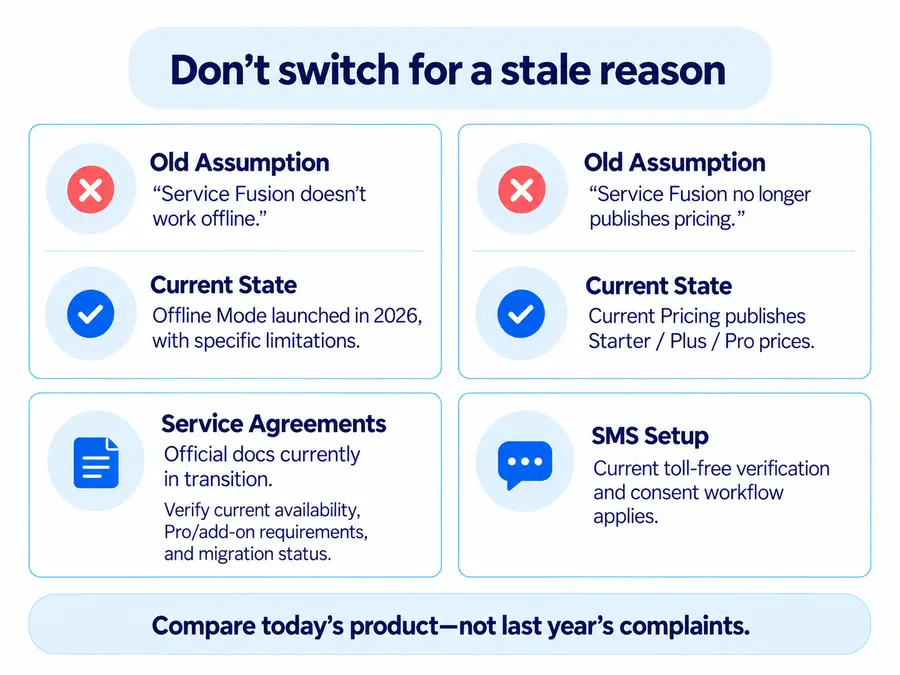
That last point matters in 2026.
Service Fusion launched Offline Mode this year. Current documentation says technicians can now view schedules, customer/job information, notes, photos, documents, estimates, invoices, and equipment offline, while adding/editing notes, updating photos, and working with tasks/checklists. Changes sync when connectivity returns.
The initial release still has limits: creating new jobs/estimates, certain status workflows, payments, and product catalogs are not fully available offline.
So “Service Fusion has no offline mode” is now stale.
Service Agreements require more caution.
An August 25 Help Center article still labels the new module a closed beta. But September 8 migration documentation tells customers that upgrading to Pro or adding the Service Agreements add-on triggers migration into the new module, and that migration is one-way.
Those official surfaces are not perfectly aligned.
Before making a switch based on Service Agreements, verify current:
- availability;
- Pro/add-on requirement;
- migration eligibility;
- legacy-agreement behavior.
Switch because another product solves a current business problem—not because an old review describes an outdated version of Service Fusion.
Which Service Fusion Alternative Should You Choose?
Choose based on the mismatch you are actually trying to fix.
Small team / lower entry cost: Jobber, Housecall Pro, or Kickserv.
Low-cost unlimited users / Apple-first: ServiceM8.
More configurable growing-team operations: FieldPulse.
Calls and lead handling: Workiz.
QuickBooks Desktop + established HVAC/plumbing/electrical workflow: FieldEdge.
Deeper revenue and operations platform: ServiceTitan.
Commercial service + project management: BuildOps.
There is an important final filter:
What useful Service Fusion capability will you lose by switching?
For one business, giving up flat unlimited-user economics may be irrelevant.
For another, losing QuickBooks Desktop continuity could make the entire migration impractical.
Another company may care far more about phone handling, custom workflows, project financials, or lower small-team cost.
The right alternative fixes the specific reason Service Fusion no longer fits without forcing the business to give up an unlimited-user, accounting, communication, or operational capability it still depends on.
If you are still comparing broader options for a smaller service business, see our handyman software guide.