
Jobber connects leads, customer records, quotes, scheduling, field jobs, invoices, payments, communication, and team operations in one field-service platform. Its main appeal is not any single feature—it is the continuity between those workflows.
That makes Jobber a strong candidate for solo operators and small home-service teams that are starting to outgrow separate calendars, spreadsheets, estimate apps, invoice tools, and customer text threads.
The harder buying question is whether your business needs enough of that connected system to justify Jobber’s plan gates and total cost.
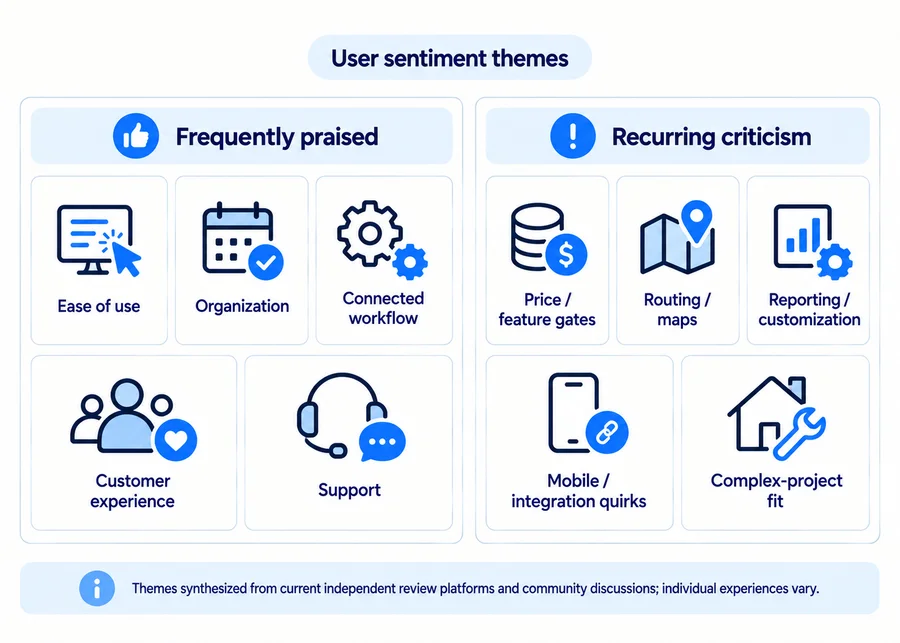
Current Jobber reviews generally reinforce both sides of that trade-off. Ease of use, organization, customer-facing workflows, and support receive recurring praise. Complaints more often focus on pricing and feature gates, routing or mobile friction, reporting/customization limits, integrations, and cases where a business needs deeper project-management functionality than a service-oriented FSM is designed to provide. Those are recurring themes, not universal experiences.
Last updated: September 2026
Product and pricing facts checked: September 15, 2026
User-review data checked: September 15, 2026
Jobber Review: Quick Verdict
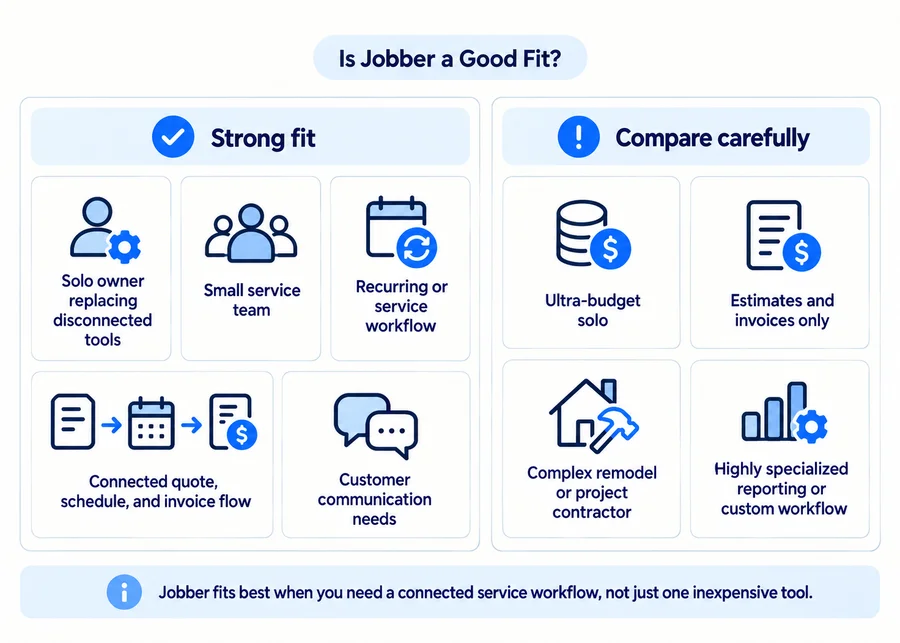
Best for: Solo operators and small-to-growing home-service teams that want quoting, scheduling, customer management, jobs, invoices, payments, and communication connected in one platform.
Less suitable for: Businesses that mainly need one or two inexpensive tools, or operations centered on deep construction/project management, extensive project phases, highly specialized reporting, or unusual workflow customization.
Standout strengths:
- relatively approachable connected workflow;
- strong quote → job → invoice continuity;
- useful Client Hub/customer experience;
- broad mobile field functionality;
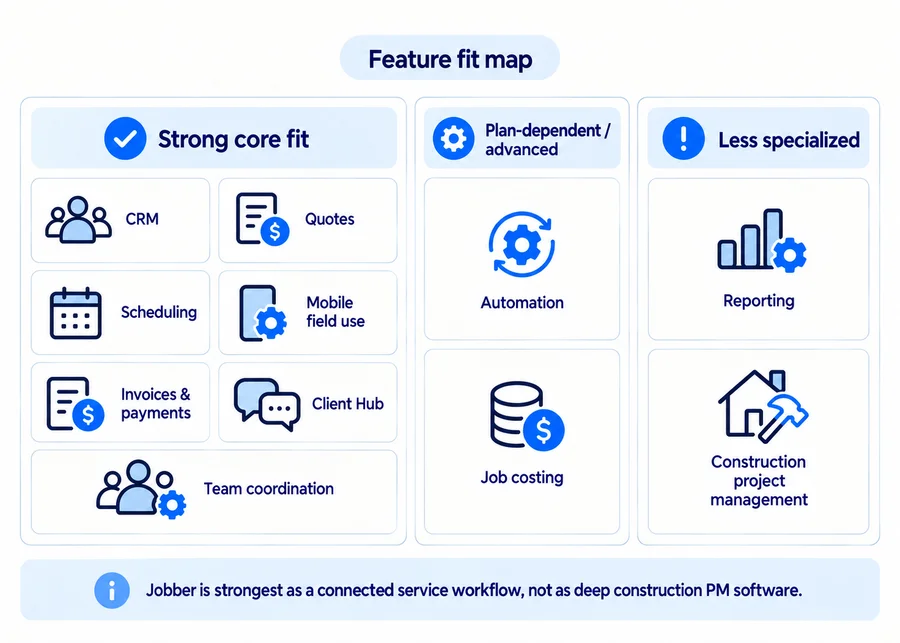
- automation and team tools that become more useful as administrative workload grows.
Main trade-offs:
- meaningful capabilities are gated behind higher plans;
- cost rises substantially as team and feature needs expand;
- some current reviewers report routing, mobile, reporting, and integration frustrations;
- Jobber is optimized for service operations rather than specialized construction PM;
- consolidating clients, jobs, accounting flows, and communication into one SaaS platform increases dependence on its data and integration model.
Home Service Fit verdict: Jobber is one of the stronger balanced options for a small home-service business that genuinely needs an integrated operating system. It becomes less compelling if estimates and invoices are almost all you need or if your core work is built around complex, long-running construction projects.
What Is Jobber?
Jobber is field-service management software for home and commercial service businesses. It connects customer requests and records with quoting, scheduling, jobs and visits, invoicing, payments, and customer communication.
The core idea is that information should move through the service lifecycle instead of being re-entered across several disconnected apps. Customer records sit behind requests, quotes, jobs, and invoices, while office and field users can access relevant work information through web and mobile apps.
It is therefore broader than a CRM or invoicing product, but lighter and more service-oriented than specialized construction project-management software.
How We Evaluated Jobber
We evaluated Jobber as an operational platform rather than scoring its feature list.
The review considers setup, everyday usability, solo and team fit, CRM, quoting, scheduling, recurring work, mobile use, field documentation, invoices, payments, automation, communication, job costing, reporting, integrations, feature gates, support, pricing, and data dependence.
We used four evidence layers:
- current Jobber pricing, Help Center, Terms, and Privacy documentation for product and legal facts;
- Capterra, G2, Software Advice, and Trustpilot for recurring user-review themes;
- community discussions for qualitative context;
- Home Service Fit editorial judgment for business fit.
Review evidence has limits. Different platforms attract different users, and some marketplace reviews may be vendor-referred or incentivized while others are organic. One negative Reddit thread is no more definitive than one five-star marketplace review.
We therefore look for themes that recur across several sources rather than treating a single review or aggregate score as the final answer.
Jobber Pros and Cons
| Pros | Cons |
|---|---|
| Connected customer → quote → job → invoice workflow | Important capabilities require higher plans |
| Generally approachable interface for an FSM | Cost can rise materially with users and feature needs |
| Client Hub improves customer self-service | Reporting/customization will not fit every advanced workflow |
| Useful mobile field tools | Routing/maps and mobile friction appear in some current reviews |
| Automation and communication tools can reduce manual admin | New QuickBooks model changes established accounting workflows |
| Good fit across many small service-business types | Less specialized for complex construction/project management |
| Strong current support sentiment across several review sources | Greater platform dependence makes exports, backups, and exit planning more important |
This is Home Service Fit’s editorial assessment, informed by verified product capabilities and recurring user sentiment rather than a numerical rating.
Jobber Features Reviewed
CRM, Leads, and Client Hub
Jobber’s customer-management layer is practical rather than enterprise-sales-oriented.
Client records connect contact details, service addresses, requests, quotes, jobs, billing history, and notes. Requests and booking forms can feed new work into the system, while customer records become the anchor for later quotes, jobs, and invoices.
Client Hub is one of the stronger parts of the customer experience. Customers can view quotes and invoices, check upcoming appointments, approve quotes, make payments, and interact with work already associated with their account.
That is useful for a small handyman business because it replaces some of the back-and-forth around “Can you resend the quote?” or “When are you coming?” without requiring the customer to learn a complicated portal.
The trade-off is scope. If you need sophisticated enterprise-style sales pipelines, highly custom sales objects, or complex B2B account management, Jobber’s customer tools are not designed to replace a dedicated enterprise CRM.
If customer management is your main buying priority, see our handyman CRM software guide for a broader comparison of CRM-focused options.
Quotes and Estimates
Jobber is strongest at workflow-based quoting.
You can create quotes from web or mobile, send them for customer approval, take deposits, and turn approved work into jobs. Higher-tier quoting adds options such as richer visual customization, images, optional line items, and markup-related functionality. Current pricing places several advanced quote capabilities on Grow.
That makes Jobber useful when the quote is expected to flow into scheduling and invoicing.
It is less specialized when the hardest part of estimating is actually figuring out what the work should cost from detailed local labor/material databases or AI-assisted scope calculation. Dedicated estimating products can go deeper on that side.
Scheduling, Dispatch, and Recurring Work
For a solo operator, Jobber’s calendar can replace a mix of calendar events, handwritten notes, and customer texts.
For a small team, the value changes: assignments, visits, job details, recurring work, and team visibility need to stay synchronized across several people.
Jobber supports both one-off and recurring jobs, and its scheduling model distinguishes jobs from the visits used to complete them. That works particularly well for recurring service businesses where the same customer may need repeated visits and predictable invoicing.
Routing deserves a more qualified assessment. Current user reviews include recurring criticism of maps, routing, or scheduling friction, but other reviewers describe Jobber’s scheduling and organization positively. It is more accurate to say that routing needs should be tested against your real service area than to label the feature objectively good or bad.
For a broader comparison of scheduling, booking, recurring work, and routing across products, see our handyman scheduling software guide.
Mobile App and Field Use
Much of the everyday service workflow is accessible through Jobber’s iOS and Android apps: client information, schedules, visits, job details, quotes, invoices, notes, photos, time tracking, and field updates.
Selected work also continues offline. Jobber currently documents offline support for tasks such as starting/stopping timers, completing job forms, and adding notes or attachments, with changes syncing when connectivity returns. However, some information and tools still require an internet connection.
So the right conclusion is useful offline support, not “Jobber works fully offline.”
That distinction matters if your team regularly works in basements, rural properties, or other weak-signal environments.
Invoicing and Payments
Jobber keeps billing closely connected to completed work. Invoices can follow jobs rather than existing as disconnected accounting documents, and customers can view and pay them through Client Hub.
Depending on the plan and payment setup, Jobber supports cards, ACH/bank payments, automatic payments, follow-ups, and mobile payment workflows.
For a service business, that continuity is useful: the customer record, job, invoice, and payment history remain linked.
Integrated payments still introduce normal processor risks. A cardholder can dispute a charge, and current Jobber documentation says that during a chargeback the disputed amount and dispute fee can be withdrawn from the connected bank account while the bank reviews the dispute. If the business wins, the funds and fee are returned.
For a closer comparison of billing tools, see our handyman invoicing software guide and full Jobber pricing guide.
Automations and Customer Communication
Automation becomes much more valuable when the owner’s problem is no longer doing the actual service—it is remembering every reminder, quote follow-up, invoice follow-up, customer update, and internal handoff.
Current Jobber plans progressively add automated reminders, quote and invoice follow-ups, two-way SMS, and custom workflow automations. Connect introduces several standard automation tools, while Grow adds two-way SMS and custom automation capabilities.
For US businesses using Jobber’s dedicated number for two-way texting, there is an additional setup requirement worth knowing about. Jobber currently requires A2P 10DLC/TCR registration, including business information, publicly accessible privacy and terms pages, and appropriate SMS opt-in language on relevant online forms. Jobber says registration may take up to roughly three weeks. This is a carrier/The Campaign Registry requirement—not a new federal law created by Jobber.
Automation does not remove the business owner’s responsibility for applicable consent, opt-outs, privacy, and call/text rules. The FCC has confirmed that outbound calls using AI-generated artificial or prerecorded voices remain subject to TCPA consent requirements. Separately, the FCC has delayed the specific cross-category “revoke all” requirement until January 31, 2027, so it would be inaccurate to imply that every opt-out today automatically blocks all unrelated categories of future robocalls or robotexts from that business.
This is practical compliance context, not legal advice.
Job Costing, Time Tracking, and Reporting
Job costing is currently available on Grow and Plus.
Jobber uses employee time, line-item costs, and expenses to calculate job profit and margin. That can be useful for a growing handyman business that has moved beyond “Did the customer pay?” to “Did this type of job actually make money?”
Reporting is harder to judge universally.
Some businesses will find Jobber’s built-in reporting sufficient for everyday operational questions. Others want deeper custom reporting, more flexible dashboards, or more specialized construction/project analytics. Current user reviews include both positive comments about visibility and organization and criticism around reporting flexibility.
That makes reporting a trial item rather than an automatic deal-breaker.
QuickBooks and Other Integrations
This is one of the most important current integration changes.
Jobber is gradually rolling out a newer QuickBooks Online integration to select accounts. Where the newer integration is used, the ongoing sync is one-way from Jobber to QuickBooks.
There is an initial import for new connections, but after setup Jobber becomes the source of truth for clients and products/services. Invoices and supported payment information move toward QuickBooks, while a paid-invoice status entered in QuickBooks no longer flows back into Jobber. Syncing is ongoing and automatic rather than relying on the old manual sync process.
Legacy QuickBooks users may still be on the older integration. Jobber says existing users can migrate, but once migrated, they cannot return to the legacy integration.
For a business with an established bookkeeper or accountant, that is not a small technical detail. Review the new sync model with whoever manages your books before migrating.
Setup, Ease of Use, and Support
Jobber is not a zero-setup tool, but it generally avoids enterprise-style implementation.
A solo owner can create clients, services, pricing, forms, templates, and day-to-day workflows without building a custom system. Complexity rises as you add employees, automations, payment workflows, QuickBooks, custom fields, and communication tools.
Independent review data supports a generally positive ease-of-use picture. Capterra currently shows 4.6/5 for ease of use, while G2’s current category data places Jobber’s ease-of-use score around 9/10. Support also receives frequent praise across G2 and Trustpilot, although negative support experiences clearly exist as well.
The practical question is not whether Jobber is “the easiest FSM.” It is whether your office and field staff can learn the specific tasks they need without creating more process than the software removes.
Jobber AI and Newer Tools
Jobber is expanding AI across both support and operational workflows.
Current Jobber AI voice/chat functionality can answer account questions and perform actions such as creating quotes, sending invoices, checking schedules, capturing notes, and converting requests into quotes or jobs. Receptionist can handle customer calls or texts and perform supported actions such as booking work.
These tools are useful additions, but they should not be the main reason most small businesses choose the platform.
Jobber’s own Terms also caution that AI outputs can be inaccurate and require user review. Information shared with AI tools may be logged for analysis, improvement, and security.
Jobber Risks and Practical Considerations Before You Commit
Jobber can simplify a business by moving many workflows into one system. That same consolidation creates a few practical dependencies worth understanding.
Data dependence and exit planning. Jobber’s current Terms say users are responsible for maintaining backups of their data, and Jobber may set storage or retention limits and restrict account/data access in circumstances covered by its Terms. That does not mean Jobber will arbitrarily delete business records; it means a company should not treat any SaaS platform as its only continuity plan. Before fully committing, verify what critical client, invoice, job, and other records you can export and how you would preserve them.
QuickBooks migration. If you already use Jobber’s legacy QuickBooks integration, moving to the newer integration changes which system controls client/product data and how payment status syncs. Jobber currently says that migration cannot be reversed. Coordinate the switch with your bookkeeper or accountant before changing a workflow that affects the books.
AI connectors and customer data. Jobber’s Terms allow supported third-party AI connections to access account data and, depending on permissions, create, update, delete, or otherwise act on records. Jobber states that some actions may happen automatically and may not be reversible. Its Privacy Policy also says End User data can include recordings or transcripts of communications and conversations involving AI tools. Grant only the permissions you actually need and review the third-party AI provider’s own data terms before connecting it.
Payment disputes. Integrated payments are convenient, but chargebacks still exist. During a card dispute, funds and a dispute fee may be withdrawn from the connected bank account while the case is resolved. Keep clear records and understand the dispute process if Jobber Payments becomes a meaningful part of your cash flow.
Jobber Pricing: Is It Good Value?
Jobber currently has four standard plan levels: Core, Connect, Grow, and Plus.
For the smallest published configurations, current annual-billing starting rates are approximately:
- Core: $29/month equivalent;
- Connect: $99/month equivalent;
- Grow: $149/month equivalent;
- Plus: $399/month equivalent, with Plus beginning at a larger included-user configuration.
Those annual figures should not be confused with flexible month-to-month pricing. Current no-commitment rates are materially higher.
The value question is less about whether $29 sounds affordable and more about which plan contains the workflow you actually need.
QuickBooks sync, automated follow-ups, time/expense tracking, two-way SMS, custom automation, job costing, and premium tools can push a business toward Connect, Grow, or Plus. That is where Jobber’s real cost can separate sharply from its entry-level headline.
The current free trial lasts 14 days, requires no credit card, and provides full access to Grow-plan features. That is useful, but it also means you can become accustomed to capabilities that disappear if you later subscribe to Core or Connect.
For the full plan breakdown, see our Jobber pricing guide.
What Current Jobber Reviews Say
Current review scores are broadly positive, but the distribution and review environment differ by platform.
| Source | Current rating | Review count | What it helps us understand |
|---|---|---|---|
| Capterra | 4.6/5 | 1,480 | Small-business usability, functionality, support, scheduling, and workflow feedback |
| G2 | 4.6/5 | 529 | Verified B2B user feedback on ease of use, admin, support, and operational fit |
| Software Advice | 4.6/5 | 1,480 | Small-business implementation, ease-of-use, functionality, and buying-fit themes |
| Trustpilot | 4.2/5 | 228 | More polarized support, billing, app, and service experiences |
User-review data checked: September 15, 2026. Capterra and Software Advice currently display identical review counts, so those counts should not be added together and interpreted as 2,960 unique independent respondents.
Trustpilot is particularly useful as a contrast. Its current distribution is more polarized: 71% of reviews are five-star while 18% are one-star. That does not mean Trustpilot is more or less truthful—it captures a different review environment and more service/billing disputes than B2B software marketplaces often emphasize.
Community discussions add qualitative context but should be weighted lightly. Recent handyman threads include complaints about cost/add-ons and mixed sales experiences alongside users who consider Jobber a strong platform. Those anecdotes help identify questions to investigate; they do not establish overall product quality.
What Users Commonly Like About Jobber
The most consistent positive theme is organization without excessive operational complexity.
Current reviews repeatedly praise:
- ease of use;
- centralizing scheduling, estimates, invoices, and customer records;
- reducing disconnected administrative workflows;
- the customer-facing experience;
- support responsiveness.
G2 currently reports strong ease-of-use, ease-of-admin, and support scores, while Trustpilot’s recent review summary heavily emphasizes helpful and knowledgeable support staff. Capterra reviews also repeatedly describe the benefit of keeping quotes, schedules, invoices, customer communication, and recurring work in one system.
That aligns with Home Service Fit’s main editorial assessment: Jobber’s strongest advantage is not feature novelty; it is making a fairly broad service-business workflow approachable enough for a small team to actually use.
What Users Commonly Dislike About Jobber
Pricing and feature gating are recurring complaints.
Some reviewers feel an important capability sits one plan higher than expected, particularly as the business grows. Current reviews also surface criticism around maps/routing, mobile usability in specific scenarios, integration behavior, reporting/customization, and occasional glitches.
Another recurring fit issue is specialization. Jobber’s simplicity is an advantage for many service companies, but businesses with advanced construction or project-management requirements can find that same design less flexible.
The key distinction is important:
A recurring complaint in Jobber reviews is not the same thing as an objective defect every user will experience.
Is Jobber Good for a Handyman Business?
Solo Handyman
Jobber can be a strong fit when a solo operator wants to replace several disconnected tools.
If your current workflow is a calendar, client notes, a separate estimate app, an invoice app, payment links, and manual reminders, Jobber can consolidate enough of that system to reduce operational fragmentation.
The value is weaker when estimates and invoices are essentially all you need. In that case, a simpler contractor app can cost less and require less setup.
Small Handyman Team
This is one of Jobber’s strongest use cases.
Shared scheduling, assignments, customer history, notes/photos, time tracking, invoicing, and customer communication become more valuable when information can no longer live in one owner’s head.
The main consideration is plan selection. Many team workflows naturally pull buyers beyond Core because features such as QuickBooks sync, time/expense tracking, automated follow-ups, and other coordination tools sit higher in the current plan structure.
Growing Service Business
Jobber becomes more compelling as administrative work starts scaling faster than the owner’s ability to manage it manually.
Higher job volume, more employees, repeat customers, recurring work, quote/invoice follow-up, and customer communication all increase the potential value of automation.
The trade-off is cost. The version of Jobber a growing business actually wants may be very different from the $29 annual-equivalent Core headline.
Complex Project or Construction Business
Jobber can support project-like service work, but this is where fit needs closer scrutiny.
If the operation revolves around long multi-phase projects, subcontractors, extensive change-order processes, detailed project phases, complex construction budgets, or specialized construction PM, Jobber’s service-management strengths may not provide enough depth.
That does not mean Jobber “cannot handle projects.” It means a platform built around service jobs and visits should be compared carefully with software designed specifically for construction-project management.
If Jobber is not the right fit for your workflow, compare our guide to the best Jobber alternatives before switching platforms.
What to Test During Jobber’s Free Trial
Do not spend the trial clicking through menus.
Test one representative job from beginning to end:
- Add a test client.
- Build a realistic quote.
- Preview the customer approval experience.
- Convert the quote to a job.
- Schedule the visit.
- Open the job on your phone.
- Add realistic notes, photos, and time entries.
- Complete the job.
- Create the invoice.
- Test the payment and Client Hub experience.
- Create a recurring job if repeat work matters to you.
- Check the QuickBooks workflow if you use QuickBooks.
- Write down every feature you actually relied on.
- Confirm which paid plan contains those features.
Jobber’s current trial lasts 14 days, requires no credit card, and exposes Grow functionality. Do not enter sensitive real-customer data merely to test the product.
At the end, ask:
Did Jobber remove enough administrative friction to justify the paid plan that contains the features I actually used?
Is Jobber Worth It? Final Verdict
Jobber is worth serious consideration for solo-to-growing home-service businesses that benefit from connecting customer records, quoting, scheduling, field work, invoices, payments, and communication in one platform.
Its main trade-off is that the Jobber configuration a growing business actually needs can cost materially more than the entry-level headline price. Moving more of the operation into Jobber also increases dependence on its plan structure, integrations, and data workflows.
For a typical small handyman or home-service team that genuinely needs those connected workflows, Jobber can be a strong fit. If the business mainly needs a few basic tools or highly specialized construction/project management, a simpler or more specialized product may provide better value.
You can also compare Jobber with other options in our broader handyman software guide.
FAQs
Is Jobber a Legitimate Company?
Yes. Jobber is an established field-service SaaS company launched in 2011, and it currently has substantial review volume across major independent software-review platforms.
That does not mean every customer has a positive experience, but it is clearly an established operating software company rather than an unknown or newly launched service.
Is Jobber Good for a One-Person Business?
It can be.
Jobber makes the most sense for a solo operator who benefits from combining client records, scheduling, quotes, invoices, payments, and communication instead of maintaining several separate apps.
If your requirements are limited to simple estimates and invoices, a lighter product may offer better value.
Does Jobber Have a Free Plan?
No permanent free plan is currently offered.
Jobber instead provides a 14-day free trial with no credit card required, currently giving trial accounts access to Grow-plan functionality.
See our Jobber pricing guide for current plan and trial details.
Can Jobber Work Without Internet?
Partially.
The mobile app can handle selected offline actions, including some timer, form, note, and attachment tasks, and sync them after connectivity returns.
However, offline use does not provide full feature parity, and some current information or tools still require an internet connection.
Does Jobber Integrate With QuickBooks?
Yes, Jobber integrates with QuickBooks Online on applicable plans.
Jobber is gradually rolling out a newer QuickBooks Online integration to select accounts. Where that newer integration is used, the ongoing sync is one-way from Jobber to QuickBooks, with Jobber serving as the source of truth for clients and products/services.
What Percentage Does Jobber Take From Payments?
There is no single universal Jobber payment percentage.
Processing cost varies by payment method and account/plan context, including card, ACH, Tap to Pay, and other supported payment types.
See our Jobber pricing guide for current payment-fee details.
Is Jobber Better Than Housecall Pro?
Neither platform is universally better.
The stronger fit depends on the team’s workflow, pricing configuration, required features, dispatch needs, communication preferences, and how much operational complexity the business wants.
For the full head-to-head evaluation, read our Jobber vs Housecall Pro comparison.