

Jobber is a capable all-in-one field-service platform, but it is not the best fit for every business. Some Jobber alternatives use different pricing models, include more users, focus more heavily on calls and communications, offer deeper customization, or provide a cheaper way to run a small operation.
The important question is not which Jobber competitor has the longest feature list. It is what specific problem you want to solve, which alternative solves it better, and whether that improvement is worth the disruption of switching systems.
Last updated: September 2026
Product and pricing information last verified September 19, 2026.
Best Jobber Alternatives at a Glance
These are use-case recommendations, not numerical rankings.
| Alternative | Best For | Pricing Model | Team Fit | Trial / Demo | Main Advantage vs Jobber | Main Trade-Off |
|---|---|---|---|---|---|---|
| Housecall Pro | Closest all-around Jobber alternative | Basic $59/mo annually; Essentials $149; MAX $299 | Solo to growing teams | 14-day free trial, no card | Similar broad residential-service workflow with different team, GPS, routing, and advanced-tool structure | Not automatically cheaper; higher-tier tools and add-ons can raise cost |
| QuoteIQ | Handyman owner-operators wanting a lower-cost all-in-one starting point | $29.99 Essentials to $699 Max | Solo to larger teams | 14-day trial; card required | Low-cost contractor-specific entry | Advanced features are heavily plan-gated |
| ServiceM8 | Free/low-cost Apple-first solo businesses | Free for 1 user/30 jobs; paid plans use job-volume limits with unlimited users | Solo to small teams | 14-day free trial, no card | Free entry and unlimited users on paid plans | Job caps and Apple-first design |
| Workiz | Phone-heavy and communications-driven service businesses | Request pricing | Small to growing teams | 7-day free trial | Deep phone, lead, messaging, booking, and dispatch ecosystem | Communications products/add-ons can add complexity and cost |
| FieldPulse | Growing teams needing customizable workflows | Custom seat-based quote | Growing teams | Demo | Flexible operations, customer sites, workflows, and field management | No simple public price |
| Service Fusion | Growing teams that value unlimited users | $208/mo annual-equivalent Starter; $245 month-to-month | Multi-user teams | Demo | Unlimited users across current plans | Higher entry price; annual discount requires full-year payment upfront |
| Kickserv | Straightforward package for a small multi-user team | $60 / 5 users; $119 / 10; $199 / 20 | Small teams | 30-day free trial | Several users included from the first paid tier | Required plan still depends on feature needs |
| Markate | Affordable follow-up and repeat-customer workflows | $39.95/mo equivalent billed as $479.40/year + $5/active employee | Solo to small teams | 14-day trial, no card | Low entry cost with lead/follow-up focus | Some marketing and lead tools cost extra |
| ServiceTitan | Advanced operations that have outgrown SMB-level software | Personalized pricing | Larger, more complex operations | Personalized demo | Deeper operational, dispatch, call-center, and reporting capability | Custom pricing, heavier implementation, and greater operational complexity |
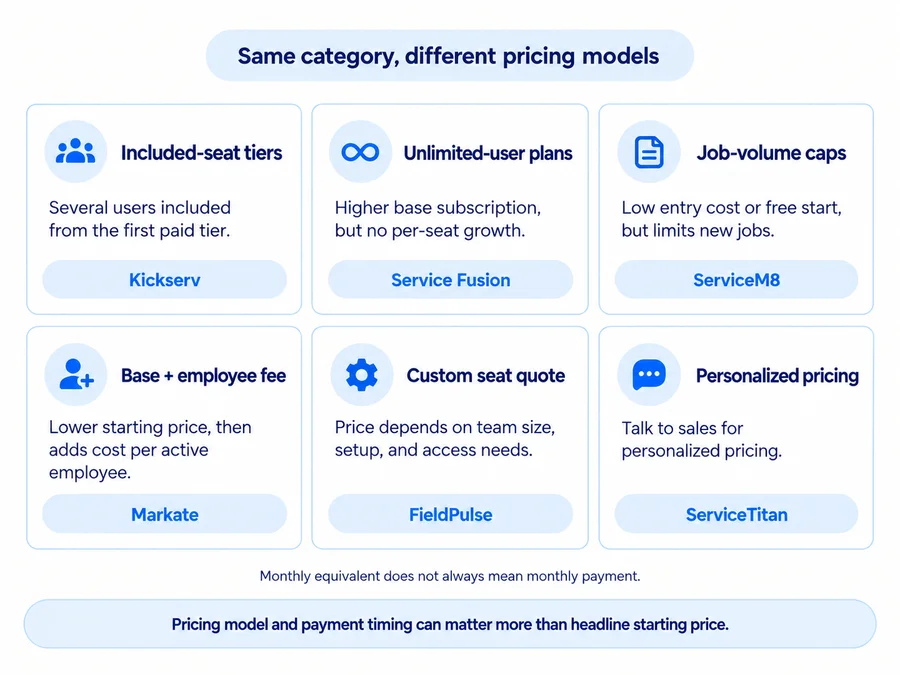
Pricing models matter as much as headline prices. “Unlimited users” can still come with job-volume limits or a higher base subscription, while a low monthly equivalent may require paying an entire year upfront.
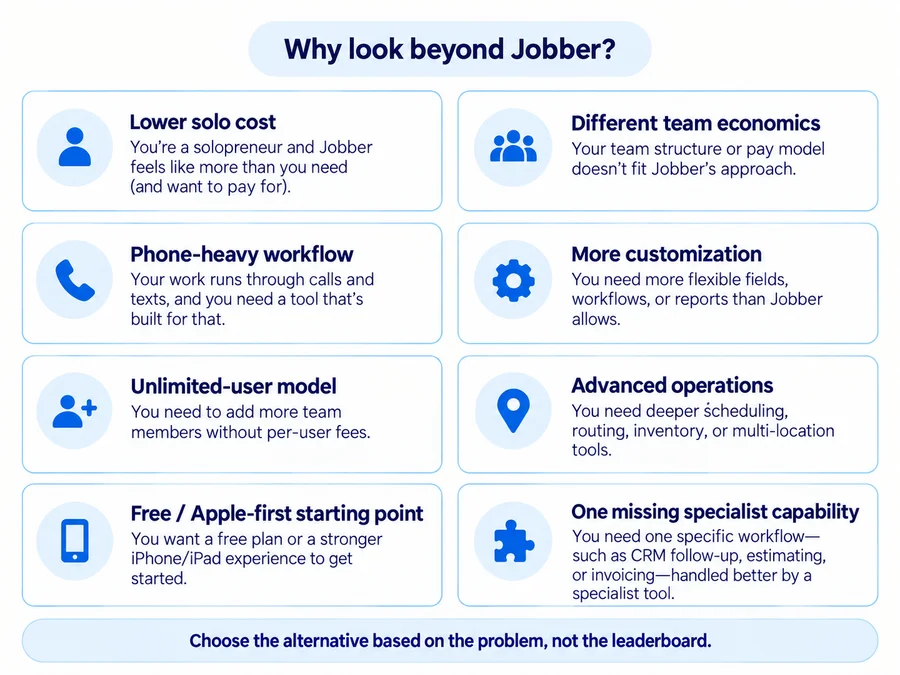
Why Look for an Alternative to Jobber?
Jobber is already broad enough to handle CRM, scheduling, quoting, jobs, invoicing, payments, and team workflows. Replacing it only makes sense when another platform solves a specific operating problem materially better.
Your Required Workflow Pushes You Into a Higher Plan
A low advertised starting price is not useful if the features you actually require sit several tiers higher.
Possible upgrade triggers include:
- QuickBooks;
- automation;
- time and expense tracking;
- job costing;
- larger teams;
- routing;
- advanced communication;
- pipeline or marketing tools.
When comparing alternatives, use the lowest suitable configuration, not the cheapest plan shown on each homepage.
For the full plan and billing breakdown, see our Jobber pricing guide.
Your Team Does Not Fit the Pricing Model
Field-service software can charge in very different ways.
Jobber uses plans with included-user counts. Service Fusion currently includes unlimited users. ServiceM8 also includes unlimited users on paid tiers but limits monthly new jobs. Markate uses a base Owner Operator price plus a small employee fee. FieldPulse uses custom seat-based pricing.
Those models can produce very different economics at one, five, or ten people.
Billing timing matters too.
A price described as “$208 per month billed annually” does not necessarily mean twelve monthly $208 payments. Service Fusion currently charges its discounted annual plan as one annual payment at signup.
You Need a More Specialized Workflow
A Jobber alternative can make sense when one operational need dominates.
Examples include:
- phone-heavy lead intake → Workiz;
- highly customizable growing-team workflow → FieldPulse;
- multiple users without per-seat growth → Service Fusion;
- inexpensive Apple-first field operation → ServiceM8;
- lead follow-up and customer reactivation → Markate;
- advanced call-center/dispatch operations → ServiceTitan.
You May Only Need a Specialist Tool
Sometimes replacing Jobber is the wrong solution.
If Jobber already handles customers, scheduling, jobs, quotes, and invoices well but one specific function is missing, adding a specialist product may cause less disruption than migrating the entire business.
For example, the real problem might be CRM follow-up, estimating, or invoicing rather than the core operating system.
If the problem is narrower, our handyman software guide gives the broader context, while the handyman CRM software, handyman estimating software, and handyman invoicing software guides compare those specialist workflows in more detail.
How We Selected the Best Jobber Alternatives
Home Service Fit evaluated alternatives using current US search results, official vendor pricing, Help Centers, product documentation, and overlap with the workflow a small home-service business might currently run in Jobber.
We considered:
- CRM;
- estimating;
- scheduling and dispatch;
- jobs;
- invoicing and payments;
- mobile workflow;
- communications;
- integrations;
- team structure;
- pricing and billing;
- migration and data considerations.
We do not claim hands-on testing. Affiliate relationships do not determine inclusion, order, Best For labels, criticism, or switching recommendations.
9 Best Jobber Alternatives
Housecall Pro: Best Closest All-Around Jobber Alternative
Housecall Pro is one of the most direct broad substitutes for Jobber because both platforms connect customer management with scheduling, dispatch, estimates, invoices, payments, and field-team operations.
Current standard pricing starts at $59/month billed annually for Basic, with Essentials at $149 for five users and MAX at $299 for eight users.
The reason to switch is not that Housecall Pro is universally cheaper or more capable. Its routing structure, current employee-location GPS model, customer/payment experience, add-ons, and advanced MAX tools differ from Jobber in ways that can better fit some teams.
The trade-off is that moving from one mature all-in-one platform to another is a significant migration, and many desirable HCP capabilities also sit above Basic.
Use the dedicated comparison before treating it as an obvious replacement.
For the head-to-head decision, read our Jobber vs Housecall Pro comparison. For more detail on Housecall Pro itself, see our full Housecall Pro review and Housecall Pro pricing guide.
QuoteIQ: Best for Handyman Owner-Operators Wanting a Lower-Cost All-in-One Starting Point
QuoteIQ is particularly relevant for handyman businesses because its workflow combines customers, estimates, scheduling, invoicing, payments, and contractor-specific tools.
Current pricing starts at $29.99/month for one-user Essentials, followed by Beginner at $74.99, Pro at $149.99, Elite at $299, and Max at $699.
That gives a solo owner a lower-cost entry point than many full FSM platforms.
The main trade-off is plan gating.
Advanced tools should not be inferred from the $29.99 price. QuoteIQ’s deeper capabilities—such as Pipelines & Deals and several advanced scheduling features — sit much higher in the current plan structure.
Its 14-day trial also currently requires a payment card.
For buyers mainly trying to reduce software cost without abandoning an all-in-one contractor workflow, QuoteIQ deserves consideration — but compare the plan containing the features you actually need.
For a deeper look at QuoteIQ’s plans, CRM depth, user feedback, and practical trade-offs, read our QuoteIQ review.
ServiceM8: Best Free/Low-Cost Option for Apple-First Solo Businesses
ServiceM8 has a fundamentally different pricing model.
Its current US Free plan costs $0 for one user and up to 30 new jobs per month.
Paid plans start at:
- Starter — $29/month, 50 jobs;
- Growing — $79, 150 jobs;
- Premium — $149, 500 jobs;
- Premium Plus — $349, 1,500+ jobs.
Paid plans currently include unlimited users.
That can be attractive when adding staff would otherwise push subscription cost upward.
But:
Unlimited users does not mean unlimited jobs.
ServiceM8 pricing scales primarily through monthly job volume.
The second trade-off is device fit. ServiceM8 remains Apple-first. The full experience is built around iPhone/iPad, while ServiceM8 Lite gives Android technicians more limited core functionality.
For an Apple-based solo business or small team, it can be a genuinely low-cost Jobber alternative. For an Android-heavy operation, test the device mix first.
Workiz: Best for Phone-Heavy and Communications-Driven Service Businesses
Workiz deserves consideration when the business revolves around phone calls, incoming leads, messages, booking, and dispatch.
Its current Standard, Pro, and Ultimate tiers use Request pricing, so old dollar amounts from third-party reviews should not be used.
Standard covers the core FSM stack, including scheduling, jobs, estimates, client management, custom fields, service areas, reports, payments, and QuickBooks.
The broader difference is the communications ecosystem.
Workiz offers products such as Genius Phone and Genius Answering alongside lead and scheduling tools. This can fit a service business where the operational problem is not simply scheduling technicians but capturing and converting inbound demand without losing customer context.
The trade-off is that some advanced phone, answering, marketing, and AI functionality sits in separate products rather than one simple subscription.
Workiz currently advertises a 7-day free trial.
FieldPulse: Best for Growing Teams Needing Customizable Workflows
FieldPulse is a stronger alternative when a growing business wants more operational flexibility around jobs, customer sites, teams, and internal workflows.
Its platform spans scheduling, dispatch, customer management, job management, project management, job costing, inventory, maintenance agreements, communications, forms, and multi-location customer records.
That depth can be useful when standard SMB workflows start feeling restrictive.
The pricing model is also different from a public Jobber plan table.
FieldPulse currently uses custom seat-based pricing based on the team’s size, setup, and required access. Buyers need a quote rather than relying on old third-party dollar estimates.
That is also the main trade-off: it is difficult to model the real switching economics before speaking with sales.
FieldPulse currently offers demos rather than a clearly advertised self-serve trial on its main pricing surface.
For a deeper breakdown of its seat-based quote, contract terms, and additional cost layers, see our FieldPulse pricing guide.
Service Fusion: Best for Growing Teams That Value Unlimited Users
Service Fusion stands out because all current plans include unlimited users.
Current pricing is:
Annual option
- Starter — $208/month equivalent;
- Plus — $325;
- Pro — $533.
Month-to-month
- Starter — $245/month;
- Plus — $382;
- Pro — $627.
The critical detail is billing.
The discounted annual option is currently charged as one annual payment at signup. So Starter at $208/month equivalent is not twelve separate $208 monthly payments.
For a growing team, that model can still be attractive because adding employees does not create the same per-user escalation found in some competitors.
The platform includes scheduling/dispatch, customer management, estimates/jobs, invoicing, payments, QuickBooks, reporting, and project-management functionality.
The trade-off is a substantially higher starting subscription—and potentially a significant upfront annual cash requirement.
Service Fusion currently offers a demo, not a free trial.
Kickserv: Best Straightforward Package for a Small Multi-User Team
Kickserv is worth comparing when the goal is a relatively clear field-service package with several users included immediately.
Current public monthly pricing is:
- Start — $60/month for 5 users;
- Run — $119 for 10 users;
- Scale — $199 for 20 users.
Start includes customer-engagement tools, an embeddable contact form, automated email/text reminders, reporting, time tracking, expense tracking, and QuickBooks Online integration.
Run adds dispatch mapping, GPS check-ins, custom fields, custom reports, and additional accounting functionality.
That makes Kickserv easy to understand for a small team that wants customer/job operations without immediately navigating a custom quote.
The trade-off is that “five users for $60” should not automatically be interpreted as cheaper than Jobber. Compare the specific feature tier your team needs.
Kickserv currently advertises a 30-day free trial.
Markate: Best for Affordable Follow-Up and Repeat-Customer Workflows
Markate is a useful alternative when the main pain point is not deep dispatch but inconsistent lead follow-up and repeat-customer communication.
Current Owner Operator pricing is $39.95/month equivalent when billed yearly as one $479.40 annual payment, with active team members currently adding $5 per employee/month.
Markate combines customer management with jobs, scheduling, invoices, payments, lead tracking, Opportunity Pipeline, follow-ups, and communications.
That can work well for an owner-operator who wants more structured follow-up without immediately jumping into a much more expensive field-service platform.
But buyers should check add-ons.
Some marketing and lead functions are separately priced. Current pricing, for example, lists automated website lead capture as an additional paid feature.
Markate currently advertises a 14-day free trial with no credit card required.
ServiceTitan: Best for Advanced Operations That Have Outgrown SMB-Level Software
ServiceTitan belongs on this list for a very different reason from QuoteIQ or ServiceM8.
It is aimed at businesses that need deeper operational infrastructure around:
- multiple crews;
- sophisticated dispatch;
- call booking;
- reporting;
- field operations;
- complex processes;
- larger service organizations.
ServiceTitan does not currently publish simple self-serve plan prices. Its official pricing flow uses personalized pricing and a requested demo, so per-technician estimates from third-party articles should not be presented as current facts.
For a larger home-service company that has genuinely outgrown SMB-level systems, this deeper operating model can be the reason to consider switching.
For a solo handyman or tiny crew, however, it is usually a very different level of software and implementation than the other alternatives here.
The trade-off is custom pricing, heavier implementation, and greater operational complexity.
Compare Jobber Alternatives by Why You Want to Switch
The fastest way to narrow the list is to start with your switching trigger.
Closest like-for-like replacement: Housecall Pro.
Solo owner / lower-cost entry: QuoteIQ, ServiceM8, or Markate.
More users without per-seat growth: Service Fusion or paid ServiceM8 plans.
Phone-heavy workflow: Workiz.
More customizable operational depth: FieldPulse.
Straightforward small-team pricing: Kickserv.
Advanced/larger operation: ServiceTitan.
This is more useful than asking which product ranks second behind Jobber because each solves a different reason for leaving.
How to Compare Jobber Alternatives Fairly
Compare the Same Workflow
Run the same basic process in each candidate:
lead → estimate → schedule → job → invoice → payment → follow-up
Watch for:
- duplicate entry;
- upgrades;
- required add-ons;
- mobile friction;
- accounting friction.
Compare the Lowest Suitable Plan
Do not compare Jobber Core with another vendor’s premium tier simply because both appear in a pricing table.
Write down your must-have features, then identify the cheapest configuration that actually contains them.
Calculate Cost at Your Actual Team Size
Run the numbers for the team you expect to have—not only the team you have today.
Useful checkpoints are:
- one person;
- two to five;
- around ten.
ServiceM8’s unlimited users, Service Fusion’s unlimited-user plans, Kickserv’s included-user tiers, Markate’s base-plus-employee model, and FieldPulse’s custom seats can produce very different results as headcount changes.
Check the Replacement’s Billing Commitment
Verify before buying:
- monthly option;
- annual prepayment;
- contract term;
- first charge;
- renewal;
- cancellation.
A lower monthly-equivalent rate can still require a much larger first payment.
Treat QuickBooks as a Workflow, Not a Checkbox
“Integrates with QuickBooks” does not mean two systems behave the same way.
Jobber is currently moving first-time QuickBooks connections toward its newer integration, while some current Help Center documentation still describes the rollout as gradual/select-account.
Where the new integration is used, ongoing sync is primarily Jobber → QuickBooks Online, and Jobber becomes the source of truth for important client and product/service records. Current documentation also distinguishes legacy accounts and says migration to the newer integration cannot be reversed.
If QuickBooks matters, verify which Jobber integration generation your account currently has before planning the cutover.
Then test the replacement’s actual:
- sync direction;
- invoice behavior;
- payment reconciliation;
- customer/item behavior;
- correction workflow.
Communication and AI Controls
If a replacement will send automated SMS, marketing texts, commercial email, or AI-generated calls, evaluate compliance controls as part of the software workflow.
For applicable TCPA robocall/robotext consent-revocation requests, current FCC rules generally require them to be honored within a reasonable time, no more than 10 business days. The broader cross-category “revoke all” requirement is currently delayed until January 31, 2027.
The FCC has also confirmed that AI-generated voices can fall under existing artificial/prerecorded-voice TCPA restrictions.
For email, FTC CAN-SPAM guidance requires covered opt-outs to be honored within 10 business days. Twilio also now requires public Privacy Policy and Terms URLs for new API-based A2P 10DLC campaign registrations submitted after June 30, 2026.
This is software-selection context, not legal advice.
How to Switch From Jobber Without Creating a Mess
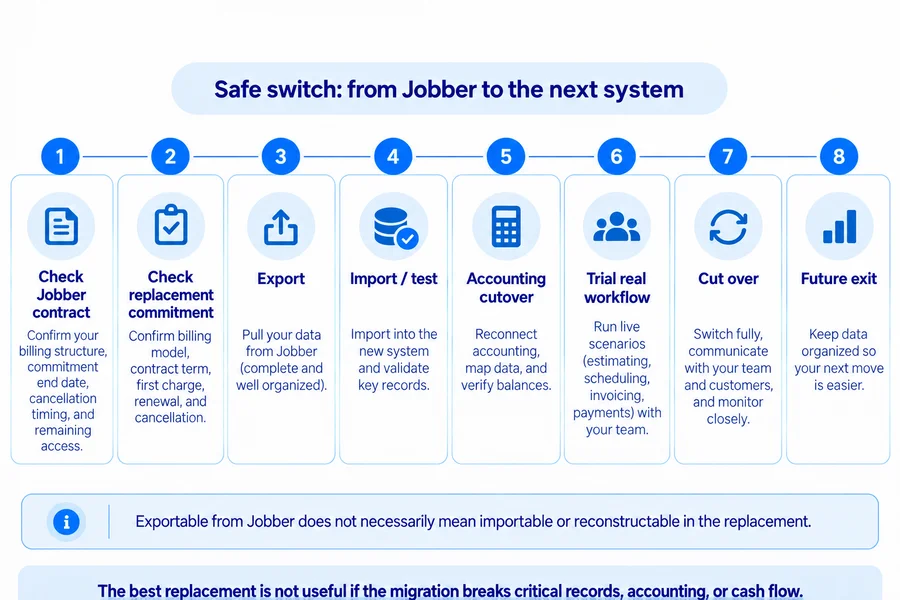
The alternative is only better if the migration does not break your records, accounting, billing, or day-to-day operations.
Check the Jobber Billing Term
Jobber currently supports three web subscription structures:
- flexible monthly;
- annual payment upfront;
- monthly payments with a 12-month commitment.
Check your actual Account and Billing page before choosing a switch date.
If you cancel a flexible plan, access continues until the current billing period ends.
If you are on an annual or monthly 1-year commitment, Jobber currently says access continues until the end of that full term—not simply the end of the current month.
So cancellation does not necessarily mean future committed payments disappear immediately.
See our Jobber pricing guide for the full breakdown of plans, billing structures, and current commitment terms.
Check the Replacement’s Commitment Too
Do the same exercise with the replacement:
- Is the advertised rate month-to-month?
- Does annual pricing require prepayment?
- Is there a contract?
- When is the first charge?
- When does renewal occur?
- How does cancellation work?
Plan the final Jobber payment and the replacement’s first payment together so the migration does not create an unexpected cash-flow overlap.
Export Before Access Ends
Do not assume the Jobber Client CSV is a complete account backup.
Current Jobber documentation supports exportable information through several different areas and reports, including:
- clients;
- one-off jobs;
- recurring jobs;
- visits;
- requests;
- invoices;
- products/services.
Client exports can include contacts, property addresses, tags, and custom fields.
Before cancellation, build an inventory of every business-critical dataset you need.
The important distinction is:
Exportable from Jobber does not mean importable—or reconstructable—in the replacement.
Test a Small Migration First
Do not import years of production data simply because a vendor says it supports Jobber migration.
Start with a small sample and verify:
- customers;
- properties;
- contacts;
- custom fields;
- jobs;
- visits;
- dates;
- attachments;
- accounting IDs.
Check where each field lands.
A migration that technically succeeds but drops property relationships, files, history, or custom fields may create more cleanup work than expected.
Plan the QuickBooks Cutover Separately
Accounting deserves its own migration plan.
Identify:
- which Jobber QuickBooks integration generation you currently use;
- which platform is the current source of truth;
- the final Jobber sync;
- whether invoices/payments still need reconciliation;
- duplicate-record risk;
- when the replacement should begin syncing.
Do not have two field-service systems freely writing overlapping records into QuickBooks during the transition without understanding the consequences.
Test the Future Exit
Before moving into the new platform, ask the same question you should have asked before choosing Jobber:
What can we export if we leave later?
Check:
- customers;
- properties;
- jobs;
- notes;
- files;
- communications;
- custom fields;
- invoices;
- history.
Evaluate the replacement across entry + operation + exit.
When Staying With Jobber May Make More Sense
Switching platforms is not automatically progress.
Staying with Jobber may make more sense when:
- the existing workflow is working;
- employees already know the system;
- customer/job records are organized;
- QuickBooks and other integrations are stable;
- the only reason to switch is a cheaper advertised starting price;
- the alternative requires similar upgrades or add-ons;
- there is no measurable operating problem to solve.
A cheaper subscription can be erased quickly by migration time, retraining, duplicate data, accounting cleanup, or temporary operational slowdown.
Ask:
What measurable operating problem will this migration solve?
If the answer is vague—“this one looks newer,” “it has more features,” or “the homepage price is lower”—the disruption may outweigh the benefit.
Switch because another platform solves a specific operational problem better, not simply because it advertises a lower price or longer feature list.
For the broader evaluation of Jobber itself, read our full Jobber review.
Which Jobber Alternative Should You Choose?
Choose based on why Jobber is no longer fitting the business.
Closest overall substitute: Housecall Pro.
Handyman owner-operator / low entry cost: QuoteIQ.
Free or inexpensive Apple-first operation: ServiceM8.
Phone-heavy service workflow: Workiz.
Customizable growing operation: FieldPulse.
Unlimited-user pricing model: Service Fusion.
Straightforward multi-user package: Kickserv.
Lead follow-up and repeat customers: Markate.
Advanced larger operation: ServiceTitan.
If none of these alternatives solves a clearly defined problem better than your current Jobber setup, staying with Jobber may be the better operational choice.
FAQs
What Is the Best Alternative to Jobber?
There is no universal best alternative.
Housecall Pro is one of the closest broad replacements. QuoteIQ is compelling for handyman owner-operators seeking a lower entry price. ServiceM8 is strong for low-cost Apple-first operations. Workiz suits phone-heavy businesses, while FieldPulse and ServiceTitan target progressively more complex operational needs.
Is There a Free Alternative to Jobber?
Yes. ServiceM8 currently offers a permanent Free plan for one user and up to 30 new jobs per month.
That can be enough for a small solo operation, but free does not mean unlimited. The Free tier limits users and monthly new jobs, and ServiceM8 remains Apple-first for its full experience.
What Is the Closest Competitor to Jobber?
Housecall Pro is one of the closest broad Jobber competitors because both combine CRM, scheduling, dispatch, estimates, invoices, payments, customer communication, and team operations.
Their pricing, routing, GPS, QuickBooks, and higher-tier feature models differ enough that the dedicated comparison is more useful than declaring them interchangeable.
Which Jobber Alternative Is Best for a Solo Business?
For a solo business, QuoteIQ, ServiceM8, and Markate deserve close consideration because each offers a relatively accessible starting point but solves a different problem.
QuoteIQ is more contractor/all-in-one oriented, ServiceM8 emphasizes low-cost Apple-first field operations, and Markate focuses strongly on follow-up and repeat business.
Housecall Pro can still make sense for a solo operator when its broader workflow justifies the higher entry price.