
Jobber and Housecall Pro both cover the core field-service workflow: customers, scheduling, estimates, jobs, invoices, payments, and team operations. The more meaningful differences appear when you look at the plan your business actually needs, how each platform handles routing and technician location, what happens in low-connectivity environments, how QuickBooks works, and which advanced tools force an upgrade.
So this Jobber vs Housecall Pro comparison does not look for one universal winner. The better fit is the platform whose lowest suitable paid plan creates fewer compromises for the way your business actually operates.
Last updated: September 2026
Pricing and product information last verified September 18, 2026.
On this page
- Jobber vs Housecall Pro at a Glance
- Jobber vs Housecall Pro Pricing: Compare the Plan You Actually Need
- How Jobber and Housecall Pro Compare
- What Current Users Say About Jobber vs Housecall Pro
- Which Is Better for Different Home-Service Businesses?
- How to Test Jobber and Housecall Pro Before You Choose
- Jobber vs Housecall Pro: Which Should You Choose?
- FAQs
Jobber vs Housecall Pro at a Glance
| Decision Area | Jobber | Housecall Pro | Why It Matters |
|---|---|---|---|
| Solo entry cost | Core: $29/mo equivalent billed annually for 1 user | Basic: $59/mo billed annually for 1 user | Entry pricing differs materially, but price alone does not determine fit |
| Five-person cost | Connect: $149/mo annually for up to 5 users | Essentials: $149/mo annually for 5 users | Same subscription price can buy different capabilities |
| Scheduling | Jobs, visits, recurring work, New Schedule, team calendar | Scheduling/dispatch, recurring jobs, team calendar | Both cover core service scheduling |
| Routing | New Schedule Route Optimization on Connect+ | Routes on Essentials; Optimize by Drive Time on MAX | Similarly named tools behave differently and require different tiers |
| Online booking | Request forms and direct booking with Client Hub/customer workflow | Online Booking through website, direct link, and supported Google surfaces | Handyman businesses may need request-first as well as instant booking |
| Payments | Integrated card/ACH, automatic payments, Instant Payouts, Wisetack financing | Integrated card/ACH, Instapay, Wisetack financing | Neither has an exclusive claim on financing or faster payouts |
| GPS/location | GPS Waypoints tied to technician actions/events | Employee GPS can show current/near-real-time location on HCP Map | These are materially different location models |
| Low-connectivity work | Several specific offline actions are clearly documented | Current official sources conflict on the full offline editing scope | Businesses working in poor-signal areas should test exact actions |
| QuickBooks | New integration is primarily Jobber → QBO; Jobber becomes operational source of truth for key data | Primarily HCP → QBO; later invoice edits may require manual re-sync | Both require understanding where records should originate |
| Onboarding/support | Standard support plus higher-tier onboarding/premium support | Phone/chat included; MAX adds dedicated onboarding and escalated support | Support channels and onboarding depth vary by plan |
| Growth tools | Automation, job costing, AI/Receptionist, Pipeline/marketing and Plus-level controls | Service Plans, Sales Proposals, AI/add-ons, Route Optimization, open API | The useful growth path matters more than raw feature count |
| Free trial | 14 days, no card, Grow-level functionality | 14 days, no card, MAX-level functionality | Trial capability is higher than entry paid-plan capability |
Current pricing confirms Jobber Core at $29/month equivalent annually, Connect at $149 for five users, Housecall Pro Basic at $59 annually, and Essentials at $149 for five users. Both products currently offer 14-day no-card trials.
Jobber vs Housecall Pro Pricing: Compare the Plan You Actually Need
The biggest mistake in a Jobber vs Housecall Pro cost comparison is putting the two cheapest advertised prices beside each other and stopping there.
The useful question is:
What is the lowest-cost plan in each platform that actually contains your must-have workflow?
Solo Business
For one user, Jobber currently has the materially lower standard annual entry price.
Jobber Core
- 1 user;
- $29/month equivalent when billed annually;
- $49/month with no commitment.
Housecall Pro Basic
- 1 user;
- $59/month billed annually;
- $79 month-to-month.
That makes Jobber easier to enter from a pure subscription-cost perspective. But Core and Basic are not identical bundles.
Housecall Pro Basic includes features such as job costing, Price Book functionality, Online Booking, estimates/invoicing, payments, and consumer-financing access. Jobber Core covers the essential customer, scheduling, quoting, invoicing, payment, online-booking, and reporting workflow, while several automation and team capabilities begin on Connect.
The relevant question for a solo owner is therefore not simply, “Can I save $30 per month with Jobber?”
It is:
Would I actually use anything in Housecall Pro Basic that justifies paying more?
Five-Person Team
At five users, the pricing comparison becomes much more interesting.
Jobber Connect — 5 users: approximately $149/month billed annually.
Housecall Pro Essentials — 5 users: approximately $149/month billed annually.
Same current price. Different feature bundle.
Jobber Connect adds QuickBooks Online sync, time and expense tracking, automated client reminders, automatic payments, quote/invoice follow-ups, checklists, and New Schedule Route Optimization.
Housecall Pro Essentials adds Routes, employee GPS tracking, QuickBooks Online sync, checklist automation, commissions, flat-rate pricing, and richer photo/reporting tools.
So the five-person comparison is where feature behavior matters more than sticker price.
When You Need More Advanced Operations
Advanced tiers are not direct equivalents.
Jobber Grow currently adds job costing, more advanced quoting, two-way SMS, custom automation, and automatic time tracking. Plus moves into more sophisticated team controls, file/media management, marketing/Pipeline/Receptionist tools, dedicated onboarding, and premium support.
Housecall Pro MAX adds capabilities such as automatic Route Optimization, recurring Service Plans, the Sales Proposal Tool, open API access, dedicated onboarding, and escalated phone support.
The right upgrade question is:
Which specific requirement forces us into the next tier?
For a deeper breakdown of plans, team sizes, and feature gates, see our Jobber pricing guide and Housecall Pro pricing guide.

How Jobber and Housecall Pro Compare
Scheduling, Dispatch, and Routing
Both products can manage one-time work, repeat work, assignments, rescheduling, and team calendars. The more important difference is what each product means by routing.
Jobber’s current New Schedule supports Route Optimization on Connect, Grow, and Plus. It can optimize scheduled anytime visits directly from the schedule based on actual driving distance. Jobber still has Legacy Schedule documentation as well, including older master-route behavior, so those two scheduling models should not be mixed together.
Housecall Pro separates Routes from Optimize by Drive Time.
Essentials includes Routes, which shift scheduling toward route-based organization. MAX adds Optimize by Drive Time, which automatically reorders one technician’s jobs within a day using job locations and live traffic. It does not reassign technicians or move jobs to different days.
This creates a practical difference for a five-person team paying roughly $149/month on either platform.
If you simply need to organize work into routes, Housecall Pro Essentials may cover that need.
If you specifically need automatic drive-time route reordering, Jobber Connect currently reaches that behavior at the $149 five-user configuration, while Housecall Pro requires MAX.
That still does not make Jobber universally “better at routing.” The right question is which routing behavior your team needs.
For a broader comparison of calendars, booking, recurring work, routing, and travel controls, see our handyman scheduling software guide.
Online Booking and Customer Experience
Both platforms let customers start work without calling the office.
Jobber supports work-request forms and direct online booking. Its Client Hub then provides a customer-facing place to review quotes, appointment information, invoices, and payments.
Housecall Pro offers Online Booking through a business website, direct booking links, and supported Google surfaces, with customer communication continuing through estimates, job notifications, invoices, and payment flows.
For handyman businesses, the key difference is not simply whether a “Book Now” button exists.
Some services are predictable enough for direct booking. Others need photos, questions, an assessment, or manual approval before they belong on the calendar.
Both systems should therefore be evaluated on whether their booking workflow lets your business keep enough control over uncertain jobs, rather than on who exposes more slots to customers.
Estimates, Invoicing, Payments, and Financing
Both products can handle the main commercial workflow:
estimate → approval → job → invoice → payment
Both also support integrated card and bank-payment options, faster-payout functionality, and Wisetack consumer financing in the US.
Jobber currently offers Wisetack financing across eligible plans and Instant Payouts that can send eligible pending funds to a debit card within minutes for an additional 1% fee.
Housecall Pro also integrates Wisetack and offers Instapay, which currently adds 1% on top of the underlying card or ACH processing cost and typically sends eligible funds much faster than standard payouts.
So financing and fast payouts should not be treated as an exclusive advantage of either product.
The more useful comparison is workflow preference:
- How easy is it to move an approved estimate into active work?
- Can the technician finish the job and invoice from the field?
- How does the customer see and pay the invoice?
- Which payment tools are included in the plan you actually need?
- How do payouts, disputes, and accounting fit your process?
If quoting or billing is the main problem you are trying to solve, compare our handyman estimating software guide and handyman invoicing software guide.
Team Management, GPS, and Time Tracking
“Both have GPS” hides an important implementation difference.
Jobber GPS Waypoints are primarily event/action-based location records.
When a technician performs supported activities—such as timer events, completing work, adding certain updates, notes, or attachments—Jobber can associate those events with a timestamp and location. The resulting waypoint history helps the office understand where work-related actions happened and how the day progressed.
That is different from continuous live employee tracking.
Housecall Pro Employee GPS, where enabled, can show an employee’s current or near-current location on the HCP Map during business hours. Housecall Pro says Android locations update roughly every 15 minutes, while iOS updates are triggered by movement and app activity. Employee GPS is also distinct from Housecall Pro’s separate vehicle-GPS hardware product.
So ask what you actually need:
- Where did the technician perform a work action?
- Where does the employee currently appear to be?
- Where is the vehicle?
- How is paid work time tracked?
Jobber also supports time tracking, expenses, and higher-tier location-based timer functionality. Housecall Pro combines employee-location visibility with its team/time workflows.
These are not interchangeable implementations.
Mobile App and Low-Connectivity Field Work
Both products have iOS and Android apps. Low-connectivity work is where the comparison becomes less clean.
Jobber currently has clearer official documentation for several specific offline actions.
Its Help Center says technicians can:
- start and stop timers offline;
- fill out job forms;
- add notes;
- attach photos/files;
and have the data synchronize when connectivity returns. Some tools—such as location-based timers and live/current team information—still require a connection.
Housecall Pro’s official guidance is currently inconsistent.
Its Help Center says previously opened job information can be stored and viewed offline and states that general editing without Wi-Fi or cellular service is not supported.
However, a recent official Housecall Pro App Store developer response describes limited offline actions including job forms, customer signatures, and photo attachments.
The correct conclusion is therefore not “Jobber works offline and Housecall Pro does not.”
It is:
Jobber currently documents several offline field workflows more clearly. Housecall Pro’s current official sources describe different levels of offline capability.
If weak-signal work is important, test the exact actions you need in both current apps before choosing.
QuickBooks and Integrations
Both products integrate with QuickBooks Online, but neither should be summarized as simply having “two-way QuickBooks sync.”
Jobber
Jobber is moving first-time QuickBooks connections to its newer integration model, although some current Jobber documentation still describes the rollout as gradual. Where the new integration is used, ongoing sync is one-way from Jobber to QuickBooks.
Under the newer model, Jobber becomes the operational source of truth for relevant client and product/service information.
Legacy integration accounts can still exist. Jobber’s current documentation also says that once a legacy account migrates to the new integration, it cannot return to the old integration.
That matters if your accountant is used to the older workflow.
Housecall Pro
Housecall Pro also says its QBO integration typically operates HCP → QuickBooks Online, but the reconciliation behavior is different. Once an invoice first syncs, later edits in Housecall Pro do not automatically update the QBO invoice; the invoice needs to be manually pushed again. Deleting or canceling the HCP invoice also does not automatically remove or cancel the corresponding QBO invoice. Current setup can also use different initial sync triggers, such as a job becoming Finished or Invoiced.
So the buyer question is: Which application becomes the operating source of truth, and what manual reconciliation remains when records change?
If you haven’t chosen an accounting platform yet, our handyman accounting software guide compares QuickBooks, Wave, Xero, and other options based on bookkeeping capabilities, project profitability, and integration needs.
Ease of Setup, Onboarding, and Support
Both platforms can be self-started by a small business without an enterprise implementation project, but the setup burden increases once you add teams, accounting, automations, payments, routing, customer communications, and historical data.
Jobber provides live and email support across its main paid plans. Its current Grow documentation includes live/email support, while Plus adds a dedicated onboarding specialist, premium support, and expanded data-import/onboarding assistance.
Housecall Pro currently includes live phone and chat support across plans. MAX adds a dedicated onboarding specialist and escalated phone support.
That describes support availability, not support quality.
Actual support experiences differ by customer and situation, so current user sentiment belongs in the review-evidence section below.
When testing either platform, pay particular attention to how difficult it is to set up your real services, customers, schedule, payment flow, QuickBooks process, and staff permissions.
Reporting, Job Costing, and Growth Tools
Both platforms extend beyond basic scheduling and invoicing as the business grows, but their advanced paths are packaged differently.
Jobber Grow currently emphasizes job costing, profitability, advanced quoting, automatic time tracking, two-way SMS, and custom workflow automation. Plus adds more team/document controls along with Pipeline, Marketing Suite, AI Receptionist, dedicated onboarding, premium support, and broader advanced-operation tools.
Housecall Pro includes job costing at Basic, then adds more team tools on Essentials. MAX moves into automatic Route Optimization, recurring Service Plans, Sales Proposals, open API access, and stronger onboarding/support. Housecall Pro also sells additional operational, communications, marketing, AI, and finance tools separately.
Neither growth path is automatically better.
The more useful question is:
Which advanced capability will this business actually use enough to justify the tier or add-on that contains it?
What Current Users Say About Jobber vs Housecall Pro
Current software-review marketplaces rate both products positively, but the review environments are not identical.
On Capterra, Jobber currently shows 4.6/5 from 1,482 reviews, while Housecall Pro shows 4.7/5 from 2,745 reviews. A 0.1-star difference is not meaningful evidence that one platform is universally better.
On G2, Jobber currently shows 4.6/5 from 529 reviews and Housecall Pro 4.3/5 from 205 reviews. Again, these are different reviewer populations rather than a controlled product experiment.
The recurring Jobber positives across current reviews include:
- ease of use;
- organization;
- scheduling;
- quoting/invoicing workflow;
- customer communication;
- positive support experiences.
Recurring criticism includes pricing/plan limitations, routing or map frustration in some workflows, reporting/customization limits, updates, and integration issues.
Housecall Pro reviews commonly praise:
- scheduling;
- ease of use;
- connected customer/job workflow;
- invoicing/payments;
- mobile convenience;
- positive support experiences.
Current criticism includes price and add-ons, product/UI changes, billing or cancellation frustration, payments/payout issues, support inconsistency, and integration/mobile complaints.
Trustpilot is especially different: Jobber currently shows 4.2/5 from 228 reviews, while Housecall Pro shows 2.4/5 from roughly 637 reviews. That gap should be treated as a signal to investigate complaint themes, not a direct product-quality scorecard.
Recent handyman discussions are similarly mixed. Some users describe Jobber as easier to operate; others prefer Housecall Pro’s particular workflow or advanced proposal features. Other comments criticize the price and complexity of both. Community anecdotes are useful for finding questions to test, not for establishing universal facts.
For a deeper look at each platform separately, read our full Jobber review and Housecall Pro review.
Which Is Better for Different Home-Service Businesses?
Solo Handyman or Owner-Operator
Jobber deserves especially close consideration for a solo owner because its current annual entry point is materially lower.
If Core contains the actual workflow you need, starting around $29/month equivalent instead of $59 for Housecall Pro Basic can matter.
But price should not make the decision by itself.
Housecall Pro Basic may still make more sense if its particular customer workflow, job costing, Price Book, payments, booking model, or overall operating style fits the business better.
For a solo operator, the right test is simple:
Which system removes more admin without making you adopt features you will barely use?
Small Team of 2–5 People
At around five users, current base subscription pricing can converge.
That means the decision should shift away from “Which costs less?” toward:
- Which routing behavior do we need?
- Do we want event-based GPS waypoints or current employee-location visibility?
- How important is QuickBooks?
- Which automation tools do we need?
- How do we track time?
- Which customer workflow feels natural?
- What onboarding/support level do we need?
This is probably the clearest example of why comparing plan names or prices alone is not enough.
Routing-Heavy Service Team
For a team making many stops each day, route behavior can materially change the required plan.
Jobber currently provides New Schedule Route Optimization on Connect and above.
Housecall Pro Essentials provides Routes, but automatic Optimize by Drive Time requires MAX.
So if automatic drive-time reordering is genuinely required, calculate the subscription tier needed for that behavior—not simply whether both websites mention “routing.”
If route grouping and predictable territories are enough, Housecall Pro Essentials may still meet the need.
Business Working in Weak-Signal Areas
Jobber currently documents more specific offline actions clearly, including timers, forms, notes, and attachments.
Housecall Pro’s current official sources conflict about how far its offline editing extends.
That means this scenario should not be decided from the comparison table.
During both trials, reproduce the actual field workflow:
- open the job;
- lose connectivity;
- complete the required form;
- add photos;
- capture any needed signatures;
- write notes;
- run timers;
- make the job update you rely on;
- reconnect and confirm synchronization.
The better fit is whichever current app reliably supports the exact field actions your business needs.
Growing Team That Needs More Sales and Service Tools
As the company grows, the difference becomes less about core FSM functionality and more about which expansion path matches the operation.
Jobber may fit a team that values its automation model, advanced quoting, job costing, Marketing Suite, Pipeline, AI Receptionist, and Plus-level onboarding/support.
Housecall Pro may fit a team that specifically values Service Plans, Sales Proposals, real-time employee GPS visibility, MAX Route Optimization, its API model, or its broader ecosystem of paid operational add-ons.
More advanced features do not automatically mean more value.
They only matter if the business will use them.
Project-Heavy Construction Business
Neither product is primarily a deep construction project-management platform.
If your business depends on:
- long multi-phase projects;
- procurement;
- subcontractor workflows;
- detailed project accounting;
- extensive construction documentation;
- formal construction-specific project controls;
the better answer may be a different software category entirely.
That is a poor-fit scenario for the comparison itself, not a reason to force one of these two platforms into a workflow they were not primarily designed to manage.
If neither platform fits your workflow, our broader handyman software guide compares additional options for small service businesses.
How to Test Jobber and Housecall Pro Before You Choose
The fairest way to compare them is to run the same realistic workflow in both systems.
There is one major warning first.
Jobber’s current 14-day trial provides access to Grow-level functionality, while Housecall Pro’s 14-day trial provides MAX-level functionality. Neither trial therefore represents the cheapest paid configuration.
Do not choose based on which trial appears more capable.
After testing, map every feature you actually used to the lowest paid plan that contains it.
Run this same test in both:
- Create the same fictional customer.
- Build the same estimate.
- Convert it into a job.
- Schedule the job.
- Reschedule it.
- Add a recurring visit.
- Assign another employee if relevant.
- Test Online Booking.
- Open the job on mobile.
- Add the same notes and photos.
- Test the exact low-connectivity actions that matter to your business.
- Create the invoice.
- Test the payment workflow without unnecessary real payment data.
- If you use QuickBooks, test both integrations with safe test records.
- Test the routing behavior you actually need.
- Export the same sample customer/job data.
- Write down every feature you relied on.
- Identify the lowest paid plan in each platform that contains those features.
If you are switching from another FSM, add a migration test.
Verify:
- which customer fields import;
- which job/history data moves;
- whether attachments transfer;
- whether custom fields map;
- what must be archived separately;
- which records or relationships cannot be recreated cleanly.
Do this before canceling the old platform.
At the end, ask:
Which product required fewer workarounds at the paid tier we would actually need?
Jobber vs Housecall Pro: Which Should You Choose?
There is no universal answer to Housecall Pro vs Jobber.
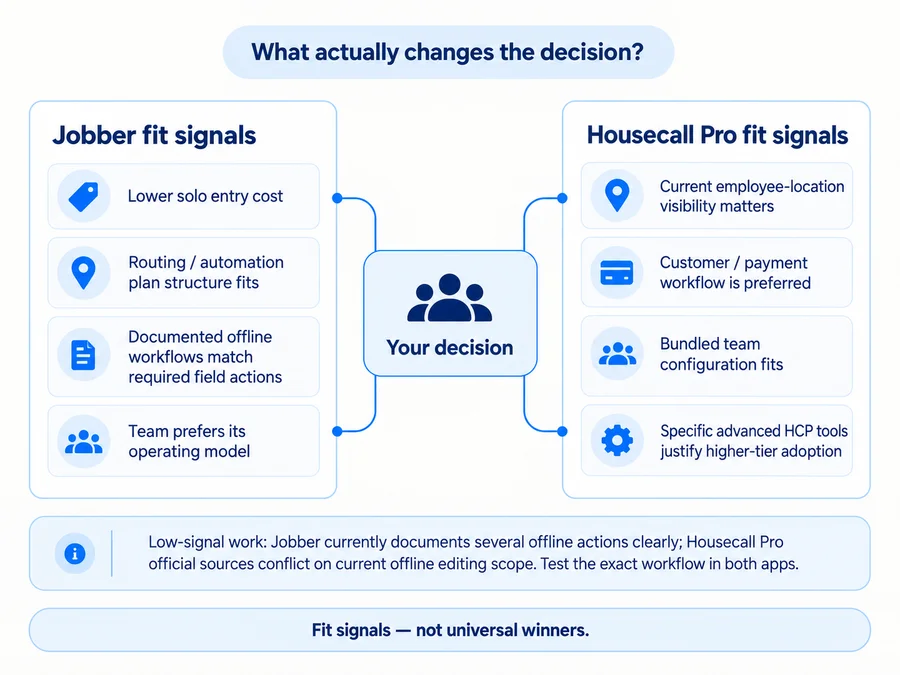
Jobber may fit better when the lower solo entry price matters, its particular plan structure covers your required workflow at a lower tier, its routing/automation model fits the way your team operates, or its clearly documented offline workflows match important field actions after you test both apps.
Housecall Pro may fit better when current employee-location visibility matters, you prefer its customer/payment workflow, its five-user Essentials bundle matches your team, or specific MAX-level tools such as automatic route optimization, Service Plans, Sales Proposals, or API access justify the higher tier.
For a five-person team, the current $149-vs-$149 example shows why there is no useful “winner” based on price alone. For a solo business, Jobber’s lower starting price matters—but only if Core actually covers what you need.
The final principle is:
Choose the platform whose lowest suitable paid plan supports your real workflow with the fewest compromises—not the product that wins the most rows in a feature table.
FAQs
Is Jobber Cheaper Than Housecall Pro?
For one user, Jobber currently has the lower standard annual entry price: Core is about $29/month equivalent versus $59/month for Housecall Pro Basic.
For teams, the answer depends on size and required features. At five users, Jobber Connect and Housecall Pro Essentials currently both cost about $149/month billed annually, but they include different capabilities.
For current plan details, see our Jobber pricing guide and Housecall Pro pricing guide.
Is Jobber or Housecall Pro Better for a Solo Business?
Jobber deserves close consideration because its current single-user entry price is lower.
Housecall Pro can still justify its higher starting price when the owner specifically prefers its workflow or will actively use capabilities included in Basic.
For a solo business, compare the lowest suitable plan, not just the lowest advertised price.