

The best handyman invoicing software can be anything from a simple phone-first invoice app to a complete field-service platform connecting estimates, jobs, invoices, payments, and customer history. A solo handyman searching for a handyman invoice app may only need to bill a customer before leaving the jobsite, while a busier business may need recurring billing, payment reminders, accounting sync, or invoices tied directly to completed jobs.
The right choice depends heavily on what happens before and after the invoice.
Do you already know what to bill? Do you want an accepted estimate to become the invoice automatically? Do customers pay by card or ACH? Do you collect deposits or staged payments? Do you have recurring maintenance clients? And does the invoice need to flow into QuickBooks or another accounting system?
For a solo handyman completing one-off repairs, fast mobile invoice creation, clear labor and material line items, online payment, and a receipt may be enough. A growing owner-operator or team may additionally need deposits, payment schedules, overdue reminders, recurring invoices, customer/job history, and accounting integration.
The goal is not to buy the largest system. It is to find the simplest invoicing setup that lets you bill correctly, collect payment, and keep the records your business actually needs.
Best Handyman Invoicing Software at a Glance
These are use-case recommendations, not an absolute numerical ranking.
- Joist — Best overall for simple handyman invoicing: A contractor-focused mobile workflow for estimates, invoices, deposits, payment schedules, reminders, and on-site payments without requiring a large FSM platform.
- Billdu — Best dedicated invoice app for professional documents and reminders: Strong invoice-specific functionality, client tracking, estimates, recurring invoices on higher tiers, and polished mobile/web billing.
- QuoteIQ — Best for an all-in-one handyman invoicing workflow: Connects estimates, invoices, recurring billing, payments, customers, scheduling, and job information in a home-service-oriented system.
- Tofu — Best for offline mobile invoicing from the jobsite: Especially useful when invoices and estimates need to be created on a phone even when connectivity is weak or unavailable.
- Jobber — Best for recurring jobs and automated invoice follow-up: A stronger fit when invoicing is tied to recurring service work, invoice schedules, batch billing, customer reminders, and automatic payments.
- Housecall Pro — Best for growing teams and advanced payment workflows: Combines invoicing with job operations, automatic reminders, auto invoicing, progress invoicing, financing, and team workflows.
- Wave — Best free invoicing with basic bookkeeping: Its Starter plan currently provides unlimited invoices and basic bookkeeping without a software subscription.
- QuickBooks Online — Best for invoicing tied to full accounting: Best when the invoice should immediately become part of the business’s accounting ledger, receivables, expenses, reporting, and project financials.
- Square Invoices — Best for payment-first invoicing and deposits: Strong for businesses already centered on card, ACH, and in-person payments, with free invoicing plus recurring billing and deposits.
- SupaHandi — Best for connecting invoices with actual job profit: A handyman-focused workflow that connects what you billed and collected with labor, materials, expenses, and actual project margin.
Handyman Invoicing Software Comparison
| Software | Best for | Invoice workflow type | Mobile invoicing | Online payments | Recurring/reminders | Pricing approach | Main limitation |
| Joist | Simple contractor billing | Contractor invoice app | Yes | Cards, ACH, wallets, Tap to Pay and other supported methods | Automatic reminders; payment schedules | Basics $10/mo; Pro $17; Elite $32; Run currently $70 introductory rate; 14-day trial | Basics limited to 5 documents/month; deeper job workflow requires higher tiers |
| Billdu | Dedicated invoicing | Dedicated invoicing software | iOS, Android and web | Stripe/PayPal-supported online payments | Reminder functionality; recurring invoices on Premium | Lite $7.99 monthly / $4.99 annual-equivalent; higher tiers add clients and automation | Not a handyman job-management platform |
| QuoteIQ | Connected handyman workflow | Handyman all-in-one | Yes | Cards, ACH, wallets and other Stripe-supported methods | Automated reminders and recurring/subscription billing | Essentials starts at $29.99/mo | QuickBooks sync and job costing require Pro or above |
| Tofu | Offline field billing | Mobile FSM / invoice app | Yes, including offline creation | Card and ACH payment links | Automatic reminders; recurring-job invoice drafts | Solo regular list $29 monthly; annual and promotional rates can be lower; 7-day trial | Broader than a pure invoice app if all you need is basic billing |
| Jobber | Recurring service workflows | Full FSM | Yes | Card and ACH through Jobber Payments | Recurring-job invoice schedules, follow-ups and automatic payments on qualifying plans | Core regular pricing starts $49/mo no commitment or $29/mo annual-equivalent | Important automation features are plan-gated |
| Housecall Pro | Team-based invoicing | Full FSM | Yes | Cards, ACH, in-person methods, financing and others | Invoice reminders, auto invoicing; progress invoicing where enabled | Basic $79 monthly or $59/mo billed annually | More software and payment complexity than many solo operators need |
| Wave | Free invoicing + basic books | Accounting + invoicing | Yes | Card and bank payments subject to eligibility/fees | Recurring invoices; automatic sending/reminders depend on payments/plan | Starter $0; Pro $19/mo or $190/year | Limited handyman-specific job workflow |
| QuickBooks Online | Full accounting | Accounting + invoicing | Yes | QuickBooks Payments | Recurring transactions and reminders/automation depending on workflow and plan | Simple Start regular list $38/mo; higher accounting tiers cost more | Not primarily field-service software |
| Square Invoices | Payments and deposits | Payments + invoicing | Yes | Strong online, ACH and in-person Square ecosystem | Recurring invoices and reminders broadly available; some advanced schedules require paid tiers | Square Free $0/location; Plus $49; Premium $149 | Advanced invoice functionality and processing rates vary by tier |
| SupaHandi | Invoice-to-profit tracking | Invoicing + profit tracking | Web/mobile-friendly workflow | Online payment on sent invoices | Basic billing rather than deep recurring automation | First send free; Pro $20/mo | Not a full accounting suite or large FSM |
Product, plan, and pricing details were checked against current official vendor information on September 4, 2026. Features, payment rates, and subscription structures can change.
How We Selected and Evaluated Handyman Invoicing Software
We evaluated these products around the way a handyman moves from completed work to collected payment.
Criteria included:
- field and mobile invoicing;
- estimate-to-invoice conversion;
- labor/material line items;
- deposits, partial payments, and payment schedules;
- card, ACH, and in-person payments;
- payment reminders and invoice tracking;
- recurring invoices and automatic billing;
- customer and job history;
- accounting integrations;
- users and team fit;
- payment-processing costs;
- subscription and free-plan limits;
- broader software complexity.
Official vendor documentation is our primary source for current pricing and product facts. This is a curated shortlist rather than an exhaustive market map.
Home Service Fit does not claim hands-on testing unless explicitly stated, and affiliate availability does not determine product inclusion, position, or verdict.
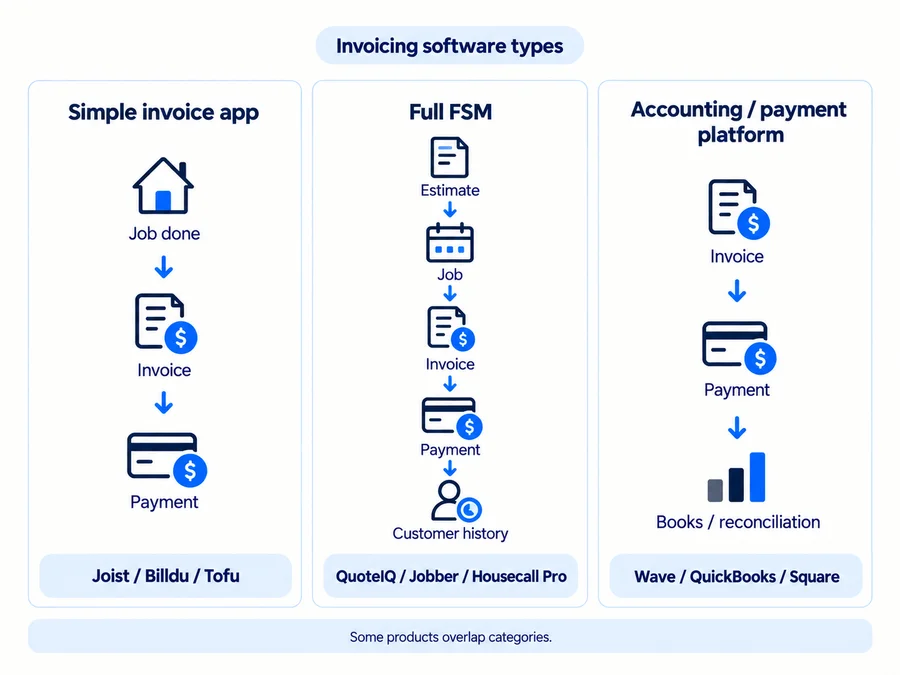
Invoice App vs Invoicing Software vs Full Field Service Software
Mobile Invoice Apps
A mobile invoice app is primarily about doing billing work quickly from a phone or tablet.
For a solo handyman, the useful workflow may be only:
finish job → add labor/materials → send invoice → collect payment → send receipt
Joist, Billdu, and Tofu all serve this need differently. Joist is contractor-centric, Billdu is dedicated invoicing software, and Tofu adds offline and lightweight field-service capabilities.
Invoicing and Accounting Software
Wave and QuickBooks Online treat invoicing as part of the financial system.
They make more sense when the owner also needs bookkeeping, expense categorization, reconciliation, reporting, or accountant access.
The trade-off is operational depth. Accounting software generally does not replace the scheduling, dispatch, field documentation, and job workflows found in a handyman FSM.
Full Field Service Platforms
QuoteIQ, Jobber, and Housecall Pro make more sense when an invoice belongs to a larger workflow:
customer → estimate → scheduled job → completed work → invoice → payment → customer history
That becomes more valuable as job volume and team complexity grow. For a solo handyman who mainly needs to send invoices from a phone, the extra FSM functionality may not justify the additional cost.
10 Best Handyman Invoicing Software & Apps for 2026
Joist: Best Overall for Simple Handyman Invoicing
Best for: Solo handymen and owner-operators who want a straightforward contractor-focused path from estimate to invoice to payment.
Invoicing approach: Joist is centered on estimates, invoices, and getting paid, although its newer Run tier adds Jobs and Scheduling rather than leaving the product invoice-only.
Key capabilities: Mobile and web invoicing, one-tap estimate-to-invoice conversion, reusable templates, branded documents on qualifying tiers, signatures, deposits, payment schedules, automatic payment reminders, invoice-status tracking, online payments, and Tap to Pay. Joist also supports cards, ACH bank transfers, digital wallets, and other payment methods through its current payments stack.
Strengths: The product remains focused enough for a solo contractor. You can create an invoice at the jobsite, request a deposit or staged payment, track whether it was viewed or paid, and collect payment without implementing a full dispatch system.
Main limitations: Basics is capped at five documents per month. QuickBooks synchronization and more advanced business features require higher plans, while Run adds job organization and scheduling at a much higher price.
Pricing: Basics currently starts at $10/month, Pro $17, Elite $32, and Run is currently shown at a $70 introductory monthly price. Joist offers a 14-day trial and no longer has its old permanent free plan.
Verdict: Joist is the strongest simple invoicing fit for many solo handymen who do not need full FSM complexity.
Billdu: Best Dedicated Invoice App for Professional Documents and Reminders
Best for: Handymen who want a dedicated billing app with stronger invoice-specific functionality than a basic invoice maker.
Invoicing approach: Billdu focuses on documents, clients, payments, reminders, expenses, and recurring billing rather than scheduling technicians and dispatching jobs.
Key capabilities: Web, iOS, and Android invoicing, professional templates, saved products/services, client signatures, invoice status, estimates that can move into invoices, online payments through providers such as Stripe and PayPal, receipts, expense tracking, and recurring invoices.
Strengths: All current paid tiers include unlimited invoices. Lite supports 10 clients, Standard increases that to 50 and adds estimates and two team members, while Premium provides unlimited clients, 10 team members, and recurring invoices.
There is one current documentation nuance around reminders. Billdu’s pricing page lists payment reminders on Standard, but its newer Help Center says configurable automatic reminder rules are Premium-only. Buyers who specifically want hands-off overdue follow-up should verify that distinction.
Main limitations: Billdu does not primarily manage handyman scheduling, job dispatch, or field operations. Recurring invoices are also currently configured through its web workflow.
Pricing: Lite is currently $7.99 month-to-month or $4.99/month equivalent annually; Standard $14.99/$9.99; Premium $27.99/$19.99. A 7-day trial is available without a credit card.
Verdict: Billdu makes sense when professional billing depth matters more than full handyman business management.
QuoteIQ: Best for an All-in-One Handyman Invoicing Workflow
Best for: A handyman who wants invoices connected with estimates, payments, recurring billing, scheduling, customers, and job information.
Invoicing approach: QuoteIQ treats invoicing as part of a wider home-service workflow rather than a standalone document.
Key capabilities: One-tap estimate-to-invoice conversion, invoices created from scratch or with AI Autopilot, mobile/web access, automated reminders, mass invoicing, online card and ACH payments, deposits and partial payments, recurring/subscription billing, customer history, scheduling, and job documentation.
QuickBooks Online synchronization is currently available on Pro and above, where invoices and payments can sync into QuickBooks. Job costing also begins at Pro in the current plan structure.
Strengths: The main advantage is continuity. An approved estimate can become the invoice, the payment remains associated with the customer and job, and recurring work can use subscription billing rather than requiring each invoice to be rebuilt.
Main limitations: A handyman who only needs invoice creation may pay for scheduling, CRM, estimating, and other functionality that a dedicated invoice app handles more cheaply.
Pricing: Essentials currently starts at $29.99/month for one user. Recurring invoices and invoicing are documented on Essentials, while higher tiers add deeper financial and team functionality.
For a broader evaluation of QuoteIQ beyond invoicing, read our QuoteIQ review.
Verdict: QuoteIQ is strongest when invoicing needs to stay connected with the rest of a handyman business rather than functioning as an isolated billing tool.
Tofu: Best for Offline Mobile Invoicing From the Jobsite
Best for: Handymen who work primarily from their phones and cannot assume reliable connectivity at every jobsite.
Invoicing approach: Tofu combines field invoicing with lightweight FSM functionality and a strong offline workflow.
Key capabilities: iOS, Android, and web access; invoices and estimates that can be created offline and synced when connectivity returns; estimate-to-invoice conversion; sending by text, email, or link; card and ACH payments; price book; job photos; scheduling; recurring visits; payment reminders; and customer history.
For recurring jobs, Tofu can create invoice drafts for review and sending. That should not be confused with fully automatic recurring invoice delivery.
Strengths: Offline support is the clear differentiator. If you regularly work in basements, rural properties, new construction, or other locations with poor signal, being able to build the invoice before connectivity returns is materially useful.
Tofu has also expanded beyond a basic invoice maker with jobs, scheduling, recurring visits, and team workflows.
Main limitations: That broader functionality can be unnecessary if all you want is a lightweight document generator. Current pricing pages also layer temporary promotions over normal rates.
Pricing: Tofu’s current pricing surface shows Solo at a $29 regular monthly list price, with lower annual-equivalent and temporary promotional rates. It currently offers a 7-day trial.
Verdict: Tofu is the most differentiated choice here when reliable jobsite invoicing matters even without an internet connection.
Jobber: Best for Recurring Jobs and Automated Invoice Follow-Up
Best for: Handyman businesses with repeat work, recurring service visits, higher invoice volume, and customers who need automated billing follow-up.
Invoicing approach: Jobber’s invoices are tied directly to jobs, customers, recurring-service schedules, and payment workflows.
Key capabilities: Invoices created from jobs, recurring-job invoice schedules, invoice reminders, batch invoice creation and delivery, automated overdue invoice follow-ups, client portal access, card and ACH payments, and automatic payments on eligible recurring jobs and plans.
The terminology matters.
An invoice reminder inside Jobber can be an internal prompt telling the business when it is time to create an invoice. An invoice follow-up is a customer-facing reminder about an overdue invoice. Automatic payments actually create and charge invoices according to a recurring job’s billing schedule when a supported payment method is stored.
Strengths: That makes Jobber especially useful for repeat maintenance work. You can schedule recurring jobs, decide when billing should happen, batch routine invoices, and automate parts of collection.
Main limitations: Customer-facing invoice follow-up requires Connect or above, and automatic payments are also limited to select plans. Jobber provides far more operational functionality than an invoice-only business may need.
Pricing: Core regular pricing currently starts at $49/month with no commitment or $29/month equivalent when prepaid annually.
For a full breakdown of plans, billing options, and fees, see our Jobber pricing guide.
For the full platform assessment, see our Jobber review.
Verdict: Jobber is strongest when recurring work and invoice automation are parts of the same operational system.
Housecall Pro: Best for Growing Teams and Advanced Payment Workflows
Best for: Growing handyman teams that generate invoices as part of a larger field-service operation.
Invoicing approach: Housecall Pro ties invoices to jobs and team operations while adding several distinct billing workflows.
Key capabilities: Job-to-invoice workflow, invoice status views, automatic overdue reminders, Auto Invoicing, card and ACH payment options, financing, QuickBooks Online integration on qualifying plans, and Progress Invoicing where enabled.
Housecall Pro distinguishes Auto Invoicing from Invoice Reminders. Auto Invoicing sends existing invoices for completed work on a set cadence; Invoice Reminders follow up after an invoice becomes overdue.
Progress Invoicing can split a larger job into percentage- or amount-based invoices, but it is not necessarily enabled on every account. Housecall Pro says users who do not see it should contact Support. Auto Invoicing currently does not support Progress Invoices.
Strengths: This is useful for larger or multi-stage projects and teams where invoices, jobs, customers, payment status, and accounting need to remain connected.
Main limitations: It is more complex than a phone-first invoice app, and payment-processing economics vary by transaction method.
Pricing: Basic currently costs $79 month-to-month or $59/month billed annually for one user.
For a broader look at Housecall Pro beyond invoicing and payments, read our full Housecall Pro review.
For a closer look at plans, included users, add-ons, and payment costs, see our Housecall Pro pricing guide.
Verdict: Housecall Pro is best considered when invoicing is one part of a growing service team’s operations, not the only software problem.
Wave: Best Free Invoicing With Basic Bookkeeping
Best for: Solo handymen who want legitimate no-subscription invoicing plus basic accounting records.
Invoicing approach: Wave combines invoicing and bookkeeping rather than trying to manage technician schedules and field jobs.
Key capabilities: The Starter plan currently includes unlimited estimates, invoices, bills, and bookkeeping records, mobile invoicing, customer management, and the option to apply for online payments. Pro adds stronger automation, branded invoices, automatic bank importing/categorization, receipt capture, and automatic late-payment reminders.
Wave also supports recurring invoices. Businesses accepting Wave online payments or using Pro can automatically send recurring invoices, and supported saved payment methods can be used for automatic recurring payments.
Strengths: The $0 subscription is real. If you invoice customers, keep relatively simple books, and do not need dispatch software, Wave can cover a surprising amount without a monthly software fee.
Main limitations: Free subscription does not mean free payment processing. Starter currently lists standard card processing from 2.9% + $0.60, with a higher Amex rate, and it lacks the handyman-specific workflow of an FSM.
Pricing: Starter is $0. Pro is currently $19/month or $190/year. Temporary promotions should not be treated as the normal Pro price.
Verdict: Wave is one of the clearest options when you want to keep software subscription cost at zero and basic bookkeeping matters alongside invoicing.
QuickBooks Online: Best for Invoicing Tied to Full Accounting
Best for: A handyman whose accounting system—not the field-service platform—is the financial source of truth.
Invoicing approach: QuickBooks places invoices directly inside the accounting ledger.
Key capabilities: Invoices, estimates, estimate-to-invoice conversion, payment and invoice status, reminders and automation, customer records, expenses, bank reconciliation, reporting, recurring transactions, and QuickBooks Payments. Accepted estimates can be converted directly into invoices so the transactions stay linked in the books.
QuickBooks Plus is particularly relevant when the business wants project profitability, including project labor and expense tracking.
Strengths: There is no need to synchronize invoice revenue into a second accounting platform—the invoice is already there. This is useful for owners who work closely with an accountant or want receivables, expenses, taxes, reports, and customer billing connected.
Main limitations: QuickBooks is not primarily handyman scheduling or job-management software. A field-heavy operation may still need an FSM and synchronize the two.
Pricing: Current regular list prices are $38/month for Simple Start, $85 for Essentials, $140 for Plus, and $340 for Advanced. Introductory signup discounts are temporary and should not be treated as normal pricing.
Verdict: QuickBooks is the strongest choice when invoicing needs to live inside full accounting rather than a field-service job record.
Square Invoices: Best for Payment-First Invoicing and Deposits
Best for: Handymen who care most about collecting money across online, ACH, and in-person channels.
Invoicing approach: Square combines invoices with its broader payment ecosystem rather than traditional FSM.
Key capabilities: Unlimited digital invoices, mobile invoicing, estimates, deposits, recurring invoices, payment reminders, cards on file, ACH payments, in-person Square payments, and customer payment links.
The current plan generation is Square Free, Square Plus, and Square Premium, even though some support pages still refer to Square Invoices Free and Plus.
Advanced invoice features require more care. Milestone payment schedules are currently limited to Square Plus, Premium, or Square Invoices Plus, while batch invoicing, richer estimate conversion, and some template functionality are also associated with paid tiers.
Strengths: Payment flexibility is the main appeal. A handyman can invoice online and use the same ecosystem for in-person card acceptance.
Main limitations: Square is not a full handyman job-management system, and processing rates vary by tier. On Square Free, current invoice/online card processing is 3.3% + $0.30, compared with 2.9% + $0.30 on Plus and Premium.
Pricing: Square Free is $0/month per location; Plus $49; Premium $149.
Verdict: Square is a strong payment-first choice when invoicing and collecting money matter more than dispatch or deep job management.
SupaHandi: Best for Connecting Invoices With Actual Job Profit
Best for: Handymen who want the billing record tied directly to what the job actually cost and earned.
Invoicing approach: SupaHandi connects estimates, invoices, payments, expenses, and job profit rather than functioning as either a full accounting suite or large FSM.
Key capabilities: Estimate-to-invoice workflow, online customer approval, invoices, online payments, manually recorded payment activity, job expenses, labor/material costs, customer and job history, profit dashboards, margin visibility, and team access on Pro.
Strengths: It answers a question basic invoice apps do not:
What did I invoice, what did I actually collect, what did the job cost, and what profit was left?
Main limitations: SupaHandi is not intended to replace QuickBooks or a complete accounting ledger, and it does not have the operational depth of Jobber or Housecall Pro.
Pricing: The current Free tier lets you send your first estimate or invoice free, while keeping unlimited drafts, customers, and jobs. Pro is $20/month and adds unlimited sending, expenses, payment tracking, profit visibility, and crew logins without per-person fees.
Verdict: SupaHandi is particularly interesting when getting paid is only half the question and you also want to know whether the job was profitable.
Which Handyman Invoicing Tool Is Right for You?

If You Mainly Need Fast Invoices From Your Phone
Start with Joist, Billdu, or Tofu.
Joist is the contractor-focused choice; Billdu provides deeper dedicated invoice administration; Tofu stands out when offline field use matters.
There is little reason to pay for a large FSM if invoices and payments are the main problem.
If You Want Estimates, Jobs, and Invoices in One System
Look at QuoteIQ, Jobber, and Housecall Pro.
These become more useful when the invoice can inherit the customer, estimate, job, technician, line items, and payment history already stored in the system.
Our handyman estimating software guide compares the estimating side of this workflow, while our broader handyman software guide covers complete business-management platforms.
If You Want Free or Very Low-Cost Invoicing
Wave is the clearest $0-subscription choice here, while Square Free is attractive when payment collection is central.
SupaHandi provides a limited free workflow but requires Pro for unlimited sending.
$0 software subscription ≠ $0 payment processing.
If You Need Invoicing and Full Accounting
Choose QuickBooks Online when full accounting, reporting, receivables, and project financials are the priority.
Choose Wave when accounting requirements are simpler and keeping subscription cost low matters more.
A third option is invoicing through an FSM and synchronizing the financial data into QuickBooks.
If You Do Recurring Maintenance or Repeat Work
Check exactly what “recurring” means.
A recurring job, recurring invoice, and automatic payment are different capabilities.
Jobber offers recurring-job invoice schedules and automatic payments on qualifying plans. QuoteIQ documents recurring invoice subscriptions. Tofu can create invoice drafts for recurring jobs, which the user reviews and sends rather than assuming every recurring invoice is automatically delivered.
If You Want to Know Whether the Job Was Actually Profitable
SupaHandi provides the clearest handyman-specific connection between invoice revenue, collected payments, costs, and job profit.
Jobber also provides job costing on higher tiers, while QuickBooks Plus supports project profitability inside the accounting system.
What to Look for in Handyman Invoicing Software
Fast Mobile Invoicing
Check whether the phone workflow actually lets you create, edit, add labor/materials, send, collect payment, and record the result without returning to a desktop.
Estimate-to-Invoice Conversion
Converting an accepted estimate can carry customer details, labor, materials, and totals forward without duplicate entry.
You can compare this workflow across more products in our handyman estimating software guide.
Deposits, Partial Payments, and Payment Schedules
A deposit is collected before full completion. A partial payment covers part of the balance. Progress invoices bill stages of completed work, while a payment schedule defines planned payments across the project.
Consumer financing is a separate product again.
These features matter more for material-heavy or multi-day work than for small same-day repairs.
Payment Reminders and Overdue Invoices
Useful tools track invoice status and due dates and can automate some customer follow-up.
Check whether the feature is genuinely automatic and whether it is included in your plan.
Online and On-Site Payments
Compare the transaction types your customers actually use:
- online card;
- card-on-file or keyed card;
- ACH;
- Tap to Pay or card reader;
- instant payout;
- financing.
Do not compare vendors solely by their lowest advertised processing percentage when payment methods differ.
Recurring Billing
Recurring billing can help with property managers, commercial clients, and repeat maintenance.
Verify whether the product creates an invoice automatically, merely creates a draft, sends it automatically, and/or actually charges a stored payment method. Those are separate levels of automation.
Accounting Integration
Three common models are:
- invoice directly inside accounting software;
- invoice inside an FSM and sync to accounting;
- invoice elsewhere and reconcile manually.
Choose based on where you want the authoritative financial and customer records to live.
How Much Does Handyman Invoicing Software Cost?
Cost varies significantly by software type.
Free products such as Wave Starter and Square Free can have $0 subscription cost. Low-cost dedicated apps such as Billdu and Joist start in the single digits or low tens per month.
Accounting software costs more as financial depth increases: QuickBooks Simple Start currently lists at $38/month, while Plus is $140/month.
Full FSM systems can cost more again because invoicing is only one part of the platform. Jobber Core’s regular flexible rate is $49/month, while Housecall Pro Basic is $79 month-to-month.
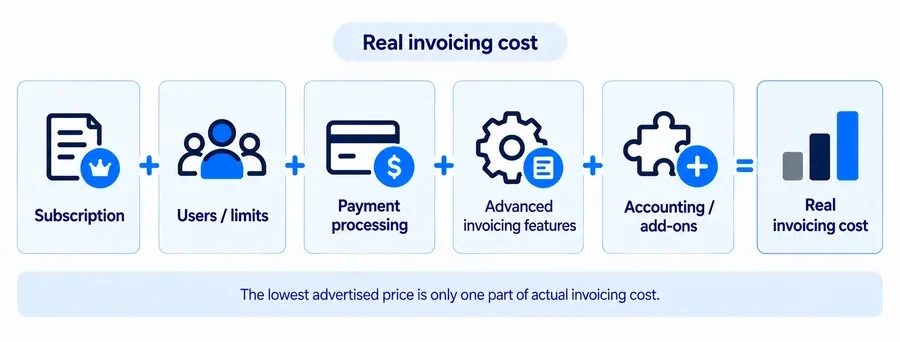
The relevant total can also include users, document limits, payment-processing fees, advanced invoice features, accounting integrations, and add-ons.
Is There Free Handyman Invoicing Software?
Yes.
Wave Starter currently provides unlimited invoices, estimates, bills, and basic bookkeeping records for $0/month.
Square Free also provides invoicing without a monthly software subscription.
SupaHandi lets users send the first estimate or invoice free, but Pro is required for unlimited sending and its deeper profit tools.
Joist is not currently free. Its former permanent free plan has been discontinued.
Free plans can still carry payment-processing charges.
Final Recommendations
Choose Joist when you want a simple contractor-focused estimate-to-invoice and payment workflow.
Choose Billdu when professional invoice administration matters more than field-service management.
Choose QuoteIQ when invoicing should remain connected with estimates, scheduling, customers, and payments.
Choose Tofu when offline phone-first field invoicing is the key requirement.
Choose Jobber when recurring jobs, invoice schedules, batch billing, and automated follow-up matter.
Choose Housecall Pro when invoicing is part of a growing team’s broader service operations.
Choose Wave when $0 subscription invoicing and basic bookkeeping are priorities.
Choose QuickBooks Online when invoices belong inside the full accounting system.
Choose Square when payment collection is the center of the workflow.
Choose SupaHandi when invoices should connect directly with costs and actual job profit.
The best handyman invoice software is the one that gets an accurate invoice to the customer, makes payment convenient, and keeps the records your business needs without forcing you to pay for unnecessary complexity.
FAQs
What Is the Best Invoice App for a Handyman Business?
There is no universal winner.
Joist is a strong fit for many solo handymen who want contractor-focused mobile estimates, invoices, deposits, reminders, and payments. Billdu is stronger as a dedicated invoice app, while Tofu stands out for offline field use.
Growing teams may prefer QuoteIQ, Jobber, or Housecall Pro because invoicing stays connected with jobs and customer workflows.
What Is the Best Free Invoicing Software for Handymen?
Wave Starter is one of the strongest current options because it includes unlimited invoicing and basic bookkeeping at $0/month.
Square Free is another useful option when payment collection matters.
Transaction-processing fees can still apply even when the software subscription is free.
Can Handyman Invoicing Software Accept Credit Cards and ACH?
Many products support one or both, including Joist, QuoteIQ, Jobber, Housecall Pro, Wave, QuickBooks Payments, and Square.
Rates, eligibility, and supported methods differ, so compare the payment types your customers actually use.
Can I Turn a Handyman Estimate Into an Invoice?
Yes. Joist, QuoteIQ, Tofu, QuickBooks, Jobber, Housecall Pro, and other products support connected estimate-to-invoice workflows.
This avoids re-entering customer and line-item information after an estimate is approved.
See our handyman estimating software guide for a broader comparison of estimate and quote workflows.
Can Handyman Invoicing Software Send Automatic Payment Reminders?
Many products can, but plan requirements and automation levels vary.
A reminder automates follow-up; it does not guarantee payment.
Can I Send Recurring Invoices for Handyman Maintenance Work?
Yes, several tools support recurring billing, but check whether the product creates a draft, sends the invoice automatically, or actually charges a stored payment method.
Those are different workflows.
Should I Use QuickBooks or a Handyman Invoice App?
Use QuickBooks Online when bookkeeping and accounting are the central system.
Use a contractor invoice app or FSM when field workflows—estimating, jobs, scheduling, customer communication, and jobsite payments—matter more.
Many growing businesses ultimately use both, with the field-service system syncing financial information into QuickBooks.