
The best handyman estimating software depends on which part of estimating is actually slowing you down. Some tools help calculate labor and material costs, others turn prices you already know into professional quotes, and full field-service platforms connect an approved estimate to scheduling, jobs, invoices, payments, and customer records.
That distinction matters for handyman work. One day you might quote a drywall repair and faucet replacement; the next, a deck repair, room painting, and several smaller punch-list items. Software that works well for repeating one standardized service may be less useful when scope, materials, labor, and job size change constantly.
A useful handyman estimating tool may therefore need some combination of mobile estimate creation, saved prices, labor and material costing, markups, photos, proposal options, signatures, estimate approvals, and estimate-to-invoice conversion.
The key question is not simply, “Which app can create an estimate?” It is:
Do you need help figuring out what the job should cost, turning a known price into a customer-ready quote, or managing everything that happens after the customer approves it?
Best Handyman Estimating Software at a Glance
These are use-case recommendations rather than a universal numerical ranking.
- QuoteIQ — Best for multi-service handyman estimating and quoting: A strong fit for handymen who want several estimate formats, a reusable price book, mobile quoting, AI assistance, and invoicing inside one home-service-oriented platform.
- Joist — Best for simple mobile estimates and invoices: Particularly useful when you mostly know your prices and want a straightforward way to create, approve, and convert estimates without adopting a large FSM system.
- Contractor+ — Best free starting point for estimating: Its current Freedom tier provides limited monthly estimating at no subscription cost, with live local material data and AI estimating available on paid tiers.
- HandyHelper — Best for live local material pricing and AI-assisted job costing: Built around generating materials and labor while connecting those materials to current local retailer products and prices.
- SimplyWise — Best for photo-based cost estimating: Uses project descriptions and optional photos to generate editable itemized estimates with regional labor and material pricing.
- Clear Estimates — Best for localized labor and material cost data: A cost-database-focused estimator with localized pricing, handyman templates, editable markups, and an estimate-to-invoice workflow.
- Jobber — Best for estimate-to-job-to-invoice workflow: A better fit when the quote needs to become part of a complete customer, job, scheduling, invoicing, and payment system.
- Housecall Pro — Best for pricebooks, tiered proposals, and growing service teams: Strong when several workers need consistent pricing and more polished Good-Better-Best-style proposals.
- SupaHandi — Best for estimate-to-profit visibility: Connects estimates with actual labor, material, expense, payment, and project-profit tracking.
- Hearth — Best for estimates with customer financing: Most relevant to larger home-improvement jobs where presenting financing and monthly-payment options helps support the sales process.
Handyman Estimating Software Comparison
| Software | Best for | Estimating type | Cost/pricing assistance | Estimate-to-invoice | Pricing approach | Main limitation |
| QuoteIQ | Multi-service handyman quoting | Handyman estimating platform | Price book, reusable items, AI-assisted estimating and field tools | Yes | Essentials starts at $29.99/mo; higher tiers add more AI credits plus advanced field, job-costing, integration, and team functionality | Some advanced field/accounting capabilities require higher tiers |
| Joist | Fast estimates and invoices | Estimate/invoice app | User-entered prices, saved items/templates | Yes | Basics currently starts at $10/mo; 14-day trial | Less focused on underlying labor/material cost calculation |
| Contractor+ | Limited free estimating | Estimate/invoice app + cost tools | National-average pricing on free tier; live local costs and Estimatic AI on Pro | Yes | Freedom is free but currently limited to 5 estimates/invoices monthly; Pro is paid | Best cost-data and AI tools require a paid plan |
| HandyHelper | Live local material pricing | Cost estimator / handyman estimating platform | AI materials and labor, business labor rates, live local retailer products/prices | Yes | First 5 estimates currently offered free; official product surfaces also advertise a trial | AI-generated scope and quantities still need professional verification |
| SimplyWise | Photo-assisted estimate drafts | Cost estimator | Regional cost data plus AI-generated labor/material/fee line items from project details and photos | Invoice functionality available | Official standard pricing lists $29.99/mo or $239.99/yr after a 7-day trial | A photo does not automatically provide all required measurements or jobsite context |
| Clear Estimates | Detailed localized costing | Cost-database estimator | Localized labor/material database, templates, AI Scope Assistant | Yes | Standard $79/mo or $59/mo equivalent billed annually; 30-day trial | More estimating-focused than full FSM |
| Jobber | Connected job workflow | Full FSM | Saved products/services, costs, markups and advanced quote tools on qualifying plans | Yes, through job workflow | Core regular pricing starts at $49/mo no commitment or $29/mo equivalent annually | Advanced quoting and job costing can require higher plans |
| Housecall Pro | Standardized team pricing and proposals | Full FSM | Price book, flat-rate pricing, templates, multi-option estimates | Yes, via job workflow | Full FSM subscription; Sales Proposal Tool costs extra on Basic/Essentials and is included on Max | More complexity and cost than many solo estimators need |
| SupaHandi | Estimated vs actual profitability | Handyman estimating/profit platform | User-entered pricing plus actual labor/material/expense and profit tracking | Yes | First send free; Pro $20/mo | Not a construction cost database or live supplier-pricing estimator |
| Hearth | Financing-led proposals | Sales/proposal platform | Saved line items and customer financing/monthly-payment presentation | Yes | Hearth Pro, Pro + Harper, Enterprise; request/demo pricing | More sales/financing-oriented than labor/material cost estimation |
Product and pricing details were checked against current official vendor information on September 4, 2026. Pricing, plans, AI capabilities, and feature availability can change.
How We Selected and Evaluated Handyman Estimating Software
We evaluated these products based on the parts of estimating that matter most to solo handymen and small service businesses:
- how quickly an estimate can be created in the field;
- labor and material cost support;
- price books and reusable templates;
- localized or live material pricing;
- markups, overhead, fees, and other adjustments;
- photo and job documentation;
- mobile usefulness;
- estimate options and tiered proposals;
- digital approvals and signatures;
- estimate-to-job and estimate-to-invoice workflows;
- quote follow-up;
- financing where relevant;
- job-cost and profit visibility;
- accounting integrations;
- free-plan and trial limits;
- pricing and feature gating;
- fit for a solo operator versus a team.
We also distinguish between software that calculates or assists with the underlying job cost and software that primarily creates a polished quote from prices the business already knows.
Official vendor documentation is our primary source for current product facts. Affiliate availability does not determine inclusion, ordering, or recommendations, and Home Service Fit does not claim hands-on testing unless explicitly stated.
Cost Estimator Apps vs Estimating and Quoting Software

The phrase handyman cost estimator software can describe something meaningfully different from a handyman quote app.
There are three broad categories.
Cost Estimator Tools
A cost estimator helps answer:
“What should this job cost?”
Different products approach that problem differently.
A localized cost database provides labor and material data adjusted by region. Clear Estimates, for example, uses localized residential construction pricing and updates material pricing regularly.
Live retailer or supplier pricing is different. HandyHelper connects estimate materials to actual products and local pricing from retailers including Home Depot and Lowe’s, while Contractor+ reserves live local material cost data for its paid Pro tier.
An AI/photo-generated estimate draft tries to infer scope or create initial material and labor line items from project information. SimplyWise lets users enter a project description and optionally add photos or blueprints, then generates editable labor, material, and fee items. Its own documentation makes an important limitation clear: measurements still need to be supplied where required rather than assumed from a photo.
And user-controlled pricing remains essential. Your labor rate, markup, overhead, minimum job charge, travel, disposal fees, and other business-specific inputs cannot be replaced by a generic database.
AI- or database-assisted estimates should therefore be treated as starting points that require professional review, not guaranteed final prices.
Estimate and Quote Apps
These tools become more useful once you largely know what you want to charge.
Their job is to turn the scope and price into a document the customer can understand and approve.
That commonly includes:
- line-item estimates;
- saved products or services;
- photos;
- branded documents;
- optional items or packages;
- signatures;
- deposits;
- invoice conversion;
- payments.
Joist is the clearest lightweight example. It focuses heavily on mobile estimates, approvals, invoicing, and payments. QuoteIQ goes further with multiple quote formats, a price book, package/options estimates, AI features, and a broader home-service workflow. SupaHandi adds actual job-cost and profit feedback after the estimate.
Full Field Service Platforms
Jobber and Housecall Pro are different purchases.
Their estimating tools live inside systems that also manage customers, scheduling, jobs, technicians, invoices, payments, and broader workflows.
That can be valuable when an approved estimate immediately needs to become operational work. Jobber, for example, can convert an approved quote to a job, while Housecall Pro can copy an approved estimate directly into a job without re-entering the same details.
But a solo handyman who mainly wants better estimates may be paying for a much larger system than necessary.
10 Best Handyman Estimating Software & Apps for 2026
QuoteIQ: Best for Multi-Service Handyman Estimating and Quoting
Best for: Handymen who quote many different job types and want flexible estimate formats inside a home-service-oriented platform.
Estimating approach: QuoteIQ combines a price book with Standard, Quick, Options, and Package estimates. Its current pricing documentation shows those core estimate formats across the plan family, while AI tools use monthly IQ Credits.
Key capabilities: Mobile/web estimate creation, reusable pricing, multi-line quotes, packages, Good-Better-Best-style options, AI-assisted estimate workflows, customer/job documentation, payments, and one-click estimate-to-invoice conversion. QuoteIQ also documents built-in signatures and proposals, although its current product pages are not perfectly consistent about the lowest plan on which every signing workflow is available.
Strengths: The variety of quote formats fits handyman work particularly well. A small repair may need a Quick Estimate; a larger project may benefit from options or a package.
Main limitations: Some of QuoteIQ’s more advanced field tools, job costing, QuickBooks sync, and higher AI usage require higher plans. AI credits are also a usage consideration.
Pricing: Essentials currently starts at $29.99/month for one user with 500 monthly IQ Credits. Higher plans increase users, credits, and functionality.
For a broader evaluation of QuoteIQ beyond estimating, read our QuoteIQ review.
Verdict: QuoteIQ is a strong fit when the main problem is creating flexible handyman estimates—not simply managing dispatch.
Joist: Best for Simple Mobile Estimates and Invoices
Best for: Solo handymen who mostly know their prices and want a clean estimate-to-invoice workflow.
Estimating approach: Joist is primarily a quote and invoicing app rather than a system designed to calculate local construction costs for you.
Key capabilities: Mobile and web estimates, line items, project templates, document photos on paid tiers, digital signatures, deposits, homeowner financing, invoice conversion, online payments, and client records. Its newer Run plan also adds jobs and scheduling, so Joist is no longer accurately described as an estimate-and-invoice-only app.
Strengths: It keeps estimating comparatively straightforward. If your labor rate and common service prices already exist, you can build a customer-ready estimate without first configuring a large FSM system.
Main limitations: Joist does not provide the same underlying cost-calculation support as products centered on live material pricing or localized labor/material databases. Its lower Basics plan is also limited to five documents per month.
Pricing: Basics currently starts at $10/month, with Pro, Elite, and Run above it. The current pricing page offers a 14-day trial with no credit card and explicitly states that the old permanent free plan is no longer available.
Verdict: Joist is one of the clearest choices when you already know what to charge and want to turn that price into a polished estimate and invoice quickly.
Contractor+: Best Free Starting Point for Estimating
Best for: A new or low-volume handyman who wants to create professional estimates without paying immediately.
Estimating approach: Contractor+ spans both quote creation and cost assistance. Its Freedom plan handles basic estimating, while paid Pro adds live local material costs and Estimatic AI.
Key capabilities: Line-item estimates, invoices, branding, web/mobile access, estimate-to-invoice conversion, material pricing support, optional items on paid tiers, and AI-assisted estimating.
The important current limitation is volume. Contractor+’s dedicated Freedom-plan documentation says free accounts can create up to five estimates and/or invoices per month. A more general pricing article still contains older “unlimited” wording, so the specific monthly-limit documentation is the safer current source.
Strengths: Five monthly documents may be enough for someone starting a side business or evaluating whether estimating software improves their workflow. Freedom also gives access to basic client management and national-average material pricing.
Main limitations: Live local material-cost data, unlimited documents, optional line items, scheduling, and Estimatic AI require Pro. Pro currently includes 10 Estimatic AI credits per month.
Pricing: Freedom is $0. Pro is currently $49/month or $348/year, equivalent to $29/month when prepaid annually.
Verdict: Contractor+ is the strongest free starting point here when five monthly estimate/invoice documents are enough.
HandyHelper: Best for Live Local Material Pricing and AI-Assisted Job Costing
Best for: Independent handymen whose estimating bottleneck is building the actual material-and-labor structure of varied jobs.
Estimating approach: HandyHelper goes beyond formatting a quote. You can record or type the scope, and its system generates material quantities and labor tasks/hours that you then review and adjust.
Key capabilities: AI-generated material lists, AI labor tasks and hours, configurable labor rates, live local product pricing and availability, Home Depot and Lowe’s product selection, custom materials, travel charges, job minimums, taxes, fees, discounts, markup, photos, voice-to-text notes, options, digital signatures, PDF/text/email delivery, and estimate-to-invoice conversion.
Strengths: The combination of AI-generated scope components with actual retailer products is distinctive. It can help answer “what materials do I need and what do they cost locally?” instead of only “how should this quote look?”
Main limitations: AI-generated quantities, labor hours, and suggested products still need professional verification. Site conditions, waste, access, code requirements, and unusual scope can change the real job cost.
Pricing: The main current product surface offers the first five estimates free with no credit card, while its Features page also advertises a 14-day trial. The public pricing surface did not provide a stable dollar figure in the version available during this check, so verify current paid pricing before subscribing.
Verdict: HandyHelper is one of the strongest fits when estimating means calculating the job—not merely generating a PDF.
SimplyWise: Best for Photo-Based Cost Estimating
Best for: Handymen who want a fast first draft of an itemized cost estimate from job details and photos.
Estimating approach: SimplyWise combines AI-assisted scope creation with regional cost data. You enter a project description, optionally add photos or blueprints, answer clarifying questions, and receive editable material, labor, and fee line items.
Key capabilities: Photo-assisted estimates, labor/material/fee line items, regional cost adjustments, manual line-item editing, AI-assisted edits, markups and fees, quote sharing, approvals, mobile estimating, invoices, and project organization.
Strengths: Starting from a photo and job description can reduce the blank-page problem when estimating unfamiliar or varied work. This is particularly relevant to the handyman cost estimator software intent.
Main limitations: The photo is not magic measurement data. SimplyWise’s own FAQ states that the app currently cannot automatically read all measurements from an image; measurements should be entered when relevant. The handyman still needs to verify quantities, labor assumptions, local prices, markup, and site conditions.
Pricing: SimplyWise’s current official pricing page lists $29.99/month or $239.99/year with a 7-day free trial, while noting that App Store or Google Play pricing experiments may result in different displayed prices.
Verdict: SimplyWise is useful when getting to a reasonable first cost draft is the bottleneck—but the contractor still owns the final number.
Clear Estimates: Best for Localized Labor and Material Cost Data
Best for: Handymen and small contractors who want structured residential cost data rather than building every price from scratch.
Estimating approach: Clear Estimates is closer to traditional construction estimating software. It combines localized labor/material pricing with templates, editable cost items, markups, and an AI Scope Assistant.
Key capabilities: Local pricing by location, handyman-specific templates, a large cost-item database, AI-assisted scope building, editable line items, markups, professional proposals, mobile/browser access, estimate-to-invoice conversion, and payments on its current handyman workflow.
Strengths: The key advantage is the cost database. If you do residential repairs and improvement work where material and labor inputs change by location and project scope, localized data provides a more useful starting point than a blank estimate template.
Clear Estimates also publishes quarterly material-pricing updates.
Main limitations: It is more estimating-centric than a full field-service platform. If the real problem is dispatching several technicians, coordinating schedules, or automating customer communication, another product may fit better.
Pricing: Standard is currently $79/month when billed monthly or $59/month equivalent on annual billing, with a 30-day free trial.
Verdict: Clear Estimates is the strongest fit here when detailed localized labor and material cost support matters more than broader FSM functionality.
Jobber: Best for Estimate-to-Job-to-Invoice Workflow
Best for: A handyman business that wants an approved estimate to become part of the same operational system as the customer, job, invoice, and payment.
Estimating approach: Jobber combines customer-facing quotes with saved products/services and, on higher plans, deeper quote customization and job profitability tools.
Key capabilities: Mobile quotes, quantities, unit costs and prices, discounts, deposits, product/service reuse, customer approvals, automated quote follow-ups on qualifying plans, and conversion from an approved quote into a scheduled job. Grow adds advanced quoting features including optional line items, images, text sections, and markups.
Jobber also offers consumer financing through Wisetack for qualifying work.
Strengths: The advantage is downstream workflow. Once a customer approves the estimate, you do not have to rebuild the same job in separate scheduling and invoicing tools.
Main limitations: Estimating is part of a much larger platform, and some useful quote capabilities require Grow. That can make Jobber significantly more expensive than a dedicated estimator if quoting is your only problem.
Pricing: Jobber’s Core pricing is currently $49/month with no commitment or $29/month equivalent when prepaid annually. Temporary offers can appear on some pricing surfaces, so compare the regular post-promotion cost.
For a broader evaluation of the platform beyond estimating, read our full Jobber review.
Verdict: Jobber is strongest when a quote is the beginning of a complete job-management workflow rather than the end of the estimating process.
Housecall Pro: Best for Pricebooks, Tiered Proposals, and Growing Service Teams
Best for: Growing handyman companies that want several workers quoting from standardized pricing and presenting more sophisticated customer options.
Estimating approach: Housecall Pro combines normal estimates with a price book, templates, multi-option estimates, and an optional visual Sales Proposal experience.
Key capabilities: Estimates by text or email, price-book items, estimate/proposal templates, multiple options, signatures, customer approval, estimate-to-job conversion, financing, and Good-Better-Best-style visual proposals.
The distinction between a normal estimate and Sales Proposals matters. Standard estimates are part of the Housecall Pro platform. Its current estimating page lists the visual Sales Proposal Tool at $40/month for Basic and Essentials, while Max includes it.
Strengths: Standardized price books and templates become increasingly useful once different employees are quoting similar services. The proposal tools also give teams a clearer way to present several choices consistently.
Main limitations: It is overkill if you simply need to calculate labor and materials for occasional handyman jobs. The full FSM subscription and proposal add-on structure can make it a much more expensive estimating solution.
Pricing: Basic currently starts at $59/month billed annually, with higher plans and user configurations costing more.
For the broader product picture beyond estimating, read our full Housecall Pro review.
For a closer look at plan pricing, included users, and additional cost drivers, see our Housecall Pro pricing guide.
Verdict: Housecall Pro becomes more compelling when estimating consistency is a team problem rather than just a document-creation problem.
SupaHandi: Best for Estimate-to-Profit Visibility
Best for: Handymen who want to know whether the jobs they quoted actually made money.
Estimating approach: SupaHandi focuses less on external construction cost databases and more on connecting your estimate with actual costs after work begins.
Key capabilities: Estimates, online approvals by button or signature, invoices, online and manual payments, labor/material/expense tracking, project records, customer history, revenue, profit, and margin visibility.
Strengths: It closes a useful feedback loop:
quoted price → actual labor/material/expenses → payment → real project profit.
That matters because an estimate can look profitable before the work begins but perform very differently once extra labor, materials, drive time, or other expenses are recorded.
Main limitations: SupaHandi is not trying to supply a localized construction-cost database or live Lowe’s/Home Depot pricing. You are still responsible for building the estimated cost inputs.
Pricing: Its current pricing page offers a Free tier that allows the first estimate or invoice to be sent free, with unlimited drafts, customers, and jobs. Pro costs $20/month and unlocks unlimited estimate/invoice sending, profit tracking, expense tracking, and team access without per-person pricing.
Verdict: SupaHandi is most useful when estimating needs to improve based on what previous jobs actually earned.
Hearth: Best for Estimates With Customer Financing
Best for: Larger repair, improvement, and remodeling work where affordability and monthly payments can affect the customer’s decision.
Estimating approach: Hearth is primarily a contractor sales and financing platform rather than a labor/material cost-estimation engine.
Key capabilities: Digital quotes, saved line items, monthly-payment presentation, customer approvals, automated quote reminders, contracts, signatures, invoices, digital payments, customer management, and integrated financing. Hearth’s current pricing packages are Hearth Pro, Pro + Harper, and Enterprise.
Its current Hearth Pro package includes quotes with monthly payments built in, its financing marketplace, client management, digital payments, and other sales tools. Pro + Harper adds Hearth’s AI lead/call follow-up functionality.
Strengths: Financing is the differentiator. On a larger improvement project, the customer’s buying decision may depend as much on the monthly payment as the full project total.
Main limitations: Hearth is less useful if the hard part is determining how many labor hours or materials a repair requires. It is closer to a proposal-and-sales platform once the contractor has a price.
Pricing: The current main pricing experience does not publish simple dollar prices and instead routes buyers to a demo. Older Essentials/Pro/Elite price structures should not be mixed with today’s Hearth Pro / Pro + Harper / Enterprise packages.
Verdict: Hearth makes the most sense when financing is part of the estimate conversation—not for everyday low-ticket repair quotes.
Which Handyman Estimating Tool Is Right for You?
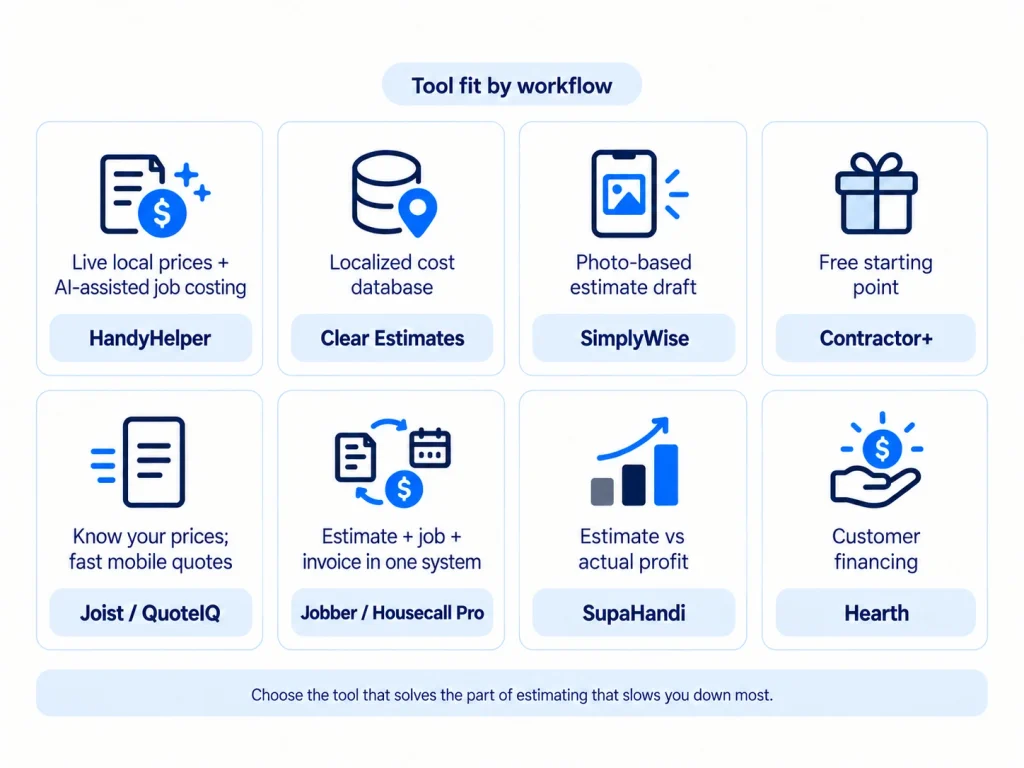
If You Need Help Figuring Out What the Job Should Cost
Focus on the cost estimator, not the prettiest proposal builder.
Choose based on where you want pricing information to come from:
- HandyHelper: AI material/labor suggestions plus live local retailer products and pricing.
- Clear Estimates: localized construction labor/material databases and templates.
- SimplyWise: AI-generated first drafts using project details, photos, and regional data.
- Contractor+: your own estimate workflow, with live local material costs and Estimatic AI available on paid tiers.
No approach eliminates professional judgment.
A live retailer price can tell you what a box of fasteners costs. It cannot know whether the wall behind the drywall has hidden damage. A regional labor database cannot know that parking, access, cleanup, or customer requirements will add two hours to your job.
If You Already Know Your Prices and Just Need Faster Quotes
Start lighter.
Joist works well when you want line items, a professional document, signature, invoice conversion, and payment.
QuoteIQ provides more estimating formats and a reusable price book while remaining more estimate-oriented than the broader FSM products.
The key is avoiding software complexity that does not solve your current bottleneck.
If You Want Estimates to Flow Into Scheduling and Jobs
This is where broader handyman software becomes more valuable.
Jobber can convert an approved quote into a job and keep that workflow connected to customer history, scheduling, invoices, and payments.
Housecall Pro provides a similar advantage for growing teams, with additional price-book and proposal capabilities.
QuoteIQ sits between the lightweight and full-FSM ends of the spectrum, combining estimating with scheduling and broader home-service operations.
If You Need Better Visibility Into Whether Jobs Are Profitable
Estimating and job costing are related but different.
Estimating asks what you expect the job to cost before work begins.
Job costing records what labor, materials, and other expenses actually cost as work happens.
The useful feedback loop is comparing those assumptions after completion.
SupaHandi is the clearest handyman-focused example on this list because it ties estimates, expenses, payments, and project profit together.
Jobber also provides job costing on its current Grow and Plus plans, while QuoteIQ lists job costing from Pro upward.
If You Quote Larger Jobs That Customers May Need to Finance
Consider the sales workflow as well as estimating.
Hearth is designed around putting monthly-payment options into the contractor proposal process. Housecall Pro also supports customer financing directly within its broader estimating workflow.
This can matter for a multi-thousand-dollar repair or improvement project. It is far less important when most of your jobs are small same-day fixes.
What to Look for in Handyman Estimating Software
Labor, Materials, Markup, and Local Pricing
Understand where the number comes from.
A product may use:
- your own labor rate;
- saved prices;
- national-average pricing;
- regional construction databases;
- current local retailer products;
- AI-generated material quantities;
- AI-generated labor tasks or hours.
Whatever the source, verify the result against your own labor rate, overhead, material cost, markup, taxes, fees, travel, and local conditions.
Price Books and Templates
Handymen repeat more work than it initially seems.
Ceiling-fan installs, drywall patches, door adjustments, faucet replacements, TV mounts, furniture assembly, pressure washing, and other services can often benefit from reusable items or templates.
The goal is not to make every job identical. It is to avoid retyping the predictable portion while keeping job-specific adjustments easy.
Mobile Estimate Creation
Do not stop at “has an app.”
Ask what you can actually do from the phone:
- create an estimate;
- edit quantities and prices;
- attach job photos;
- add materials;
- apply markup;
- send the quote;
- collect approval or signature;
- convert it to the next stage.
A mobile app that forces you back to a desktop for critical estimating tasks may not solve the jobsite workflow you bought it for.
Estimate Options, Add-Ons, and Approvals
For larger jobs, one total is not always the best format.
Optional line items and Good-Better-Best proposals can let the customer select materials, scope, or upgrades without requiring multiple separate estimates.
Digital approvals and signatures then create a clearer record before work begins.
But these functions are frequently plan-gated or sold as add-ons. Housecall Pro’s Sales Proposal Tool is one current example, while Jobber reserves its advanced optional-line-item quoting for qualifying higher plans.
Estimate-to-Invoice and Estimate-to-Job Workflow
Re-entering the same customer, materials, scope, and total becomes increasingly wasteful as job volume grows.
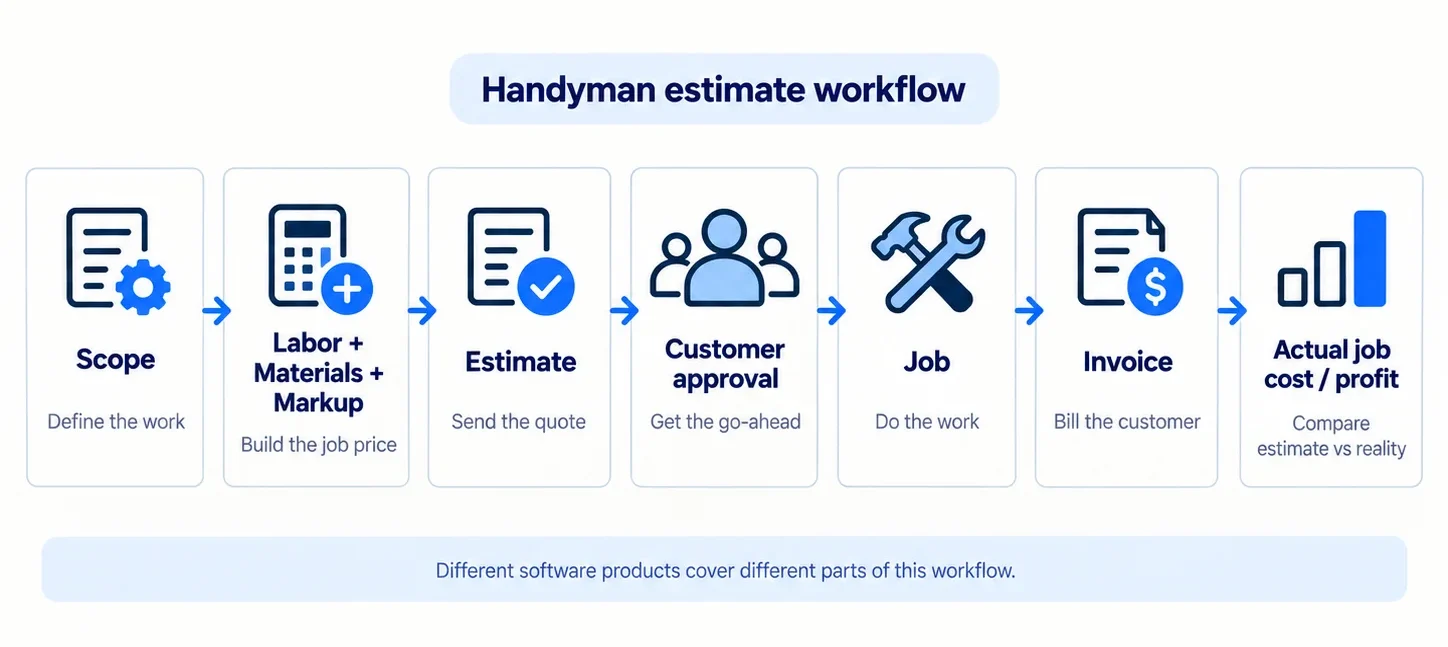
A connected workflow can turn:
estimate → approval → job → invoice
without rebuilding the data.
For a closer comparison of what happens after the estimate is approved, see our handyman invoicing software guide.
Integrations and Accounting
If you use QuickBooks or another accounting system, verify the exact integration and plan requirement.
Do not assume that accounting sync is included just because a vendor advertises QuickBooks somewhere on its site.
For example, Jobber currently places QuickBooks Online synchronization on Connect and above, while Contractor+ reserves QuickBooks Online integration for its Pro Team tier.
Is There Free Handyman Estimating Software?
Yes, but “free” usually comes with a boundary.
Contractor+ currently lets Freedom users create up to five estimates or invoices per month. Its more powerful live local cost data and Estimatic AI require Pro.
SupaHandi lets you send your first estimate or invoice free and keeps drafts, customers, and jobs available without a paid subscription; unlimited sending and profit tools are on its $20/month Pro plan.
HandyHelper currently advertises the first five estimates free with no credit card on its main product page.
Joist should not be included in the permanent-free category. Its official pricing page now states that the old free plan is gone, although a 14-day trial is available.
Free software can be a sensible starting point, but check:
- monthly estimate/document limits;
- access to material-cost data;
- AI credits;
- integrations;
- scheduling;
- branding;
- users.
How Much Does Handyman Estimating Software Cost?
There is no useful single “average” because these products solve different problems.
At one end, limited-free products such as Contractor+ and SupaHandi let a new handyman begin without a subscription.
Lightweight estimate/invoice apps can cost in the low tens of dollars per month. Joist currently starts at $10/month.
More specialized tools can cost more because you are paying for cost data or AI. SimplyWise lists $29.99/month for its Cost Estimator, while Clear Estimates Standard is $79/month on monthly billing.
Full FSM platforms are another category entirely. Jobber Core’s regular no-commitment price is $49/month, while Housecall Pro Basic starts at $59/month when billed annually—and higher plans or add-ons may be needed for specific quoting features.
Total cost can depend on:
- number of users;
- monthly versus annual billing;
- document limits;
- AI credits;
- cost-database access;
- live material-pricing capabilities;
- integrations;
- proposal add-ons;
- financing or payment services;
- feature gating.
Compare the price of solving your estimating problem, not simply the cheapest subscription.
Final Recommendations
There is no universal winner because the ten products solve different parts of estimating.
Choose QuoteIQ when you want handyman-friendly multi-service estimating with several quote formats and broader workflow support.
Choose Joist when you already know your prices and want a simple mobile estimate-to-invoice process.
Start with Contractor+ when a limited free estimating workflow is enough.
Look closely at HandyHelper when the hard part is producing materials, labor tasks, and local product costs—not just creating the customer document.
Use SimplyWise when turning photos and project descriptions into an initial itemized cost draft is the main bottleneck.
Choose Clear Estimates when localized labor and material cost data is more valuable than full field-service management.
Choose Jobber when estimates need to become jobs, invoices, payments, and customer workflows inside one platform.
Consider Housecall Pro when pricing consistency, price books, polished proposals, and multiple workers become more important.
Use SupaHandi when you want the estimate connected to actual job costs and profit.
And consider Hearth when financing and monthly-payment presentation are important to closing larger home-improvement jobs.
The best handyman estimating app is therefore the one that solves the part of estimating you currently do badly, slowly, or inconsistently—without making you pay for operational complexity you do not need.
FAQs
What Is the Difference Between a Handyman Cost Estimator and Estimating Software?
A handyman cost estimator focuses more heavily on calculating the underlying job price—labor, materials, quantities, fees, or regional costs.
Estimating or quoting software may assume you already know those numbers and focus instead on producing a professional customer-facing estimate, collecting approval, and converting it into an invoice.
Some products do both.
What Is the Best Free Handyman Estimating Software?
Contractor+ is currently the clearest full software example because its Freedom plan allows up to five estimates or invoices per month at no subscription cost.
SupaHandi also offers a limited free sending workflow, while HandyHelper currently advertises five free initial estimates.
The best choice depends on whether you need simple documents, cost data, AI estimating, or post-estimate job tracking.
Can Handyman Estimating Software Calculate Labor and Material Costs?
Some can, but the approach varies significantly.
A product may use:
- prices you enter yourself;
- saved price books;
- localized labor/material databases;
- live retailer pricing;
- AI-generated material lists;
- AI-generated labor tasks or hours.
HandyHelper, Clear Estimates, SimplyWise, and Contractor+ illustrate different versions of those approaches.
Always verify the generated number before sending it to a customer.
Can I Create and Send a Handyman Estimate From My Phone?
Yes, many of these products support mobile estimating.
But actual functionality varies. Some let you create the entire estimate, add photos and materials, capture a signature, and convert the approved quote to an invoice from the phone. Others provide fuller functionality on the web or reserve specific features for higher plans.
Check the mobile workflow you actually need rather than simply confirming that an app exists.
Can Estimating Software Turn an Approved Estimate Into an Invoice?
Yes. QuoteIQ, Joist, Contractor+, HandyHelper, Clear Estimates, SupaHandi, and other products on this list document direct or connected estimate-to-invoice workflows.
You can compare invoice creation, payment collection, reminders, and recurring billing in our handyman invoicing software guide.
Full FSM products such as Jobber and Housecall Pro commonly insert a job step between approval and final invoicing because the estimate becomes part of the broader service workflow.
Can AI Accurately Estimate a Handyman Job From a Photo or Job Description?
AI can produce a useful first draft, but it should not be treated as a guaranteed accurate final estimate.
The handyman still needs to verify:
- the actual scope;
- measurements;
- material quantities;
- labor assumptions;
- local prices and availability;
- waste;
- markup;
- overhead;
- access and site conditions;
- any hidden or unusual complications.
SimplyWise’s own current documentation illustrates the limitation clearly: photos can assist the estimating workflow, but measurements still need to be entered when the app cannot infer them reliably.