

Housecall Pro combines scheduling, customer records, estimates, invoices, payments, communication, and field-team management inside one home-service platform. Its appeal is the ability to replace several separate tools with a connected workflow.
The real buying question is whether your business needs enough of that system to justify the subscription cost, higher-tier feature gates, add-ons, and the operational commitment that comes with making Housecall Pro a core part of how the business runs.
Last updated: September 2026
Product, pricing, and review information last verified September 16, 2026.
On this page
- Is Housecall Pro a Good Fit?
- What Is Housecall Pro?
- How We Evaluated Housecall Pro
- Housecall Pro Pros and Cons
- Housecall Pro Features Reviewed
- Housecall Pro Risks and Practical Considerations Before You Commit
- Housecall Pro Pricing: Is It Good Value?
- What Current Housecall Pro Reviews Say
- How Housecall Pro Fits Different Handyman Businesses
- What to Test During Housecall Pro’s Free Trial
- Is Housecall Pro Worth It? Final Verdict
- FAQs
Is Housecall Pro a Good Fit?
Best for:
Solo operators and small-to-growing home-service teams that want scheduling, customer management, estimates, invoices, payments, and field operations connected in one platform.
Think twice if:
You mainly need one simple function, prioritize the lowest possible software cost, rely heavily on dependable offline field operation, or run complex construction/project workflows. Housecall Pro’s current official sources are inconsistent about the exact actions available offline, so businesses that regularly work without connectivity should test their required mobile tasks during the trial.
Main strength:
A connected home-service workflow that can replace several separate tools.
Main trade-off:
The platform becomes materially more expensive and more operationally important as the business depends on higher-tier features, add-ons, payments, accounting, and team workflows.
For the right small service business, that consolidation can justify the cost. For a business that only needs a calendar, invoicing, or one narrow workflow, Housecall Pro can be more software than necessary.
What Is Housecall Pro?
Housecall Pro is cloud-based field-service management software built primarily for home-service businesses.
It provides a web platform plus iOS and Android apps and connects customer records with scheduling and dispatch, estimates, jobs, invoices, payments, communication, and online booking. Teams can use the same platform to manage office and field activity rather than maintaining separate scheduling, billing, and customer-management systems.
Housecall Pro is therefore broader than a simple CRM, estimating app, or invoice tool. Its value comes from how those functions connect across the service workflow rather than from one isolated feature.
How We Evaluated Housecall Pro
Home Service Fit evaluated Housecall Pro using:
- current Housecall Pro pricing and Help Center documentation;
- current Terms and Privacy documentation where relevant;
- mobile-app documentation and current official app-store information;
- Capterra, Software Advice, G2, Trustpilot, app-store reviews, BBB complaints, and community discussions;
- current US search-result and buyer-intent evidence.
We separate three things throughout this review:
- Official product facts — what Housecall Pro currently documents.
- User-reported experience — recurring themes across independent review environments.
- Home Service Fit editorial judgment — our assessment of which business types are a practical fit.
We do not claim hands-on testing, and we do not calculate a Home Service Fit numerical score.
Housecall Pro Pros and Cons
| Pros | Cons |
|---|---|
| Broad connected workflow across scheduling, estimates, jobs, invoices, payments, and customers | Subscription cost rises materially between plans |
| Strong scheduling and customer-facing Online Booking | Useful team and routing capabilities are gated to Essentials or MAX |
| Mobile workflow for field technicians | Offline capabilities are limited and current official sources are inconsistent about exactly which actions work without connectivity |
| Estimate → job → invoice → payment continuity | QuickBooks integration has meaningful one-way-sync limitations |
| Routes, GPS, automation, and team tools as the business grows | Add-ons can raise the real operating cost |
| Customer-facing reminders, booking, estimates, invoices, and payments | Billing and cancellation process deserves careful review |
| QuickBooks Online support and export options | Product/interface changes create friction for some users |
| Can consolidate several separate small-business tools | Not a specialized construction project-management platform |
This table is Home Service Fit’s editorial assessment. External review sentiment is covered separately below.
Housecall Pro Features Reviewed
Scheduling, Dispatch, and Online Booking
Scheduling is one of Housecall Pro’s strongest core capabilities.
Basic currently includes scheduling and dispatch plus Online Booking. A solo owner can schedule work, assign jobs, manage arrival windows, and make changes from web or mobile. A small team gains more value as several technicians need shared visibility and customer notifications.
Online Booking also matters because customers can book from a business website, direct link, or supported Google surfaces rather than every lead requiring a phone call.
The important freshness distinction is routing.
Routes and Route Optimization are not the same feature.
Essentials currently includes Routes, which organize and sequence jobs into route-based scheduling. MAX adds Optimize by Drive Time, which automatically reorders one technician’s scheduled work using actual locations and live traffic to reduce driving. Housecall Pro currently documents Optimize by Drive Time as MAX-only.
That distinction matters for a growing handyman team. A business that simply wants route organization may not need MAX, while a business expecting automatic drive-time optimization does.
For a broader comparison of scheduling, booking, recurring work, and routing tools, see our handyman scheduling software guide.
Estimates, Price Book, Invoicing, and Payments
Housecall Pro works well when quoting and billing are expected to stay connected to the job.
The practical workflow can be:
estimate → approval → job → invoice → payment
Basic currently includes estimates, invoicing, payments, consumer financing access, Price Book functionality, and job costing. That means a solo business does not have to move to a higher plan simply to create estimates or invoices.
The Price Book helps keep common services and materials available for reuse, while customer approvals and signatures can remain tied to the job record.
Housecall Pro also offers a more advanced Sales Proposal Tool for businesses that need richer side-by-side or Good-Better-Best-style presentations. That should not be confused with ordinary estimates.
Integrated payments support cards, bank transfer/ACH, mobile/in-person workflows, and other methods, but processing costs vary by payment type. Current standard published rates include 2.59% for standard card-reader/Tap to Pay transactions, 2.99% for customer-entered online standard cards, 3.49% for manually entered or card-on-file standard cards, and 1% for standard ACH. Detailed fee comparison belongs on the pricing page rather than in this review.
Payment processing also introduces normal processor issues such as refunds, payout timing, transaction reviews, and chargebacks. That is not unique to Housecall Pro, but it becomes operationally important once the business relies heavily on integrated payments.
If quoting or billing is your main priority, compare our handyman estimating software guide and handyman invoicing software guide.
For current plan prices, payment fees, and add-on costs, see our full Housecall Pro pricing guide.
CRM, Customer History, and Job Records
Housecall Pro’s customer-management layer is useful because customer information does not sit in isolation from the work.
A customer record can connect addresses, job history, estimates, invoices, notes, attachments, and repeat-service context. That makes it easier for an owner or technician to understand what has previously happened at a property before arriving.
For a handyman business, that can be more useful than a generic sales CRM because the record is tied to actual field activity.
The limitation is scope. Housecall Pro is not a sophisticated enterprise sales CRM with deeply customizable account objects or complex pipeline modeling. Its customer records are designed around running a service business.
To compare Housecall Pro with other customer-management approaches, see our handyman CRM software guide.
Mobile App, Team Management, GPS, and Time Tracking
Housecall Pro’s iOS and Android apps support much of the field workflow: schedules, jobs, customer details, estimates, invoices, photos, notes, payments, and team activity.
For a solo operator, that means fewer reasons to return to a desktop between jobs.
For a team, the mobile value expands into job assignment, schedule visibility, technician activity, GPS, and time-related workflows. Essentials currently includes employee GPS tracking, which can help an office see where technicians are during the day.
Offline use requires more caution.
Housecall Pro’s current Help Center says general offline editing is not supported and explains that previously opened job information can be stored locally and viewed when cell service or Wi-Fi is unavailable.
However, a recent official Housecall Pro response in the Apple App Store describes limited offline actions beyond viewing, including filling out job forms, capturing customer signatures, and attaching photos.
Those current official surfaces therefore do not align perfectly.
The safest conclusion is that Housecall Pro provides some offline field functionality, but businesses should not assume full offline operation or a specific offline feature set without testing it.
That matters particularly for technicians working:
- in rural service areas;
- inside basements;
- in buildings with poor reception;
- at remote properties.
If low-signal work is common, use the free trial to verify the exact offline actions your field staff needs rather than relying on a broad “offline capable” label.
Reporting and Job Costing
Housecall Pro currently includes job costing even on Basic, which is useful for businesses that want to move beyond simply tracking revenue.
The owner can connect job-level pricing and costs with reporting to better understand which work is profitable. For a small handyman business, that can be enough to answer practical questions about estimates, completed jobs, payments, and margins.
Housecall Pro also provides exportable Jobs, Estimates, Payments, and dashboard reports. Current reporting tools allow filtering and exporting data for further analysis outside the platform.
The question is not whether Housecall Pro competes with enterprise BI software. It is whether its built-in reports answer the operational questions your business actually asks.
A small owner may find the existing dashboards sufficient. A larger or more specialized operation may want deeper customization.
QuickBooks and Other Integrations
Housecall Pro supports QuickBooks Online, but the integration should not be described as fully two-way.
Current documentation says the integration typically functions one-way from Housecall Pro to QuickBooks Online, with a few limited exceptions and manual actions in the other direction.
Invoices, payments, new customers, and Price Book items can sync from Housecall Pro into QuickBooks. However, once an invoice has initially synced, later edits in Housecall Pro do not automatically update that QBO invoice unless the user manually syncs it again. Canceling or deleting the HCP invoice also does not automatically cancel or delete the corresponding QuickBooks invoice.
Housecall Pro’s newer documentation also allows some accounts to choose the first invoice-sync trigger—such as when a job is marked Finished or when it reaches Invoiced status—but that does not remove the broader re-sync limitations. That means the business should decide where work is supposed to originate and which system is treated as operationally authoritative.
For a solo owner with straightforward books, this may be manageable. For a company with an established bookkeeper or accountant, it is worth testing:
- when invoices first sync;
- how edits are handled;
- how payments reconcile;
- what must be corrected manually.
If you’re still deciding which accounting platform should manage your books, our handyman accounting software guide compares QuickBooks, Wave, Xero, and other options based on bookkeeping depth, project profitability, and integration considerations.
Housecall Pro AI and Newer Tools
Housecall Pro is increasingly adding AI to office and customer workflows.
Current product and Terms documentation describe AI-assisted communication and account actions, including examples such as booking appointments based on calendar/service information and automatically disputing certain card chargebacks.
The more important buyer issue is control.
Housecall Pro’s current Terms say User Data may be used to improve and train proprietary AI models and that third-party AI providers may be involved. The Terms also authorize certain automated or semi-automated actions and explicitly state that users remain responsible for reviewing and validating AI-generated outputs such as customer communication, estimates, scheduling decisions, and reports.
That is not evidence that Housecall Pro is unsafe. It is a reason to understand:
- what business/customer data enters an AI workflow;
- what actions AI may perform;
- what permissions are enabled;
- where human review still matters.
AI should be treated as an operational tool, not as a substitute for business oversight.
Setup, Onboarding, and Support
Housecall Pro is broad enough that setup matters.
A solo operator can begin with customer information, common services, scheduling, estimates, and payments without a long enterprise implementation project. Complexity increases as the business adds multiple technicians, automation, routing, QuickBooks, add-ons, or AI-supported communication.
All current plans include phone and chat support. MAX currently adds a dedicated onboarding specialist and escalated phone support.
The free trial is also unusually useful for evaluating plan fit because Housecall Pro currently gives trial users 14 days of MAX functionality with no credit card required.
That is helpful—but it can also create a trap. You may test a MAX feature, build your workflow around it, and only later realize that the paid plan containing that feature costs much more than Basic.
The trial should therefore be used to test a realistic workflow and map each important feature back to the plan you would actually buy.
Housecall Pro Risks and Practical Considerations Before You Commit
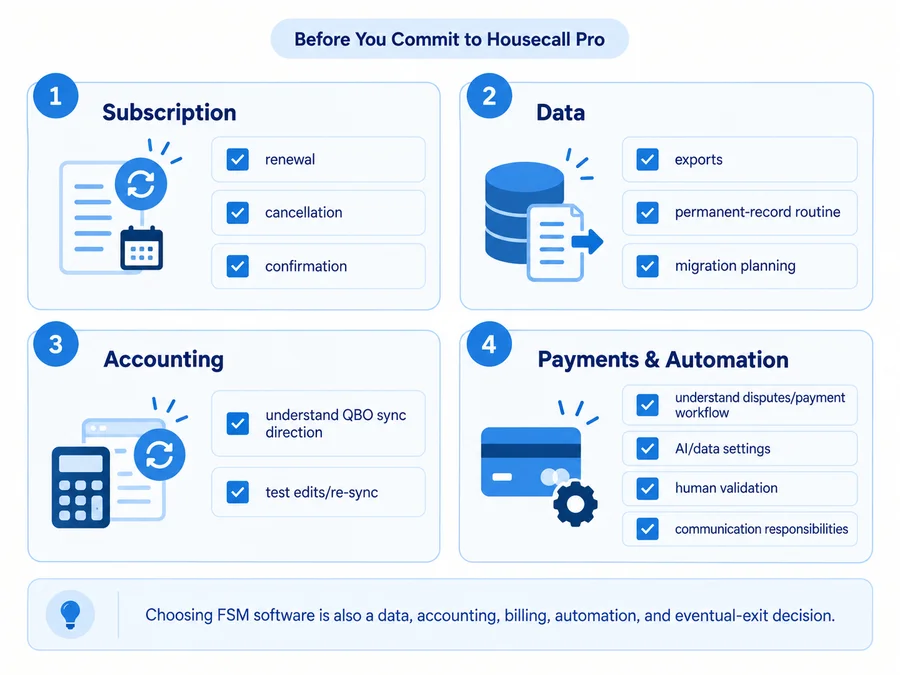
Choosing Housecall Pro is not only a feature decision. It can become a subscription, data, accounting, payment, and workflow decision.
Subscription and renewal. Housecall Pro subscriptions automatically renew unless terminated before renewal. Current Billing documentation says paid-account cancellation begins through Support, after which the Billing team contacts the account owner; Housecall Pro says it cannot fully process cancellation or pause billing until a team member has spoken with the account owner. Its current guidance says the Billing team may take 1–3 business days to respond. Subscription fees generally are not prorated or refunded unless a specific exception applies.
Practical approach: know your renewal date, start cancellation early enough, retain written confirmation, and verify the next billing cycle.
Data and exit planning. Housecall Pro provides customer/job exports and payment/report exports, and its own backup guidance recommends regularly exporting operational data. At the same time, current Terms say the account holder is responsible for compiling and retaining permanent records of transactions and other account data.
A CSV export is useful, but it does not necessarily recreate every attachment, relationship, automation, or workflow inside another platform. A business making Housecall Pro its core system should maintain a sensible record-retention routine.
Payments. Integrated payment processing can simplify collections, but the business should understand processing fees, refund rules, payout timing, account reviews, and chargebacks. In a card dispute, current Housecall Pro documentation says the payment amount can be reversed and a $25 dispute fee assessed; if the business wins, the amount and fee are returned.
AI and customer data. If you enable newer AI functionality, understand what data enters the workflow, where third parties may be involved, which actions may happen automatically, and what still requires human validation.
Housecall Pro communication and AI features also do not remove the business’s responsibility for applicable customer consent, opt-out, privacy, messaging, or call-recording requirements. Its own Terms place responsibility for required communication consents and call-recording compliance on the business.
Housecall Pro Pricing: Is It Good Value?
Housecall Pro currently uses three standard general plan levels:
- Basic — $59/month billed annually or $79 month-to-month; 1 user.
- Essentials — $149/month billed annually or $189 month-to-month; 5 users.
- MAX — $299/month billed annually or $329 month-to-month; 8 users.
The important review question is not which tier has the longest feature list.
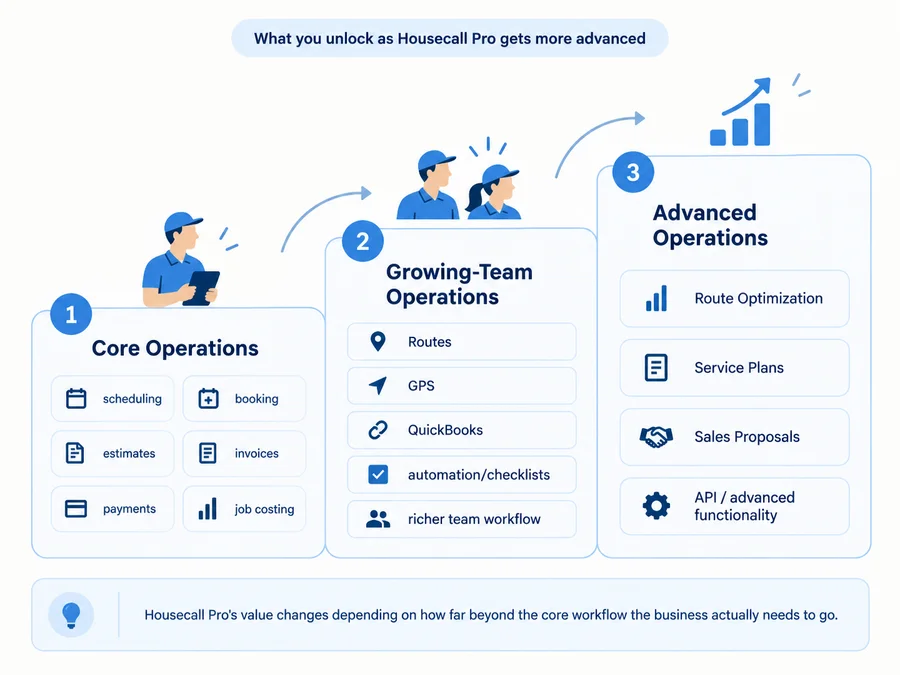
Basic already covers the core operating workflow: scheduling, dispatch, Online Booking, estimates, invoicing, payments, Price Book, job costing, and review management.
Essentials adds more team-oriented functionality including Routes, employee GPS, checklist automation, richer photo reporting, commissions, and QuickBooks Online sync.
MAX moves further into advanced operations with true Route Optimization, recurring Service Plans, the Sales Proposal Tool, open API access, and stronger onboarding/support.
That progression can make Housecall Pro good value when it replaces several tools the business was already paying for.
It becomes harder to justify when the buyer only needs:
- a calendar;
- simple estimates/invoices;
- one customer-booking page;
- or another narrow workflow.
Add-ons and payment processing can also raise real cost beyond the base subscription.
For a detailed breakdown of plans, users, add-ons, and fees, read our Housecall Pro pricing guide.
What Current Housecall Pro Reviews Say
Housecall Pro’s current review picture is notably different depending on where you look.
Current Review Snapshot
| Source | Current rating | Current volume | What it helps us understand |
|---|---|---|---|
| Capterra | 4.7/5 | 2,745 reviews | Small-business usability, functionality, support, scheduling, and workflow feedback |
| Software Advice | 4.7/5 | 2,745 reviews | Similar small-business buying/use themes; same broader Gartner Digital Markets ecosystem |
| G2 | 4.3/5 | 205 reviews | B2B software feedback from verified/validated business users |
| Trustpilot | 2.4/5 | 635 reviews | More polarized service, billing, payments, cancellation, and support experiences |
| Apple App Store | 4.6/5 | 30K ratings | Large mobile-app satisfaction sample, especially iOS field use |
| Google Play | 4.5/5 | ~6.3K reviews | Android/mobile field-use feedback |
Review data checked September 16, 2026.
These figures should not be combined into one Home Service Fit score.
Capterra and Software Advice are part of the broader Gartner Digital Markets ecosystem and currently display the same Housecall Pro review count, so they should not be interpreted as 5,490 entirely separate reviewers.
The app stores measure a different experience again: they are useful for understanding mobile sentiment but do not capture the complete desktop/admin product.
Trustpilot is much more negative than the B2B software marketplaces. That does not make either environment inherently more truthful—it means they attract different kinds of reviewers and experiences.
BBB complaint data also currently shows recurring complaint categories around service/repair issues, billing, and customer service. Complaint pages are useful for identifying risk themes, not for estimating what percentage of Housecall Pro customers experience those problems.
What Users Commonly Like About Housecall Pro
A recurring positive theme in current reviews is the benefit of keeping several service-business workflows in one place.
Users repeatedly praise:
- scheduling and calendar usability;
- organizing customers and jobs;
- connected estimates, invoicing, and payments;
- customer communication;
- mobile convenience;
- ease of use;
- positive support experiences.
Capterra currently shows 4.6/5 for ease of use and 4.7/5 for customer service, while Software Advice shows similar secondary ratings.
Recent Trustpilot reviews also include customers praising the schedule page, dispatch/billing workflow, ease of navigation, and helpful support—despite that platform’s much lower overall score.
This aligns with Housecall Pro’s strongest editorial case: a small service business can centralize a surprisingly broad amount of daily admin without moving into an enterprise-sized system.
What Users Commonly Dislike About Housecall Pro
The negative themes are more fragmented.
Across current review environments, recurring complaints include:
- pricing and feature gates;
- bugs or lag;
- interface/product changes;
- billing or cancellation friction;
- inconsistent support experiences;
- payment/payout disputes;
- mobile/connectivity limitations;
- QuickBooks or other integration quirks.
Software Advice currently surfaces complaints about occasional bugs and frequent layout changes affecting workflow. Trustpilot contains a much higher concentration of billing, cancellation, support, and payment complaints.
The distinction matters:
A recurring complaint theme is not the same thing as an established defect affecting every Housecall Pro customer.
For example, some users report strong support experiences while others describe frustration. Some businesses consider the frequent product evolution useful; others dislike adapting to interface changes.
The correct buying response is to test the parts of Housecall Pro that matter most to your actual operation.
How Housecall Pro Fits Different Handyman Businesses
Solo Handyman
Housecall Pro can make sense for a solo owner who wants to consolidate:
- scheduling;
- customer records;
- estimates;
- invoices;
- payments;
- booking;
- reminders and communication.
The fact that Basic already includes the core operating workflow makes a one-person business a legitimate fit—not automatically a poor fit. The weaker case is a solo handyman who mainly wants estimates and invoices. In that situation, a lighter contractor app may solve the real problem for much less money and with less setup.
If you are comparing Housecall Pro with lighter all-in-one options, see our broader handyman software guide.
Small Handyman Team
This is one of Housecall Pro’s strongest scenarios. As soon as several people share jobs, the value of connected scheduling, assignments, customer notifications, field access, job history, photos, invoices, and payments rises. Essentials also adds capabilities that become more relevant for a team, particularly Routes, GPS tracking, QuickBooks sync, checklist automation, and richer operational controls. The key question is whether those team features save enough coordination work to justify the jump in subscription cost.
Growing Service Business
Housecall Pro becomes more compelling when operational complexity expands. A growing business may increasingly need:
- multiple technicians;
- Routes and eventually route optimization;
- accounting integration;
- stronger reporting;
- recurring service plans;
- automation;
- more structured customer communication;
- integrations/API access.
At the same time, the business becomes more dependent on the platform. More customer records, payment history, accounting workflows, add-ons, routing logic, and team processes mean switching later becomes a larger operational project. That is not necessarily a reason to avoid Housecall Pro—it is a reason to choose it deliberately.
Complex Project or Construction Business
Housecall Pro is primarily field-service management software. That is different from specialized construction project management. A business whose core work revolves around:
- long multi-phase projects;
- procurement;
- subcontractor coordination;
- deep construction documentation;
- formal change-order workflows;
- complex project accounting;
should compare dedicated construction/project-management products. Housecall Pro can still manage longer jobs and service projects, but its strongest design is around service operations rather than deep construction PM.
If Housecall Pro is not the right fit for your workflow, compare our guide to the best Housecall Pro alternatives.
What to Test During Housecall Pro’s Free Trial
Housecall Pro’s current free trial lasts 14 days, requires no credit card, and provides MAX-level functionality. Do not spend that trial casually browsing menus. Run one realistic test workflow:
- Create a safe test customer.
- Build a realistic estimate.
- Convert the estimate into a job.
- Schedule the job.
- Assign a technician if relevant.
- Reschedule it once.
- Test Online Booking.
- Open the job in the mobile app.
- Add realistic notes and photos.
- Test low/no-signal behavior if connectivity matters to your business.
- Finish the job and generate an invoice.
- Test a safe, non-production payment workflow if appropriate.
- Export the test customer/job data.
- If QuickBooks matters, test the integration using non-sensitive test records.
- Write down every feature you actually used.
- Confirm which paid plan includes those features.
- Review the renewal and cancellation process before upgrading.
Do not use sensitive real-customer information or real payment details simply to evaluate the software. At the end, ask: Did Housecall Pro replace enough separate admin work to justify the plan that contains the features you actually used?
Is Housecall Pro Worth It? Final Verdict
Housecall Pro is easiest to justify when a solo-to-growing home-service business genuinely benefits from putting scheduling, customer records, estimates, field work, invoicing, payments, and communication into one connected operating platform.
Its biggest advantage is consolidation. Its biggest trade-off is that the version of Housecall Pro a growing company actually wants may sit substantially above the entry-level plan, and greater reliance on the platform also increases the importance of its billing, accounting, data, payment, and integration workflows.
For a typical small handyman team that has outgrown disconnected apps and manual coordination, Housecall Pro can be a strong fit.
For businesses that mainly need one or two lightweight functions—or need deep construction project-management functionality—a simpler or more specialized product may provide better value. If configurable field workflows, offline execution, or asset management are the deciding factors, our FieldPulse vs Housecall Pro comparison explains where the two platforms differ.
Businesses that depend heavily on incoming service calls and dispatcher-led booking should also consider Workiz. Our Housecall Pro vs Workiz comparison examines how both platforms handle phone workflows, scheduling, pricing, and contract terms.
FAQs
What Percentage Does Housecall Pro Take From Payments?
There is no single Housecall Pro payment percentage. Current standard rates depend on how the payment is collected. For example, Housecall Pro currently publishes:
- 2.59% for standard cards accepted through a card reader or Tap to Pay;
- 2.99% for customer-entered online standard cards;
- 3.49% for manually entered/card-on-file standard cards;
- 1% for standard ACH/bank transfers.
Other payment types have different rates. Tap to Pay also currently carries a separate $5 monthly service charge when actively used. Because Housecall Pro’s current documentation uses inconsistent active user and active device wording for that charge, this review does not assign it to one specific unit. Detailed payment-fee mechanics belong in the dedicated pricing guide. For the full breakdown of current payment fees and pricing, see our Housecall Pro pricing guide.
Does Housecall Pro Report Payments to the IRS?
Housecall Pro’s current Help Center says an account qualifies for a Form 1099-K when it has more than $20,000 in gross sales and more than 200 transactions, and it says those thresholds apply to credit-card transactions processed through Housecall Pro. However, current IRS guidance makes an important distinction. For third-party settlement organizations (TPSOs), the federal reporting threshold is over $20,000 and more than 200 transactions. For other payment settlement entities such as merchant acquiring entities handling payment-card transactions, the IRS says there is no de minimis federal reporting threshold.
Housecall Pro’s public documentation does not clearly establish enough detail here for Home Service Fit to independently determine how every Housecall Pro payment flow is classified for federal reporting. So do not treat the $20,000/200 figure as a universal rule for every payment type.
Receiving—or not receiving—a Form 1099-K also does not by itself determine whether business income is taxable. Check current IRS guidance or speak with a tax professional about your circumstances.
Can Housecall Pro Work Without Internet?
Partially, but the current official guidance is inconsistent about the exact offline feature set.
Housecall Pro’s current Help Center says previously opened job information can be stored and viewed without a cell or Wi-Fi connection and says general offline editing is not supported. However, a recent official Housecall Pro response in the Apple App Store describes limited offline actions such as filling out job forms, capturing customer signatures, and attaching photos. Those statements do not fully align.
If your business regularly works in rural locations, basements, remote buildings, or other poor-signal environments, do not assume either full offline operation or view-only access. Verify the exact mobile actions available in your account and test your real field workflow during the free trial.
Is Housecall Pro Better Than Jobber?
Neither platform is universally better. The stronger fit depends on the business’s workflow, team size, plan requirements, pricing, preferred scheduling/dispatch model, communication needs, and accounting/integration preferences.
For the full head-to-head evaluation, read our Jobber vs Housecall Pro comparison.