

Housecall Pro is a capable all-in-one field-service platform, but another option may fit better when a business needs different team economics, a lower solo entry cost, stronger phone workflows, more customization, simpler packaging, or much deeper operations.
The key with Housecall Pro alternatives is to compare more than the replacement subscription. Before switching, identify everything Housecall Pro currently connects for your business and whether the new setup will replace those functions cleanly—or require several additional tools.
Last updated: September 2026
Product and pricing information last verified September 19, 2026.
Best Housecall Pro Alternatives at a Glance
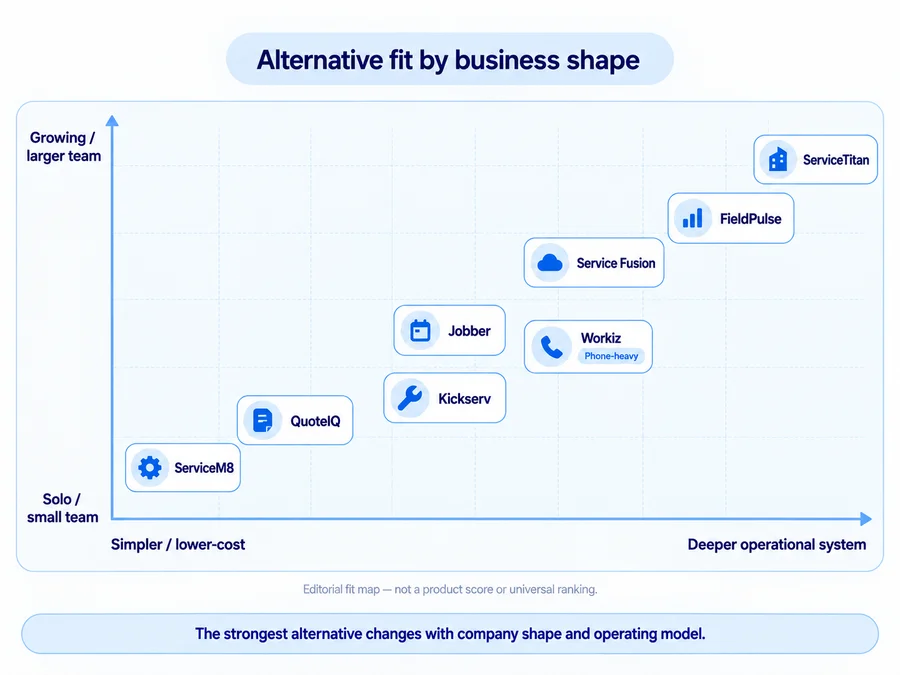
These are use-case recommendations, not numerical rankings.
| Alternative | Best For | Pricing Model | Team Fit | Trial / Demo | What You Gain | What You May Need to Replace Separately |
|---|---|---|---|---|---|---|
| Jobber | Closest all-around Housecall Pro alternative | Starts at $29/mo annual-equivalent for 1 user | Solo to growing teams | 14-day free trial, no card | Similar full-service workflow with a lower solo entry point | HCP-style GPS, phone/AI, routing, and advanced workflows behave differently |
| QuoteIQ | Handyman owner-operators wanting a lower-cost contractor-focused platform | $29.99 Essentials to $699 Max | Solo to larger teams | 14-day trial; card required | Low-cost contractor workflow with CRM, estimating, scheduling, invoicing, and payments | Advanced routing, GPS, pipelines, communications, and team tools require higher tiers or different setup |
| Workiz | Phone-heavy service businesses | Request pricing | Small to larger teams | 7-day free trial | Strong call, lead, booking, dispatch, and communications ecosystem | Genius Phone, Answering, and Marketing are separate products/add-ons |
| Service Fusion | Growing teams that value unlimited users | $208/mo annual-equivalent Starter; $245 month-to-month | Multi-user teams | Demo | Unlimited users across current plans | Website/domain, some AI/communications, and other HCP ecosystem functions may still need separate tools |
| ServiceM8 | Free/low-cost Apple-first alternative | Free 1 user/30 jobs; paid tiers use job caps with unlimited users | Solo to small teams | 14-day free trial, no card | Genuine free entry and simple job-volume pricing | Apple-first operation; phone/AI/advanced team functions differ |
| FieldPulse | Growing teams needing more customizable operations | Custom seat-based pricing | Growing teams | Demo | Deeper configurable operations, sites, projects, inventory, fleet, and workflows | No simple public price; customer-acquisition/website stack may need separate tools |
| Kickserv | Straightforward small multi-user team | $60 / 5 users; $119 / 10; $199 / 20 | Small teams | 30-day free trial | Clear included-user tiers and simpler packaging | Less HCP-style phone/AI/ecosystem depth |
| ServiceTitan | Advanced operations that have outgrown SMB-level software | Personalized pricing | Larger, more complex operations | Personalized demo | Much deeper dispatch, reporting, call booking, memberships, and operational control | Heavier implementation and processes; website/domain and other dependencies still need explicit cutover planning |
A lower-priced FSM can still produce a more expensive total software stack if it forces you to replace Housecall Pro phone, AI, website, routing, customer communication, or recurring-service tools separately.
Why Look for an Alternative to Housecall Pro?
Housecall Pro currently covers a broad core workflow, with Basic starting at $59/month billed annually for one user, Essentials at $149 for five users, and MAX at $299 for eight users. The 14-day trial currently requires no credit card.
Your Team Outgrows the Plan Structure
Housecall Pro moves from:
- Basic — 1 user;
- Essentials — 5 users;
- MAX — 8 users, with additional seats available.
That can work well for many teams, but company growth may push you into another tier even when you do not need every new feature in that tier.
The useful question is not:
“Which platform starts cheaper?”
It is:
“What is the lowest plan that supports our actual team and workflow?”
For the full plan and billing breakdown, see our Housecall Pro pricing guide.
You Need a Different Pricing Model
Competitors package teams differently.
Some use:
- included-seat tiers;
- unlimited-user plans;
- job-volume caps;
- custom seat pricing;
- request pricing.
Service Fusion, for example, currently includes unlimited users on every plan, while ServiceM8 gives unlimited users on paid tiers but limits monthly jobs.
That can matter more than a headline starting rate.
You Need a Different Operating Model
A switch may make sense because the business itself is different.
Examples:
- phone-heavy intake → Workiz;
- more configurable operations → FieldPulse;
- Apple-first mobile operation → ServiceM8;
- simpler owner-operator workflow → QuoteIQ;
- larger and more complex operations → ServiceTitan.
More software is not automatically better software.
You May Not Need to Replace Housecall Pro
If the business likes Housecall Pro’s CRM, scheduling, estimates, jobs, invoicing, and payments but dislikes one narrow function, replacing the entire FSM may create more disruption than value.
A specialist tool can sometimes solve the missing piece with less migration risk.
If the problem is narrower, our handyman software guide gives the broader context, while the handyman CRM software and handyman scheduling software guides cover those workflows in more detail.
How We Selected the Best Housecall Pro Alternatives
Home Service Fit evaluated products using current US search results, official vendor pricing, product documentation, Help Centers, overlap with Housecall Pro’s workflow, and fit for small US home-service businesses.
We focused on:
- customer management;
- estimating;
- scheduling and dispatch;
- invoicing/payments;
- mobile workflow;
- communications;
- team economics;
- integrations;
- operational depth;
- switching dependencies.
We do not claim hands-on testing. Affiliate relationships do not affect inclusion, order, Best For labels, criticism, trade-offs, or final recommendations.
8 Best Housecall Pro Alternatives
Jobber: Best Closest All-Around Housecall Pro Alternative
Jobber is one of the closest broad replacements because it follows the same basic service-business chain:
customer → estimate → schedule → job → invoice → payment
Current Core pricing starts at $29/month equivalent when billed annually for one user, compared with Housecall Pro Basic at $59/month when billed annually. Jobber also currently offers a 14-day Grow-level trial with no credit card.
The reason to consider it is not simply the lower solo price. Jobber’s plan structure, routing, GPS model, communications, automations, and advanced workflows differ from Housecall Pro in ways that can better fit some small businesses.
The trade-off is that it is not a drop-in clone. Moving from HCP Voice, current employee-location GPS, Service Plans, or specific MAX features may require workflow changes.
For the detailed head-to-head decision, read our Jobber vs Housecall Pro comparison. You can also see our full Jobber review and Jobber pricing guide.
QuoteIQ: Best for Handyman Owner-Operators Wanting a Lower-Cost Contractor-Focused Platform
QuoteIQ is attractive when the buyer wants a contractor-focused all-in-one platform without starting at Housecall Pro’s price level.
Current plans start at:
- Essentials — $29.99/month, 1 user;
- Beginner — $74.99, 2 users;
- Pro — $149.99, 4 users;
- Elite — $299, 10 users;
- Max — $699, unlimited users.
The entry plans cover core CRM, estimating, invoicing, scheduling, and payment workflows.
The important trade-off is plan depth.
Advanced tools such as GPS tracking, route optimization, and Pipelines & Deals live higher in the current structure; Elite is where several team features appear. The 14-day trial currently requires a payment card.
Do not compare QuoteIQ Essentials with HCP MAX as if both represent the same operating model.
For a deeper evaluation of QuoteIQ itself, read our QuoteIQ review.
Workiz: Best for Phone-Heavy Service Businesses
Workiz is especially relevant when new business begins with calls, messages, leads, booking, and dispatch.
Current Standard, Pro, and Ultimate plans use Request pricing rather than fixed public dollar tiers. Standard already covers core scheduling, jobs, estimates, client management, payments, reports, custom fields, and QuickBooks. Pro and Ultimate add progressively stronger automation and operational tools.
The larger differentiation is communications.
Workiz sells Genius Phone, Genius Answering, and Genius Marketing separately, so a business can build a communications-heavy ecosystem around the FSM. Current Workiz documentation also shows Genius Answering depends on a Genius Phone plan.
That can fit a call-driven business better than HCP’s setup—but actual replacement-stack cost requires a current quote.
Workiz currently offers a 7-day free trial with no card.
Service Fusion: Best for Growing Teams That Value Unlimited Users
Service Fusion’s strongest contrast with Housecall Pro is team economics.
Every current Service Fusion plan includes unlimited users.
Current pricing is:
- Starter — $208/month equivalent annually or $245 month-to-month;
- Plus — $325 / $382;
- Pro — $533 / $627.
The annual figures need an important qualification: Service Fusion currently charges the full annual amount as one payment at signup.
For a larger team, unlimited users may be appealing compared with expanding an included-seat structure.
Service Fusion covers customer management, estimates/jobs, scheduling/dispatch, payments, QuickBooks, reporting, and other FSM functions.
The trade-off is a higher starting subscription and potentially large upfront annual payment. Some HCP ecosystem functions—website/domain, particular AI or communications workflows, and other add-ons—may still need separate replacement planning.
Current public onboarding path is a demo, not a standard free trial.
ServiceM8: Best Free/Low-Cost Apple-First Alternative
ServiceM8 can make sense for a solo or very small operation that wants to reduce software cost dramatically.
Current US pricing includes:
- Free — $0, 1 user, 30 jobs/month;
- Starter — $29, unlimited users, 50 jobs;
- Growing — $79, 150 jobs;
- Premium — $149, 500 jobs;
- Premium Plus — $349, 1,500+ jobs.
The unusual advantage is that paid tiers include unlimited users.
But unlimited users does not mean unlimited jobs.
Pricing scales through job volume.
ServiceM8 is also still Apple-first. The vendor recommends iPhone/iPad for the full experience while ServiceM8 Lite provides more limited Android technician functionality.
Its current trial lasts 14 days and does not require a credit card.
The main question is whether the Apple-first, job-volume model fits better than HCP’s broader team ecosystem.
FieldPulse: Best for Growing Teams Needing More Customizable Operations
FieldPulse is a stronger candidate when the reason for leaving Housecall Pro is a need for more configurable operational depth.
Its current platform includes areas such as:
- Customer Sites;
- job and project management;
- custom workflows;
- job costing;
- inventory;
- routing;
- fleet/assets;
- reporting;
- customer communication.
Current pricing is custom and seat-based. FieldPulse says pricing depends on team size, setup, and what each seat needs access to, so unofficial public dollar estimates should not be used.
That flexibility can be useful for a growing operation that is becoming more complex than a simpler SMB FSM.
The trade-off is price transparency: you cannot model the replacement economics accurately without a sales quote.
FieldPulse currently promotes a custom quote and free demo rather than a clearly advertised self-serve trial.
For a deeper breakdown of its custom seat-based pricing and contract terms, see our FieldPulse pricing guide.
Kickserv: Best Straightforward Option for a Small Multi-User Team
Kickserv is useful when the business wants simpler, clearly packaged multi-user pricing.
Current plans are:
- Start — $60/month for 5 users;
- Run — $119 for 10 users;
- Scale — $199 for 20 users.
Start already includes customer engagement tools, automated email/text reminders, reports, time tracking, expense tracking, and QuickBooks Online integration.
Run adds capabilities such as dispatch mapping, GPS check-ins, custom fields, and custom reports.
The advantage is easy-to-understand team packaging.
The trade-off is that HCP’s wider ecosystem—phone/AI, website/domain, advanced routing, and other specialized tools—may not map one-for-one.
So do not conclude that “$60 for five users” automatically means the whole replacement is cheaper.
Kickserv currently offers a 30-day free trial.
ServiceTitan: Best for Advanced Operations That Have Outgrown SMB-Level Software
ServiceTitan belongs here for businesses moving in the opposite direction: more operational complexity, not less.
Its current product set covers areas such as:
- dispatch;
- call booking;
- scheduling;
- reporting;
- pricebook;
- memberships/service agreements;
- marketing;
- mobile field operations;
- more complex financial and operational controls.
ServiceTitan also maintains a dedicated handyman-software product surface, so it is a legitimate comparison for more advanced handyman/service organizations.
Public pricing is not self-serve. The current official flow uses personalized pricing and a personalized demo, so this article does not invent a per-technician figure.
The trade-off is heavier implementation and more process than a solo handyman or tiny team may need.
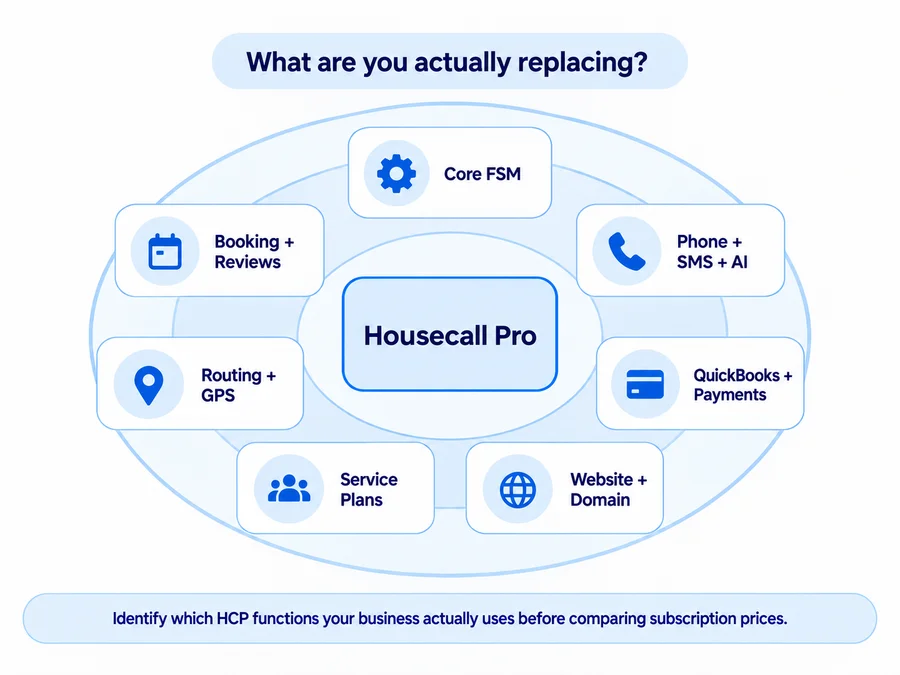
Before You Switch, Rebuild Your Housecall Pro Stack on Paper
Before comparing subscription prices, write down what Housecall Pro is currently doing for the business.
Core FSM
- customers;
- estimates;
- jobs;
- scheduling;
- invoices;
- payments.
Customer Acquisition and Experience
- Online Booking;
- reviews;
- customer notifications;
- booking and payment experience.
Phone, SMS, and AI
- Voice;
- notification number;
- SMS;
- CSR AI;
- other AI Team tools.
Current Housecall Pro documentation says most AI Team members are included and enabled by default, while CSR AI call answering is an optional paid add-on. Do not treat every HCP AI capability as separately paid.
Field Operations
- Routes;
- Employee GPS;
- MAX Route Optimization;
- Vehicle GPS, if used.
Housecall Pro does have route optimization: Essentials includes Routes, while automatic Optimize by Drive Time is currently MAX-only.
Finance and Back Office
- QuickBooks;
- payments;
- financing;
- Service Plans.
Business Assets
- website;
- domain;
- phone number;
- customer/job history.
Now ask:
Does the replacement include these functions, or will we need additional subscriptions?
A cheaper FSM subscription does not necessarily create a cheaper software stack.
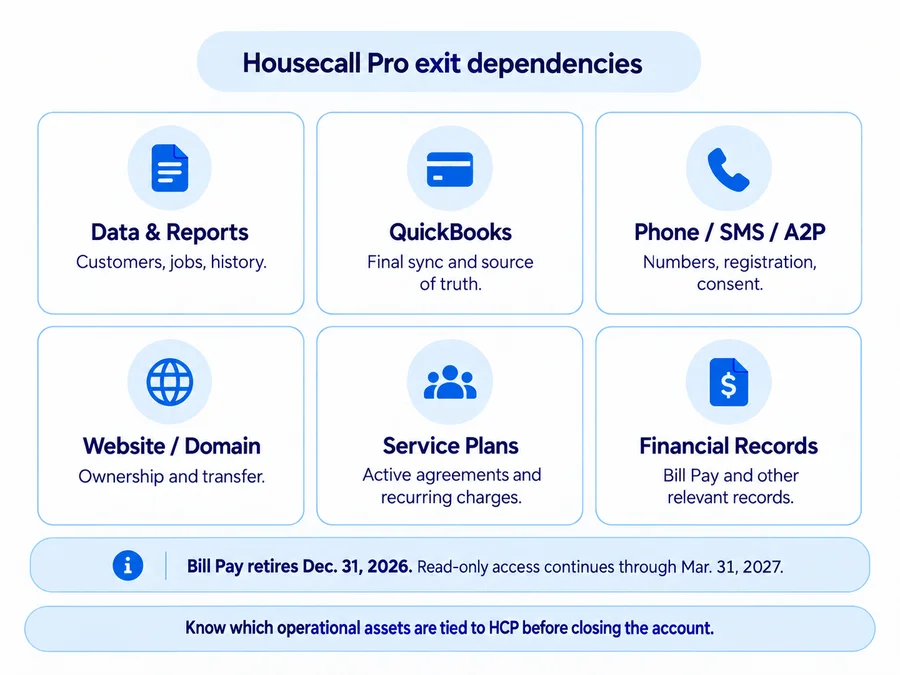
What to Check Before Leaving Housecall Pro
Export the Records You Actually Need
Housecall Pro currently supports direct Customer and Job exports to CSV/Excel-style files and separate exportable Jobs/Estimates reporting.
Do not treat that as a complete account backup.
Before switching, inventory whether the destination can preserve or recreate:
- customers;
- addresses/properties;
- job history;
- estimates;
- invoices/payments;
- tags;
- lead sources;
- attachments;
- equipment;
- Price Book;
- Service Plans;
- communications.
Exportable from Housecall Pro does not mean importable or reconstructable in the replacement.
Audit Phone Numbers, SMS, and A2P
This is easy to miss.
Current Housecall Pro Terms say Pro-specific notification phone numbers may not be transferable and are held for 90 days after cancellation. The same Terms put responsibility for required SMS consent on the business.
Do not confuse an HCP-generated notification number with a business number that was previously ported into a phone service.
If you use HCP phone/SMS tools, verify:
- which number the customer sees;
- who owns it;
- whether it can be ported;
- how A2P registration is handled;
- whether consent/suppression records move.
Do this before canceling.
Protect the Website and Domain
If your website/domain is managed through Housecall Pro, deal with the domain before closing the service.
Current Terms say HCP will transfer a Website Builder domain to another hosting provider on written request. If no transfer instructions are received within 30 days after cancellation takes effect, Housecall Pro may stop renewing the domain at its next renewal.
Domain transfers can also be subject to normal transfer restrictions and processing times.
Plan the QuickBooks Cutover
Current Housecall Pro QuickBooks Online behavior is primarily HCP → QBO after setup.
Invoices, payments, customers, and relevant Price Book information can sync, but invoice edits after the first sync may require a manual push. Deleting or canceling an HCP invoice does not automatically delete or cancel its QBO counterpart.
Before switching, define:
- final HCP sync date;
- unsynced records;
- current source of truth;
- duplicate risk;
- how the replacement integration behaves.
“The replacement also supports QuickBooks” does not mean the cutover is automatic.
Inventory Service Plans and Other Ongoing Commitments
If Housecall Pro is managing active Service Plans, those may connect:
- ongoing agreements;
- recurring charges;
- planned visits;
- customer expectations.
Do not assume a new FSM automatically recreates those relationships.
Map each active plan and decide how recurring billing, scheduled work, and customer communication will continue.
Check Cancellation and Time-Sensitive Financial Records
Housecall Pro’s current cancellation process starts through Support. Its Billing team says it will contact the account owner within 1–3 business days, and cancellation or billing pause is not fully processed until a team member has spoken with the owner.
There is also a time-sensitive Bill Pay dependency.
Housecall Pro says:
- December 31, 2026: Bill Pay retires and becomes read-only;
- January 1–March 31, 2027: records remain accessible in read-only mode;
- after March 31, 2027: Bill Pay history, vendor information, and Bill Inbox attachments are no longer available.
If you use Bill Pay, save the relevant records separately.
When Staying With Housecall Pro May Make More Sense
Switching can look attractive until you price the full replacement stack.
Staying with Housecall Pro may make more sense when:
- the core workflow already works;
- staff are trained;
- booking and payment workflows are established;
- QuickBooks is stable;
- Service Plans are active;
- phone/SMS processes are embedded;
- the website or domain depends on HCP;
- replacing HCP would require several additional subscriptions;
- the only motivation is a lower advertised starting price.
Migration also creates training, duplicate-data, accounting, and customer-communication risk.
Ask:
After recreating the whole stack, what measurable problem will the new setup solve?
If the answer is unclear, a lower FSM price may still produce more fragmentation, administration, and total cost.
Replace Housecall Pro when another setup solves a specific operational problem better—not simply because it advertises a cheaper entry plan.
For a broader evaluation of the platform itself, read our full Housecall Pro review.
Which Housecall Pro Alternative Should You Choose?
Choose according to the business problem.
Closest broad replacement: Jobber.
Handyman owner-operator / lower-cost contractor platform: QuoteIQ.
Phone-heavy business: Workiz.
Growing team that values unlimited users: Service Fusion.
Free/low-cost Apple-first operation: ServiceM8.
More customizable operational depth: FieldPulse.
Straightforward small multi-user package: Kickserv.
Advanced/larger operation: ServiceTitan.
The final comparison should include the complete replacement stack, not only the FSM subscription.
If a cheaper platform forces you to rebuild Housecall Pro through several phone, AI, website, routing, marketing, or recurring-service tools without solving a meaningful operational problem, staying with Housecall Pro may be the better choice.
If Jobber is one of your main options, our Jobber alternatives guide shows how it compares with other field-service platforms from the opposite buying angle.
FAQs
What Is the Best Alternative to Housecall Pro?
There is no universal best alternative.
Jobber is one of the closest broad replacements for a small home-service business.
QuoteIQ is a stronger low-cost contractor-focused option, Workiz is more compelling for phone-heavy operations, and products such as FieldPulse or ServiceTitan make more sense when operational complexity is growing.
Is There a Free Alternative to Housecall Pro?
Yes.
ServiceM8 currently offers a permanent Free plan for one user and up to 30 new jobs per month.
Free does not mean unlimited: the plan limits both users and job volume, and the product remains Apple-first for its full experience.
What Is the Closest Competitor to Housecall Pro?
For many small US home-service businesses, Jobber is one of the closest broad Housecall Pro competitors because both cover customer management, scheduling, estimates, jobs, invoices, payments, and team operations.
The detailed differences in pricing, routing, GPS, QuickBooks, and plan structure are covered in our Jobber vs Housecall Pro comparison.
Does Housecall Pro Work Offline?
Partially, but current official Housecall Pro guidance is inconsistent about exactly which actions work offline.
The current Help Center says previously opened job information can be stored and viewed offline but that general editing without Wi-Fi or cellular service is not supported.
However, a recent official Housecall Pro App Store developer response says users can view job details, fill out job forms, capture customer signatures, and attach photos offline, with changes syncing after connectivity returns.
Businesses that rely on weak-signal field work should test the exact actions they need before choosing—or leaving—Housecall Pro.