

Good handyman CRM software should do more than store names and phone numbers. It should help you remember who the customer is, which property the work belongs to, what happened there before, what was promised, which quote still needs follow-up, which lead has gone quiet, and when repeat work may be due.
The important part is that “CRM” can mean very different things. Some tools are mainly customer databases. Others focus on sales pipelines and follow-up. Others connect the customer record directly to estimates, jobs, scheduling, invoices, payments, and field operations.
The best option depends on which customer-relationship problem your handyman business is actually trying to solve.
Last updated: September 2026
Product and pricing information last verified September 18, 2026.
On this page
Best Handyman CRM Software at a Glance
These are use-case recommendations, not numerical rankings.
| CRM | Best For | CRM Type | Pricing Approach | Main Limitation | Trial/Demo |
|---|---|---|---|---|---|
| Jobber | Balanced CRM + field-service workflow | Full field-service CRM | Core starts at $29/mo annual-equivalent; advanced Pipeline is separate/add-on unless included in Plus | Full visual sales pipeline costs substantially more than basic CRM | 14-day free trial, no card |
| Markate | Lead follow-up and repeat-customer marketing | Service CRM + follow-up | Owner Operator $49.95/mo monthly; $45.95/mo equivalent billed yearly ($551.40 upfront, verify at checkout); +$5/mo per active employee | Some lead/marketing capabilities carry separate charges | 14-day free trial, no card; demo available |
| QuoteIQ | Handyman-specific CRM for owner-operators | Contractor CRM/FSM | $29.99 Essentials to $699 Max | Visual Pipelines & Deals require Elite at $299/mo; meaningful export gaps | 14-day trial; card required; demo available |
| Housecall Pro | Growing teams tying CRM to field operations | Full field-service CRM | Basic $59/mo annually; Essentials $149; MAX $299 | Complete Pipeline/Customer Intake layer involves add-ons or higher packages | 14-day free trial, no card |
| DripJobs | Sales pipeline and automated lead follow-up | Sales/process CRM for contractors | Pro $97/mo; Advanced $147; Growth custom | Texting and several operational tools are add-ons | Demo available |
| Agiled | CRM + projects, contracts, and back-office | General CRM + business management | $24 / $59 / $99 / $199 annual-equivalent tiers | Less field-service/dispatch depth than specialist FSMs | 14-day free trial, no card |
| Workiz | Phone-heavy lead capture and communications | FSM CRM + communications | Standard/Pro/Ultimate use request pricing | Harder to evaluate total cost without a quote | 7-day free trial; demo available |
| Kickserv | Straightforward CRM + QuickBooks for small teams | Small-team FSM/CRM | Start $60 / Run $119 / Scale $199 | Less sophisticated CRM/pipeline depth than sales-focused tools | 30-day free trial |
| FieldPulse | Customizable growing-team CRM workflows | Full FSM CRM | Custom, seat-based pricing | No simple public starting price | Demo / interactive demo |
| ServiceM8 | Free/low-cost CRM starting point for Apple-first businesses | Field-service customer/job CRM | Free for 1 user/30 jobs; paid from $29 with unlimited users | Apple-first; export capability requires add-on for some data | 14-day trial, no card; permanent Free plan |
Trial and demo availability can change quickly. Current statuses above were rechecked against vendor-owned pages immediately before drafting.
What Does CRM Actually Mean for a Handyman Business?
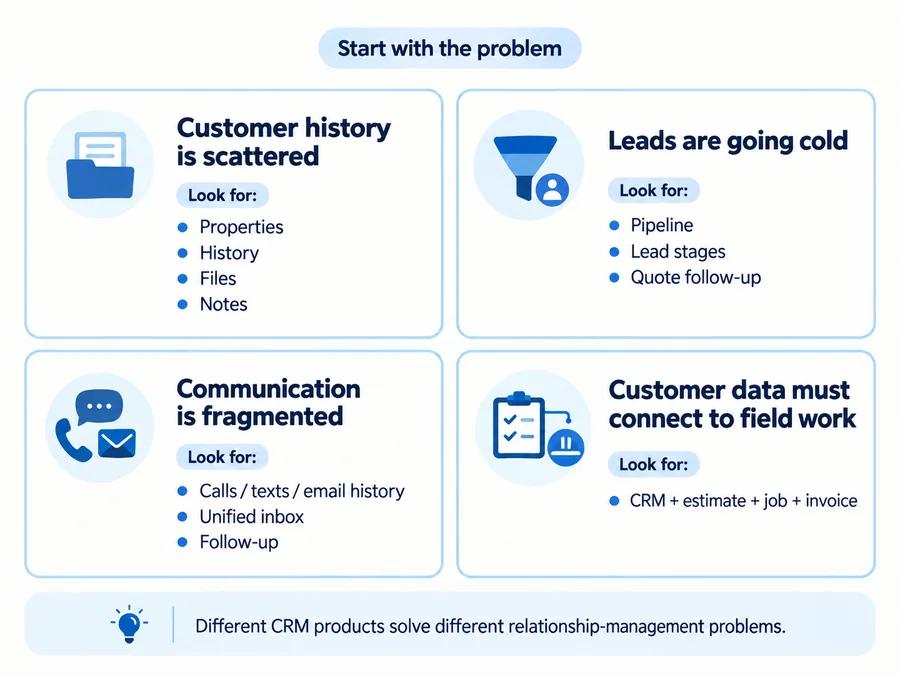
A CRM is only useful if you define what relationship information your business needs to remember.
For a handyman company, that can mean four very different things.
Customer and Property History CRM
The simplest CRM problem is:
“When this customer calls again, can I immediately understand who they are and what happened before?”
A useful customer record may include:
- contact information;
- billing contact;
- one or more service addresses;
- property-specific notes;
- gate/access instructions;
- previous jobs;
- estimates and invoices;
- photos and documents;
- communication history;
- repeat-work history.
The property structure matters more than many generic CRM comparisons acknowledge.
One customer is not always one property.
A property manager might manage:
- Apartment A;
- Apartment B;
- Rental House C;
- a small commercial site.
The useful CRM needs to make it clear:
- who pays;
- who should be contacted;
- where the work takes place;
- what happened at that specific site previously.
FieldPulse, for example, currently supports multiple service locations and multiple contacts under one customer account, with site-specific job/service history.
That is a much more useful handyman criterion than simply asking whether software “stores contacts.”
Lead and Sales Pipeline CRM
A customer database is not automatically a sales pipeline.
Pipeline CRM becomes relevant when your problem is:
- new inquiries;
- opportunities;
- estimates waiting for a decision;
- different sales stages;
- won/lost work;
- lead-source tracking;
- forecasting future sales.
A handyman doing twenty straightforward jobs a month may not need a Kanban board.
A contractor handling larger remodels, property-management proposals, or many open quotes may benefit from knowing:
New Lead → Site Visit → Quote Sent → Follow-Up → Won/Lost
The major buying trap is that basic CRM records and advanced visual pipelines often live on dramatically different plans.
Jobber, QuoteIQ, and Housecall Pro are all good examples of why you need to verify the specific CRM layer you need rather than trusting the word “CRM” on a pricing page.
Communication and Follow-Up CRM
Sometimes the problem is not missing customer records.
It is that the business forgets what happens next.
For example:
- a quote went out three days ago;
- a customer asked to call again next month;
- a completed customer should receive a review request;
- a landlord may need another maintenance visit;
- an old lead never replied.
A useful follow-up CRM can automate or organize:
- quote follow-ups;
- reminders;
- post-job check-ins;
- customer reactivation;
- review requests;
- recurring-service reminders.
The key question becomes:
Can the owner see what has already been said to this customer and what should happen next?
Full Field-Service CRM
The final model connects the relationship record to the whole operating workflow:
lead → customer → estimate → job → invoice → repeat work
Jobber, Housecall Pro, Workiz, FieldPulse, ServiceM8, and similar FSM products follow this model. The advantage is less re-entry. The customer record stays connected to the work.
The trade-off is that you may also be buying:
- scheduling;
- dispatch;
- invoicing;
- payments;
- route tools;
- team management;
- automations;
- other operational features.
That can be valuable—but it can also be too much software for a solo handyman whose real problem is simply remembering customers and following up.
For a broader look at software that connects CRM with the rest of a handyman business, see our handyman software guide.
A full field-service CRM can connect customer history with the repairs performed at each property, but buyers should also inspect the underlying job records. Our work order management software guide focuses on assigned tasks, approvals, photos, return visits, and completion notes.

How We Selected and Evaluated Handyman CRM Software
Home Service Fit evaluated these products using current official:
- pricing pages;
- feature documentation;
- Help Centers;
- customer-management pages;
- export documentation;
- current live US SERP evidence.
We focused specifically on CRM usefulness rather than overall software feature count.
Criteria included:
- customer records;
- multiple properties/addresses;
- job/service history;
- lead capture;
- lead sources;
- pipeline depth;
- communication history;
- automated follow-up;
- repeat-work tools;
- customer portals;
- CRM-to-job workflow;
- mobile access;
- integrations;
- exports and portability;
- pricing and plan gates;
- team structure;
- meaningful limitations.
We do not claim hands-on testing, and affiliate commission does not determine inclusion, order, Best For labels, criticism, or recommendations.
10 Best Handyman CRM Software
Jobber: Best Balanced CRM + Field-Service Workflow
Best for: Solo operators and small teams that want customer management connected directly to jobs, quoting, scheduling, invoicing, and payments.
Jobber’s core CRM is Client Manager, and it sits inside the standard customer-management workflow rather than being a separate enterprise-style CRM product.
Current pricing documents:
- Client Manager;
- Client Hub;
- Requests;
- lead management;
- customer notifications;
- online booking
within the wider Jobber product stack. Client records stay connected to property details, requests, quotes, jobs, and invoices.
For a handyman company, that makes Jobber particularly useful when the CRM problem is:
“I want every customer interaction connected to the work we actually perform.”
Jobber also supports lead-source tracking and allows leads to remain separate from active customers.
The major distinction is Pipeline.
Basic customer management does not require Jobber Plus. But the full visual Sales Pipeline is a different capability. It is currently included in Plus and also available as a $49/month add-on to eligible subscriptions.
That creates two very different buying cases:
- a solo handyman mainly needing customers, properties, requests, and work history;
- a business wanting a structured visual board for every open sales opportunity.
Do not pay for the second problem if you only have the first.
Data portability: Jobber currently lets eligible/admin users export clients as CSV or vCard, including information such as tags, property addresses, contacts, and custom fields. Availability depends on plan and permissions.
Main limitation: Advanced pipeline management can materially increase the real CRM cost.
For a deeper look at Jobber itself, read our full Jobber review and detailed Jobber pricing guide.
Markate: Best for Lead Follow-Up and Repeat-Customer Marketing
Best for: Owner-operators whose biggest problem is leads and past customers falling through the cracks. Markate combines CRM with a broader service-operations platform, but its strongest CRM-specific argument is the follow-up layer.
Current pricing lists:
- Owner Operator: $49.95/month on monthly billing; current public annual listing is $45.95/month equivalent ($551.40 prepaid), subject to checkout confirmation;
- team access: $5 per employee/month above the base price.
Markate currently documents Leads Management with:
- Leads / Opportunity Pipeline;
- follow-up tracking;
- notifications;
- sales reporting and analytics.
That makes it useful when leads already exist, but the business struggles with:
- remembering to call them;
- knowing which stage they are in;
- following up on old opportunities;
- staying in touch with previous customers.
Markate also supports campaigns and broader customer communication, which can help with customer reactivation and repeat business. But watch the add-ons. The pricing page lists optional features such as automated website lead capture for $10/month, so you should not assume every lead-generation or marketing feature is included in the $49.95 monthly owner subscription. Annual pricing and additional modules should be checked before purchase.
Before choosing Markate for lead follow-up, check the complete subscription cost. Our Markate pricing guide covers the owner subscription, employee access, optional CRM and marketing modules, and the billing terms worth confirming.
Markate currently advertises a 14-day free trial with no credit card required plus a live demo.
Main limitation: The overall platform has many operational features, and some marketing/lead tools add extra cost.
QuoteIQ: Best Handyman-Specific CRM for Owner-Operators
Best for: Handyman businesses that want CRM inside a contractor-specific quoting, customer, scheduling, and payment workflow.
QuoteIQ’s current entry pricing is unusually low:
- Essentials — $29.99/month, 1 user;
- Beginner — $74.99, 2 users;
- Pro — $149.99, 4 users;
- Elite — $299, 10 users;
- Max — $699, unlimited users.
For the full pricing structure—including user limits, feature gates, IQ Credits, and extra costs—see our QuoteIQ pricing guide.
Essentials already includes contact management, lead-source tracking, estimates, invoicing, scheduling, and data exports.
That is real CRM functionality.
But it is not the same thing as QuoteIQ Pipelines & Deals.
Current Pricing and Help Center documentation place Pipelines & Deals on Elite and Max. Elite currently includes up to five pipelines, while Max removes that limit.
So the buyer lesson is important:
$29.99 core CRM and $299 sales-pipeline CRM solve different problems.
A solo handyman may be perfectly happy on Essentials or Pro without a Kanban sales board.
A business tracking commercial bids, several sales stages, weighted opportunity value, or multiple parallel pipelines may genuinely need Elite.
There is also an unusually important data-portability issue.
QuoteIQ’s current export documentation says it exports seven core data types, including customers, estimates, invoices, payments, expenses, tax data, and P&L information. But it currently does not bulk export several other categories, including:
- jobs / appointments / schedule history;
- ClientHub texts and call logs;
- photos, documents, and inspection forms;
- notes;
- tags;
- lead-source data;
- services / Price Book.
Some of that information remains accessible only while the account is active.
That does not make QuoteIQ a bad CRM. It means a buyer should understand the exit path before putting years of customer context into the system.
QuoteIQ currently offers a 14-day trial, but a credit/debit card is required. It also offers live demos.
Main limitation: The advanced CRM/pipeline tier is dramatically more expensive than core CRM, and bulk export coverage is incomplete.
For a deeper look at QuoteIQ’s core CRM, higher-tier Pipelines & Deals, user feedback, and export limitations, read our QuoteIQ review.
Housecall Pro: Best for Growing Teams Tying CRM to Field Operations
Best for: Small and growing teams that want customer records tightly connected to dispatch, jobs, payments, technicians, and day-to-day field operations.
Housecall Pro’s current Customer Profile acts as a centralized customer record with:
- contact information;
- estimates;
- jobs;
- invoices;
- attachments;
- notes;
- service history.
That is useful when the customer record needs to answer:
“What has this business done for this customer before, and what is happening next?”
Housecall Pro also now has dedicated Leads functionality for tracking potential jobs before they become estimates or booked work.
The important distinction is that customer records and leads are not the same thing as the full Pipeline / Customer Intake stack.
Current HCP documentation treats Pipeline as an additional configurable product, and Customer Intake is available through Voice, HCP Assist, or Pipeline add-ons.
That means buyers should not assume the Basic subscription automatically includes every sales/intake capability they see elsewhere in the Housecall Pro ecosystem.
Current general/home-service pricing starts at:
- Basic — $59/month billed annually;
- Essentials — $149/month;
- MAX — $299/month.
Housecall Pro also supports exporting customers and jobs for backup or migration, though a flat export should not be assumed to recreate every relationship or workflow automatically in another CRM.
Main limitation: Strong CRM depth can become tied to additional HCP products/add-ons and a broader operational commitment.
For more detail, read our full Housecall Pro review, see the Housecall Pro pricing guide, or compare Jobber vs Housecall Pro side by side.
DripJobs: Best for Sales Pipeline and Automated Lead Follow-Up
Best for: Contractors whose biggest CRM problem is that open leads and unsold proposals are not being followed up consistently.
DripJobs is the clearest example in this list of sales/process CRM rather than merely customer-record CRM.
Current pricing is:
- Pro — $97/month;
- Advanced — $147/month;
- Growth — custom pricing.
Its core CRM concept is built around a sales pipeline and automated drip follow-up.
Pro currently includes:
- 40+ prebuilt drip messages;
- email drips;
- proposals/e-signatures;
- scheduler;
- invoicing/payments;
- customer portal;
- financing;
- work orders.
That makes DripJobs particularly relevant when the actual problem is:
“We generate leads and quotes, but nobody consistently chases them.”
Drip sequences can change based on pipeline stage, including stages such as Cold Lead, Warm Lead, Estimate Scheduled, Proposal Sent, Scheduled, In Progress, and Completed.
Two-way texting is an add-on.
DripJobs Chat currently costs $25/month and provides a dedicated business number, two-way texting, shared conversation history, and SMS drip functionality.
The vendor also advertises A2P/10DLC handling with that add-on. That is useful operationally, but it should not be interpreted as eliminating the business’s own responsibilities around consent, suppression, and opt-outs.
A current demo is available.
Main limitation: CRM depth is strongest around selling and follow-up; several communications and operational functions are separate add-ons.
Agiled: Best for CRM Plus Back-Office Projects, Contracts, and Client Management
Best for: Solo and small businesses that want a genuine CRM/pipeline plus projects and client-management tools without making field dispatch the center of the system.
Agiled offers a different model from Jobber or Housecall Pro.
Current annual-equivalent pricing is:
- Starter — $24/month, 1 seat;
- Pro — $59/month, 3 seats;
- Business — $99/month, 7 seats;
- Scale — $199/month, 15 seats.
Starter already includes:
- contacts;
- accounts;
- one deal pipeline;
- projects;
- invoicing;
- calendar.
Pro increases CRM depth with unlimited contacts and three pipelines, while Business and Scale support unlimited pipelines.
Agiled also includes project/task management, forms, contracts/docs, workflows, invoices, estimates, and client-facing tools.
This gives it an interesting fit for a handyman business doing:
- larger quoted projects;
- property-manager relationships;
- contracts;
- multi-step back-office work;
- tasks/projects;
- client documentation.
In other words:
Agiled is closer to CRM + back-office/project/client management.
Jobber, Housecall Pro, Workiz, FieldPulse, and ServiceM8 are more field-service-first.
Agiled currently advertises a 14-day free trial with no credit card required, and its current FAQ says users can continue on a Free workspace after the trial if they do not select a paid plan.
Main limitation: It does not have the same dispatch/technician/routing depth as dedicated field-service platforms.
Workiz: Best for Phone-Heavy Lead Capture and Integrated Communications
Best for: Teams where a large share of new business begins with phone calls, texts, emails, or incoming service inquiries.
Workiz becomes interesting when your CRM problem is:
“Leads arrive through several communication channels, and the customer context is fragmented.”
Current Standard, Pro, and Ultimate plans use Request pricing rather than stable public dollar amounts.
For the full cost structure behind that quote—including seats, Genius add-ons, billing, and contract terms — see our Workiz pricing guide.
The Standard package currently includes:
- client management;
- custom fields;
- QuickBooks;
- service areas;
- built-in reporting;
- automation.
Pro adds capabilities such as Genius Leads, Genius Scheduling, and stronger automation.
Workiz’s Client CRM is built around maintaining job history, payments, service plans, notes, and other context under one client record.
Its broader differentiation is communications.
Genius Phone, Genius Answering, and related tools connect calls, texts, and other inquiries into the service workflow. Current pricing documentation also explicitly lists 10DLC Registration (free) under Genius Phone.
Again, carrier registration support does not transfer all consent or opt-out responsibility to Workiz.
Workiz currently advertises both a 7-day free trial and a demo.
Main limitation: Request pricing makes it harder to compare real CRM cost before talking to sales.
For a deeper evaluation of its lead workflow, communications tools, mobile apps, pricing model, and practical risks, see our Workiz review.
Kickserv: Best for Small Teams Wanting Straightforward CRM + QuickBooks
Best for: Small teams that want a relatively clear customer/job system without paying for a large enterprise-style stack.
Kickserv’s current public pricing is refreshingly straightforward:
- Start — $60/month, 5 users;
- Run — $119/month, 10 users;
- Scale — $199/month, 20 users.
Start already includes several things that matter to a small handyman team:
- embeddable contact form;
- automated email/text reminders;
- reporting;
- time tracking;
- expense tracking;
- QuickBooks Online integration.
The wider platform keeps customer records connected to job history and communication, which is usually more important for a small service team than complex enterprise pipeline customization.
Run adds dispatch mapping, GPS check-ins, custom fields, custom reports, and optional QuickBooks Desktop connectivity.
Kickserv currently advertises 30-day free trials for its main plans.
Main limitation: It is a straightforward FSM/CRM rather than one of the most sophisticated sales-pipeline or marketing-automation tools in this list.
FieldPulse: Best for Customizable Growing-Team CRM Workflows
Best for: Growing teams where customer context must be shared consistently across office staff, field technicians, several contacts, and multiple properties.
FieldPulse’s CRM currently centralizes:
- customer details;
- communication history;
- job history;
- payment records;
- notes;
- follow-up tasks.
It also supports automated:
- post-job follow-up;
- maintenance reminders;
- review requests.
For a handyman or home-service business, one of FieldPulse’s strongest CRM distinctions is multi-site customer management.
A customer account can contain:
- multiple service locations;
- multiple contacts;
- site-specific history;
- the correct contact assigned to a specific location.
That can be particularly useful for:
- landlords;
- property managers;
- commercial clients;
- HOAs;
- multi-location accounts.
FieldPulse also offers centralized communication records, including email, calls, and messages, and can keep customer communication visible to the wider team.
Current pricing is custom and seat-based. FieldPulse explicitly directs buyers to request a tailored quote rather than relying on third-party price estimates.
A live demo and interactive product demo are available.
Main limitation: Buyers cannot quickly calculate total subscription cost from a public price table.
ServiceM8: Best Free/Low-Cost CRM Starting Point for Apple-First Businesses
Best for: Solo and very small businesses that mainly need customer/job history connected to basic field-service workflow at minimal cost.
ServiceM8 is not a traditional sales-pipeline CRM.
Its CRM value comes from the Client Card.
A Client Card can include:
- client details;
- multiple contacts;
- primary and billing contacts;
- Client Diary;
- badges;
- job history;
- notes;
- photos/documents associated with the client;
- connected jobs.
That is useful for a solo handyman asking:
“When this customer calls again, can I immediately see what we’ve done for them before?”
Current US pricing is:
- Free — $0, 1 user, 30 new jobs/month;
- Starter — $29/month, unlimited users, 50 jobs;
- Growing — $79/month, unlimited users, 150 jobs;
- Premium — $149/month, unlimited users, 500 jobs;
- Premium Plus — $349/month, unlimited users, 1,500+ jobs.
That makes ServiceM8 unusually accessible for a solo operator.
The device model matters, however.
ServiceM8 remains Apple-first. The vendor recommends iPhone/iPad for the full experience, while ServiceM8 Lite for Android is intended for technicians and other workers who only need the basics.
There is also an export caveat.
The current Advanced Reporting Pack is what adds client-list and job-list CSV exports. Those CSV reports are text-based and do not include every associated file or piece of job data.
ServiceM8 currently offers a 14-day free trial with no credit card required, plus the permanent Free plan.
Main limitation: Apple-first operation and plan/add-on-dependent export capability need to fit your workflow.
What to Look for in Handyman CRM Software
Customer and Property History
Start with the question that will matter six months from now:
When I return to this property, can I immediately see what happened last time?
Look for:
- customer records;
- multiple service addresses;
- billing versus site contacts;
- access instructions;
- property notes;
- previous jobs;
- photos/files;
- estimates/invoice history;
- repeat-work context.
For businesses serving landlords or property managers, the relationship between customer → property → job history can matter more than advanced marketing automation.
Lead Capture and Pipeline Depth
Do not treat these seven capabilities as interchangeable:
- Website inquiry.
- Lead record.
- Lead-source tracking.
- Quote waiting for response.
- Stage-based visual pipeline.
- Automated actions based on pipeline stage.
- Revenue/opportunity forecasting.
A $30 CRM may do the first three perfectly well.
You may need a much more expensive tier for the last three.
That is exactly what happens with products such as Jobber and QuoteIQ.
Follow-Up and Repeat Business
Handyman businesses often lose repeat revenue not because customer information is missing, but because nobody remembers to use it.
Look for the ability to manage:
- quote reminders;
- post-job follow-up;
- review requests;
- maintenance reminders;
- reactivation campaigns;
- recurring-customer communication.
A simple reminder that actually gets used can be worth more than a sophisticated pipeline nobody opens.
Calls, Texts, Emails, and Customer Context
The useful question is not:
“Does the CRM support SMS?”
It is:
“Can the next person looking at this customer understand the conversation so far?”
Communication is more valuable when calls, texts, email, notes, and automated follow-up stay connected to:
- the customer;
- the property;
- the lead;
- the job/opportunity.
That becomes especially important when an office person, spouse/admin, or technician may pick up the next interaction.
CRM-to-Job Workflow
For field-service businesses, evaluate how much re-entry happens across:
lead → customer → estimate → job → invoice → repeat work
A dedicated sales CRM may be excellent at leads but require manual handoff into another job system.
A full FSM CRM may keep everything connected but charge more and require greater setup.
Neither model is automatically better.
For deeper comparisons of those individual workflows, see our handyman estimating software, handyman scheduling software, and handyman invoicing software guides.
Messaging Consent, Opt-Out, and Registration Controls
CRM automation does not remove the business’s own responsibility for compliant communication.
For US automated calls/texts, current FCC rules generally require covered consent-revocation and do-not-call requests to be honored within a reasonable time, not exceeding 10 business days. The broader rule that would extend one informational-message revocation across unrelated categories has been delayed until January 31, 2027, so it would be inaccurate to say that one STOP request today necessarily blocks every unrelated category of automated communication.
If your CRM sends US A2P 10DLC texts, check how registration works. Twilio, for example, has required Privacy Policy and Terms & Conditions URLs for new API-based A2P campaign registrations since June 30, 2026—but not every CRM necessarily uses Twilio.
For commercial email, FTC CAN-SPAM guidance requires opt-out requests to be honored within 10 business days and makes clear that a business cannot simply contract away its compliance responsibility to the sending vendor.
AI-generated outbound voices also remain subject to applicable TCPA artificial/prerecorded-voice rules.
This is practical buying context, not legal advice.
The CRM question is:
Does the system provide the controls and records your business needs to manage consent, suppression, and opt-outs responsibly?
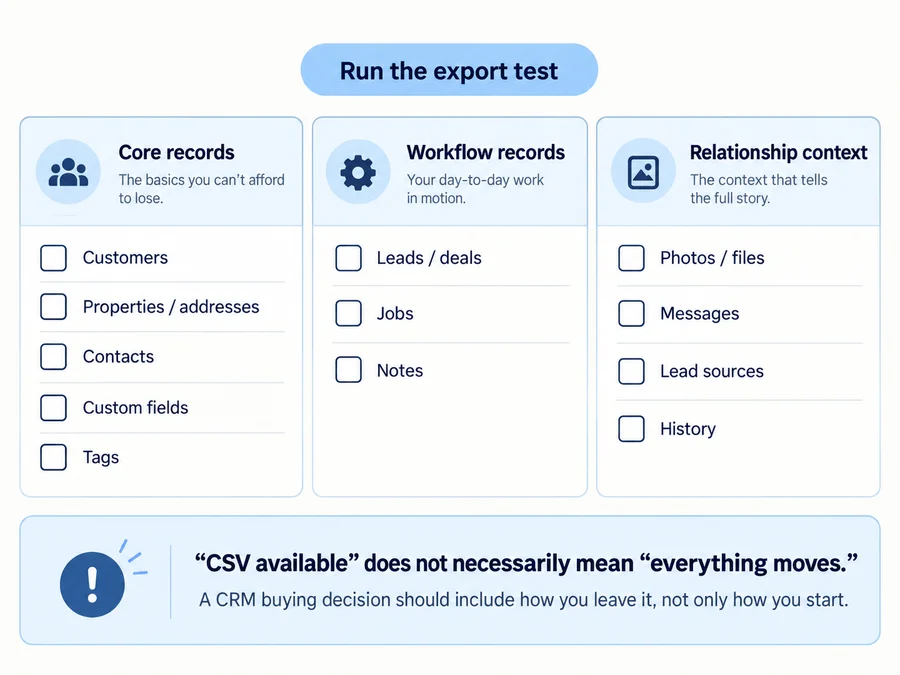
Data Export and Exit Planning
Before choosing CRM software, ask:
What can I take with me if I leave?
Test whether you can export:
- customers;
- contacts;
- properties/addresses;
- custom fields;
- tags;
- lead sources;
- opportunities;
- pipeline stages;
- estimates;
- jobs;
- notes;
- photos/documents;
- communications;
- service history.
And remember:
“CSV export available” does not mean “the entire CRM can be recreated somewhere else.”
QuoteIQ is a good current example. It exports several important financial/customer categories but not jobs/schedule history, conversations, photos/documents, notes, tags, lead-source data, or Price Book data in bulk.
Jobber exports useful client/property/custom-field data, while Housecall Pro can export customers and jobs. ServiceM8 requires the Advanced Reporting Pack for key client/job CSV exports.
The point is not to dramatize “vendor lock-in.”
It is to understand the exit plan before customer data becomes mission-critical.
Pricing and Plan Gates
One of the biggest CRM-shopping traps is assuming that basic CRM and advanced CRM live on the same plan.
Current examples:
- Jobber: Client Manager/customer records are core; Pipeline is currently $49/month as an add-on and included in Plus.
- QuoteIQ: core CRM begins at $29.99; Pipelines & Deals begin at Elite for $299/month.
- Housecall Pro: customer profiles and Leads exist in the main platform, while Pipeline and Customer Intake sit within a broader add-on/product structure.
So do not ask:
“What does this CRM start at?”
Ask:
“What is the cheapest plan that contains the specific CRM capability I need?”
When You May Not Need a Separate Handyman CRM
A deeper CRM is not automatically a sign of a more professional business.
You may not need one when your existing software already solves the customer-management problem.
If your current field-service system already provides:
- customer history;
- property notes;
- quote follow-up;
- repeat reminders;
- communication records;
adding another CRM may simply create duplicate data.
You may also need something lighter if your actual problem is estimates and invoices rather than lead management.
If that describes your business, compare our handyman estimating software and handyman invoicing software guides before paying for a deeper CRM.
A solo handyman doing a handful of jobs each month may find that free handyman software covers the operational basics without needing visual pipelines, marketing automation, AI reception, and sales forecasting.
Likewise, if most leads live and are managed entirely inside another marketplace or booking platform, copying every record into a separate CRM may add unnecessary admin.
And the biggest practical test is adoption.
A perfect CRM does not help if:
- the owner keeps texting from a personal phone;
- the admin keeps using a spreadsheet;
- technicians never update records;
- everyone still relies on memory.
Buy a CRM to solve a specific customer-management problem, not because successful businesses are “supposed” to have one.
Which Handyman CRM Should You Choose?
Do not begin with the product.
Begin with the problem.
If you want balanced CRM + field-service operations:
Start with Jobber. Its core customer-management layer connects naturally to estimates, jobs, scheduling, invoices, and Client Hub without requiring the advanced Pipeline product.
If follow-up and customer reactivation are the main problem:
Look closely at Markate.
If you want a handyman-specific owner-operator system:
QuoteIQ is compelling—but decide whether you really need $299 Elite-level Pipelines or only the much cheaper core CRM.
If CRM must support a growing field team:
Compare Housecall Pro and FieldPulse.
If your sales process needs serious pipeline automation:
DripJobs has one of the clearest sales-first CRM models in this group.
If you need CRM + projects/contracts/back-office rather than deep dispatch:
Agiled is a useful alternative to FSM-first platforms.
If calls and messages are the main lead bottleneck:
Look at Workiz.
If you want straightforward multi-user FSM/CRM with public pricing:
Kickserv is easier to evaluate than many custom-priced competitors.
If low starting cost matters:
ServiceM8 is unusually accessible, provided its Apple-first operating model fits your business.
If the decision comes down specifically to Jobber and Housecall Pro, the key differences are better handled in our dedicated Jobber vs Housecall Pro comparison rather than repeated here.
The final principle is:
The best handyman CRM is the one that preserves the customer and property context your business actually needs—from first inquiry through the next repeat job—without making you pay for a sales or field-service stack you will not use.
FAQs
What Is the Best CRM for a Handyman Business?
There is no universal best CRM for every handyman.
Jobber is a strong balanced choice when customer records need to connect directly to field-service operations.
Markate is particularly relevant for lead follow-up and repeat-customer communication.
QuoteIQ offers a handyman-specific CRM starting at a low price, but its advanced visual pipeline requires Elite.
DripJobs is stronger when structured sales pipeline and automated follow-up are the main problem.
Housecall Pro and FieldPulse deserve close consideration for growing teams.
What Should a Handyman CRM Keep Track Of?
At minimum, useful handyman CRM software should help track:
- customer details;
- service properties/addresses;
- billing and site contacts;
- lead source;
- active opportunities;
- quote/follow-up status;
- previous jobs;
- notes;
- photos/files;
- customer communication;
- job/payment context;
- next follow-up;
- repeat-work opportunities.
The exact feature set matters less than whether the next person opening the record can understand the full customer/property history.
Can a Handyman CRM Manage Multiple Properties for One Customer?
Some can, but the structure varies by product.
For landlords, property managers, commercial clients, and other multi-location accounts, the ideal CRM separates:
customer/account
from:
individual service location/property
while keeping job/service history tied to the correct location.
FieldPulse currently documents a particularly clear multi-site model: multiple addresses and contacts can sit under a single customer record, with job history tracked against the appropriate location.
Do not assume every CRM in this list uses the same customer/property hierarchy.