
Last updated: October 2026
Product features, plan conditions, and published cost examples last checked October 25, 2026.
On this page
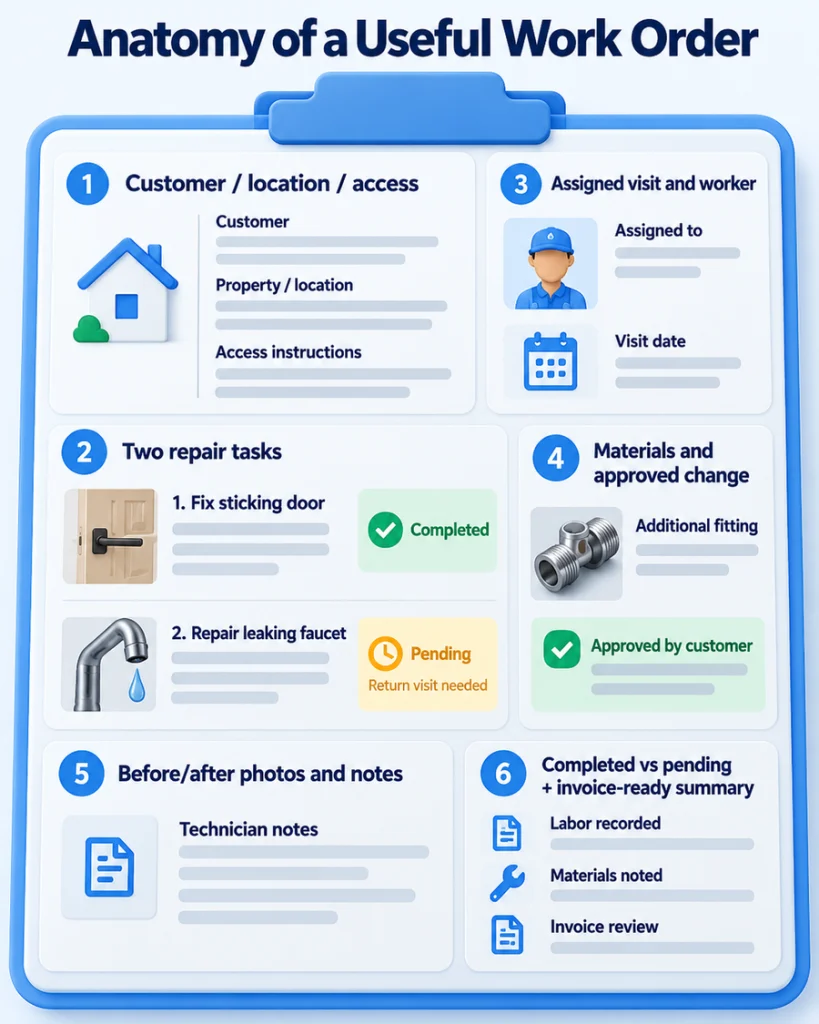
A handyman arrives to repair a sticking door and replace a leaking faucet. The faucet needs an unexpected fitting, the customer authorizes the additional material, and the door repair is finished while the faucet requires another visit. A useful work order keeps the original instructions, the approved change, photos, materials used, and unfinished task together so the returning worker and the person preparing the invoice can see what actually happened.
Jobber is a practical choice for everyday job and visit records; FieldPulse offers more customizable stages and forms; QuoteIQ suits photo-heavy mixed repairs; and Maintenance Care is better aligned with repeated property-maintenance requests. A solo handyman handling a few straightforward jobs may be better off with a reusable template. The options below are assessed by how well they preserve assigned scope, field evidence, return visits, and billing handoffs—not by the size of their general handyman software feature lists.
Best Tools at a Glance
| Software | Best for | Work-order strength | Main trade-off |
|---|---|---|---|
| Jobber | Everyday work orders | Connected job scope, visit instructions, notes, and checklists | Documentation and costing depend on plan |
| FieldPulse | Custom repair stages and forms | Custom statuses, job-attached forms, files, and change documentation | Quote-based pricing; more setup |
| QuoteIQ | Photo-heavy mixed repairs | Job-linked images, inspection reports, estimate context | Photo, signing, and crew tools have different plan gates |
| ServiceM8 | Job-limited mobile teams | Job cards, notes, photos, and visits | New-job caps; conflicting Android documentation |
| Field Promax | Form-heavy field paperwork | Work orders, checklists, signatures, photos, and time | Higher entry cost; conflicting published prices |
| Kickserv | Simple team records | Shared customer history and jobs | Dispatch map and custom fields require Run |
| Housecall Pro | Dispatched residential visits | Assignments, checklists, and photo reports | Documentation/routing features are plan-dependent |
| Maintenance Care | Recurring property maintenance | Requests, assets, histories, and technician updates | CMMS emphasis may be unnecessary for quote-led repair work |
| Service Fusion | Larger teams seeking unlimited users | Shared jobs, dispatch, and office/field records | Photos and costing on Starter require add-ons |
These are different work-order models. Maintenance Care organizes maintenance requests against facilities and assets; most other products organize service jobs for paying customers. Jobber is a good general starting point, but specialized paperwork, job-volume limits, user costs, and the actual field handoff can change which tool makes sense.
What a Good Work Order Captures
Consider the door-and-faucet appointment. The record should identify the customer and property, describe each authorized repair, show access instructions and the assigned worker, and distinguish finished work from the part that still needs attention. The technician should be able to add a photo of the damaged fixture, record an approved replacement fitting, note time and materials, and explain why another visit is needed. The office should later retrieve those details without piecing together a group text and someone’s camera roll.
Useful fields include the order reference, address, task scope, assigned visit, status, time, materials, notes, authorization, and completion information. The approved scope should carry over from the estimate, whether created manually or with handyman estimating software. Photos and signatures are valuable when they clarify work performed, but not every platform includes them on its entry tier. Authorization should identify the approved change.
A job can cover the overall service assignment while a visit is a particular trip to the property. A work order communicates what should be done and records associated work, although platforms differ in whether they use that exact term or organize the information under jobs and visits. A maintenance request often begins with a tenant, staff member, or property asset and becomes assigned work after review. For an operator who needs to book time slots rather than preserve repair details, our handyman scheduling software guide addresses a different purchasing decision.
The 9 Best Work Order Tools
Jobber — Best for Everyday Work Orders
Jobber is particularly useful when a job requires several visits. Its job holds the overall assignment, while scheduled visits carry individual dates, workers, instructions, line items, notes, and checklists. A technician can complete the door repair on the first visit, leave the faucet task documented for a follow-up, and allow the office to distinguish completed visits from unfinished ones. Images and signatures can be captured within configured checklist fields, creating a more useful visit record than an appointment marked complete without explanation.
Current Jobber documentation also supports offline queuing for checklist changes and certain notes, which sync after connectivity returns; that should not be interpreted as unlimited offline use of all job features. Connect for five users is $199/month on regular no-commitment monthly billing and includes checklists, while job costing belongs to Grow and Plus. Jobber may be less attractive if every repair type needs highly customized forms and approval stages. Our Jobber review covers its wider operating model.
FieldPulse — Best Custom Work Order Forms
FieldPulse suits teams whose assignments move through more than a simple scheduled/completed sequence. A repair awaiting parts can have a distinct job status, and office staff can standardize what technicians must record before closing different kinds of work. FieldPulse documents custom job statuses and forms for service reports, change orders, purchase orders, and customer reports. Forms can be attached to jobs, carry photos or files, and be exported as PDFs for customers or office records.
That flexibility is valuable for a property-service business handling varied repairs, inspections, and approvals, especially when employees need repeatable evidence requirements. It also takes thoughtful setup: a poorly designed status or form library can make simple calls cumbersome. Pricing is custom-quote, and buyers should demonstrate the needed forms, permissions, and automations on the offered tier rather than assume universal inclusion. The broader operational trade-offs are covered in our FieldPulse review.
QuoteIQ — Best for Photo-Heavy Repairs
QuoteIQ is worth considering when a handyman performs different small repairs during the same visit and needs each set of photos, inspection notes, and estimate details to stay discoverable. QuoteIQ Cam supports job and inspection reports, dated job-photo storage, and image sharing, reducing reliance on a personal phone gallery. Its estimating and invoicing functions supply useful context, although a job photo alone is not evidence that the customer approved extra work.
Plan distinctions matter. QuoteIQ Cam inspection reports begin at Beginner. The current detailed matrix lists estimate e-signatures across all tiers, while creating new standalone documents through QuoteIQ Sign starts at Pro. EmployeeHub and advanced crew management are higher-tier capabilities, not merely extra logins. The October 5, 2026 plan update makes Pro $199.99/month with four users, with another user at $25/month. A five-login example is therefore $224.99, before other fees. Avoid older Pro-price comparisons; check the current October plan changes and chosen signing workflow before subscribing.
ServiceM8 — Best for Job-Limited Teams
ServiceM8 organizes work around job cards, connecting client details, notes, photos, assigned workers, appointments, and the eventual invoice. Its pricing is unusual: Free supports one user and 30 new jobs per month, while Starter costs $29/month for unlimited users and 50 new jobs per month. This makes the entry cost attractive to a lean crew with predictable job volume. ServiceM8 explains that converting an existing quote job card into a work order does not consume another new-job credit; a job allowance is different from a user allowance.
There is a current mobile-platform discrepancy to resolve before buying. ServiceM8’s US homepage and 2026 timeline describe a full-featured Android app, while its dedicated Android information page still describes the narrower ServiceM8 Lite product. Neither an “iOS-only” description nor a promise of complete Android/iOS parity is adequately supported across these sources. Android-based teams should identify the actual downloadable app and check photos, documents, completion, and billing on their own devices.
Field Promax — Best for Field Documentation
Field Promax places work orders and technician paperwork at the center of its offering. Its current work-order materials describe task instructions, job attachments, customizable templates, recurring orders, checklists, photos, signatures, labor tracking, and an office invoice handoff. Field workers can use iOS or Android apps. This is useful for maintenance visits or repair crews that need consistent completed forms, rather than simply a technician’s short note saying the visit happened.
The buying issue is pricing clarity. Field Promax’s dedicated pricing page lists Standard at $239/month for two to five users, while its current homepage FAQ lists $299/month for the same user band. Those official figures have not been reconciled here, so neither is treated as a guaranteed checkout price or included in the five-user cost graphic. Verify the current monthly quote and selected forms before committing. Vendor claims about less data entry do not eliminate reconciliation.
Kickserv — Best Simple Team Records
Kickserv is a reasonable option for a small handyman crew that wants shared customer history, job notes, status visibility, reminders, and straightforward work tracking without designing a complicated form system. The office can see the same customer and job context as the worker, which is helpful when somebody calls about an earlier repair or a visit needs to be reassigned.
Its regular monthly Start plan costs $60 for five users, including time tracking, expense tracking, and basic customer communication. Run is $119/month for ten users and adds dispatch mapping, GPS check-ins, and custom fields. These are meaningful upgrades if the dispatcher needs map-based coordination or more structured order data. Before relying on a completed job record as a signable work order, confirm photo capture, signature handling, and role access in the exact plan.
Housecall Pro — Best for Dispatched Visits
Housecall Pro is most relevant when a residential handyman company needs to keep technicians and the office coordinated throughout the visit. In Essentials, employees can use job checklists, annotated photo reports, and route-related tools while the office manages schedules and customer notifications. That helps a worker arrive with the correct property instructions and lets the office review what was done before billing.
The regular Essentials monthly price is $189 with five users included; first-month promotional offers are not the standing subscription baseline. Essentials includes Routes and GPS-related tools, but Max adds optimization based on actual drive times and live traffic. Those are different capabilities. Buyers should also verify the exact job actions available without connectivity instead of assuming full offline editing. Our Housecall Pro review covers the broader product beyond visit documentation.
Maintenance Care — Best for Property Maintenance
Maintenance Care approaches work orders from a CMMS perspective: a resident or building employee submits a maintenance request, the manager reviews and assigns it, and a technician updates the status and service history. Recurring preventive maintenance and asset records help connect repeated problems to a specific unit, building, or piece of equipment. That makes it a plausible choice for a handyman servicing a landlord portfolio, apartment buildings, or a facility with ongoing internal repair requests.
Its current Free tier permits two users with limited assets and preventive-maintenance records plus Mobile App Lite. The paid Maintenance Care plan lists $250/month based on yearly pricing and includes unlimited users and broader maintenance features. That is not the same as a confirmed $250 month-to-month contract. The product is a weaker fit for a solo homeowner-facing handyman whose main process is quoting occasional repairs and collecting payment. Its asset and request structure is valuable when ongoing maintenance history drives the work.
Service Fusion — Best for Larger Crews
Service Fusion deserves attention when an office needs to coordinate substantial job volume and wants unlimited users on Starter, Plus, and Pro. Its shared customer, job, schedule, and dispatch records can keep more technicians and office staff working from the same assignment information without a new base seat charge each time someone joins.
However, its current official pricing page contains conflicting monthly price presentations, so a definitive plan amount would be misleading here. The detailed feature matrix places job photo uploads, inventory, and job costing among optional Starter add-ons, while they are included from Plus upward. Documentation-heavy repair workflows may therefore require more than the entry configuration. The relevant comparison is the written quote for the minimum plan that supports the team’s photo, material, and job-record needs, alongside the Service Fusion pricing breakdown.
Work Orders in Real Field Conditions
Multiple Tasks and Return Visits
Consider a single property visit with a door adjustment, faucet repair, and minor drywall patch. The worker completes two tasks but discovers that the faucet fitting must be ordered. A good work-order setup preserves each task’s status and the material already approved, then lets the office arrange a return visit without losing the notes from the first trip. The next technician should know which work is complete and which still needs parts, even if the original employee is unavailable.
Different tools implement this relationship differently. Jobber explicitly separates jobs and scheduled visits. Another product may rely on custom job statuses or linked work orders; a CMMS may generate requests against the same asset over time. During selection, inspect the history that a returning technician actually sees, how unfinished tasks appear on office screens, and whether the invoice can exclude work that has not yet been performed.
Photos, Approvals and Completion Notes
A photo becomes far more useful when it is attached to the correct visit or work order with a note explaining what it shows. Similarly, an extra-material approval should record which task changed, what the customer agreed to, and when the change was made. Software can organize that evidence and reduce missed billing details, but it cannot guarantee the legal sufficiency of a photo or signature in a dispute.
Before the office sends the invoice, someone should review technician time, materials, unfinished items, and the notes for each visit. If the team regularly loses connectivity, test a specific offline action, including what happens when synchronization fails. Jobber, for example, documents a queue for checklist and certain note updates, but that does not establish offline availability for every estimate, payment, or job edit. The field record is only useful when it becomes visible to the office and remains retrievable later.
Templates vs Work Order Software
A paper form, spreadsheet, or editable PDF may be completely adequate for a solo handyman completing a small number of uncomplicated jobs each week. A template can capture scope, materials, assignment, approvals, and completion notes. It is inexpensive to start with, easy to print, and familiar to customers who want a written record.
Software becomes more attractive when several workers need current instructions, one repair requires return trips, or a property manager expects maintenance histories and consistent proof of completion. A template cannot by itself synchronize photos across devices, control technician permissions, notify the office of updated tasks, or hand structured job details into the invoice. Someone must store, name, find, and share each completed form.
As a free reference, ServiceTitan provides an HVAC work order template showing the sort of information a standardized service form can capture. It is trade-specific, so a handyman should adapt the fields for mixed repairs rather than assume the example suits every task. If a simple form reliably supports the actual workload, there is no need to buy a full FSM system solely to digitize it.
Five-User Work Order Software Costs
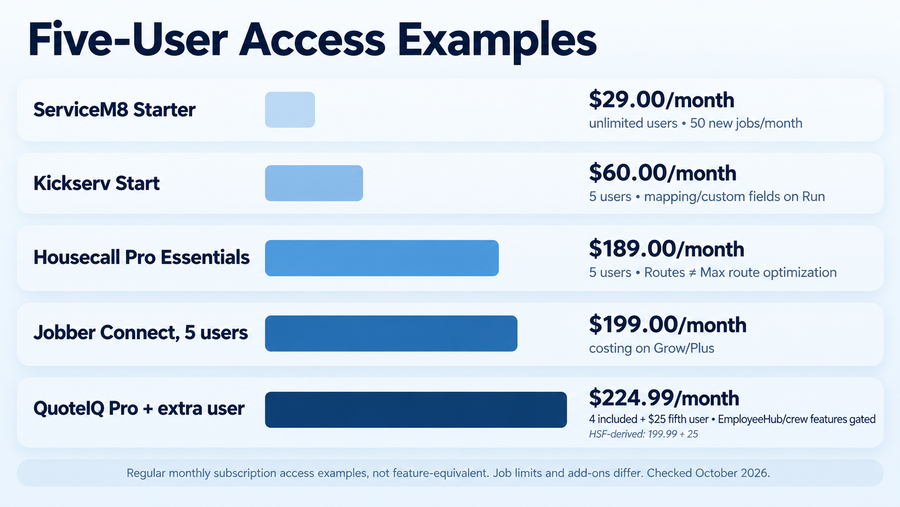
Published regular monthly access prices for five logins vary substantially, even before comparing functionality. ServiceM8 Starter is $29/month, with unlimited users but only 50 new jobs per month. Kickserv Start is $60 for five users, while mapping and custom fields require Run. Housecall Pro Essentials is $189 for five users and includes its residential documentation tools. Jobber Connect is $199 for five users, with job costing reserved for higher tiers. QuoteIQ Pro plus one additional login is $224.99, but its more extensive crew/EmployeeHub capabilities are not included simply because five people can log in.
These are access configurations, not feature-equivalent work-order packages. A low seat price may accompany a job cap, and a higher one may include photo reports, checklists, or permissions that a lower plan lacks. FieldPulse is quote-based; Field Promax and Service Fusion have unresolved official price presentations, so they are intentionally excluded from the quantitative comparison rather than assigned speculative numbers. The five named products’ published monthly prices were checked in October 2026, excluding introductory promotions, annual prepayment equivalents, payment fees, and optional add-ons.
How to Test a Work Order
A short trial should reproduce the kind of repair that has previously created extra calls, lost materials, or billing corrections. Use the plan and employee roles you would actually purchase, rather than a demonstration account with every upgrade enabled.
- Create one customer assignment containing a door repair and a faucet repair at the same address. Enter separate task descriptions, access notes, and a photo of the existing conditions.
- Assign the first visit to a technician. Check exactly what appears in the mobile app, whether a checklist or form is available, and whether the worker can find earlier customer instructions.
- Record a change and partial completion. Add an approved fitting to the faucet task, document the finished door repair, and leave the faucet work visibly unfinished because the part is unavailable.
- Schedule the return. Reopen the assignment as the returning worker and verify that photos, material authorization, and previous visit notes are still available. Check whether the new visit consumes a job credit where limits apply.
- Review the office and billing record. Confirm that completed work, unfinished tasks, time, materials, and approved changes are visible before preparing the invoice. Repeat the necessary steps using the actual office and field permissions, including a weak-signal test if relevant.
The strongest candidate is the one whose records remain understandable after the first technician leaves, not simply the one with the fastest-looking scheduling screen.
Final Recommendations
For ordinary residential repairs, Jobber offers an approachable job-and-visit structure, while FieldPulse is better worth investigating when task stages, service forms, and change records need to be tailored to the business. QuoteIQ is attractive when a growing share of repair documentation involves photos and inspections, provided the selected plan covers the required images, signatures, and employees. ServiceM8 and Kickserv give lower-cost options for teams that can work within their job or feature limits; Housecall Pro makes more sense when homeowner-facing dispatch and visit evidence are tightly connected.
Field Promax suits paperwork-heavy field work when its quote and forms meet the requirements. Maintenance Care stands apart for recurring requests, buildings, and assets, while Service Fusion becomes relevant when unlimited access for a larger office-and-field crew offsets higher base costs. None is automatically the best purchase for every handyman company. The lowest operationally sufficient plan is the one that preserves the authorized work, return-visit context, field changes, and completion details the business actually needs to retrieve.