

Last updated: October 2026
On this page
Service Fusion currently lists three flat-rate plans in recent official materials: Starter at $245 per month, Plus at $382, and Pro at $627. Annual billing lowers the displayed monthly equivalents to $208, $325, and $533 respectively, and all three plans include unlimited users.
That makes Service Fusion pricing less about how many employees need logins and more about which workflows your business actually needs. The important questions are when to upgrade, which features may sit outside the base plan, and what payment or subscription costs can increase the real total.
Service Fusion Pricing at a Glance
Here is the current pricing baseline for Service Fusion:
| Plan | Month-to-Month | Billed Annually | Users |
|---|---|---|---|
| Starter | $245/month | $208/month | Unlimited |
| Plus | $382/month | $325/month | Unlimited |
| Pro | $627/month | $533/month | Unlimited |
Service Fusion advertises a 15% discount for annual billing, but the annual option is paid upfront rather than month by month. The $208, $325, and $533 figures are therefore monthly equivalents for annual billing, not necessarily the exact amount that will appear on an annual invoice.
These rates, the unlimited-user model, and the annual-billing terms are confirmed in Service Fusion’s recent field service management software cost guide.
The pricing model has another important difference from many field service platforms: there is no standard paid-seat allowance across Starter, Plus, and Pro. Each of these plans currently includes unlimited users, so adding another dispatcher, technician, manager, or office employee does not automatically move you into a higher plan.
Service Fusion does not offer a self-serve free trial. The current evaluation route is a free demo. One freshness caution is worth noting. Some third-party pricing pages still show older Service Fusion rates of $259, $399, and $649. Recent dated Service Fusion materials instead list the rates above. The company’s live pricing experience can also direct visitors to Get Demo and Pricing, so confirm the final amount in your own quote before purchasing.
Starter, Plus and Pro Compared
The most useful way to choose between Service Fusion plans is not by team size. Because users are unlimited, the bigger question is which operational capabilities your team needs.
Service Fusion’s current pricing page is useful for comparing the visible plan structure, feature differences, and add-on positioning, even though the normally rendered page may not visibly show the dollar prices listed in recent official Service Fusion articles.
| Plan | Monthly | Annual Billing Equivalent | Users | Defining Capabilities | Main Upgrade Trigger |
|---|---|---|---|---|---|
| Starter | $245 | $208/mo | Unlimited | Core scheduling, jobs, invoicing, payments, and reporting | Need stronger field documentation, inventory, costing, or communications |
| Plus | $382 | $325/mo | Unlimited | More detailed job and field operations | Need API, customer portal, custom documents, or advanced billing |
| Pro | $627 | $533/mo | Unlimited | Advanced integration, document, portal, and billing workflows | Need API, custom docs/eSign, portal, or advanced billing |
Starter
Starter costs $245 per month, or $208 per month when billed annually. It covers the core field service workflow, including customer management, estimates and jobs, scheduling and dispatching, QuickBooks integration, invoicing, payments, project management, reporting, text alerts, and estimate options. That makes Starter more than a basic invoicing plan. A company can use it to manage the main path from customer and estimate through scheduling, completed work, invoicing, and payment.
The important point is that Starter is not automatically the plan for solo businesses. Service Fusion’s unlimited-user model means a multi-person team can remain on Starter if it does not need the operational tools gated higher up. The reason to move away from Starter is therefore usually workflow complexity, not headcount.
Plus
Plus costs $382 per month, or $325 per month billed annually. Its main additions include:
- job photo uploads;
- inventory management;
- job costing;
- integrated voice and text.
These features start to matter when managers need more detail about what happens on each job. For example, scheduling a technician and sending an invoice may be enough for a relatively straightforward service operation. But once technicians regularly document work with photos, the business tracks parts or materials, or management needs to understand job-level cost, Plus becomes more relevant.
The same applies to communications. If integrated voice and text become part of how the office and field team handle daily work, that can be a stronger reason to upgrade than simply adding more employees.
Pro
Pro costs $627 per month, or $533 per month billed annually. It adds capabilities such as:
- Open API access;
- custom documents;
- eSign documents;
- customer web portal;
- progress billing;
- recurring invoicing.
Pro is therefore less about having a large workforce and more about running workflows that Starter and Plus do not cover as deeply. A business may need Pro because customers should sign documents electronically, because a portal is central to the customer experience, because outside systems need API access, or because recurring and progress billing are a regular part of the operation.
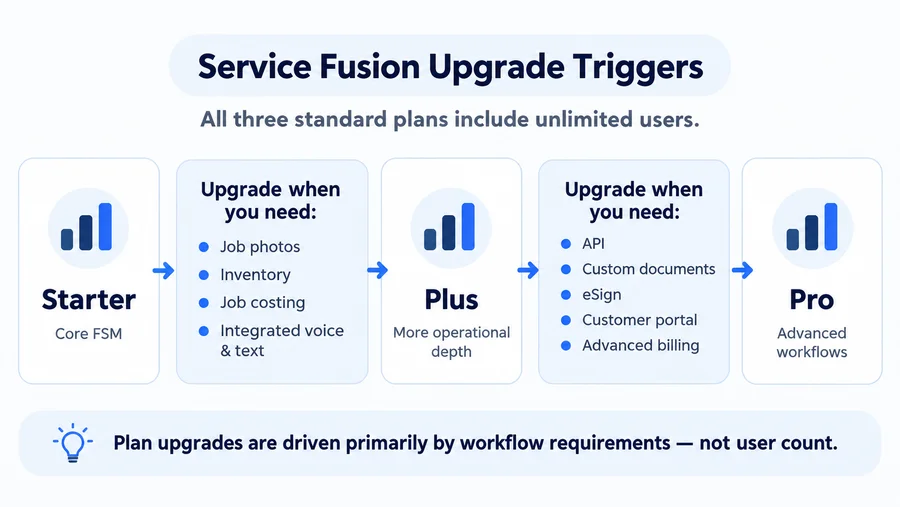
That distinction matters. Since all three plans already include unlimited users, moving to Pro simply because the team grew from five people to ten would miss the point of Service Fusion’s pricing structure.
When Should You Upgrade?
A higher Service Fusion plan makes sense when a specific workflow problem is worth solving—not just because another tier exists.
For a Starter → Plus upgrade, common triggers include technicians needing to attach job photos, inventory becoming important to daily operations, managers needing job-cost visibility, or integrated voice and text becoming useful.
For Plus → Pro, the decision is more likely to involve API access, custom documents, eSign, a customer portal, progress billing, or recurring invoicing.
There is one complication: some capabilities associated with higher plans may also be available as paid add-ons on lower tiers. That means the decision is not always: Need feature X → upgrade immediately. Instead, ask Service Fusion for two numbers:
- the cost of adding the specific capability to your existing plan; and
- the cost of moving to the next plan.
If you only need one additional function, an add-on may make more sense. If several required features sit in the next tier, upgrading may simplify both pricing and workflow. Service Fusion does not publicly provide dollar prices for all of these add-ons, so avoid building your budget around assumed amounts.
Monthly vs Annual Billing
Service Fusion currently advertises these monthly and annual-billing equivalents:
| Plan | 12 Months at Monthly Rate | Approx. Annualized Amount* |
|---|---|---|
| Starter | $2,940 | ~$2,496 |
| Plus | $4,584 | ~$3,900 |
| Pro | $7,524 | ~$6,396 |
*Approximate Home Service Fit calculations based on Service Fusion’s rounded monthly equivalents for annual billing. They may not equal the actual annual invoice. Confirm the exact upfront amount in your quote or Online Order.
The annual option looks cheaper because Service Fusion advertises a 15% discount. But the cash-flow difference matters: the annual subscription is charged upfront.
For a business comparing Starter, for example, $208 may look like the monthly cost. In practice, annual billing means committing a much larger amount at sign-up rather than paying $208 each month.
That can still make financial sense if you have chosen the platform, know the required plan, and have enough cash available. Month-to-month billing can be easier to absorb if you are still evaluating fit or want to avoid a large upfront software payment.
Do not assume that multiplying the displayed annual monthly equivalent by 12 gives the exact invoice Service Fusion will charge. The published monthly equivalents are rounded, so confirm the actual annual total before approving the order.
Extra Costs Beyond the Plan
The Starter, Plus, and Pro subscription is only the first layer of Service Fusion cost. Depending on your setup, you may also need to budget for feature add-ons, communications or fleet products, payment processing, taxes, or account-related charges.
Feature Add-Ons
Some capabilities may be available as add-ons rather than requiring an immediate plan upgrade. Depending on the plan and current offer, these can include functions such as:
- job photo uploads;
- inventory;
- job costing;
- custom documents;
- eSign;
- customer portal;
- progress or recurring invoicing.
This flexibility is useful, but it also makes the advertised base price an incomplete budget if your workflow depends on several optional features. Before signing up, make a list of everything your team considers essential and ask Service Fusion to label each item as:
- included;
- paid add-on; or
- available only on a higher plan.
Then request every applicable add-on price in writing.
ServiceCall.ai and GPS
ServiceCall.ai and GPS Fleet Tracking can also sit outside the base software subscription. According to Service Fusion’s official ServiceCall.ai page, its standard plan includes up to 2,000 minutes per user, with those minutes pooled across active users. ServiceCall.ai charges are added to the Service Fusion subscription.
Public dollar pricing is not currently provided, so businesses that depend heavily on call tracking, phone routing, or related communication features should request an exact quote.
Also avoid treating Integrated Voice & Text and ServiceCall.ai as interchangeable. Service Fusion references them separately, so confirm exactly which communications capabilities come with your selected plan. The same principle applies to GPS Fleet Tracking: if vehicle visibility is part of the buying decision, include GPS pricing in the quote rather than assuming it is covered by the base Pro subscription.
Payment Processing Fees
Businesses using Service Fusion Payments also need to account for transaction costs. Service Fusion’s current standard US payment-fee schedule lists:
| Fee | Standard Published Rate |
|---|---|
| Card transaction | 2.90% + $0.30 |
| Daily batch fee | $0.75 on processing days |
| Card-not-present surcharge | +1.00% where applicable |
| Chargeback | $30 |
| PCI DSS non-compliance | $59.95/month |
| Optional mobile terminal | $1.50 per terminal/month |
For ACH payments:
| Fee | Standard Published Rate |
|---|---|
| ACH transaction | 1.00% + $0.30, capped at $15 |
| ACH chargeback | $30 |
| ACH return | $5 |
These are standard published rates, not a promise that every Service Fusion customer will receive exactly the same processing agreement. Service Fusion notes that customers with non-standard pricing may have different terms.
For a business processing significant payment volume, these fees can matter more than a relatively small difference between software plans. Ask for the payment-processing agreement that applies to your account and model costs using your normal mix of card-present, card-not-present, and ACH transactions.
Other Possible Costs
There are a few less obvious items worth checking. Taxes may be added where applicable. Service Fusion’s SaaS Subscription Agreement also says that if a customer requests professional services for exporting account data, Service Fusion can charge a separate fee for that work. The agreement does not publish a standard dollar amount for the export service. There are also account-payment failure charges that should not be confused with the $5 ACH return fee above.
The $5 fee applies to a payment-processing ACH transaction rejected by the payer’s financial institution. Separately, the SaaS Agreement states that a $35 administrative charge can apply when an electronic payment the subscriber owes Service Fusion is declined. If Service Fusion retries an ACH debit returned for insufficient funds, each returned NSF attempt may also create another $35 charge.
Those are two different billing contexts.

Contract and Renewal Terms
Service Fusion’s current marketing is relatively simple: plans are available month-to-month, and annual billing provides a discount. The legal subscription framework has more detail. Under Service Fusion’s current SaaS Subscription Agreement, the buyer’s Online Order defines the initial term. After that, the subscription automatically renews for successive periods equal to the initial term unless it is cancelled according to the agreement. The agreement also states that cancellation requires 30 days’ written notice before the end of the current term. Other terms worth knowing include:
- fees are non-refundable;
- upgrades take effect immediately;
- an upgrade can trigger the associated fee increase immediately;
- a downgrade does not create a prorated refund;
- Service Fusion can change fees with notice;
- the Online Order can contain additional terms applicable to the purchase.
That is why neither of these blanket statements is useful: “Service Fusion has no contracts.” or “Service Fusion requires an annual contract.”
Current Service Fusion marketing materials describe month-to-month availability, but the actual Online Order controls important subscription terms.
Before paying—especially if you choose annual billing—check the Online Order for:
- initial subscription term;
- renewal period;
- cancellation deadline;
- exact annual invoice;
- applicable add-ons;
- any account-specific terms.
The difference between billing cadence and contract term is important. Paying annually tells you how the subscription is billed; your Order tells you what you are actually agreeing to.
Is the Pricing Model a Fit?
Service Fusion’s unlimited-user model becomes more interesting as more people need access to the same field service system. A growing business may want separate accounts for technicians, dispatchers, office staff, managers, and owners without recalculating software cost every time someone joins the team. Service Fusion removes the normal per-seat question from the three standard plans. But unlimited users do not automatically make it a good value.
The model is easier to justify when your team actually needs the scheduling, dispatch, job, invoicing, accounting, and higher-tier workflows included in the selected plan. It may be less attractive if only one or two people need software and the business mainly wants basic estimates, invoices, and scheduling. In that situation, paying for a broader FSM platform can mean buying capabilities you do not use.
The same applies if several essential features require separate add-on quotes. A Starter or Plus subscription may look straightforward until the business layers on communications, GPS, optional features, and payment costs.
For product-level strengths, drawbacks, mobile experience, and user feedback, see our Service Fusion review.
If the overall pricing model does not fit your workflow or budget, compare the options in our Service Fusion alternatives guide.
What to Verify Before Buying
Before accepting a Service Fusion quote, work through this checklist:
- Confirm the current plan prices. Ask Service Fusion to confirm Starter, Plus, and Pro pricing in writing.
- Choose monthly or annual billing. Make sure the cash-flow difference is clear.
- Get the exact annual invoice. Do not assume the published annual monthly equivalent multiplied by 12 will equal the invoice.
- Confirm unlimited-user terms. Verify how they apply to the plan and products you are buying.
- Map your required features. Mark each one as included, add-on, or higher-tier.
- Get all add-on prices in writing.
- Clarify Integrated Voice & Text versus ServiceCall.ai if phone or messaging workflows matter.
- Confirm GPS pricing if vehicle tracking is required.
- Confirm payment-processing rates and surcharges for your account.
- Read the Online Order for the initial term and renewal language.
- Confirm the cancellation process and notice deadline.
- Ask about data export if future migration or exit planning is important.
The best plan is not necessarily the cheapest starting tier. It is the lowest-cost configuration that covers the workflows your business actually needs without relying on workarounds or unnecessary upgrades.
FAQs
How Much Does Service Fusion Cost Per Month?
Recent official Service Fusion materials list Starter at $245 per month, Plus at $382 per month, and Pro at $627 per month. With annual billing, the displayed monthly equivalents are currently $208 for Starter, $325 for Plus, and $533 for Pro. Service Fusion advertises a 15% annual discount and charges the annual amount upfront. Because those monthly equivalents are rounded, confirm the exact annual invoice before purchasing.
Does Service Fusion Charge Per User?
Starter, Plus, and Pro currently include unlimited users rather than a standard per-user seat allowance. That means adding another technician, dispatcher, or office employee does not automatically change the base subscription price when the business remains on the same plan. Optional products, add-ons, processing costs, or other account charges can still affect the total bill.
Does Service Fusion Have a Free Trial?
Service Fusion currently offers a free demo rather than a self-serve free trial. Use the demo to test the workflows that matter to your business rather than only reviewing the dashboard. For example, walk through scheduling a job, dispatching it, field updates, invoicing, payments, QuickBooks, and any features that would require Plus, Pro, or an add-on.
Does Service Fusion Require a Contract?
There is no useful universal yes-or-no answer. Service Fusion’s current marketing describes month-to-month availability, while its SaaS Agreement states that the buyer’s Online Order defines the initial subscription term. The agreement also includes automatic renewal language and requires 30 days’ written notice before the end of the current term for cancellation. Before signing up, check the actual Online Order for your initial term, renewal period, cancellation deadline, billing amount, and any additional terms.