

Service Fusion is field service management software built around a connected workflow: capture customers and estimates, schedule and dispatch jobs, give technicians access in the field, then move completed work into invoicing, payments, and accounting.
What makes it different from many small-business field service tools is its pricing structure. Starter, Plus, and Pro currently include unlimited users, so the standard plan structure does not use per-user pricing for ordinary team access.
That can make Service Fusion attractive to growing teams — but only if the office and mobile workflows work well enough for everyone who gets access.
That distinction matters more in 2026 because Service Fusion has also rebuilt its mobile app and introduced Offline Mode. The desktop product has a long review history; the current mobile app is much newer and is still receiving mixed feedback.
Last updated: October 2026
On this page
Quick Verdict
Service Fusion is worth a close look for a home-service business that has moved beyond a simple owner-operator setup and needs several people working from the same operational system.
Its strongest case is straightforward: unlimited users, a capable scheduling and dispatch foundation, centralized customer and job history, and a connected estimate-to-invoice workflow. Service Fusion also supports QuickBooks Online and QuickBooks Desktop, making it relevant to businesses that want field operations and accounting connected without replacing QuickBooks entirely.
The trade-off is that unlimited user access only helps if the system works effectively for the people using it.
The newer Service Fusion By EverPro mobile app is a major improvement effort, with a redesigned interface and new Offline Mode, but its current app-store feedback is much weaker than Service Fusion’s broader software ratings. The sample is still small, so that is a reason to test the app carefully — not proof that every technician will have a bad experience.
Service Fusion is therefore a stronger shortlist candidate for a growing, dispatch-heavy operation than for a solo contractor that mainly needs estimates and invoices.
The most important step before buying is not comparing another feature checklist. It is running your actual workflow through a demo:
office → dispatch → technician → invoice → accounting
and seeing where friction appears.
Pros and Cons
| Pros | Cons / Caveats |
|---|---|
| Unlimited users on all current plans | Entry price can be difficult to justify for a very small team |
| Strong scheduling and dispatch foundation | Rebuilt mobile app is still proving itself |
| Connected estimate-to-job-to-invoice workflow | Current new-app ratings are weak |
| Centralized customer and job history | Some users report slower search or performance as data volume grows |
| QuickBooks Online and Desktop support | Inventory and reporting receive recurring criticism |
| Mobile access plus new Offline Mode | Support experiences are not uniformly positive |
| Flat company-level pricing can suit multi-user teams | Migration scope should be clarified before switching |
| Many business-software reviewers praise usability and support | More complex operational requirements need careful validation |
The key is not to treat either column as universal. Several of the negatives above come from recurring user reports rather than documented hard product limits, while the strengths still depend on how closely Service Fusion matches your own operating process.
Who It Fits
Service Fusion makes the most sense when scheduling and coordination have become real operational problems rather than occasional administrative tasks.
A growing service company may have an owner, dispatcher, office manager, several technicians, and possibly an administrator or bookkeeper who all need access.
With Service Fusion’s current pricing model, Starter, Plus, and Pro include unlimited users rather than a standard per-user seat allowance.
That makes it particularly relevant when:
- dispatch is central to the workday;
- multiple technicians need job details in the field;
- estimates regularly become scheduled jobs;
- customer and service history need to stay centralized;
- several office and field employees need access;
- QuickBooks remains part of the accounting workflow.
Service Fusion for handyman businesses
Service Fusion specifically markets the platform to handyman companies, so the handyman use case is not something we have to infer from generic FSM functionality.
Its handyman product includes estimating, drag-and-drop scheduling and dispatch, customer and job history, technician mobile access, invoicing, payments, and QuickBooks connectivity.
That is most relevant to a handyman operation coordinating multiple technicians, many active jobs, and frequent handoffs between the office and the field.
It is less compelling for a solo handyman who mainly wants to quote jobs, send invoices, and keep a basic calendar. In that situation, paying for a full dispatch-centered FSM system may solve problems the business does not actually have.
There is no useful magic number such as “Service Fusion becomes worth it at five technicians.” Team size matters, but workflow matters more.
For a broader look at software choices for this trade, see our handyman software guide.
What Service Fusion Does Well
Scheduling and Dispatch
Scheduling and dispatch are at the center of Service Fusion.
The current platform lets office staff see jobs and estimates together, move appointments with drag-and-drop scheduling, assign work to technicians, and send job information into the field. Service Fusion also provides visibility into jobsite activity and technician status.
That matters because the value of dispatch software is not simply having a prettier calendar.
The real benefit is reducing the amount of information that has to move manually between:
office → dispatcher → technician
A customer call can become an estimate or job, get assigned to the correct technician, appear in that technician’s workload, and stay attached to the same customer and job record.
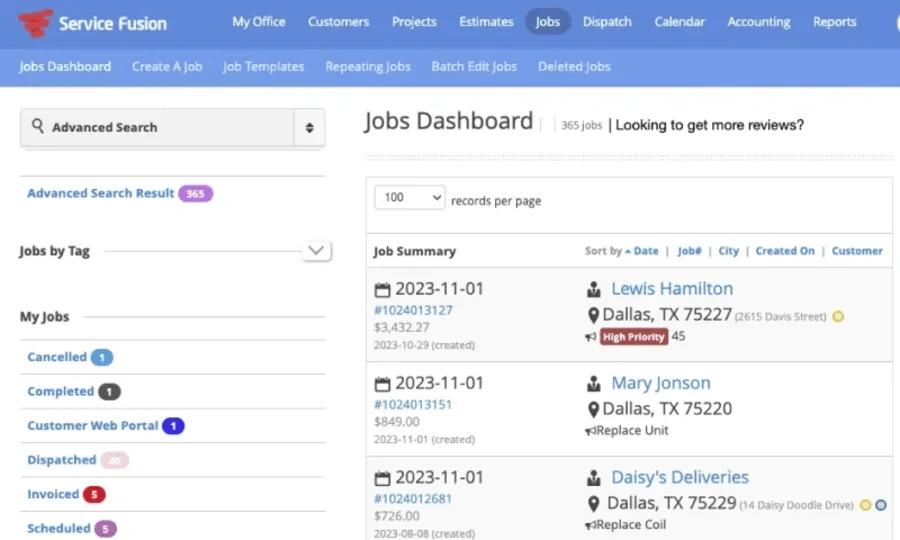
The screenshot shows that office-side reality well: jobs can be viewed with customer information, status, priority, dates, and other operational details in one interface.
Team-Wide Access
The second major strength is easy to overlook because it is a pricing feature with an operational consequence. Starter, Plus, and Pro currently include unlimited users. For ordinary team access, the standard plan structure therefore does not use a fixed seat allowance that increases with each additional login. That can simplify access when responsibilities spread across an owner, dispatcher, office manager, technician, administrator, or manager. It does not, however, mean Service Fusion is automatically cheaper than Jobber, Housecall Pro, ServiceTitan, or another platform at a particular team size.
Our Service Fusion vs ServiceTitan comparison examines how unlimited-user pricing compares with ServiceTitan’s per-technician model and deeper operational controls.
Different platforms package features differently, and the Service Fusion plan required for your workflow matters just as much as the number of people who need access. The better question is: How many people need access, and does Service Fusion give those people the workflows they actually need?
Job-to-Payment Workflow
Service Fusion also covers a useful end-to-end operating path:
customer → estimate → job → invoice → payment
Customer records and service history stay connected to estimates and jobs; estimates can move into active work; invoicing and payment processing sit inside the same broader system. For businesses already using QuickBooks, Service Fusion currently supports both QuickBooks Online and QuickBooks Desktop. Its current system-status documentation lists the two integrations separately. The exact accounting workflow deserves its own check during a demo. Do not assume that every object, status, edit, or payment moves between Service Fusion and your version of QuickBooks exactly the way your current process requires. Ask the sales team to show the specific workflow you rely on rather than accepting “QuickBooks integration” as the end of the conversation.
Mobile App
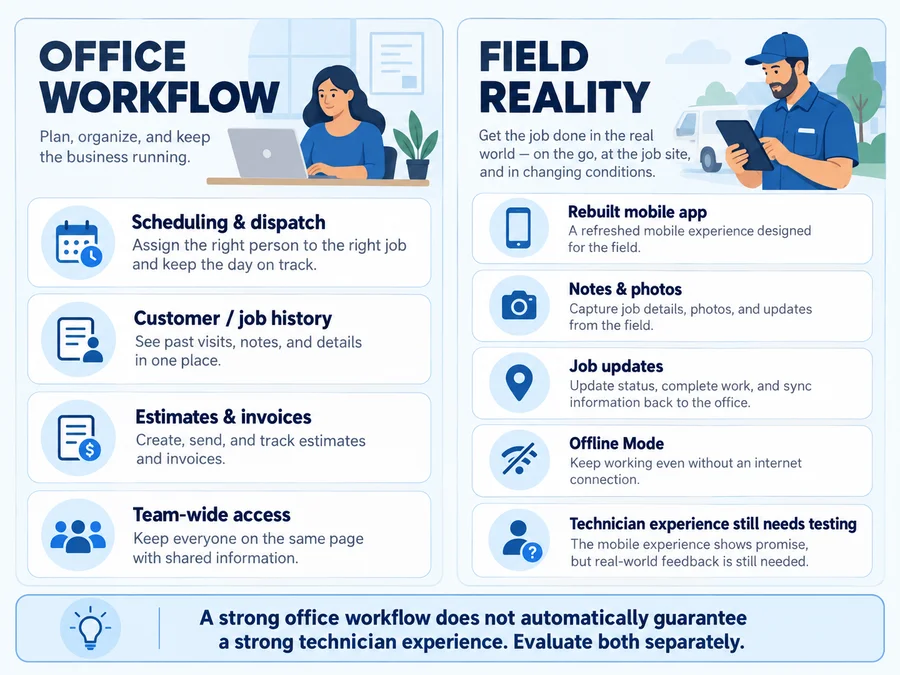
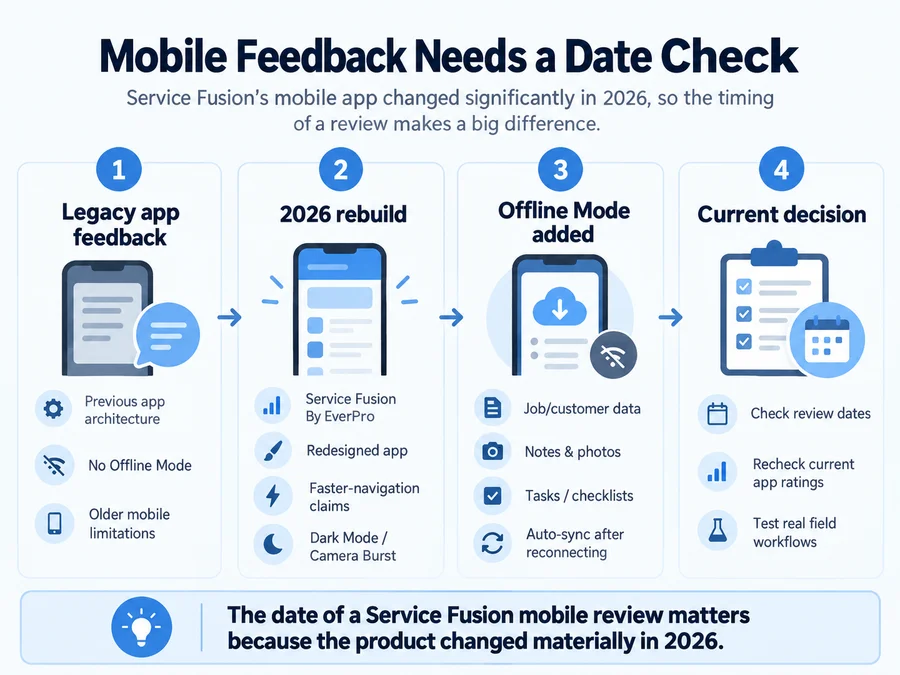
The mobile app is the part of Service Fusion that deserves the most current scrutiny. Older Service Fusion reviews are difficult to use without checking their dates because the vendor has materially changed the mobile product. The current Service Fusion By EverPro app uses a redesigned interface and adds faster-navigation claims, Dark Mode, Camera Burst Mode, built-in help and training, video uploads, and Offline Mode. That means an old complaint saying Service Fusion has no offline functionality is no longer an accurate description of the current product.
What Offline Mode does
Offline Mode now activates automatically when connectivity drops. Technicians can continue accessing supported job information and working with items such as notes and photos, with locally stored changes syncing once connectivity returns.
At the time of this review, Service Fusion says several actions are still unavailable offline:
- creating new jobs or estimates;
- changing job status;
- processing payments;
- viewing product catalogs.
The vendor describes some of these areas as targets for further improvement, so these limitations are especially important to recheck if offline field work is a major buying requirement.

What current mobile ratings tell us
The new app does not yet have anything close to the volume of historical feedback attached to Service Fusion’s older mobile product. At the time of this review, the US App Store listing showed 2.5/5 from 21 ratings. Google Play was also around the mid-2-star range with fewer than 30 current reviews. Recent mobile reviews include complaints about slow loading, freezing, lost or delayed notes, extra steps, and other workflow frustrations. At the same time, current app-store feedback also includes positive comments from users who see the rebuilt app as an improvement over the previous version. That is why we would not turn a 2.5-star rating from such a small sample into a sweeping verdict. Instead, treat it as a testing signal.
Have the technicians who will actually use Service Fusion test:
- their normal phones or tablets;
- job notes;
- photo uploads;
- job navigation;
- status changes;
- weak-signal conditions;
- Offline Mode;
- reconnecting and syncing.
A good desktop experience cannot compensate for an app technicians resist using every day.
Pricing in Brief
Service Fusion currently has three public plans:
- Starter — $245/month
- Plus — $382/month
- Pro — $627/month
Service Fusion currently advertises a 15% saving with annual billing, with effective monthly rates of:
- Starter — $208/month
- Plus — $325/month
- Pro — $533/month
The annual amount is charged upfront, and all three plans currently include unlimited users. That is enough pricing detail for this review because the most important pricing question here is not which individual feature appears on which tier. It is whether flat company-level access creates enough value across your team to justify the overall subscription. A solo contractor may find a few-hundred-dollar monthly starting price hard to justify. A business with technicians, office staff, and dispatchers may look at the same number very differently. For this review, we are keeping pricing detail to the current plan structure and headline rates rather than recreating a full pricing guide.
For a full breakdown of plan differences, add-ons, payment fees, and billing terms, see our Service Fusion pricing guide.
User Reviews
Service Fusion’s broader software ratings look considerably stronger than its current mobile-app listings.
At the time of this review:
- G2: 4.1/5 from 120 reviews;
- Capterra: 4.3/5 from 308 reviews;
- Capterra Ease of Use: 4.3/5;
- Capterra Customer Service: 4.3/5.
These numbers should not be averaged with the App Store or Google Play ratings. They measure different experiences. A business-software review may reflect an owner’s or office manager’s experience with scheduling, invoicing, customer management, implementation, and support. An app-store rating is much more likely to reflect the day-to-day technician experience on a phone or tablet. That difference is particularly important while the mobile product is being rebuilt.
How we interpret the reviews
Review collection methods also matter. Some current Capterra reviews are labeled Vendor Referred — Incentive Offered, while other reviews use different sourcing. G2 similarly identifies sources such as organic reviews, seller invites, and incentivized submissions. An incentivized review is not automatically invalid. But the sourcing is useful context when looking for recurring themes rather than treating the headline average as a complete picture. Capterra and Software Advice also surface overlapping review pools, so we would not count those as two completely independent bodies of evidence.
What users like
Across G2 and Capterra, recurring positive themes include:
- scheduling and dispatch;
- ease of navigation for common tasks;
- centralized customer information;
- invoicing and operational organization;
- customization;
- customer support;
- value relative to the workflows provided.
Several current Capterra reviewers specifically describe scheduling as easy to use, praise support, or say Service Fusion helped replace more manual ways of distributing daily schedules. The safest takeaway is not that Service Fusion is objectively “easy.” It is that ease of use and scheduling are repeated strengths in the current user evidence.
Common complaints
The negative themes are also fairly consistent.
Users report issues involving:
- slower searches or load times;
- mobile app friction;
- inventory limitations;
- reporting limitations;
- integration problems;
- implementation or migration difficulties;
- inconsistent issue resolution.
These reports need context. A performance complaint from an account with years of data does not establish a universal scalability ceiling. A mobile complaint written before the 2026 app rebuild may no longer describe the same product. And a difficult inventory workflow may be irrelevant to a small handyman business with very little stock to manage.
If those trade-offs are significant for your business, our Service Fusion alternatives guide looks at replacement options and different product fits.
Risks to Check
High-Volume Performance
One issue worth testing is how Service Fusion behaves after a business has accumulated substantial history. Some users report slower global search, work-order retrieval, or other performance issues as job volume increases. That is user-reported evidence, not a published technical limit. If your company already has years of customer and job history, use the demo to test realistic scenarios rather than a clean sample account.
Ask to see:
- customer lookup;
- old job retrieval;
- invoice search;
- dispatcher navigation;
- large account histories.
The question is not whether Service Fusion can display one demonstration customer quickly. It is whether the workflows your team repeats dozens of times per day remain practical with your expected data volume.
Inventory and Reporting
Inventory and reporting also appear repeatedly in critical user feedback. Some reviewers want better handling of larger inventories, while others describe reporting as less flexible than they need. This should not be inflated into a weakness for every buyer. A handyman company carrying a small set of common materials may barely interact with advanced inventory management. A parts-heavy operation with trucks, warehouses, large catalogs, and strict stock controls may care enormously. The same applies to reporting. Define the reports you actually need before the demo and ask Service Fusion to build or show them.
Migration and Support
Migration may be the highest-cost problem to discover too late. Current reviews include both strong praise for Service Fusion support and accounts of difficult implementations, unresolved issues, or incomplete data migration. If you are moving from another FSM platform with years of records, clarify in writing:
- what data is imported;
- how much history moves;
- whether photos and documents migrate;
- how customers with multiple locations are handled;
- who owns cleanup and validation;
- what happens if parts of the migration fail.
The lesson is not that Service Fusion support is good or bad. It is that the cost of an unclear migration is high enough that assumptions should be replaced with written scope before switching.
What to Test
Service Fusion currently offers a free demo rather than a free trial or permanent free plan. That makes the quality of your demo checklist important. Instead of letting the sales presentation stay inside ideal workflows, ask the representative to demonstrate your operating sequence from beginning to end:
- Create a customer and estimate.
- Convert the estimate into a job.
- Schedule and dispatch that job.
- Open it in the current Service Fusion By EverPro mobile app.
- Add technician notes and photos.
- Show what happens when Offline Mode activates and the device reconnects.
- Create the invoice and show the payment process.
- Demonstrate the exact QuickBooks workflow your business uses.
- Search for an older customer and job history.
- Show inventory and reporting with realistic complexity if these matter to you.
- Define migration responsibilities and data scope.
- Confirm the required plan, add-ons, current price, and order terms.
For a field service system, that sequence tells you far more than asking whether the software “has scheduling,” “has invoicing,” or “integrates with QuickBooks.” The product needs to survive the handoffs between those features.
Final Verdict
Service Fusion has a credible fit for growing home-service businesses that need multiple office and field employees working from one dispatch-centered system.
Its unlimited-user plan structure is a meaningful differentiator, particularly when access needs to extend across technicians, dispatchers, managers, and office employees. Scheduling, customer history, estimates, jobs, invoices, payments, and QuickBooks support create a broad operational foundation.
The biggest reason not to make a decision from the feature list is the field experience.
Service Fusion’s rebuilt mobile app and Offline Mode address weaknesses that make some older reviews obsolete, but the current app is still generating enough negative feedback that technician testing should be part of the buying process.
Service Fusion is a stronger shortlist candidate when:
- several people need system access;
- scheduling and dispatch drive the business;
- per-user pricing elsewhere is becoming a concern;
- the team values a connected operational platform.
It deserves more caution when:
- the operation is very small;
- mobile-app quality is the overriding priority;
- inventory or reporting is unusually complex;
- migration involves years of difficult historical data.
The deciding question is not how many features Service Fusion has.
It is whether the whole team can use those features effectively across both the office and the field.
FAQs
Is Service Fusion good for small businesses?
It can be. Service Fusion is designed for small and growing field-service businesses, but its unlimited-user plan structure becomes more relevant when several technicians and office employees need access.
A solo operator with basic scheduling and invoicing requirements may be able to meet those needs with a lighter and cheaper platform.
Does Service Fusion charge per user?
Its current Starter, Plus, and Pro plans include unlimited users, so the standard plan structure does not use a per-user seat allowance for ordinary team access.
Always verify current plan terms before purchasing because pricing structures can change.
Does Service Fusion work offline?
Yes. The rebuilt Service Fusion mobile app now includes Offline Mode, which activates when connectivity drops and lets technicians continue accessing supported job information and working with items such as notes and photos.
Changes sync when connectivity returns.
Some actions — including creating new jobs or estimates, updating job status, processing payments, and viewing product catalogs — are currently unavailable offline.
Does Service Fusion integrate with QuickBooks?
Yes. Current Service Fusion documentation supports both QuickBooks Online and QuickBooks Desktop.
Because accounting workflows can differ, ask Service Fusion to demonstrate the exact synchronization process your business relies on before switching.
Does Service Fusion have a free trial?
No. Service Fusion currently says it does not offer a free trial or permanent free plan. Buyers can request a free demo instead.