

Last updated: October 2026
Product, pricing-model, integration, and contract information last verified October 18, 2026.
On this page
Service Fusion is a strong starting point for home-service businesses that want a complete scheduling-to-payment workflow with published plans and unlimited users. It combines dispatch, estimates, invoicing, mobile work, QuickBooks connectivity, and reporting without charging the base subscription separately for every added technician or dispatcher. Higher plans add job costing, inventory, and more document and billing controls. Its updated mobile app also supports meaningful offline field work, closing an important historical gap.
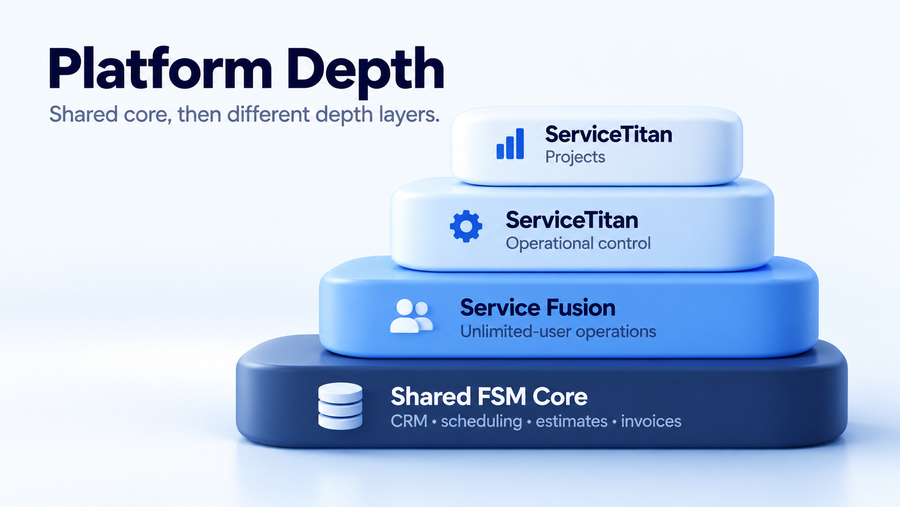
ServiceTitan becomes easier to justify when the operation needs more than an organized daily schedule: granular booking capacity, technician-skill and territory rules, governed pricebooks, deeper service-agreement administration, detailed financial reporting, or construction project controls. Both are capable field service management (FSM) platforms. The buying decision rests on user economics, the work that must happen without connectivity, and whether the company has a real use for ServiceTitan’s additional configuration and management layers.
Service Fusion vs ServiceTitan at a Glance
| Area | Service Fusion | ServiceTitan |
|---|---|---|
| Best Fit | Core FSM with accessible plans and unlimited users | Deeper operational administration and control |
| Pricing Model | Published Starter / Plus / Pro; unlimited users | Request Pricing; per-technician model |
| Scheduling | Dispatch board, zones, map reassignment; optional GPS fleet tracking | Dispatch Board plus deeper capacity, skills, zones, and business rules |
| Offline Mobile | 2026 Offline Mode for job access and documentation; defined limitations | Broader documented offline job workflow; some online-only actions |
| Estimates / Cost Control | Estimates; job costing and inventory from Plus | Core Pricebook, mobile estimates, advanced pricing governance options |
| Recurring Service | Current Service Agreements; evolving workflows | More extensively documented agreement and visit administration |
| Projects | Project management; progressive billing on Pro | Dedicated construction/project administration capabilities |
| Accounting | QuickBooks Online and Desktop | QBO, QBD, Sage Intacct, Xero (Private Preview for specific accounts), CSV |
| User Scaling | Unlimited users in base plans | Per-technician subscription economics; account terms matter |
| Admin Complexity | Less configuration to manage for a conventional service workflow | More configuration and management depth |
Service Fusion has a meaningful economic advantage when many field and office employees need access to the same core system. ServiceTitan earns consideration when the business can identify specific dispatch, financial, recurring-service, or project-management requirements that Service Fusion would not manage as deeply. Extra functionality alone is not a reason to switch.
Pricing, Users and Commitment
Service Fusion Unlimited-User Pricing
Service Fusion publishes Starter, Plus, and Pro plans, each with unlimited users. The pricing page offers monthly billing and annual billing with a currently advertised annual discount. Starter covers customer management, estimates, jobs, scheduling, dispatch, invoicing, payments, QuickBooks integration, reporting, and project management. Plus adds job photo uploads, inventory management, job costing, and integrated voice and text. Pro adds capabilities such as custom documents, eSignatures, a customer portal, and progressive or recurring invoicing.
The unlimited-user structure changes how a company can evaluate expansion. Adding another dispatcher or technician does not, by itself, trigger another base per-user subscription charge. That may be especially useful for mixed teams with part-time technicians, office administrators, and owners who all need system access. Add-on products, payment charges, the chosen plan, and billing commitment can still change the total; our Service Fusion pricing guide addresses the dollar figures and those purchasing details separately.
ServiceTitan Per-Technician Pricing
ServiceTitan currently lists Starter, Essentials, and The Works, all through Request Pricing. Its official pricing page explicitly describes a per-technician model. The packages share fundamental booking, dispatch, scheduling, invoicing, and Pricebook capabilities, then expand access to advanced functionality. ServiceTitan does not provide a reliable public base dollar rate for calculating a universal five-, ten-, or twenty-technician bill.
ServiceTitan’s commercial terms also distinguish different subscription types, optional Pro Products, and account-specific minimum subscription commitments. A buyer should ask which staff members require paid subscriptions, whether the quote has a Minimum Subscription Level, how additional technicians affect charges, and which proposed capabilities are add-ons. An increase in field headcount can change the subscription economics, but not every office role should automatically be treated as an extra paid technician. Our ServiceTitan pricing analysis covers the quote and billing mechanics without turning this comparison into a pricing calculator.
Contract and Renewal Terms
Service Fusion advertises month-to-month availability, but the company’s Subscription Agreement makes the applicable Online Order decisive: that document specifies the initial subscription term. The agreement provides for automatic renewal in periods equal to the initial term unless ended as permitted, with 30 days’ written notice before the current term ends. Fees are generally non-refundable under the agreement. Buyers who select annual billing should review the actual order instead of assuming a displayed monthly equivalent defines their legal commitment.
ServiceTitan likewise ties subscription length to the applicable Order Form. Its Terms address Minimum Subscription Levels and, for early termination during an agreed term, potential liability for remaining payments. Where the Terms alone govern without a separate Order Form, they describe a month-to-month arrangement, but that is not proof every customer receives one. Comparing a Service Fusion quote and a ServiceTitan quote requires matching the written subscription term, renewal process, minimums, add-ons, and exit conditions—not just the number next to the monthly bill.
Scheduling and Dispatch
Service Fusion provides a capable day-to-day dispatch workflow. Office staff can drag jobs from an unscheduled pool onto the calendar, consider technician availability, organize dispatch zones, and reassign appointments from a map view. Its field-service scheduling materials also describe routing and GPS-related workflows that help coordinators see where work is happening. This is practical dispatch administration for a company managing a changing mix of service calls, technicians, and appointments.
The GPS distinction matters when calculating total cost. GPS Fleet Tracking is a separately offered add-on, not a benefit automatically included with every Starter, Plus, or Pro subscription. A business interested in vehicle positions, route history, driver behavior, or customer-facing tracking should verify the fleet package rather than relying only on the core scheduling feature list.
ServiceTitan goes further into the administrative rules behind booking. Its Dispatch Board sits alongside capacity controls that can consider technician skills, zones, job types, shifts, and business units. This helps a booking team distinguish an apparently open appointment slot from one the right technician can actually cover. It also lets managers apply restrictions or adjustments when some capacity should be reserved for particular work, locations, or services.
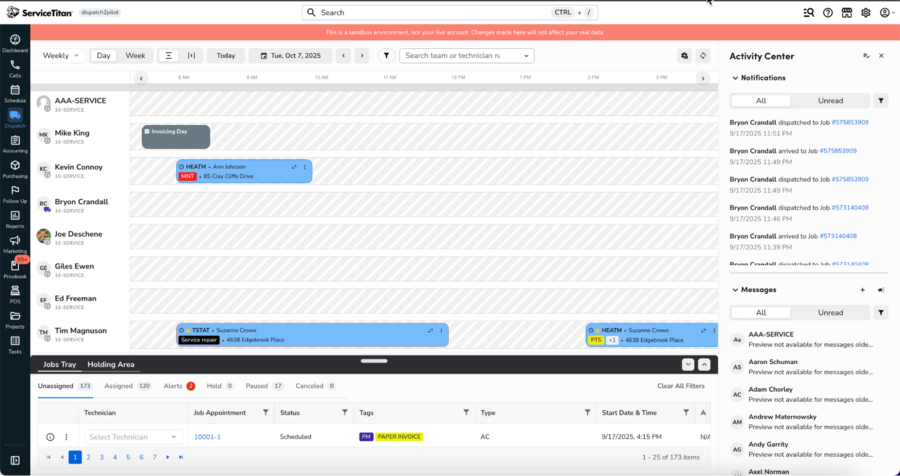
Terminology has changed in 2026. Adaptive Capacity is ServiceTitan’s next-generation system; Adjustable Capacity Planning (ACP) can coexist with it during transition, while Open Capacity Planning is legacy terminology. The two current capacity systems can use different calculations, so settings do not simply transfer between them. Service Fusion fits teams whose main problem is efficiently placing and tracking jobs. ServiceTitan becomes more relevant when dispatch is constrained by complex skill, territory, business-unit, and capacity-allocation rules.
Mobile and Offline Work
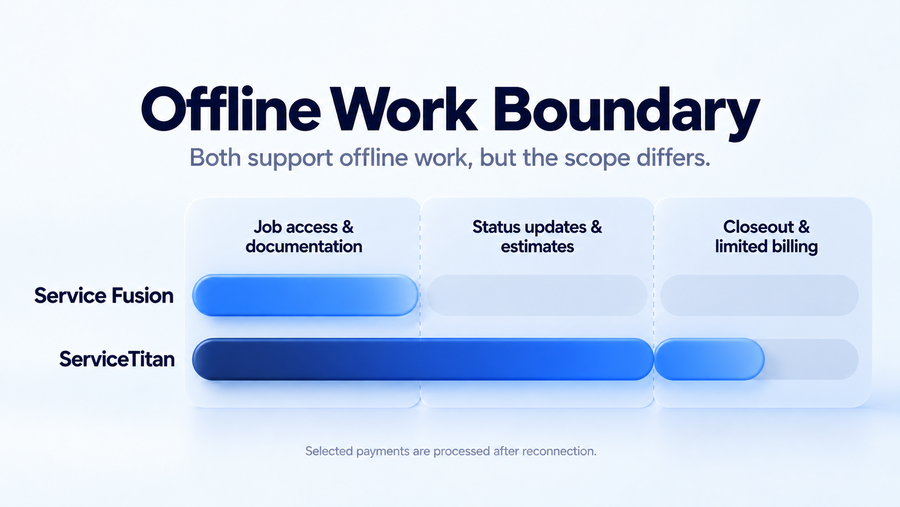
Service Fusion’s rebuilt mobile app introduced Offline Mode in 2026, and the current release is substantive. Technicians can access available job schedules, customer information, job details, notes, photos, documents, estimates, invoices, and equipment information without a connection. They can add or edit job notes, photos, tasks, and checklists; changes are stored locally and synchronized when connectivity returns. Service Fusion says Offline Mode is available to customers using the updated app, with automatic activation when signal is lost.
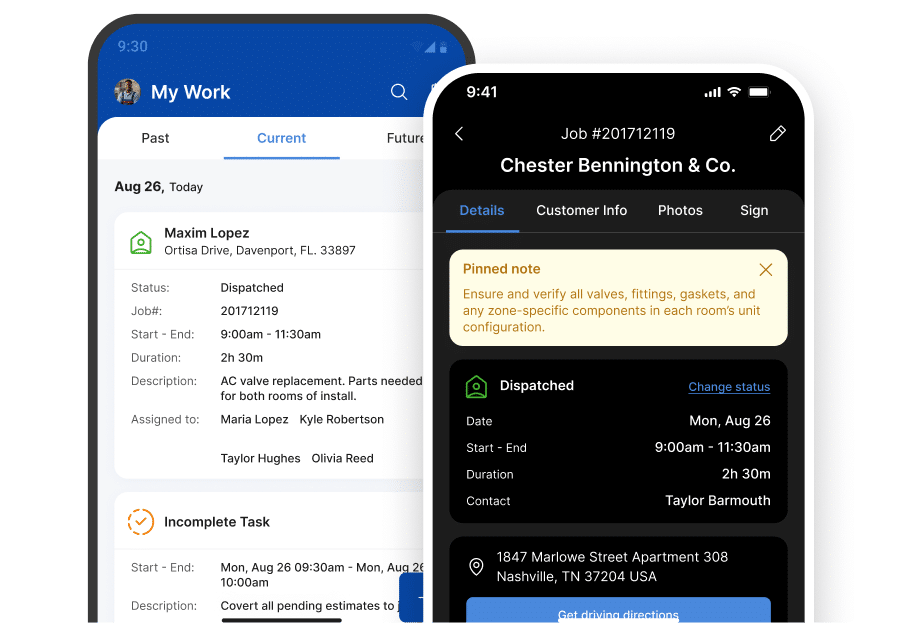
There are clear boundaries. Service Fusion’s current launch documentation says technicians cannot create new jobs or estimates, change job status, process payments, or use product catalogs while offline. Existing estimate details may be viewable without being editable. A technician who only needs to document work at a remote property may be well served, while one who regularly creates fresh estimates, closes jobs, and collects payment in a dead zone will need to reconnect for those steps. These are current limitations, not assumptions about the product’s long-term roadmap.
ServiceTitan documents a broader range of offline field actions. Its Field Mobile App supports job-status updates, time tracking, notes, photos, forms, on-device signatures, many estimating tasks, equipment-related work, and job closeout. Certain invoice edits can be saved offline. Some payment types—including manually keyed card payments, cash, checks, and selected bank-payment workflows—can be captured for processing after reconnecting; card swipe and Tap to Pay require a connection. Offline payments remain deferred until the system reconnects, so staff must confirm their processing status.
ServiceTitan’s offline coverage also has limits. Purchase orders, financing, contracts/proposals, inventory availability, and dynamic pricing require connectivity. Equipment history and other job details may need to have been opened and cached in advance, while some project and invoice actions are only partially available. Standard Pricebook rates can remain accessible offline where supported. For teams working across basements, rural service areas, or large sites, compare what a technician must actually complete before returning to coverage; neither system should be sold as entirely connection-independent.
Estimates, Costing and Pricebook
Service Fusion supports estimate creation within the ordinary customer-to-job workflow, including conversion of an approved estimate into active work. Starter already provides estimates and related job/invoice administration. Plus adds job costing and inventory, allowing managers to bring more material and cost information into job oversight, while Pro adds document and progressive-invoicing options relevant to more involved work. That is a meaningful set of financial tools for a service company seeking visibility into jobs without a separate pricebook-governance operation.
For example, a contractor replacing equipment can prepare an estimate, assign the work, record relevant costs, invoice the customer, and send accounting records onward to QuickBooks. The key questions are whether technicians consistently record labor and materials, whether managers need inventory data, and how job-costing reports are used. Service Fusion may cover the practical requirement even when a competing platform exposes more extensive price-management options.
ServiceTitan includes a core Pricebook and supports mobile estimating, with additional controls available for businesses standardizing how services, equipment, labor, and materials are priced across technicians or branches. Pricebook Pro offers enhanced trade-specific pricebook content and management workflows, but it should be evaluated as a separate Pro Product rather than assumed to be included in every base package. The commercial case improves when managers need consistent pricing policy, accurate sold hours or materials, and reliable field presentation across a complex service organization.
Those differences change the comparison from a feature count to a management decision. An owner who needs dependable estimates, job-cost visibility, and inventory control may find Service Fusion sufficient. A business with multiple pricing structures, tightly governed technician sales processes, and ongoing pricebook maintenance has stronger reasons to investigate ServiceTitan’s wider system. Buyers should check the precise package and optional product entitlements during a demo.
Recurring Service and Projects
Service Agreements
Service Fusion currently has Service Agreements; treating them as a purely future feature would be outdated. The vendor’s present product site describes agreement pricing, billing frequency and terms, PDF summaries, billing after the first invoice, and dashboard visibility into recurring revenue, renewals, and cancellations. These can help an HVAC, plumbing, or maintenance provider move beyond spreadsheets when managing repeat service.
Availability still needs careful handling. Service Fusion’s 2026 product roadmap also discusses improvements to agreement setup, status visibility, customer summaries, and automated invoicing. Some roadmap descriptions overlap with capabilities now advertised as live, and the documentation does not prove that every expanded workflow is enabled in every account or tier. A buyer should demonstrate agreement creation, visit scheduling, automatic billing, renewal handling, cancellation, and reporting in the actual configuration being proposed.
ServiceTitan’s Service Agreements system is more extensively documented around the full agreement lifecycle. Its workflow covers creating proposals and agreements, defined customer locations, planned and remaining visits, billing state, and performance monitoring. Agreement reports can compare budgeted versus actual labor, material, and other costs, including costs for individual visits and locations. This depth matters when recurring maintenance is managed as a contracted book of work that operations and finance need to track over time. ServiceTitan also notes that enabling certain agreement functionality requires account configuration.
Project and Construction Work
Service Fusion includes project management in its standard plan presentation, with progressive billing and recurring invoicing on Pro. It can therefore serve businesses doing more than isolated one-visit service calls. Contractors who run occasional multi-stage replacements or renovations should assess how estimates, assigned jobs, documentation, and staged invoices work together before assuming they need a dedicated construction platform.
ServiceTitan extends considerably further into construction-focused administration. Its documented construction offering covers project plans, crew management, daily logs, RFIs and change orders, documents, progress billing, and project financials. Daily logs can capture site conditions, materials, labor, issues, and equipment; approved changes can flow into project estimates and billing workflows. Those controls are valuable when a company must coordinate long-running work, substantiate changes, and monitor committed costs or billing across project stages.
The distinction matters only when the work actually demands it. A service contractor with occasional complex jobs may be able to operate comfortably inside Service Fusion’s project and billing features. A specialty contractor regularly managing RFIs, progress applications, crew schedules, and project budgets has a stronger reason to evaluate ServiceTitan’s construction layer. The buyer must verify the required construction features and configuration in the quote; they are not all guaranteed in every entry package.
Reporting and Accounting
Reporting and Management Control
Service Fusion includes reporting in its core FSM offering. Scheduling, customer management, project records, invoices, and payments already give owners a common operational picture, while Plus adds job costing and inventory information that can make cost-focused reporting more useful. A team wanting to review open work, technician activity, outstanding invoices, or costs on individual jobs should not assume its reports are inadequate merely because Service Fusion has a simpler buying model.
ServiceTitan becomes more compelling when reporting must support decisions across capacity, business units, technician performance, commissions, service agreements, pricing policy, and project financials. The value is in connecting a number to an administrative decision. A capacity report, for example, may show why appointment slots cannot be sold; an agreement profitability report may reveal which maintenance visits are consuming more labor than planned. These questions require disciplined data entry and configuration, not just more dashboards.
There is a trade-off in the management layer itself. Detailed classifications, business-unit rules, pricing controls, and workflows can make reporting more actionable, but they also create more setup and ongoing administration. A company without staff to maintain those definitions may realize less value from advanced reporting than a company with a manager who actively uses it to adjust dispatch, pricing, and margins.
Accounting Integrations
Service Fusion supports QuickBooks Online and QuickBooks Desktop, which covers the accounting environment of many US service businesses. Its current QuickBooks Online materials specify that invoices created in Service Fusion and payments recorded there flow into QuickBooks, while customer records remain aligned. Other official Service Fusion product pages describe bi-directional syncing for some customer, product, and service records, along with synchronization of deposits, invoices, and payments. Those statements should be read by record type and integration version, not compressed into a promise of universal two-way syncing.
ServiceTitan currently documents QuickBooks Online, QuickBooks Desktop, Sage Intacct, General CSV, and a Xero integration that is in Private Preview for specific accounts. Xero should not be treated as a generally available production integration for every buyer. The wider accounting selection can matter when a contractor moves beyond a single QuickBooks-based office, needs more structured exports, or works with a finance team using a different accounting platform. The supported record flows and setup requirements still vary by integration, so the existence of a connector alone does not establish that every transaction, status, or adjustment synchronizes both ways.
For either system, have the accountant trace a representative transaction: customer creation, estimate, deposit, final invoice, partial payment or adjustment, tax handling, and reconciliation. Confirm where changes must originate and how discrepancies are corrected. Service Fusion may be the cleaner fit for an operation primarily centered on QuickBooks; ServiceTitan’s broader accounting choices become more important when the finance structure itself is part of the buying problem.
Which Platform Fits Better?
Choose Service Fusion When
Service Fusion is the stronger fit when the company needs a reliable request-to-payment FSM workflow and wants to give office and field staff access without base per-technician subscription charges. Published Starter, Plus, and Pro plans make it easier to see where scheduling, invoices, inventory, job costing, and additional billing functions sit. The platform has meaningful dispatch controls, QuickBooks connectivity, project management, and recurring-service functionality; it is not restricted to the most basic field tasks.
Its 2026 Offline Mode also makes it more credible for teams working where reception is unpredictable, provided technicians mainly need to view assigned work and document it until they reconnect. Owners whose problems are missed scheduling details, inconsistent estimates, time-consuming invoicing, or missing job-cost visibility should consider the fit described in our Service Fusion review before paying for management tools they may not need. Unlimited users are an economic advantage, not a guarantee that every future requirement is covered.
Choose ServiceTitan When
ServiceTitan is the stronger choice when managers regularly make capacity-allocation decisions across skills, zones, business units, and job types, enforce standardized pricing, manage substantial agreement portfolios, or require financial control across projects and departments. Its broader offline job workflow is relevant when field staff must create or modify estimates, update status, complete forms, and carry out supported payment actions without a signal. Deep construction administration can be an additional decisive requirement for specialty contractors.
The commitment is more than the quoted subscription. The organization must be prepared to configure roles, pricing, capacity, reports, accounting workflows, and any relevant construction modules—and maintain those systems as operations change. Our ServiceTitan review provides the broader platform assessment; for this direct comparison, the determining factor is whether the added operating controls will be actively used enough to justify the cost and administrative burden.
Compare Before You Switch
An existing customer should recreate a realistic workflow in each proposed system, starting with receiving a lead or booking, assigning and dispatching the job, completing field work, preparing an estimate, collecting payment, and transferring the relevant records into accounting. Include the dispatcher, a technician, and whoever checks profitability or reconciles payments. If recurring maintenance drives revenue, add an agreement with several visits. If construction is important, test a project with materials, a change order, and staged billing. A polished demonstration of an empty calendar reveals much less than the company’s actual edge cases.
The commercial comparison should use the written quote and applicable agreement for each platform. Record paid technicians or users, minimums, add-ons, billing period, term, renewal notice, and payment-processing costs. Ask the vendors to show the exact offline tasks the crew needs, the path for recording labor and material costs, the accounting system of record, and which agreement or project controls are included. Avoid assuming that an advertised integration or migration service will transfer every historical job, document, financial record, or customer relationship.
Implementation effort should be evaluated alongside capability. Service Fusion’s more direct model may reduce the amount of process redesign needed for conventional service work, while ServiceTitan’s configurable departments, capacity, pricebook, agreements, and projects may demand more management attention. Neither outcome is automatic. The safer decision is the lowest-complexity configuration that can perform the company’s essential workflows now, with enough headroom for requirements it can realistically identify.