
Last updated: October 2026
Product and feature information last verified October 11, 2026.
On this page
FieldPulse and Housecall Pro overlap more than many older comparisons suggest. Both can handle core field-service workflows such as scheduling, dispatch, customer records, estimates, invoices, recurring service, reporting, field documentation, communications, and multi-stage work. Housecall Pro has also added more customization through Custom Fields, richer Checklists, conditional Checklist Automations, Job Templates, Routes, Progress Invoicing, Property Profile, and AI tools.
FieldPulse, meanwhile, is not simply a back-office operations tool. Its current ecosystem includes configurable workflow tools, substantive offline execution, Custom Forms, integrated phone and messaging through Engage, Operator AI, Chat AI, Maintenance Agreements, asset management, and project-management functionality.
The useful question is therefore not: Which platform has more features? It is: Does your business need software that can be shaped more deeply around its operating process, or a more standardized residential-service system that is easier to evaluate and deploy?
FieldPulse vs Housecall Pro at a Glance
| Decision Area | FieldPulse | Housecall Pro |
|---|---|---|
| Buying model | Custom seat-based quote | Public tier pricing + 14-day trial |
| Commitment | Standard annual term unless otherwise agreed | No required long-term contract on current public offer |
| Core FSM | Scheduling, dispatch, CRM, estimates, invoices | Scheduling, dispatch, CRM, estimates, invoices |
| Workflow control | ClearPath, custom workflows, Custom Forms | Custom Fields, Checklists, conditional Checklist Automations, templates |
| Field/offline use | Meaningful offline editing and work execution | Current Offline Mode is primarily view-only |
| Communications/AI | Engage + Operator AI + Chat AI | Voice/phone tools + CSR AI + broader AI Team |
| Recurring work | Maintenance Agreements | Service Plans |
| Assets/projects | Deeper asset lifecycle + project tooling | Property Profile + Service Plan links + Segments + Progress Invoicing |
Quick verdict: Choose FieldPulse when the business needs to configure the operating process more deeply—especially guided job stages, required field documentation, meaningful offline work, richer asset lifecycle management, or project-style workflows. Choose Housecall Pro when you want a more standardized residential home-service operating model, published pricing, a self-serve trial, and a broad ecosystem around booking, routing, recurring service, sales, reviews, and customer growth. Neither is the universal winner. The better fit depends on which operating constraint matters most.
Pricing and Buying Model
The buying experience is one of the clearest differences. FieldPulse uses customized, seat-based pricing. Its current pricing page says companies purchase a set number of seats for the contract term, with pricing depending on team size, setup, and what each seat needs access to. Optional premium products—including Engage, Operator AI, Chat AI, Pricebook, Custom Forms, payments, financing, and other capabilities—can also change the total package.
Its current Terms add an important commitment detail: unless another agreement says otherwise, the standard initial subscription term is one year, automatically renewing for subsequent one-year terms, with written notice required ahead of renewal.
For the deeper economics, contract details, and premium-product structure, our FieldPulse pricing guide covers the buying model separately. Housecall Pro is easier to inspect before speaking to sales. Its current public structure includes Basic, Essentials, and MAX, with visible pricing states. It offers a 14-day free trial with no credit card required, and its current pricing FAQ says customers are not required to sign a long-term contract.
Our Housecall Pro pricing guide handles the detailed plan economics separately. That creates a straightforward difference: Housecall Pro gives buyers more pricing and trial information before a sales conversation. FieldPulse requires a customized quote but can shape the commercial package more specifically around seats and premium products. That does not prove Housecall Pro is always cheaper. An apples-to-apples cost comparison requires the actual FieldPulse quote and the relevant Housecall Pro configuration.
Operations and Workflow Control
Scheduling, Dispatch and Offline Work
Both platforms have substantial scheduling and dispatch functionality. FieldPulse supports job scheduling, technician assignment, dispatch, mobile job access, and field execution. Its current offline functionality is particularly important for contractors working in basements, rural areas, mechanical rooms, construction sites, or other locations with unreliable signal. FieldPulse says technicians can continue working offline with cached job and customer information, notes and photos, time tracking, Custom Forms, estimates and invoices, and customer signatures. Changes are stored on the device and synchronize when connectivity returns.
Housecall Pro also provides scheduling, dispatch, mobile field access, Routes, employee location tools, and—on MAX—Optimize by Drive Time. That optimization can reorder one technician’s jobs within the same day using real locations and live traffic conditions. It does not move jobs to another date or assign them to another technician.
Housecall Pro now also has an Offline Mode, but the current functionality is materially narrower. Upcoming job data can be downloaded automatically so a technician can still view job information after losing service. However, the current documentation explicitly describes Offline Mode as view-only: offline editing is not supported, and changes, payment collection, and normal job completion require connectivity.
That gives FieldPulse a relatively clear advantage when offline execution is operationally important: FieldPulse currently supports meaningful offline data entry and field work. Housecall Pro’s Offline Mode primarily protects access to downloaded job information when the connection disappears.
Custom Workflows and Field Documentation
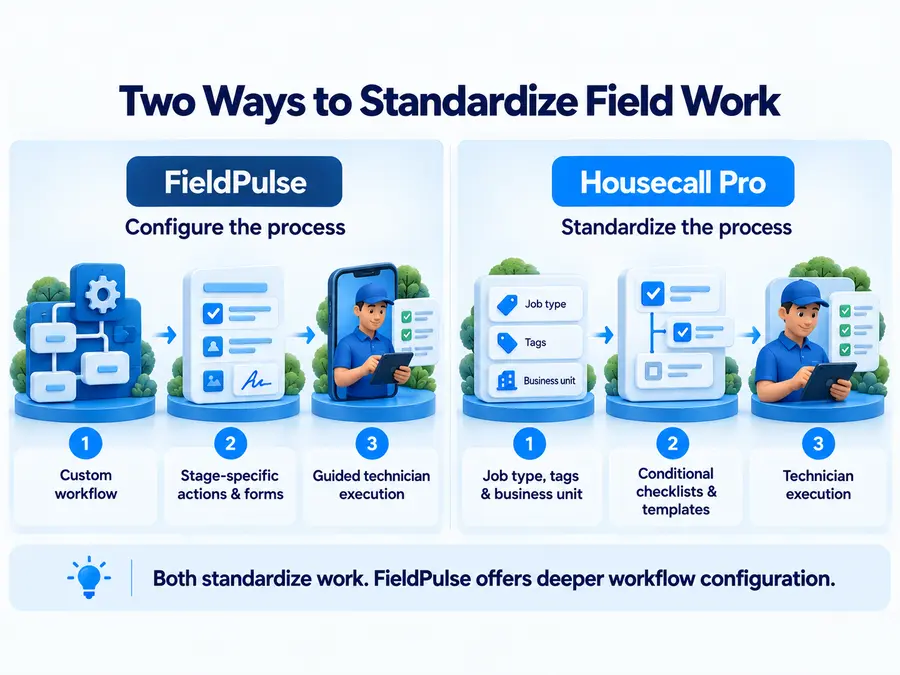
Workflow control is probably FieldPulse’s strongest differentiation—but Housecall Pro should not be described as static or non-customizable. FieldPulse’s ClearPath allows a business to define custom job stages and the actions required before work moves forward. Different job types can have different process flows, while technicians can be guided through stage-specific actions instead of working from one generic job status model.
Its Custom Forms add another layer. Businesses can build inspection reports, installation documentation, safety checklists, intake forms, and other records using different field types, conditional logic, photo uploads, and signatures. Forms can remain attached to jobs, estimates, invoices, and other operational records, and current documentation also supports offline editing.
Housecall Pro now covers more of this territory than stale comparisons imply. Its current Checklists support sections, required items, notes, photo uploads, text fields, pass/flag/fail fields, and single- or multi-select inputs. Custom Fields let businesses add structured information to jobs, while Job Templates can standardize recurring job setup.
More importantly, Checklist Automations can conditionally attach the correct checklist based on job tags, job type, business unit, service line items, or material line items.
So the distinction is not: FieldPulse customizes workflows; Housecall Pro only uses static templates. It is: Both can standardize technician work. Housecall Pro now supports meaningful conditional standardization, while FieldPulse becomes more distinctive when the workflow itself needs deeper custom stages, required actions, forms, and guided technician execution.
Sales, Communications and AI
Estimates and Pricebook
Both products cover the normal estimate-to-invoice workflow. Housecall Pro combines estimates with a Price Book and, on relevant configurations, flat-rate pricing and Sales Proposals. Its Sales Proposal Tool can present several options side by side in a good/better/best-style format and works with its broader estimate, scheduling, and financing workflows.
FieldPulse also supports estimates and invoices, but its current primary pricing page positions Pricebook among the premium capabilities that can be added to the core platform. Because FieldPulse is custom quoted, the exact Pricebook access and commercial package should be verified in the buyer’s proposal rather than inferred from an old fixed-price page.
The choice here is less about feature presence than operating style. Housecall Pro gives a residential-service business a relatively standardized selling toolkit around Price Book, estimates, proposals, payments, and financing. FieldPulse becomes more interesting where the estimating workflow needs to sit inside a more customized job process, documentation structure, asset workflow, or project.
Phone, Booking and AI
Neither platform is now accurately described as lacking integrated communications or AI. FieldPulse’s Engage is a built-in VoIP and messaging system. Calls, texts, and voicemails can be logged to the customer record, with shared or dedicated business numbers and access through web, mobile, or supported phone systems.
Its Operator AI can handle inbound calls, qualify leads, route urgent requests, and book jobs into FieldPulse. Chat AI covers website chat and booking. FieldPulse’s current pricing structure treats these AI and communications products as premium/configured capabilities, so buyers should verify the exact bundle and quote.
Housecall Pro has its own broad front-office ecosystem. Its current AI Team includes tools across marketing, scheduling, service, analytics, and support. Housecall Pro states that several AI Team functions are included across plans, while CSR AI 24/7 call answering is a paid capability. CSR AI can answer calls and work with Housecall Pro settings and booking workflows, while Housecall Pro’s broader stack also includes online booking, Voice-related functionality, review management, and customer-growth tools.
The comparison should therefore focus on the actual front-office workflow: Which phone routing, call/text logging, booking, AI answering, escalation, and package structure fits the business better? Not simply which logo can say it “has AI.”
Recurring Work, Assets and Projects
Both platforms support recurring service and equipment-linked workflows, but FieldPulse becomes more distinctive as asset and project management themselves become central to operations. FieldPulse’s Maintenance Agreements support recurring service scheduling, agreement management, renewals, recurring billing, service history, and profitability-oriented administration.
Its asset-management model goes further than simply storing an equipment make and serial number. Current functionality covers both customer-owned and company-owned assets, installation and warranty information, lifecycle status, maintenance history, reporting, ownership transfers, asset links to maintenance agreements, and barcode scanning in the field.
FieldPulse also has dedicated project-management functionality around tasks, resources, milestones, labor/material costs, and project financial visibility.
Housecall Pro should not be framed as lacking either recurring service or equipment tracking. Its Service Plans support recurring maintenance programs, billing, renewals, unscheduled-visit tracking, and dedicated recurring-revenue reporting.
Its Property Profile stores equipment such as make, model, serial number, installation date, notes, and service context, and equipment records can be associated directly with jobs. More importantly, Property Profile items can also be attached to a customer’s Service Plan.
Housecall Pro also handles more complex work through Job Segments, multi-visit jobs, and Progress Invoicing, which can bill a larger job in stages using fixed amounts or percentages.
So “FieldPulse has assets and recurring agreements; Housecall Pro does not” would be wrong. The better distinction is: Both can connect equipment records with recurring service. FieldPulse becomes more compelling when asset management requires richer lifecycle tracking, company-owned assets, barcode workflows, dedicated asset reporting, configurable documentation, or more structured project-management processes. Housecall Pro already covers meaningful equipment/service history and substantial multi-stage residential work.

Which Platform Fits Your Business?
FieldPulse Is a Stronger Fit When
FieldPulse makes more sense when the business needs the software to adapt to its operating process, rather than primarily adapting the process to a standardized FSM structure.
Signals include:
- different job types require materially different workflow stages;
- technicians need guided stage-by-stage actions;
- required documentation or Custom Forms are central to service delivery;
- technicians regularly work where connectivity is unreliable;
- meaningful offline editing and job execution matter;
- customer and company asset lifecycle tracking is operationally important;
- warranty, asset reporting, or barcode workflows are needed;
- project-style or multi-phase work is common;
- management wants deeper configuration across field processes;
- a custom quote and standard annual contractual commitment are acceptable.
Our full FieldPulse review covers the broader pros, cons, user feedback, and product risks separately. FieldPulse is not automatically better for a bigger company. It is better positioned when process complexity and configurability are the problem that needs solving.
Housecall Pro Is a Stronger Fit When
Housecall Pro is easier to defend when the business wants a comparatively standardized residential-service workflow with less friction during evaluation.
That may include businesses where:
- public pricing is important;
- a self-serve 14-day trial helps with evaluation;
- scheduling, dispatch, Routes, and current route optimization fit the operation;
- Custom Fields, Checklists, Checklist Automations, and Job Templates provide enough standardization;
- Service Plans cover recurring-service needs;
- Property Profile provides sufficient equipment history;
- Property Profile-to-Service Plan linking covers asset-linked recurring service;
- Job Segments and Progress Invoicing are deep enough for multi-stage work;
- online booking, reviews, communications, and customer-growth tools matter;
- lower contractual friction is more important than deeper process customization.
Our Housecall Pro review goes deeper into the complete platform and user experience. Housecall Pro should not be dismissed merely because another platform exposes more configuration. If the existing process is already repeatable and well served by HCP’s model, additional configurability may create administration without solving a real problem.
Do Not Choose by Team Size Alone
Headcount is an easy comparison shortcut, but it misses the actual distinction. A larger residential home-service company may run highly repeatable work: standard calls, standardized Price Book items, Service Plans, predictable routes, checklists, and straightforward multi-stage jobs. That business may still prefer Housecall Pro even with a relatively large team. A smaller specialty contractor might have technicians working in weak-connectivity areas, strict inspection documentation, different required stages by job type, complex customer and company asset records, barcode workflows, and project-style work. That smaller business may have a stronger reason to choose FieldPulse.
The decision rule is therefore: Choose based on workflow complexity, field execution, and configuration requirements—not a generic technician or revenue threshold.
If FieldPulse’s operating model isn’t the right fit, our FieldPulse alternatives guide compares seven replacement options by pricing model, workflow depth, and migration risks.
FAQs
Is FieldPulse Cheaper Than Housecall Pro?
There is no responsible categorical answer. Housecall Pro currently publishes pricing states for Basic, Essentials, and MAX and offers a 14-day trial. FieldPulse uses customized seat-based pricing, with the final scope affected by team setup and premium products.
An apples-to-apples comparison therefore requires an actual FieldPulse quote and the Housecall Pro plan/configuration that covers the same business requirements.
Does FieldPulse Have Better Customization?
FieldPulse has the clearer advantage when customization means reshaping how a job moves through the business. ClearPath supports configurable stages and required actions, while Custom Forms provide conditional fields, signatures, photos, and documentation tied to operational records. But Housecall Pro is not non-customizable. It now has Custom Fields, rich Checklists, conditional Checklist Automations, and Job Templates for standardizing different types of work.
Which Is Better Without Cell Service?
Based on current documentation, FieldPulse has the stronger offline workflow. FieldPulse supports offline editing and creation across job information, forms, notes/photos, time tracking, estimates, invoices, and signatures, with synchronization after reconnecting. Housecall Pro’s current Offline Mode is primarily a view-only fallback for downloaded upcoming job information.
Which Has Better AI and Phone Tools?
There is no universal winner. FieldPulse offers Engage for integrated calls/texts/voicemails plus Operator AI and Chat AI. Housecall Pro has Voice-related communication functionality, CSR AI, and a broader AI Team spanning customer service, marketing, analytics, and other workflows. Compare the exact phone routing, customer-record logging, booking, AI answering, escalation, package requirements, and real quote rather than choosing based on an “AI included” label.