
Last updated: October 2026
Product and pricing information last verified October 26, 2026.
On this page
- Quick Verdict
- Markate vs Jobber at a Glance
- Pricing and Five-Person Team Costs
- Customer Booking and Sales Follow-Up
- Scheduling and Field Work
- Job Costing and QuickBooks
- Automation, Communications and AI
- Billing Terms and Cancellation
- Which Software Fits Your Business?
- What to Test Before Switching
- Final Verdict
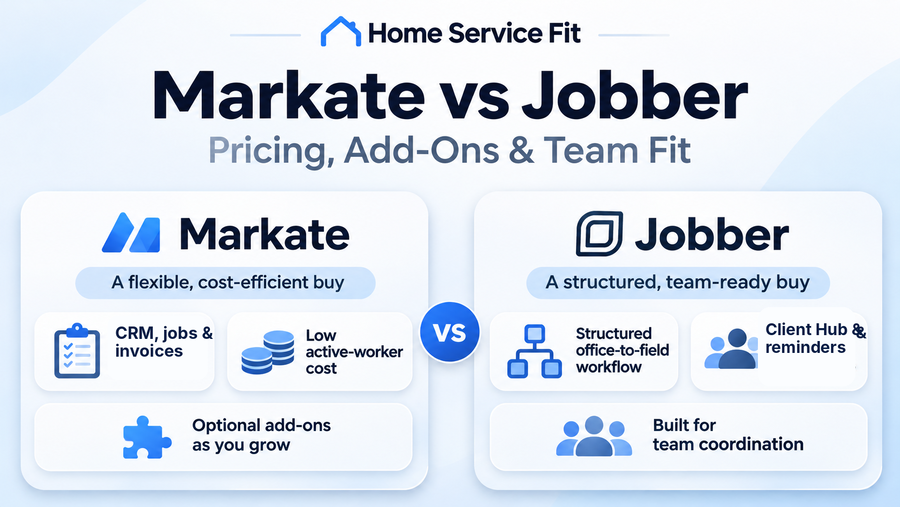
Markate can be an economical choice for a handyman business that needs customer records, estimates, work orders, scheduling, job costs, and invoicing without paying a large amount for each additional employee. Its owner-plus-active-worker pricing is attractive, but online booking, a branded customer portal, phone services, and some marketing and AI tools can increase the bill. Jobber takes a different approach, with published plans that package customer communication and field-management capabilities around team size and feature tiers.
Both platforms can handle routine service work. The better purchase depends on how customers book and approve jobs, what technicians need in the field, how accounting records move into QuickBooks, and which subscription obligations the owner is willing to accept.
Quick Verdict
Evaluate Markate first if your company wants inexpensive access for several active workers and already has a straightforward way to handle bookings and customer communication. Its core CRM, estimates, work orders, recurring jobs, and job-costing tools cover substantial day-to-day work. Paying separately for a booking form, customer portal, or review automation may still produce a practical configuration, provided the field app works well for the people using it.
Evaluate Jobber first when a consistent customer experience and a tightly organized office-to-field workflow matter more than the lowest basic employee-access cost. Client Hub, online booking, reminders, scheduled visits, and plan-dependent automation may reduce coordination work. Connect is a sensible starting point for a team needing scheduling and customer follow-up; Grow becomes more relevant for enhanced quoting and job profitability.
Run the same multi-visit job in both trials and compare the configuration each would actually require, including any optional modules and the chosen billing term.
Markate vs Jobber at a Glance
| Decision factor | Markate | Jobber |
|---|---|---|
| Best fit | Lean teams seeking broad core tools and inexpensive active-employee access | Teams prioritizing structured customer and field workflows |
| Regular monthly pricing | $49.95 owner account + $5 per additional active employee | Public plan/team pricing; five-user Connect $199, Grow $299 |
| Five-person access example | $69.95 for owner + four active employees, before add-ons | Connect $199 or Grow $299, regular no-commitment billing |
| Booking and portal | Online Booking and fully branded portal are optional paid tools | Online booking and Client Hub, with plan-dependent capabilities |
| Job costing | Listed in core operating tools | Grow and Plus |
| Scheduling and routes | Drag-and-drop dispatch, recurring and multi-day jobs | New Schedule route optimization on Connect/Grow/Plus |
| QuickBooks Online | Manual imports/exports; Auto Sync mainly exports to QBO | New integration: initial import, then ongoing Jobber-to-QBO sync |
| Billing flexibility | Monthly subscription or prepaid annual; automatic renewal | No-commitment monthly, 12-month commitment billed monthly, or prepaid annual |
These are subscription access examples, not equivalent feature bundles. The Markate example does not give all five people identical administrative access, and Jobber’s plan gates change what a team receives.
Pricing and Five-Person Team Costs
Monthly Plans and Employee Seats
Markate currently lists its Owner Operator subscription at $49.95 per month when paid monthly, with additional active employees at $5 each per month. The vendor also presents an annual-prepaid owner price of $551.40, equivalent to $45.95 per month, but that lower monthly equivalent requires committing the annual payment upfront. Add-ons selected by annual subscribers can also be billed annually. Because older indexed versions of Markate’s page show different annual figures, the current selector and checkout are the appropriate references for an actual purchase.
Markate says inactive employees are not charged, which can be useful for a seasonal operation. Its employee settings also distinguish field technicians, office staff, salespeople, accountants, and partners. A Field Tech is an app-only role, while an Accountant uses the web interface; app and web permissions are configured separately. Before treating the $5 employee charge as a full seat, confirm that each worker can perform their assigned tasks with the intended role.
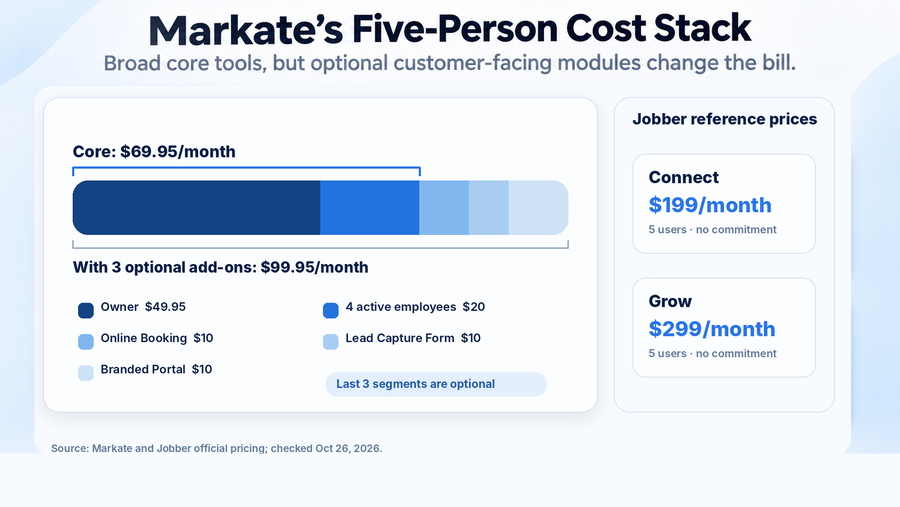
Jobber publishes four plan families—Core, Connect, Grow, and Plus—with multiple user configurations. For five included users, the current regular monthly prices without a one-year commitment are $199 for Connect, $299 for Grow, and $499 for Plus. Core is a one-user configuration, so its entry price is not an appropriate five-person comparison. Jobber also offers lower-looking monthly equivalents under annual commitments or prepaid annual billing, as well as temporary signup discounts. Our Jobber pricing analysis separates those purchase structures in greater detail. Both advertise 14-day free trials without a credit card.
Add-Ons and the Real Bill
For a concrete Markate example, assume one owner and four additional active employees. The owner subscription is $49.95 and the four worker charges total $20, producing a $69.95 monthly core subscription.
Now suppose the business also wants Markate’s Online Booking, Automated Lead Capture Contact Form, and Fully Branded Customer Portal. The current Markate pricing page lists each at $10 per month. Choosing all three would add $30, bringing this illustrative five-person configuration to $99.95 per month. These are optional choices for this scenario, not mandatory fees charged to every Markate customer.
For a closer look at the numbers behind these examples, our Markate pricing and add-ons guide breaks down employee-seat costs, optional features, usage-based charges, and annual-billing uncertainties.
Payment processing, SMS or AI usage, taxes, additional add-ons, and third-party subscriptions are excluded. Markate also sells selected review-request automation, phone-number services, integrations, and marketing campaigns separately. A business already using another booking system may need very few extras, while an owner trying to consolidate every customer-facing function may need several. Jobber’s $199 Connect and $299 Grow figures provide useful five-user reference points, but they buy different combinations of capabilities.
Customer Booking and Sales Follow-Up
Imagine a homeowner submitting a request for several repairs, receiving an estimate, approving the work, and later checking the appointment or invoice. Jobber is built around keeping those interactions connected: an inquiry can become a quote, an accepted quote can be scheduled, and the customer can use Client Hub to review shared information. Online booking and automated client communication are also part of Jobber’s broader offering, although individual capabilities and automation depth vary by plan.
Markate likewise connects leads, customer history, estimates, work orders, invoices, and reminders. It has ordinary CRM follow-ups and customer messaging in its core platform. The important commercial distinction is that its website lead-capture form, online booking, and fully branded customer portal are separately priced options. Markate offers these experiences; they simply should not be assumed to come with the basic owner subscription.
For a company handling most inquiries by telephone, core CRM and follow-ups may be sufficient. A business receiving many website requests should compare booking availability, confirmation messages, customer-access screens, and the staff work needed after a request arrives.
Estimates, Options and Approvals
Both systems support creating estimates and turning approved work into jobs or work orders. Jobber offers online quotes and customer approval, while Grow introduces more elaborate visual quotes and optional line items. Those options are useful when a customer may choose between a basic repair and a higher-priced replacement during the quoting stage.
Markate provides standard, option, and package estimates, electronic signatures, work-order conversion, and change-order approvals. It also has separate paid proposal-template and AI offerings. Consider a handyman quoting a door repair, faucet replacement, and drywall patch at the same address. During the trial, verify how each platform keeps the three tasks distinguishable, records a newly authorized part, and carries the approved amount into the work order and final invoice.
Scheduling and Field Work
Dispatch, Routes and Recurring Jobs
Markate offers a drag-and-drop calendar, employee assignment, bulk rescheduling, and recurring or multi-day work orders. Office staff can coordinate a return visit when a part is unavailable, while technicians receive job assignments and related notifications. The platform also offers location visibility, but that should not automatically be interpreted as road-distance route optimization or traffic-aware scheduling.
Jobber uses jobs and scheduled visits to manage service work. Its current New Schedule supports route optimization for anytime visits on Connect, Grow, and Plus. An office user can optimize a technician’s visits, a selected group, or the team through Jobber.com; the resulting order appears in the mobile app. Older documentation about Legacy Schedule master routes describes a different workflow and should not be used to evaluate a new account.
For a two-person crew, try adding an urgent call midway through a busy day and moving an unfinished visit to tomorrow. In Markate, confirm the reassignment and the technician’s updated instructions. In Jobber, check the schedule, any supported optimization, and what the field worker sees. An efficient scheduling setup should preserve the job history when a visit changes, rather than forcing the office to reconstruct what was promised.
Mobile Evidence and Offline Limits
Both products offer mobile access, but their documented offline capabilities differ. Markate currently describes offline viewing of schedules and work orders, followed by synchronization when connectivity returns. That description does not establish unrestricted offline creation or editing of estimates, invoices, photographs, and signatures. Buyers who regularly work in basements or remote properties should verify those individual actions on the current app.
Jobber documents selected offline note and attachment creation, checklist updates, forms, and time-related activity that can synchronize afterward. Its October 2026 mobile guidance also warns that locally stored, unsynced notes may be lost if the app is logged out, force-closed, deleted, or updated before synchronization completes. Colleagues will not see pending notes until they upload. That is an important operating procedure for a technician documenting completed work without reliable coverage.
The most useful trial involves preparing a real work order online, disconnecting a field device, adding the information the technician normally records, and reconnecting. Verify photographs, signatures, checklist states, queued updates, and access permissions separately.
Job Costing and QuickBooks
Markate includes job-costing and expense-related reporting within its current core feature presentation. An owner can track materials, labor, overhead, and other costs associated with a job to assess whether an apparently profitable repair actually covered its expenses. That is useful for small handyman and property-maintenance businesses, although software-reported profitability still depends on accurate time, purchase, and payment entries.
Jobber also connects estimates, work, invoices, and payments, but its explicit job-costing workflow is currently gated to Grow and Plus. It uses labor and timesheets, line-item costs, and expenses to calculate job-level profitability. Connect may be sufficient for straightforward invoicing, whereas a business that needs routine margin analysis should price Grow rather than assume the lower five-user plan includes the same controls.
QuickBooks Sync: Record-Level Reality
On Jobber’s new QuickBooks Online integration, an initial connection can bring selected customers and products/services from QuickBooks into Jobber. Ongoing synchronization is then one-way from Jobber to QuickBooks for supported operational records. Jobber becomes the source of truth, and an invoice being marked paid in QuickBooks does not send that paid status back to Jobber. The new connector is still described as rolling out to select accounts; legacy Jobber connections have different behavior. Buyers can inspect the new integration’s record-level rules before relying on a particular workflow.
Markate’s QuickBooks Online setup supports importing customers, invoices, expenses, and estimates into Markate, as well as manual exports of those record categories back to QuickBooks. Its separate QuickBooks FAQ explains that Auto Sync primarily exports from Markate to QuickBooks, and payments recorded in Markate can also be exported. Deleting a record in Markate does not automatically remove its counterpart from QuickBooks. This is not the same as continuous, unrestricted two-way synchronization, even though manual imports and exports can operate in both directions.
| Workflow | Markate | Jobber (New QBO Integration) |
|---|---|---|
| QBO imports | Manual imports of customers, invoices, expenses and estimates | Initial import of selected customers and products/services |
| Ongoing synchronization | Auto Sync primarily exports to QBO | One-way Jobber → QBO for supported records |
| Payment handling | Payments recorded in Markate can be exported | QBO paid status does not sync back |
If an office administrator corrects an invoice in QuickBooks after a technician records partial payment, which system should hold the authoritative version? Ask both vendors to demonstrate that exact scenario, including duplicate handling, expense mapping, tax information, and any manual reconciliation.
Automation, Communications and AI
Jobber’s plan structure separates everyday customer reminders from more advanced communications and growth tools. Connect includes recurring administrative functions such as quote and invoice follow-ups and checklists. Grow adds two-way texting and custom workflow automations, while Plus brings together more extensive marketing, Pipeline, reporting, and AI Receptionist functionality. Receptionist can also be purchased as an add-on on eligible plans, with conversation-based usage conditions, so a lower-tier subscriber should verify the complete cost.
Markate includes routine reminders, follow-ups, and messaging automation, while selected growth tools carry monthly or usage charges. Its current pricing lists automated review requests and business-phone options separately, and Kate AI Receptionist is advertised at $1 per call. AI estimating, proposals, developer access, and other products have their own feature or payment terms. Those 2026 additions expand what the system can potentially do, but they should be priced and tested individually rather than described as universally included AI.
Consider a business receiving an after-hours customer call or trying to follow up on an unanswered quote. Determine what happens to the customer’s record, whether the software actually books or only captures the request, and what a typical month of that service would cost.
Billing Terms and Cancellation
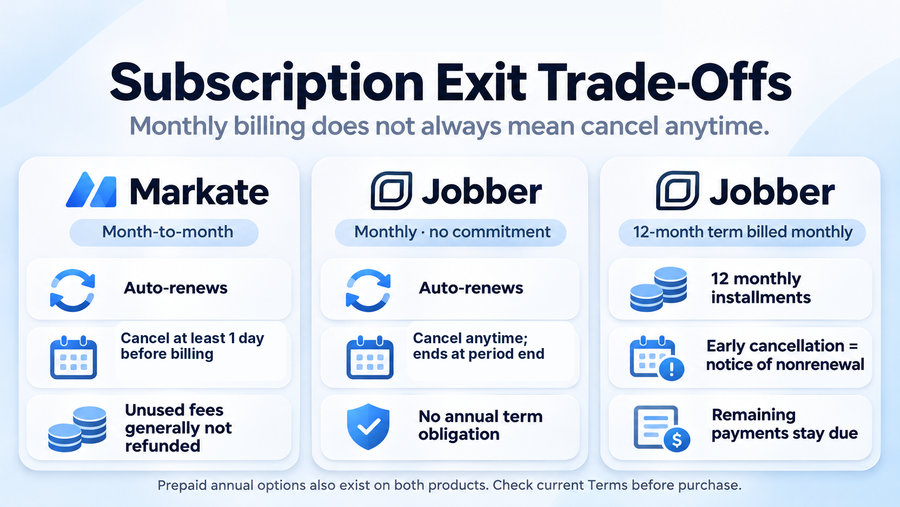
Markate promotes month-to-month subscriptions without a long-term commitment, alongside an annual-prepaid option. Its published Terms provide for automatic renewal, generally nonrefundable payments, and cancellation at least one day before the next billing date to avoid another charge. The Terms describe cancellation through the account’s My Accounts area, while the pricing FAQ also mentions contacting support. Buyers should use a documented cancellation process and retain confirmation rather than assume that a failed payment automatically terminates their obligations.
Jobber offers a genuinely no-commitment monthly option, but its other billing choices create different exposure. In particular, the annual subscription billed monthly is a full one-year commitment payable in twelve installments. Under Jobber’s current Terms, an early cancellation request for that option generally operates as notice of nonrenewal: access continues through the agreed term and the remaining monthly payments stay due. Prepaid annual subscriptions generally do not produce refunds for unused time. Automatic renewal and specified annual-plan notice rules also deserve attention before checkout.
For an owner evaluating a seasonal slowdown, the difference can be material. Markate’s monthly option and Jobber’s no-commitment monthly option offer different ways to avoid a new monthly renewal, while a Jobber installment plan carries an agreed remaining-term obligation.
Exports and Switching Risk
Markate advises users to download CSV or PDF data before a subscription lapses, since access may end when the subscription is no longer active. Jobber users should likewise establish the available export formats and access cutoff for their chosen plan. A customer list alone is not a complete migration: associated photos, repeat-work settings, signed approvals, conversation records, payment history, and accounting relationships may require separate work.
Before cancelling either service, export one representative customer with multiple jobs and an invoice, then check whether the destination can preserve the essential context. Neither vendor’s migration claims should be treated as a guarantee that every relationship transfers intact.
Which Software Fits Your Business?
Choose Markate When
Markate is worth evaluating first when a business wants its owner and several active workers in a connected CRM and field system at a relatively low access cost. It can suit a handyman crew that estimates repairs, schedules repeat visits, documents completed jobs, records costs, and invoices customers, especially when the business needs only a small selection of optional booking or communication products.
The employee economics matter only when the selected roles and mobile workflows support the team. A five-person operation may save on subscription access yet lose that advantage if workers struggle with the app, the office needs multiple paid add-ons, or QuickBooks exports create reconciliation work. The broader product advantages and limitations are examined in our full Markate review.
Choose Jobber When
Jobber deserves the first trial when consistent scheduling, customer self-service, visit documentation, reminders, and a clear office-to-field handoff are top priorities. Connect gives a five-user team a published entry point for many routine operations. Grow is more appropriate when advanced quoting, labor and material job costing, or custom automations are part of the real requirement; Plus offers a broader growth and management layer.
Our Jobber review provides the wider single-product assessment, separate from this direct buying comparison.
What to Test Before Switching
Use one representative customer and the same worker roles in both trials. Complete these six checks before selecting a paid configuration:
- Enter a request for several repairs at one property, including a return visit, access instructions, and customer history.
- Create an estimate with optional work, send it for approval, and confirm that authorized scope changes appear in the job record.
- Reassign one of two visits and verify the customer’s and technician’s updated information, along with any routing implications.
- Disconnect a technician’s phone, capture the usual checklist or photo notes, reconnect, and inspect the sync queue and final office record.
- Create an invoice and partial payment, then trace the customer and invoice through QuickBooks to identify the source of truth and any manual corrections.
- Confirm the required employee roles, add-ons, subscription term, cancellation deadline, and a sample export of customer and job history.
Record which premium features were accessible during each 14-day trial, how often staff had to switch between app and desktop, and where a supervisor had to intervene. Trial access does not guarantee that the same features will be included in the selected paid configuration, so obtain any special entitlement or add-on promise in writing.
Final Verdict
Markate offers compelling employee-access economics and a surprisingly broad operating foundation for a lean service business. The five-person $69.95 core example is attractive, but it is not a complete comparison with a Jobber team plan until customer-facing requirements and usage charges are included.
Jobber’s published five-user Connect and Grow options cost more, but can be worth that difference when customer self-service, scheduling structure, follow-ups, and plan-specific financial tools reduce actual administrative work. For most owners, the defensible choice is the lowest complete configuration that passes the same real-job trial. Start with the way the business already operates, identify the missing capability, and purchase the plan that solves it without unnecessary features or contractual exposure.