

Last updated: October 2026
Product, pricing, integration, and contract information last verified October 25, 2026.
On this page
Jobber is a strong starting point for home-service teams that handle repeatable residential jobs and want published prices, a self-service trial, and a clear path from customer request through scheduling, invoicing, and payment. FieldPulse deserves closer evaluation when jobs require configurable stages, conditional paperwork, project milestones, or service histories tied to equipment. Both platforms cover scheduling, estimates, jobs, invoices, and payments.
The difference becomes more consequential when a technician finds extra work, a part delays completion, or an accountant edits an invoice. This comparison looks at what a five-person team can actually budget, what each subscription commits it to, how field workflows hold together, and where QuickBooks data should be maintained. Neither platform wins for every crew.
The Quick Verdict
Choose Jobber first if your operation mostly schedules standard service calls, turns approved quotes into field assignments, and wants to understand its subscription cost before a sales conversation. Connect offers useful field administration, checklists, QuickBooks Online connectivity, and routing; Grow is the more relevant comparison when labor and material profitability or custom automation are central to the decision. Jobber’s 14-day trial makes it possible to validate those processes before selecting a paid term.
Shortlist FieldPulse when your team needs a specific job to remain in an awaiting-parts or awaiting-approval state, field staff must complete conditional reports, or managers follow multi-stage projects and installed equipment. That additional structure can matter even to a two-person shop. Its price and access rights depend on a negotiated configuration, however, and the standard contract terms deserve review before committing. A five-person headcount alone does not establish which system is more suitable.
At a Glance
| Decision factor | Jobber | FieldPulse |
|---|---|---|
| Price visibility | Public plan and team rates | Custom quote on main pricing page; separate calculator reference |
| Five-user economics | Connect $199, Grow $299, Plus $499 per regular no-commitment month | Five-seat total depends on written quote, seat types, and add-ons |
| Everyday workflow | Organized customer, job, visit, quote, and invoice process | Configurable jobs, status handoffs, and specialized forms |
| Projects and assets | Multi-visit/recurring jobs, costs on Grow/Plus | Dedicated project and equipment-history capabilities |
| Forms and documentation | Checklists on Connect; custom automation on Grow/Plus | Conditional Custom Forms offered as a premium product |
| Offline mobile | Timers, forms, notes, and attachments with limitations | Documented offline jobs, projects, forms, estimates, and invoices |
| QuickBooks Online | New integration: ongoing Jobber-to-QBO sync | Two-way sync for specified records, subject to exclusions |
| Buying and onboarding | Self-service trial and several billing commitments | Sales-led configuration; standard annual-term and seat rules |
These are product and commercial distinctions, not feature scores. A configured FieldPulse quote may include tools beyond the base platform, and neither vendor’s offline or accounting integration should be assumed to cover every field action or record.
Pricing, Seats & Contract Terms
Public Prices Versus a Custom Quote
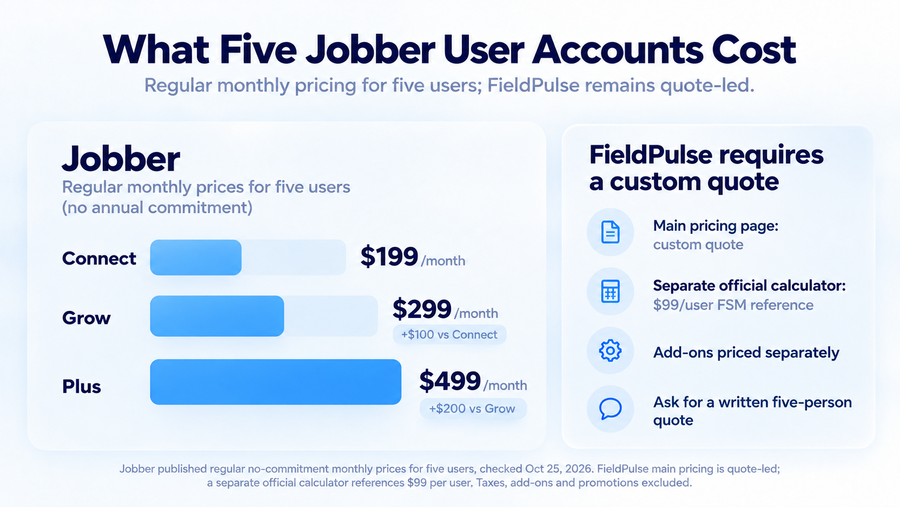
Jobber currently posts $199 per month for Connect, $299 for Grow, and $499 for Plus, each configured for five users at the regular monthly rate without an annual commitment. Core is $49 for a single user and is not a five-person substitute. Connect provides everyday scheduling, checklists, reminders, route optimization, and QuickBooks Online integration. Grow adds job costing, richer quoting, two-way SMS, and custom workflow automation; Plus adds deeper team, reporting, and growth functionality. The complete Jobber pricing breakdown helps distinguish those plan gates from billing promotions.
Jobber also advertises monthly payments with a one-year commitment and an annual-prepaid option, plus time-limited signup promotions. Those can show substantially lower introductory or monthly-equivalent figures, but they do not replace the regular no-commitment comparison above. Its free trial lasts 14 days without a credit card. A business should select the same five-person configuration and commitment setting when comparing the published options.
FieldPulse’s main pricing page instead describes seat-based custom quoting. A separate official FieldPulse calculator has exposed a $99-per-user Field Service Management reference and separate prices for products such as Custom Forms and Engage. Its current publicly accessible web page requires JavaScript, so the extracted reference is useful context, not a verified live checkout price or an invitation to multiply $99 by five and call that a quote. Field and office roles, product bundles, implementation, and contract terms all affect the offer. The FieldPulse pricing guide addresses the commercial details; for this comparison, request a written five-person quote covering every required feature.
Renewals, Seats and Exit Costs
Jobber offers a genuinely no-commitment monthly billing choice, alongside monthly payments tied to a one-year commitment and annual prepayment. The latter two should not be mistaken for the same cancellation flexibility as the first. Subscriptions renew under the selected billing terms, and prepaid annual fees are generally not refundable simply because a customer stops using the software midterm. Staff changes and add-on costs should be checked against the selected package, not the advertised entry price.
FieldPulse’s current subscription terms specify a one-year initial term by default unless the order form provides otherwise. Annual subscriptions normally renew for another year, and nonrenewal requires at least 60 days’ written notice. The terms separately recognize month-to-month subscriptions, including legacy arrangements, with 30 days’ written cancellation notice and a higher rate than comparable annual subscriptions. Monthly invoices therefore do not necessarily mean a freely cancellable monthly contract.
The seat language deserves particular attention. Under FieldPulse’s terms, adding a user can increase the allocated subscription seats, but deactivating or removing someone does not automatically reduce the billed seat count. For a business hiring seasonal technicians or replacing office staff, that is a material budget difference. Request the signed term, payment schedule, implementation charge, seat-reduction rules, and remaining-term exposure in writing before comparing it with Jobber’s more transparent buying options.
Scheduling and Field Execution
Routes, Visits and Dispatch
Imagine two technicians covering several residential jobs when a customer calls back about a leaking fixture. The dispatcher must fit in the urgent visit without losing the original day’s assignments, while the technician needs updated instructions and the homeowner needs a reliable arrival window. Both products can manage calendars and field assignments. Their more distinctive tools solve different parts of this problem.
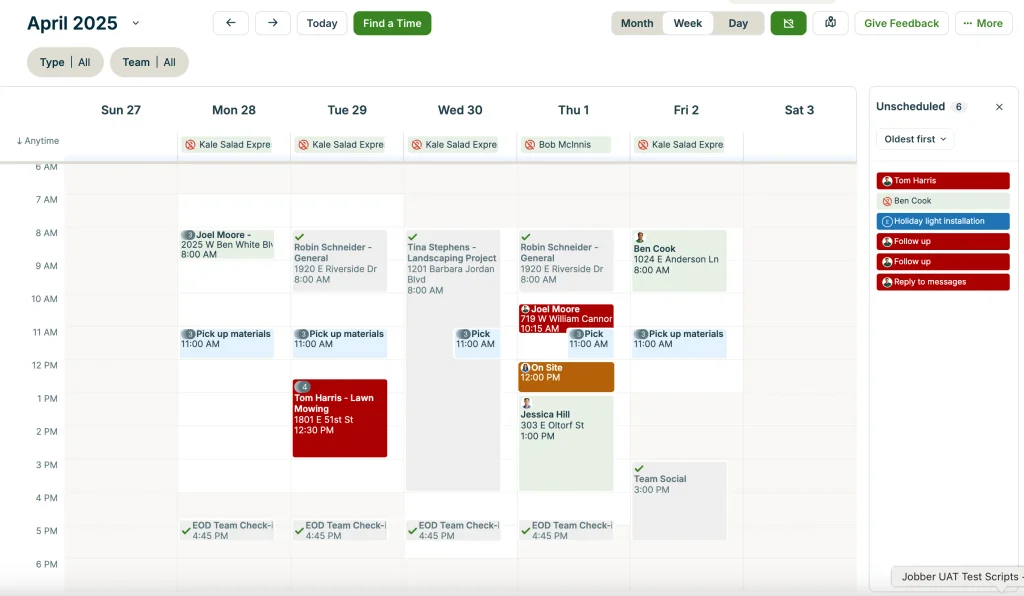
Jobber structures work around jobs and scheduled visits. Its New Schedule can optimize the order of anytime visits directly from the day or week schedule for one technician, a selected group, or the full team on Connect, Grow, and Plus. An administrator initiates route optimization on Jobber.com; the resulting order appears in the mobile app. It does not mean every fixed-time appointment is automatically rearranged, and older Settings/Master Route articles describe a legacy experience rather than the universal workflow for new accounts.
FieldPulse places more emphasis on configured job statuses and handoffs between dispatch, technicians, and managers. That can help an office separate a job waiting for approval from work ready to schedule or a technician who has completed only one stage. For a callback, ask the salesperson to demonstrate reassignment, customer notification, and the effect of custom statuses on office queues. GPS or fleet visibility should be verified within the quoted products instead of assumed to be included merely because a scheduling screen exists. Buyers focused primarily on appointments and routing can explore those purchasing distinctions in our handyman scheduling software guide.
Mobile Records and Offline Work
Both products have meaningful, but different, offline workflows. Jobber documents starting and stopping timers, completing supported job forms, and adding notes or attachments while disconnected, with updates synchronized after connectivity returns. Live team information and certain location-based functions can remain unavailable. A note stored on one technician’s phone also cannot become visible to everyone else until it has successfully uploaded.
FieldPulse’s offline documentation covers customers, jobs, projects, Custom Forms, estimates, and invoices, with synchronization on reconnection. This is a broader documented set of business record types, although the exact tasks available to a given role, app version, and purchased product still need checking. Neither documentation set guarantees that every field edit, payment, signature, or conflict can be completed identically without service.
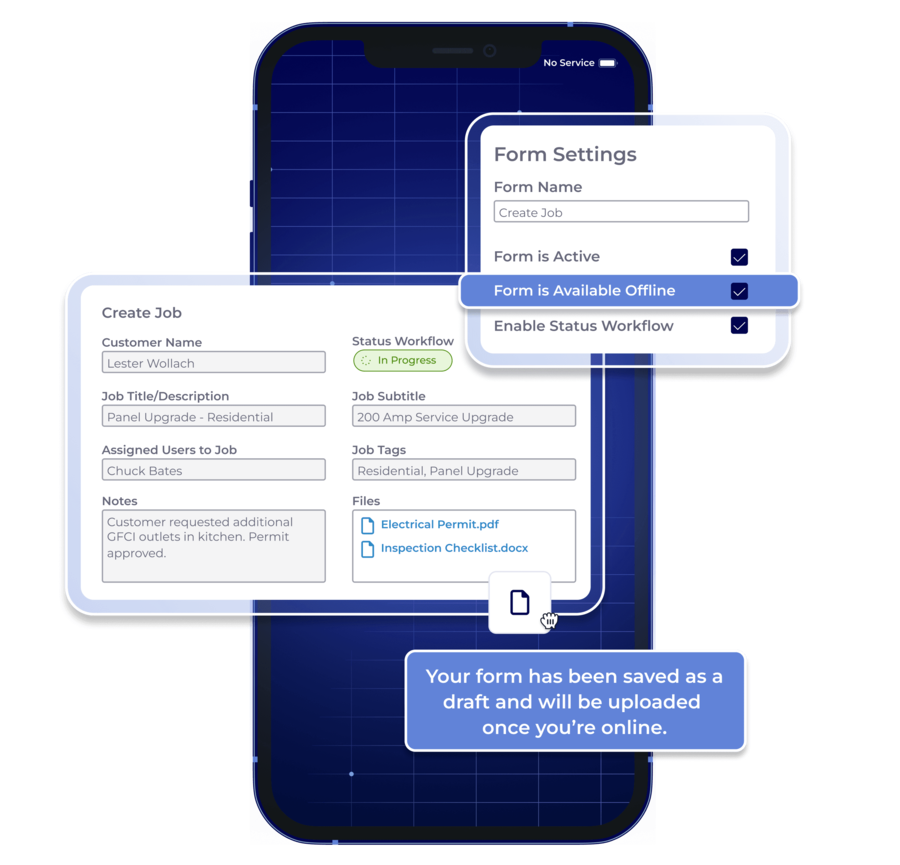
For either product, preload an actual job, disconnect the device, document a change and attach a photo, then reconnect and inspect the office record. Repeat with the credentials of a technician rather than an administrator. That small test is more informative than an undifferentiated “offline available” label.
Custom Workflows and Project Depth
Statuses, Forms and Handovers
Consider a repair that begins with an inspection, reveals an additional problem, then pauses for a replacement part. The office needs to know that the technician visited but the work remains open, that the customer approved the extra cost, and who owns the next action. A basic completed/not-completed calendar status often fails to tell that whole story.
FieldPulse documents custom job stages, triggered workflows, and conditional Custom Forms containing photos, checkboxes, signatures, and fields that appear based on earlier responses. Such forms can help a technician collect required evidence without returning to the office to finish paperwork, while status rules keep waiting jobs visible. Crucially, Custom Forms appear among the premium products on the current pricing page. Seeing them in a demonstration does not establish that the proposed subscription includes them.
Jobber provides visit notes, attachments, and checklists on Connect, with custom workflow automations on Grow and Plus. That can adequately document ordinary repairs, approved changes, and return visits without reproducing a highly customized status architecture. Buyers should check whether their real handoff needs a conditional field, an automated trigger, or simply a consistent checklist that everyone uses.
Projects, Assets and Return Visits
FieldPulse’s project tools go further into milestones, assigned tasks, resource allocation, and project cost oversight. Its asset-management offering can associate service records with installed equipment, creating context for businesses that repeatedly inspect or repair the same systems. A property-maintenance provider might care about an appliance’s previous repairs; a contractor replacing several components over three visits may need progress tracked against separate project stages.
Jobber can preserve multiple visits under a job, support recurring schedules, attach service details, and calculate job costs on higher plans. A handyman returning once to install a missing part does not necessarily need formal milestone management. FieldPulse’s dedicated modules become easier to justify when phased projects or equipment histories are standard operating requirements, rather than rare exceptions. Ask which project and asset permissions, reports, and setup services are included in the actual FieldPulse proposal.
Quotes, Invoices and Profitability
Job Margin Versus Project Control
Both products handle customer estimates, invoices, and payments. The more important test is what happens when a technician discovers extra work after the initial quote is approved. The customer needs a clear revised scope, the field worker needs authorization before continuing, and the owner needs to see whether additional labor and material costs still leave a satisfactory margin.
Jobber makes its profitability model particularly clear. Job costing on Grow and Plus uses employee timesheets and labor costs, line-item prices and costs, and recorded job expenses to calculate profit and margin. That suits an owner who wants to compare what was sold with what was spent on a completed service job. Its documentation also identifies limitations in how recurring-job costs appear in particular reports, so a maintenance-heavy buyer should check reporting with a representative recurring job rather than assume every view is identical.
FieldPulse supports more project-oriented control over labor, materials, overhead, and financial progress, alongside the ordinary estimates-and-invoices workflow. For work involving multiple crews or milestones, the distinction can be important. Its actual costing, approvals, and reporting entitlements must be verified in the quote, and neither platform should be treated as an independently reconciled accounting ledger. The owner still needs reliable cost entry and a review process for approved changes.
QuickBooks and Data Ownership
QuickBooks behavior is a consequential difference because a software migration can change where staff are allowed to edit financial records. Jobber’s new QuickBooks Online integration allows a one-time import of clients and products/services from QuickBooks during setup, then synchronizes supported operational records from Jobber to QuickBooks on an ongoing basis. Jobber becomes the source of truth for those records, and marking an invoice paid in QuickBooks no longer updates the paid status in Jobber. The new integration is being rolled out to select accounts; the older integration follows different rules. Jobber does not provide QuickBooks Desktop integration. The new integration’s record-by-record guidance is worth checking before assigning bookkeeping responsibilities.
FieldPulse’s current official documentation describes two-way QuickBooks Online syncing for customers, line items, estimates, invoices, and payments. That is a material distinction for offices accustomed to editing supported records in either system. It is still not an unlimited two-way transfer: custom fields, extra customer locations, attachments, and certain other data do not sync as ordinary supported fields, while configuration and record mapping introduce additional constraints.
Suppose an accountant corrects an invoice in QuickBooks after the office has issued it. Under Jobber’s new integration, the operating process should normally return the change to Jobber before it flows out again. In FieldPulse, the team should test whether the specific correction syncs back as expected and how conflicts appear. During evaluation, reconcile a changed invoice, a customer update, and a payment, then document which application owns each record and who resolves errors. A connector’s existence does not remove the need for reconciliation.
AI, Communication and Growth Tools
Both platforms extend beyond dispatch and billing, but their optional products address different problems. Jobber offers AI-assisted business support, Receptionist, marketing capabilities, and Pipeline lead management. Its current Receptionist add-on is advertised at $29 per month on eligible plans, with a conversation allowance and additional usage charges; Plus includes Receptionist under its own terms. Marketing Suite and Pipeline may require separate fees on other configurations.
FieldPulse markets Maverick as included on every plan and offers products such as Operator AI, Chat AI, Engage communications, Pricebook, and Fleet Tracking under separate commercial arrangements. Custom Forms likewise need to be priced as a premium capability. That broader menu may benefit a team trying to standardize field execution and lead handling together, but it can also create an implementation and subscription bundle larger than expected.
Buyers should separate the features that change how jobs are completed from those used primarily to capture leads or send campaigns. Compare call or message allowances, integrations, onboarding, and recurring fees against the same real workflow. Vendor claims about faster growth or higher booking rates are not evidence that either configuration will deliver the same outcome in your business.
Which Fits Your Crew?
Choose Jobber If…
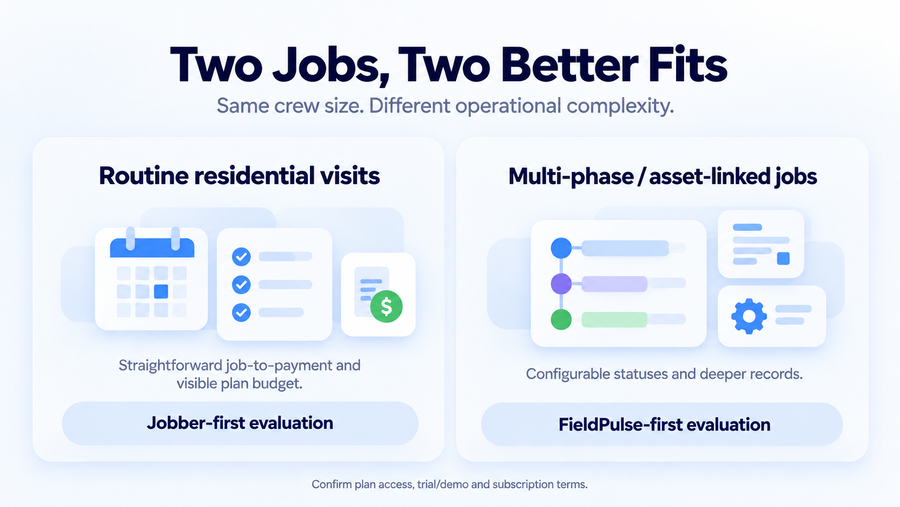
Jobber is a sensible first evaluation for a residential repair, cleaning, painting, or maintenance team with relatively repeatable visits and a strong need for clear office-to-field handoffs. Its published pricing lets you budget five users without negotiating an entire system, while the trial provides a way to test quoting, visit management, invoicing, and technician documentation. Connect is a reasonable starting configuration when checklists, scheduling, and QBO are enough; Grow becomes relevant when profitability tracking or custom automation must be part of the daily workflow.
The recommendation assumes the office is comfortable maintaining operational customer and invoice records in Jobber under the new QuickBooks integration. If the team needs highly customized job states, asset history, or conditional forms every day, verify whether Jobber’s standard tools can represent those exceptions without workarounds.
Choose FieldPulse If…
FieldPulse is more compelling when jobs follow different stages, service histories must stay attached to equipment, or technicians need specialized forms and approval trails. An electrical or appliance-service operation handling inspected assets and phased jobs may benefit from the configurable structure, even with only a small crew. The extra flexibility makes sense when someone in the office will define, maintain, and audit the workflows.
That case should be demonstrated with your own sample work order rather than a generic vendor scenario. Obtain a written proposal spelling out Custom Forms, project and asset modules, technician/office seats, QuickBooks, implementation, and renewal requirements. A team mostly seeking a shared calendar and ordinary invoices may find the commercial and administrative commitments difficult to justify.
For businesses between these use cases, compare how frequently an unusual repair genuinely requires extra status rules, reporting, or asset history. Crew size tells you less than the number of exceptions the office must manage each week.
What to Test Before Switching
A demonstration should use one complicated job, not an empty calendar or a feature tour. Bring a real customer/property record, then work through these six checks with the office and field roles that will actually use the system:
- Recreate a customer, property, and unfinished job with two scheduled visits, existing notes, and an attachment.
- Add newly discovered work from the field, document customer approval, and leave one task waiting for a part.
- Disconnect a technician’s phone, record an allowed update, reconnect, and check exactly what reaches the office.
- Reassign the next visit, review its position on the schedule, and confirm which customer and technician notifications are sent.
- Change and pay an invoice, inspect QuickBooks, and identify the system that should hold each authoritative value.
- Obtain the written seat-addition/reduction policy, term, renewal notice deadline, implementation charges, and cancellation exposure.
Request a sample export before migrating. Check whether attachments, custom fields, communication history, job visits, and accounting records retain usable relationships. FieldPulse’s terms currently describe a 60-day period after subscription termination to export or request customer data, but that does not guarantee every record or relationship is available in the format you want. Export coverage should be established before cancelling the old platform.
Final Verdict
Jobber is the more straightforward starting point for many small service teams that perform familiar jobs, want transparent five-user prices, and prefer to test operations before choosing a commitment. FieldPulse is worth the additional buying and configuration effort when complex handoffs, conditional forms, project milestones, or equipment histories solve recurring problems for the crew.
The written package can change that conclusion. Jobber’s no-commitment price differs from its annual offers; FieldPulse’s quoted seats, premium products, and renewal provisions determine the real cost of its flexibility. Choose the least complicated complete configuration that handles your actual jobs and accounting process. If neither fits, our Jobber alternatives roundup provides a broader set of options without forcing a compromise between these two systems.