
Last updated: November 2026
Pricing and user limits verified November 5, 2026. Other product details reviewed October 26, 2026.
On this page
- Quick Verdict
- Comparison at a Glance
- Pricing and Real Team Costs
- Estimates, Photos, and Property Measurements
- Scheduling, Routes, and Crews
- AI Answering and Usage Limits
- Follow-Up, Customers, and Growth Tools
- QuickBooks, Job Costing, and Reporting
- Trials, Renewals, and Data Exit
- Which Platform Fits Your Business?
- Final Recommendation
QuoteIQ and Jobber both handle customer records, estimates, scheduled work, invoices, and payments. QuoteIQ is worth considering when a contractor regularly measures properties, builds visually documented quotes, or needs specialized photo and AI tools. Jobber offers a more structured path for businesses managing repeat service visits, team schedules, client booking, and routine follow-up.
Their pricing models can produce surprising results. QuoteIQ starts lower for a solo user, but its October 2026 plan changes, paid extra logins, and higher-tier scheduling tools make a five-person comparison less obvious. Its AI features also share limited monthly credits, with unresolved documentation about additional calling charges. Jobber has separate plan gates, conversation-based AI Receptionist billing, and different subscription commitments. Comparing complete configurations is more useful than comparing entry prices.
Quick Verdict
Evaluate QuoteIQ first if your estimating process relies on property measurements, structured inspection photos, before-and-after job documentation, or specialized customer self-quoting tools. MapMeasure Pro and QuoteIQ Cam start at Beginner, while InstaQuote, InstaSchedule, and route optimization require Elite or Max under the current plan structure. A business needing the full set should budget for those tiers rather than assume the $29.99 entry plan covers them.
Evaluate Jobber first if your daily workload revolves around booked residential visits, repeat customers, multiple technicians, reminders, and consistent office-to-field handoffs. Connect provides a useful five-user operational baseline, while Grow adds job costing and richer quoting capabilities. Test both using the same job.
Comparison at a Glance
| Decision factor | QuoteIQ | Jobber |
|---|---|---|
| Primary strength | Contractor-focused photo, measurement, and specialized estimate tools | Standardized scheduling, client communication, and service-job workflows |
| Photo and measurement tools | QuoteIQ Cam and MapMeasure Pro from Beginner | Job photos/attachments; deeper visual quote and media tools depend on plan |
| Booking and routing | InstaSchedule and route optimization from Elite; crew scheduling on Max | Online booking; New Schedule route optimization from Connect |
| Job costing / QuickBooks Online | Both listed from Pro | QuickBooks from Connect; job costing from Grow |
| AI answering | Monthly shared IQ Credits; separate call-dollar fees also documented | Receptionist: Plus included, or $29 add-on on select plans with 30 conversations and overages |
| Trial | 14 days, card required; plan changes end the trial | 14 days, no card required |
| Subscription exit | Monthly auto-renewal; annual prepaid with limited discretionary refund exception | No-commitment monthly or annual commitment paid monthly or upfront |
These plan capabilities are not feature-equivalent: QuoteIQ Pro has costing and QBO but not Elite routing or EmployeeHub; Jobber Connect has routing, while costing needs Grow.
Pricing and Real Team Costs
One Person, Five People, or Ten
QuoteIQ’s current five-tier lineup is Essentials $29.99, Beginner $99.99, Pro $199.99, Elite $299.99, and Max $699.99 per month, with one, two, four, ten, and twenty included users respectively. Additional users cost $25 each per month, subject to the provider’s account limits. The October 2026 pricing update supersedes older pages still displaying a $149.99 Pro plan and different Max allowances. Grandfathered prices are not current new-customer offers.
| Plan / configuration | Monthly price | Included users |
|---|---|---|
| QuoteIQ | ||
| Essentials | $29.99 | 1 |
| Beginner | $99.99 | 2 |
| Pro | $199.99 | 4 |
| Elite | $299.99 | 10 |
| Max | $699.99 | 20 |
| Jobber — no commitment | ||
| Core — solo | $49 | 1 |
| Connect — solo | $139 | 1 |
| Connect — team | $199 | 5 |
| Grow — solo | $199 | 1 |
| Grow — team | $299 | 5 |
| Plus — team | $499 | 5 |
For a solo contractor, QuoteIQ Essentials at $29.99/month costs less than Jobber Core’s regular $49/month no-commitment rate. That may be sufficient if the work consists mainly of estimates, invoices, a calendar, and basic customer records. The lower number becomes less relevant when the owner needs QuoteIQ Cam or property measuring, which begin on the $99.99 Beginner tier. Jobber Core also provides online booking.
For a five-person team, QuoteIQ Pro includes four users, and the vendor lists additional logins at $25 per user per month. However, our feature-qualified five-user configuration remains under research QA, so we do not present a validated QuoteIQ team-cost scenario here. Jobber publishes $199/month for five users on Connect and $299/month for five users on Grow under regular no-commitment monthly billing. These plans are not feature-equivalent: QuoteIQ Pro includes job costing and QuickBooks Online, while Jobber requires Grow for job costing. Our QuoteIQ pricing guide covers the full plan structure and additional-user rules.
At ten users, QuoteIQ Elite is publicly listed at $299.99/month, with EmployeeHub, InstaSchedule, route optimization, and other advanced functions. Jobber has team-size-dependent packages, so a buyer should use its live ten-user selector and chosen plan rather than multiplying a five-user rate. Seats do not establish crew-feature parity. QuoteIQ assigns full crew creation and scheduling to Max for new subscriptions, even though certain older Elite accounts retain grandfathered access.
Feature Upgrades and Hidden Costs
A QuoteIQ subscription changes substantially as a business moves up the ladder. Beginner unlocks MapMeasure Pro and QuoteIQ Cam. Pro adds job costing, QuickBooks Online, in-app communications, and text/email automation. Elite adds route optimization, EmployeeHub, inventory, InstaQuote, and InstaSchedule. Max adds crew-management functions for new customers and a larger included-user allowance. Purchasing a fifth login on Pro does not move that account’s capabilities to Elite.
Jobber’s progression follows a different pattern. Core handles basic quoting, scheduling, invoicing, and booking. Connect adds team-friendly functions such as QuickBooks Online, checklists, follow-up workflows, and route optimization. Grow introduces job costing and richer quote features, with Plus adding more crew, reporting, marketing, and AI Receptionist capabilities. The regular five-user price remains the useful starting figure; introductory promotions, annual-prepaid equivalents, and annual commitments billed monthly are separate buying choices. Payment, usage, and third-party charges may add costs.
Both suppliers can become more expensive when the buyer discovers a missing capability after signup. Write down the actual work performed by each employee, the photos and approvals needed, whether customers must book themselves, and the number of monthly AI interactions. Then identify the lowest qualifying plan, count the users, and inspect the usage and cancellation terms. Detailed Jobber billing choices belong in our Jobber pricing guide, not a forced one-number comparison here.
Estimates, Photos, and Property Measurements
Measuring and Building a Quote
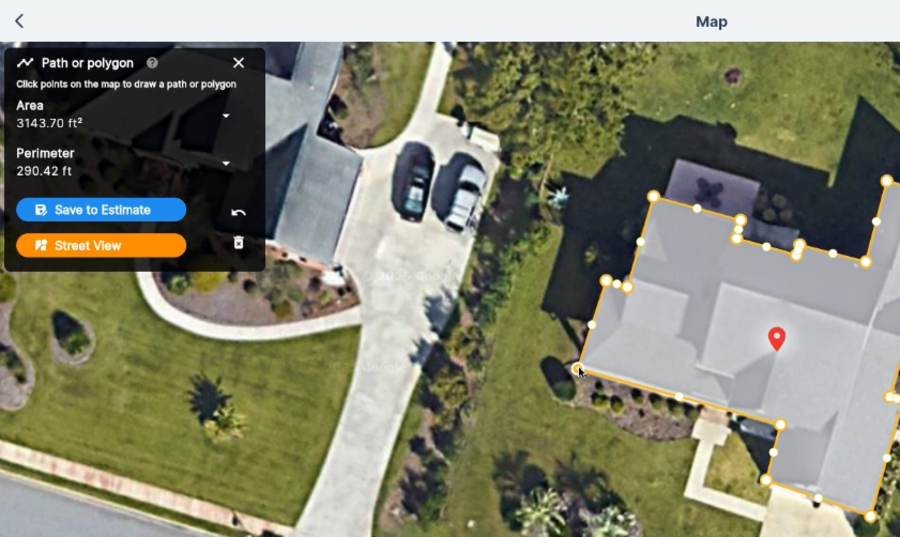
Consider a contractor quoting exterior painting alongside a gate repair. QuoteIQ’s MapMeasure Pro can help measure appropriate exterior property areas remotely, while its estimate builder supports standard, options, and package quotes. MapMeasure Pro is available from Beginner; AI-based measuring uses the product’s credit system where applicable. An owner quoting driveways, roofs, exterior surfaces, or large properties may gain something operationally important from collecting measurements without a separate measurement application. Verify site conditions and scope before sending.
An indoor handyman replacing hardware and repairing drywall may find little use for satellite measurement. Jobber handles ordinary customer quotes and approvals, with richer visual quoting and optional-line-item features on Grow. Both can quote multiple tasks. If the customer approves only two of three repairs, check that the agreed scope, revisions, and approvals remain clear on the job and invoice.
Jobsite Photos and Client Proof
QuoteIQ Cam, available from Beginner, is a more specific reason to consider QuoteIQ than a generic claim that it supports photos. It organizes photos and video around jobs, supports inspection reports, and includes actual before-and-after documentation. This can help when a handyman photographs damaged trim before repair, records concealed conditions during the visit, and needs the correct images available when the customer calls two weeks later. Retrieval and context matter more than photo count.
QuoteIQ also offers an AI-generated after preview, which is different from a photograph of finished work and consumes IQ Credits. A realistic-looking prediction should be presented as a visualization, never as documentation that a repair was completed. Jobber also supports job photos and attachments, and Plus advertises unlimited photo and video organization. Compare media capture, retrieval, and plan limits. Our QuoteIQ review discusses the broader product, while this decision should turn on the actual estimating and evidence requirements.
Scheduling, Routes, and Crews
Bookings and Route Planning
Jobber has a scheduling advantage for buyers who want specific routing capabilities at a comparatively earlier published plan tier. Its New Schedule supports route optimization for anytime visits on Connect, Grow, and Plus, initiated from Jobber.com for a selected worker, group, or team; technicians see the optimized order in the mobile app. That differs from the older Legacy Schedule’s master-route settings. Fixed-time appointments and unsupported visit types should not be assumed to behave like flexible anytime stops.
QuoteIQ provides calendar scheduling from its entry plans, but current route optimization and the full InstaSchedule booking workflow are listed on Elite and Max. Its public matrix also shows a “Client Portal Self-Scheduling” row from Pro, creating understandable ambiguity. The more detailed InstaSchedule setup documentation explicitly identifies Elite and Max for the customer flow that checks availability and allows scheduling after estimate acceptance. Buyers needing that exact self-booking experience should verify it in an Elite/Max trial rather than infer full access from the Pro portal row.
Staff Access and Day-to-Day Control
For a five-person team, access should be evaluated by role: owner, office scheduler, and three field technicians may need different tasks and permissions. QuoteIQ supports extra paid logins and role settings, but EmployeeHub’s advanced features start on Elite, while creating and scheduling crews for new customers is placed on Max. An invited user can also count against an account allowance before accepting, so administrators should verify how pending invitations affect available seats.
Jobber’s service-job and visit assignment functions support shared office and technician coordination, with deeper crew capabilities on Plus. Solo assignments and daily multi-worker crews need different controls. During evaluation, assign work, move an appointment, and verify what the field user sees and can change; a feature checkbox or seat total alone cannot answer that question.
AI Answering and Usage Limits
QuoteIQ Credits in Practical Terms
Every current QuoteIQ paid plan includes monthly IQ Credits (IQC): 500 on Essentials, 1,500 on Beginner, 3,000 on Pro, 5,000 on Elite, and 8,000 on Max. Credits are shared across AI tasks such as estimating, generated images, text assistance, automation, and Virtual Call Team. Unused credits do not roll over. Free trials receive 250 IQC, not the full paid-plan allowance. Using credits elsewhere leaves fewer for calls.
The September 2026 Virtual Call Team guide documents 125 IQC per call minute. Dividing each monthly allowance by 125 yields theoretical credit-only equivalents of 4, 12, 24, 40, and 64 minutes. Those figures assume every monthly credit goes to calling, with no other AI activity. They are a way to understand credit consumption, not a guarantee that those minutes are free or already paid for in full.
There is a material unresolved billing issue. QuoteIQ’s still-public IQ Credits guide also lists a $1.25 base fee per call, $1.25 per minute after the first 60 seconds, and a $25 auto-recharge when the call balance drops below ten minutes. The two official descriptions do not give a fully reconciled account of the charges. Before relying on AI answering for a busy business phone, inspect the live billing screen, ask whether both credits and dollar charges apply, and check the ability to disable or control recharge.
Jobber Receptionist and Conversations
Jobber measures its AI Receptionist differently. Plus includes unlimited Receptionist usage under current documentation. On select other plans, Receptionist is a $29/month add-on with 30 conversations per billing cycle, and businesses that elect to continue beyond the allowance pay $0.79 per additional conversation. They can instead pause active AI responses at the limit. A voice conversation generally involves actual engagement with the caller; text conversations have their own session rules, so a conversation cannot be converted directly into a fixed number of minutes.
Receptionist can answer inquiries, collect requests, and support booking or escalation according to the configured workflow. Check routing, permissions, and resulting call records. Compare actual call patterns and fees.
Follow-Up, Customers, and Growth Tools
A service owner often loses time after the quote is sent. One homeowner asks a question before approving the job, another needs an appointment reminder, and a third forgets to pay an invoice. Jobber Connect is built around these repeatable customer interactions, including quote and invoice follow-ups and online booking; Grow adds richer quoting and automation, and Plus bundles further marketing and customer-management tools. The value depends on how often the team uses those reminders and whether clients can complete a task without calling the office.
QuoteIQ has customer records, estimates, and communications as well, with text and email automation from Pro. Elite expands campaign functions and adds InstaQuote, allowing appropriately configured customers to initiate more of the quoting process. Its Google review access is now listed across paid plans, but viewing or responding to reviews is not identical to an automated review-request campaign. Referral-driven businesses may prioritize job documentation; web-lead-driven teams should check self-quote and follow-up gates.
This is an area where a trial should include the customer’s side of the process. Send a quote, request approval, reschedule the visit, and open the resulting message or booking link as a customer would. Note the remaining manual steps and any premium charges.
QuickBooks, Job Costing, and Reporting
QuoteIQ lists job costing and QuickBooks Online integration from Pro. Jobber lists QuickBooks Online from Connect, while job costing begins on Grow under its current plans. A technician who buys extra materials after discovering damaged framing needs to record those costs somewhere the owner can review against the accepted quote. Both products can contribute to that process, but job-level profitability is not a substitute for properly reconciled bookkeeping.
Reporting depth and cost collection differ across packages. A contractor primarily tracking individual repair profitability may prefer a direct job-cost view; another may need consistent time entry, expense handling, and custom reporting across multiple workers. Test materials, labor, revised scope, and partial payments.
Confirm the Actual Sync Direction
Jobber’s new QuickBooks Online integration begins with a one-time import of selected records and then uses ongoing, primarily Jobber-to-QuickBooks synchronization. Jobber becomes the source of truth for supported clients and products/services. Paid status entered into QuickBooks does not automatically flow back to Jobber under that new model. Older Jobber documentation describes a different legacy connection, and the new integration has been rolled out to select accounts, so existing users should identify their version rather than combine the two.
QuoteIQ’s detailed connector documentation describes automatic QuoteIQ-to-QuickBooks Online flows for customers, estimates, invoices, price-book services, and payments, with matching to existing QuickBooks customer records. Matching an existing customer is not evidence that every later edit in QuickBooks synchronizes back into QuoteIQ. Neither vendor has established an unrestricted, fully bidirectional integration for every record type. Before subscribing, create an invoice, collect a partial payment, edit a customer, and deliberately check a mismatch in QuickBooks. Assign record ownership and exception handling.
Trials, Renewals, and Data Exit
Trial and Subscription Obligations
Both vendors advertise 14-day trials, but their signup conditions differ. Jobber requires no credit card for its trial, while QuoteIQ requires a credit or debit card. QuoteIQ also warns that upgrading or downgrading during an active trial ends the trial and immediately starts billing on the card. It grants 250 trial IQ Credits regardless of the selected tier. Buyers who need to inspect Elite’s scheduling features should choose that evaluation carefully instead of assuming they can switch tiers mid-trial and preserve the free period.
QuoteIQ monthly subscriptions renew automatically unless canceled before the next renewal. Paid time is generally nonrefundable. Its annual option is prepaid and ordinarily nonrefundable, although the current QuoteIQ Terms allow the company to approve an exceptional early annual refund at its discretion. If approved, the calculation can deduct up to 15% of unused subscription value, subject to applicable terms. Approval is never guaranteed. Price-lock protection also depends on uninterrupted use of the same plan; switching plans may put the customer on the current pricing generation.
Jobber offers a regular no-commitment month-to-month option, a distinct one-year commitment paid in monthly installments, and annual prepaid billing. Canceling a year-long commitment early does not automatically eliminate remaining scheduled installments. Annual-prepaid fees also have refund restrictions, and renewal notice requirements depend on the selected terms. Monthly-looking prices can carry different commitments.
Export and Migration Test
QuoteIQ says its Export Data feature is available on all plans. Under its October 23 Terms, access continues through the paid billing period; afterward, user data remains read-only for 30 days before deletion, subject to stated exceptions and retention obligations. This is a meaningful deadline for anyone leaving the platform. Jobber’s export options and available account access should be checked by record type; there is no basis for assigning it QuoteIQ’s same 30-day policy.
Before migrating, export a small but representative sample: one repeat customer, an estimate with options, job photos, signed documents, price-book items, messages, invoices, and payments. Check whether files retain their relationship to the correct job and whether the receiving system can use them. QuickBooks records require a separate reconciliation check. A contact export is not a complete historical migration.
Which Platform Fits Your Business?
Choose QuoteIQ When
QuoteIQ warrants an early trial for an owner who quotes visually complex work or repeatedly needs property measurements and structured photos. A pressure-washing contractor estimating outdoor surfaces, or a handyman documenting several repair conditions before work begins, may find MapMeasure Pro and QuoteIQ Cam useful. The deciding plan could be Beginner for field documentation, Pro for job costing and accounting, or Elite for self-scheduling and routing. Check AI call fees and expected usage.
QuoteIQ also merits consideration when its specialized estimation and customer-self-quote capabilities are important enough to justify a higher tier. The $29.99 headline alone is insufficient. For multi-user businesses, verify the required QuoteIQ plan, additional-user charges, and crew-management permissions separately. A larger user allowance does not automatically include every advanced team workflow.
Choose Jobber When
Jobber is a practical starting point for a residential service team with recurring appointments, multiple assigned visits, and considerable customer follow-up. Connect already offers five-user pricing, booking and routing features for suitable workflows, while Grow adds job costing and richer quoting. A business spending time rescheduling technicians, confirming appointments, chasing approved quotes, and organizing job records may get more value from that package structure than from specialized property measurement.
Our Jobber review covers the wider experience; here, test daily tasks at the intended tier. A growing crew needs to confirm scheduling rights, photo storage, approvals, and any additional AI or marketing products before concluding that a higher subscription delivers meaningful operational value.
Final Recommendation
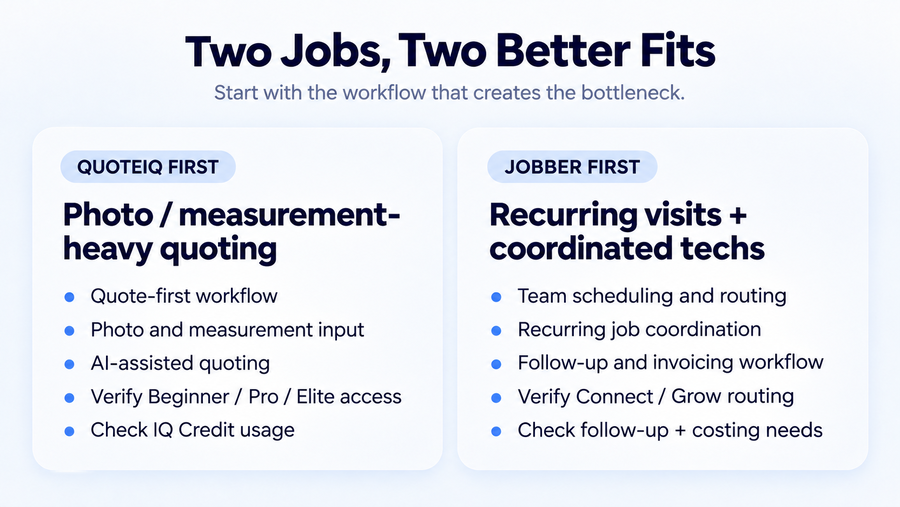
Choose QuoteIQ for documented photo- and measurement-heavy work, provided its required plan, user permissions, and AI usage limits fit your operation. Published plan prices and additional-user charges should be evaluated alongside the required features, since advanced team functions may require Elite or Max. Confirm real call charges and avoid changing trial tiers without reviewing the billing consequence.
Choose Jobber for repeatable service workflows, connected booking, route planning, and follow-up when those functions reduce your team’s administrative burden. Connect at $199/month for five is a credible starting point, with Grow worth evaluating when job costing or richer quoting is essential. Select the no-commitment or annual billing structure deliberately, and verify the QuickBooks connector your account will actually use.
The best next step is to run one identical customer job through both trials, including photos, scheduling changes, payment, and export. Buy the lowest complete configuration that performs that work reliably.