
Last updated: October 2026
On this page
Jobber and ServiceTitan both cover the core field-service workflow: customers, scheduling, dispatching, estimates, jobs, invoices, and payments. But they approach the job very differently. Jobber offers public pricing, a free trial, and a relatively direct path from evaluating the software to subscribing. ServiceTitan uses per-technician pricing, a personalized sales process, and a more structured implementation model. The bigger difference, though, is not simply company size.
Jobber is generally the stronger fit when a business needs solid field-service workflows without requiring deeper capacity management, pricebook governance, recurring-revenue administration, or reporting infrastructure. ServiceTitan becomes more compelling when dispatch capacity, standardized pricebook selling, recurring-revenue programs, detailed reporting, and marketing attribution are becoming management problems in their own right.
That means a five-technician company with complex operations can have different needs from a 15-person company running a simpler schedule → job → invoice workflow.
Jobber vs ServiceTitan at a Glance
Here is the practical difference between the two platforms:
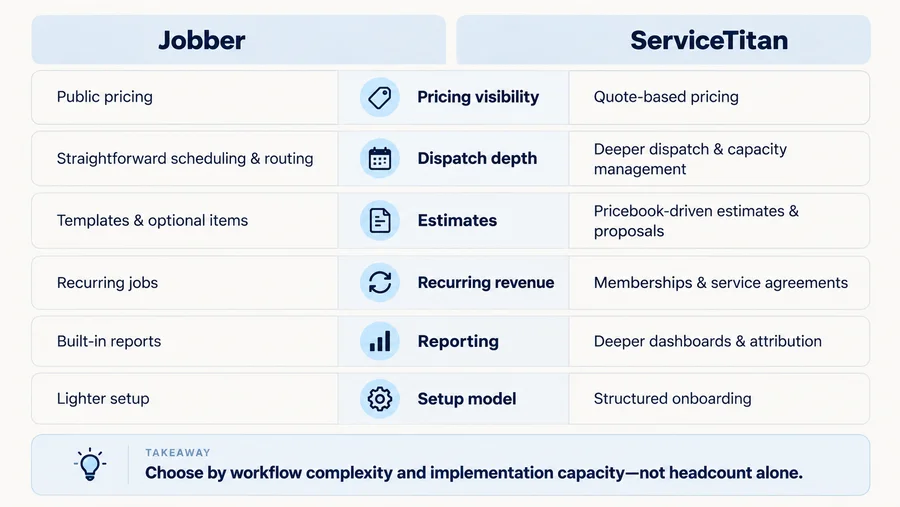
| Decision Area | Jobber | ServiceTitan |
|---|---|---|
| Pricing model | Public plan and team-size pricing | Per-technician, request pricing |
| Evaluation | Free trial and self-serve pricing | Personalized demo and sales process |
| Scheduling | Scheduling, dispatch, and route optimization on eligible plans | Scheduling, dispatch, and deeper capacity-management tooling |
| Estimates | Quote templates, optional items, customization | Pricebook-driven estimates and proposal templates |
| Recurring work | Recurring jobs and scheduled billing | Memberships and commercial Service Agreements |
| Reporting | 20+ built-in reports; marketing reporting available | Customizable dashboards and scorecards |
| Marketing | Marketing tools and performance reporting available | Marketing Pro provides deeper attribution and automation |
| Setup | Lighter evaluation and configuration model | Structured onboarding and configuration |
The short version is: Jobber reduces buying and setup friction. ServiceTitan provides more operational structure when the business actually needs it. That is more useful than labeling Jobber a “small-business platform” and ServiceTitan a “large-business platform.” ServiceTitan itself markets to smaller contractors as well, while Jobber can support multi-crew businesses. The important question is how complicated the workflows behind those teams have become.
Pricing and Buying Model
Pricing is one of the clearest differences before you even use either product.
Jobber
Jobber publishes its plans and pricing publicly. Its current lineup includes Core, Connect, Grow, and Plus, with pricing changing based on plan, team size, and billing arrangement.
Its pricing interface currently lets buyers compare monthly no-commitment billing, a discounted one-year commitment paid monthly, and annual billing. Jobber also offers a free trial without requiring a credit card upfront.
That does not mean Jobber pricing is simple in every scenario—the user allowances and team-size states still matter. But a buyer can get a meaningful cost estimate before talking to sales.
For the full plan and user-count breakdown, see our Jobber pricing guide.
ServiceTitan
ServiceTitan takes a more sales-led approach.
Its current public pricing page shows three packages:
- Starter;
- Essentials;
- The Works.
The page describes its model as per-technician pricing, but it does not publish standard dollar amounts. Each package instead leads to a Request Pricing flow. ServiceTitan’s demo page also routes prospects toward a personalized demonstration rather than a normal self-serve trial. For a deeper breakdown of the per-technician pricing model, quote economics, and order terms, see our ServiceTitan pricing guide. That makes pricing visibility and buying friction the useful comparison—not simply “Jobber is cheap and ServiceTitan is expensive.” Without an actual ServiceTitan quote, there is no reliable basis for claiming that every Jobber configuration costs less than every ServiceTitan configuration.

Scheduling and Dispatch
Both products can schedule and dispatch field teams. The real difference is how deeply the business needs to manage capacity and operational constraints.
Jobber
Jobber supports scheduling, technician assignment, map context, and route optimization.
A particularly important freshness point is that current Jobber routing is more capable than some older comparisons suggest.
Route optimization is currently available on Connect, Grow, and Plus. With Jobber’s New Schedule, the route is optimized directly from the day or week schedule using the current appointments. The older separate master-route workflow belongs to Legacy Schedule accounts and should not be treated as the normal current experience.
This makes Jobber practical for businesses that need to arrange daily visits and reduce unnecessary driving without building an entire capacity-management process around dispatching.

ServiceTitan
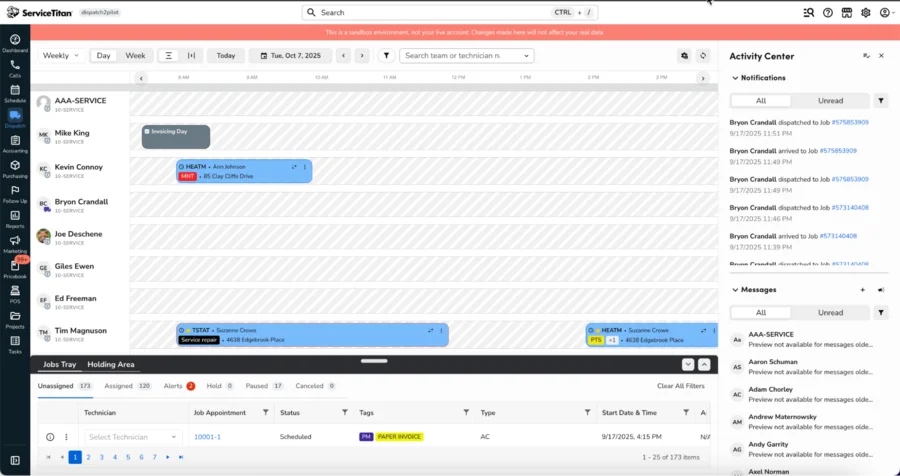
ServiceTitan also provides the standard scheduling and dispatch workflow, but its distinction appears when the office needs to manage capacity as an operational resource. For example, ServiceTitan’s Adaptive Capacity tools can account for technician availability and eligibility, capacity rules, existing work, reporting, and manual adjustments. The tools can help managers decide not only where a technician goes next, but how much bookable capacity the organization should expose for different conditions.
There is an important caveat: ServiceTitan’s current documentation says account configuration is required for Adaptive Capacity. It should not be assumed to be automatically enabled or included for every buyer.
The distinction is therefore: Jobber can manage and optimize the daily field schedule. ServiceTitan becomes more distinctive when dispatch capacity itself needs to be actively managed.
Estimates and Pricebook
Both platforms can create professional estimates. Saying that Jobber offers “basic quotes” while ServiceTitan offers “real estimating” would be misleading. The difference is how deeply pricing and sales processes need to live inside the platform.
Jobber
Jobber offers reusable quote templates on all plans, including prefilled line items, prices, terms, deposits, and client messaging.
Depending on the plan, businesses can also use features such as:
- optional line items;
- images;
- advanced quote customization;
- customer-selectable add-ons or packages.
Optional items can let a customer choose additional services rather than forcing the company to create an entirely separate quote. For many service businesses, that is enough structure to create consistent estimates while keeping the quoting process relatively straightforward.
ServiceTitan
ServiceTitan makes the Pricebook a more central operating component. Its current documentation describes the Pricebook as feeding other workflows including estimates, invoicing, purchasing, and the management of services, materials, and equipment. ServiceTitan’s estimating system can also use proposal templates to create prebuilt Good / Better / Best options for technicians to present in the field. That becomes useful when a business wants salespeople or technicians to follow a standardized pricing and proposal strategy across many jobs.
The useful comparison is therefore not: Can Jobber and ServiceTitan create estimates? Both can. It is: How much of your company’s pricing, proposal, and field-sales system needs to be standardized inside the FSM?
If the answer is “not much,” ServiceTitan’s additional structure may provide limited value. If standardized pricebooks and repeatable proposal options are essential to sales operations, that structure can become a meaningful advantage.
Recurring Work and Agreements
Recurring work is another area where a simple feature checklist can produce the wrong conclusion. Jobber does support recurring work. Its recurring jobs can schedule repeating visits and support different billing approaches, including per-visit and fixed-price invoicing. Businesses can also set custom invoice schedules, and automatic payments are available on eligible plans using Jobber Payments.
That works well when the operational model is essentially: Visit this customer every week/month/season and bill according to this schedule.
ServiceTitan goes further when recurring service becomes a formal revenue program.
Its current platform distinguishes residential Memberships from commercial Service Agreements. Memberships can support recurring billing and renewals, while commercial agreements can include more detailed contract structures, equipment coverage, billing schedules, pricing rules, and other commercial-service requirements.
ServiceTitan also has specific recurring-billing workflows for memberships and service agreements.
The difference is best described as: Jobber manages recurring jobs. ServiceTitan provides a broader operating framework when memberships or commercial service agreements are formal recurring-revenue programs.
A handyman or small service business doing repeat maintenance does not automatically need the ServiceTitan model. But a company actively managing membership retention, automatic renewals, agreement terms, equipment coverage, or commercial contract billing may benefit from the additional structure.
Reporting and Marketing
Reporting is another area where older comparisons can be too simplistic.
Jobber
Jobber currently offers more than 20 built-in reports covering areas such as revenue, completed work, outstanding payments, and team performance. Many can be filtered, customized, or exported. Jobber also has Marketing Tools and a Marketing Performance dashboard. Current documentation shows that Marketing Performance can bring together data from:
- campaigns;
- reviews;
- referrals;
- website activity;
- lead sources;
- job revenue by channel.
Availability depends on plan and the marketing tools added to the subscription. So it would be inaccurate to say that Jobber provides no marketing attribution or performance visibility.
ServiceTitan
ServiceTitan provides a deeper reporting environment through customizable dashboards and scorecards covering metrics such as revenue trends, call-booking efficiency, technician performance, and team metrics. Marketing can go further through Marketing Pro, which ServiceTitan positions separately as a Pro Product. Marketing Pro includes tools for campaign automation and attribution, while its advertising tools can connect ad activity with calls, jobs, and revenue. That distinction matters because Marketing Pro should not be treated as a feature automatically included with every ServiceTitan package. The real comparison is: Both products provide business and marketing visibility. ServiceTitan becomes more differentiated when reporting and attribution need to be more granular and more deeply embedded in management processes.
A company does not necessarily need that extra reporting structure just because it has several technicians. It needs it when the questions management is trying to answer are outgrowing the simpler reporting model.
Setup and Administration
The buying experience also hints at what happens after the purchase.
Jobber
Jobber lets prospects inspect public pricing, start a trial, choose a plan, and subscribe without first going through a personalized implementation process. That supports a lighter evaluation and configuration model. This should not be exaggerated into claims such as “you can fully implement Jobber in one day.” The actual setup effort still depends on how much customer, service, pricing, and operational data a business needs to configure or migrate. But the evaluation path itself is comparatively direct.
ServiceTitan
ServiceTitan documents a structured onboarding process with three stages:
- Pre-Implementation
- Implementation
- Go Live
Its current onboarding documentation includes Launchpad and guided setup covering areas such as company information, employees, operations, accounting, dispatch, and other configuration work. That does not automatically make ServiceTitan’s implementation model a disadvantage. If the business wants more standardized dispatch, accounting, pricebook, reporting, membership, and sales processes, a structured implementation can be part of creating that system. The trade-off appears when a company is configuring operational depth that it does not actually need. The buyer should therefore ask: Do we have the people, data, processes, and management capacity to benefit from a more configurable system? Not: Can we technically afford the software?
Which Fits Your Workflow?
This is where the Jobber vs ServiceTitan comparison becomes useful. There is no reliable technician-count rule that answers the question for every company.
Jobber Is a Stronger Fit When
Jobber is more likely to fit when:
- you want to see meaningful pricing before talking with sales;
- you want to evaluate the platform through a free trial;
- your core workflow is quoting → scheduling → routing → job → invoice → payment;
- recurring service can be managed as recurring jobs rather than a formal membership or agreement program;
- Jobber’s built-in reporting provides enough operational visibility;
- you prefer a lighter evaluation and configuration model;
- complex capacity planning is not a current bottleneck;
- your pricing and sales process does not require heavy pricebook governance;
- sophisticated marketing attribution is useful but not central to management.
This does not mean Jobber is only for solo contractors. A business with multiple crews can still fit that operating model if the underlying workflows remain relatively straightforward. For a wider view of product strengths, limitations, user feedback, and risk factors, see our Jobber review.
ServiceTitan Is a Stronger Fit When
ServiceTitan becomes more compelling when:
- dispatch and available capacity are difficult to manage manually;
- standardized pricebook governance is central to profitability;
- technicians regularly present structured sales options;
- memberships are an important residential retention strategy;
- commercial Service Agreements require more formal billing and contract workflows;
- managers need deeper scorecards and dashboards;
- marketing attribution has become a serious management requirement;
- the company has enough operational maturity to support more structured implementation and configuration.
The point is not that every business with these needs must buy ServiceTitan. It is that these are the kinds of operational pressures that can justify the extra structure. The point is not that every business with these needs must buy ServiceTitan. It is that these are the kinds of operational pressures that can justify the extra structure. Our ServiceTitan review covers the broader strengths, limitations, and adoption risks behind that decision; if the platform still appears too complex or sales-led for your current needs, compare ServiceTitan alternatives.
Do Not Decide by Headcount Alone
A common comparison shortcut is to recommend Jobber below a certain number of technicians and ServiceTitan above it. That is easy to understand, but it can produce the wrong recommendation. Imagine two businesses.
Business A has five technicians. It operates a structured membership program, tracks capacity tightly, uses standardized Good/Better/Best proposals, and needs management reporting across dispatch, sales, and marketing.
Business B has 15 employees but mostly performs straightforward jobs scheduled by a small office team. Estimates are simple, recurring work is handled through repeating jobs, and management does not need complex pricebook or attribution workflows.
Business A may have more reasons to investigate ServiceTitan even though it has fewer technicians.
Business B may still fit Jobber well despite being larger.
The useful threshold is therefore not a headcount. It is the point at which operational complexity begins creating problems the current system cannot solve cleanly.
FAQs
Is Jobber Cheaper Than ServiceTitan?
There is no reliable universal answer. Jobber publishes its plans and team-size pricing, so buyers can estimate cost before contacting sales. ServiceTitan currently uses per-technician pricing with Request Pricing, without standard public dollar amounts. That makes Jobber easier to price upfront, but it does not prove that every Jobber setup costs less than every ServiceTitan quote. For more detail, compare our Jobber pricing guide and ServiceTitan pricing guide.
Does Jobber Have Route Optimization?
Yes. Jobber currently offers route optimization on Connect, Grow, and Plus. With the New Schedule, routes are optimized directly from the day or week schedule. Legacy Schedule accounts may still use the older separate master-route workflow.
Does ServiceTitan Offer a Free Trial?
ServiceTitan’s current public buying flow emphasizes a personalized demo and pricing request rather than a normal self-serve free trial. That is different from Jobber, which currently promotes a self-serve free trial through its public pricing experience.
When Should You Move From Jobber to ServiceTitan?
Consider ServiceTitan when the limitation is no longer simply “we need another feature,” but a broader operational problem—for example:
- increasingly difficult dispatch/capacity management;
- standardized pricebook and sales processes;
- formal memberships or commercial Service Agreements;
- deeper reporting and attribution requirements.
Do not migrate solely because the business reached an arbitrary number of technicians. A platform change should solve operational problems significant enough to justify the cost and implementation effort.