

Last updated: November 2026
On this page
- Quick Verdict for Small Teams
- Pricing for One, Three, Five Users
- Included Features and Paid Add-Ons
- Scheduling, Dispatch and Offline Work
- Estimates, Job Costing and Payments
- QuickBooks and Other Integrations
- Customer Communication and AI Tools
- Real Costs for Different Businesses
- Switching and Setup Considerations
- Final Verdict: Which Fits Better?
Markate and Housecall Pro both handle the everyday work of a small service business: customer records, estimates, scheduling, invoices, payments, and job costs. Their pricing structures, however, lead to different purchasing decisions. Markate charges for an owner account, adds relatively inexpensive active employee access, and sells selected customer-facing features separately. Housecall Pro packages capabilities into Basic, Essentials, and Max plans with different included user counts.
Markate deserves a first look when a small crew can meet its needs with the core platform and a few paid modules. Housecall Pro becomes more compelling when its included booking and review tools, or the operational capabilities in Essentials and Max, solve problems the business encounters every week. This guide compares published prices, plan limits, QuickBooks, and offline work.
Quick Verdict for Small Teams
For a solo handyman who manages most work personally, Markate’s $49.95 monthly owner subscription offers an approachable way to organize estimates, work orders, invoices, and job costs. The owner can add booking, automated review requests, or a branded customer portal individually. Active employee accounts cost another $5 each monthly, subject to role permissions.
Housecall Pro Basic costs $79 per month at the regular monthly rate and lists online booking, review management, and job costing. Essentials costs $189 per month, includes five users, and adds such features as routes, employee GPS, photo reports, and QuickBooks Online synchronization. These may justify the difference when used consistently.
Neither product has a proven three-technician ceiling or an automatic advantage for every growing company. Compare the lowest configuration that covers your actual work.
Pricing for One, Three, Five Users
These examples use standard monthly rates without discounts or promotions. Users include the owner; permissions and features differ.
Markate’s Owner Plus Employee Pricing
Markate’s regular month-to-month Owner Operator subscription is $49.95. Each additional active employee costs $5 per month. An owner working alone therefore has a $49.95 baseline; an owner and two active employees cost $59.95; and an owner with four active employees costs $69.95. These calculated totals exclude modules, taxes, usage, and outside services.
The distinction between an employee account and a second owner account matters. Markate’s published role system provides different app and web permissions for field technicians, office managers, sales staff, accountants, and partners. Employee access is not unrestricted owner access. Our Markate pricing breakdown explains the subscription and add-on arithmetic in greater detail.
Markate does not publish a fixed maximum of three technicians in its current pricing materials. Verify each worker’s required mobile and desktop permissions.
Housecall Pro’s Plans and Seats
Housecall Pro uses a different model. Basic is $79 per month for one user; Essentials is $189 per month for five included users; Max is $329 per month for eight included users at regular monthly rates. The published $35 additional-user fee applies beyond Max’s eight seats, not necessarily to lower plans.
Basic covers estimates, invoicing, payments, online booking, job costing, scheduling, dispatch, and review management. Essentials adds QuickBooks Online, routes, employee GPS, checklist automation, and photo-reporting tools. Max adds advanced route optimization, recurring Service Plans, open API access, and dedicated onboarding. The Housecall Pro pricing guide provides a closer look at those tiers and their billing choices.
For three people, Essentials is the published multi-user reference, although that does not prove Housecall Pro has no other arrangement available through sales. For five, the same $189 Essentials plan covers the listed seat count. Their need for higher-tier features remains separate.
Monthly Costs and Annual Billing
Housecall Pro also publishes annual-billing equivalents of $59 for Basic, $149 for Essentials, and $299 for Max per month. These require annual billing, unlike the monthly comparisons here. Housecall Pro’s subscription terms allow monthly, annual, or other agreed periods, with auto-renewal and generally nonprorated, nonrefundable subscription charges.
Markate’s current visible annual option has shown $45.95 per month equivalent, billed as $551.40 for the owner subscription, or approximately 8% less than twelve regular monthly owner payments. However, older and some separately retrieved official price renditions have shown $39.95 and $479.40 instead. Confirm the active yearly selector and checkout total rather than treating either historical observation as a guaranteed offer. Confirm annual employee and add-on billing separately.
Both advertise 14-day, no-card trials; Housecall Pro’s Max-level trial may exceed the eventual paid tier’s access.

Included Features and Paid Add-Ons
Both cover core administration, but access differs: Markate sells selected customer and integration modules, while Housecall Pro reserves certain field and accounting tools for higher tiers.
| Buyer requirement | Markate access or charge | Housecall Pro access or plan | Practical implication |
|---|---|---|---|
| Customers, leads, and estimates | Core platform | Basic and above | Both handle routine customer-to-quote work |
| Invoices and job costing | Core platform | Basic and above | Neither lacks documented job costing |
| Online booking | $10/month add-on | Listed in Basic | Compare actual booking screens and setup |
| Automated review requests | $10/month add-on | Review management listed in Basic | Confirm automation settings, not just review links |
| Branded customer portal | $10/month add-on | Current portal documented; plan eligibility to verify | Do not assume identical customer accounts |
| Scheduling and dispatch | Core platform | Basic; broader routes in Essentials | Compare the day’s actual reassignment work |
| Employee GPS and optimized routes | Location tracking documented; automatic route optimization not established | GPS and routes: Essentials; drive-time optimization: Max | Maps, GPS, routes, and optimization differ |
| QuickBooks Online | Core connector; separate QBO subscription | Essentials or Max | Data direction and edit behavior also matter |
| AI receptionist | Kate: usage-based, $1 per qualifying call | CSR AI sold separately; price and eligibility to verify | Obtain configured call costs and capabilities |
| API and Zapier | API $50/month with approval; Zapier $10/month | Open API listed in Max | Integration needs can change the chosen plan |
Booking, Reviews and Customer Portals
Suppose a homeowner requests a repair while the owner is on a ladder. Markate can collect leads and create estimates in its core system, but its online booking module costs another $10 per month. Automated requests for Google or other customer reviews are also an available $10 monthly option. Markate documents automated requests.
Housecall Pro lists online booking and review management with Basic. The convenience does not establish identical booking or review workflows.
The portal comparison needs particular care. Markate offers a paid fully branded customer portal. Housecall Pro has a documented Customer Portal that lets customers see appointments, invoices, payments, and estimates, with online booking available when configured. Certain messaging requires registered business texting. Housecall Pro’s public pricing matrix does not clearly confirm which paid plans include the portal, so a buyer relying on it should obtain written plan confirmation before treating Essentials as a complete match.
Automation and Upgrade Costs
Markate’s modular approach suits an owner who knows which customer functions are worth paying for. Booking, review requests, a virtual business number, and Zapier each have separate listed pricing; developer API access is another paid item requiring approval. An owner who uses only booking can keep the subscription relatively simple. Someone who adds several marketing and phone tools needs to budget beyond the owner and employee fees.
Housecall Pro consolidates many routine functions into plans, but advanced capabilities are not universally included. Routes and employee GPS lead toward Essentials, while open API and drive-time route optimization are listed in Max. CSR AI, Pipeline, and Voice are additional products rather than proof that every AI or business-phone function comes with Basic. Compare actual configured costs rather than feature counts.
Scheduling, Dispatch and Offline Work
Both platforms organize appointments and assign work. Differences become more consequential when dispatchers manage callbacks across technicians or someone loses cell service.
Calendar, Routing and Employee Tracking
Markate documents drag-and-drop scheduling, employee job assignments, recurring work orders, time logs, checklists, maps, and location tracking. Its map and location capabilities should not be mistaken for a verified automatic algorithm that optimizes driving routes across the team.
Housecall Pro Basic includes scheduling and dispatch. Essentials adds route grouping and sequencing plus mobile employee GPS; Max adds route optimization based on drive time and traffic. Advanced routing is more valuable when travel and dispatch coordination are recurring problems. Our Housecall Pro review covers its broader field-service workflow beyond this comparison.
Before choosing, ask each vendor to demonstrate moving an appointment from one employee to another, adding a same-day callback, and showing the resulting technician schedule. Use the intended plan and employee permissions.
Working Without Cell Service
Weak reception can interrupt even a short job in a basement or a rural property. Markate’s pricing page describes offline access to schedules and work orders with synchronization when the app reconnects. That description does not establish that every estimate, photo, signature, or invoice can be edited and queued offline.
Housecall Pro’s current mobile offline documentation is more explicit. Its documented mode is view-only and preloads assigned jobs for the current day and next two days, up to ten jobs per day. It does not support offline editing, completing jobs, or collecting payments. Downloaded information may also be outdated if dispatch changes a job while the technician remains disconnected.
Test one assigned work order in airplane mode on each product. Check the visible instructions, whether changes can be made, and what happens after reconnecting. Offline paperwork requires more than view-only access.
Estimates, Job Costing and Payments
For a repair involving a replacement faucet, wall patching, and an unexpected additional part, both systems can manage the estimate, job record, invoice, and payment. Markate documents job costing, expenses, change orders, estimate-to-work-order conversion, and profitability reporting. Markate does have documented job costing. Its more complete workflow is covered in our full Markate review.
Housecall Pro also lists job costing in Basic. Essentials adds flat-rate pricing and photo reports, while Max offers a sales proposal tool. Both base systems can record job costs. In either system, a meaningful margin requires correct material costs, paid labor, other expenses, and approved scope changes; a feature label cannot correct incomplete inputs.
Payment acceptance introduces another layer of cost. Housecall Pro advertises card-processing rates starting at 2.59% and a 1% bank-payment fee, subject to method and account conditions. Markate supports external payment providers, including Square-related options, whose actual charges depend on the provider and payment channel. Check provider fees for card, bank, and on-site payments.
QuickBooks and Other Integrations
QuickBooks can change the recommendation for a business whose owner already reconciles invoices and payments in an accounting system. Both products support QuickBooks Online, but their documented record flows and plan requirements are different. Invoice corrections are an important test.
QuickBooks Online Requirements
Markate includes its QuickBooks Online connector without an additional Markate integration fee; an active QuickBooks Online subscription is still required. Its detailed integration instructions describe manual imports from QuickBooks into Markate for customers, invoices, expenses, and estimates. Those record types can also be exported manually from Markate to QuickBooks. Markate also documents payment exports.
Ongoing Auto Sync is principally Markate-to-QuickBooks export, not unrestricted continuous two-way synchronization. Markate lets users inspect sync logs, and deleting a record in Markate does not delete the matching QuickBooks entry. Confirm the source of truth, duplicate handling, and refunds.
Housecall Pro requires Essentials or Max for QuickBooks Online integration. It supports an initial QuickBooks import, but routine synchronization is principally Housecall Pro-to-QuickBooks. Its synchronization guidance explains that some edits to previously synced invoices require a manual push, while canceled or deleted invoices may need corresponding action directly in QuickBooks.
Consider a customer who changes the scope after receiving an invoice. The owner corrects the invoice in the field-service app, then checks whether the accounting copy reflects the same line items and payment. Match integration behavior to the actual accounting process.
APIs, Exports and Switching Risks
Markate lists Zapier integration at $10 per month and developer/API access at $50 per month, with approval requirements for the latter. Housecall Pro lists open API access in Max. These access gates can outweigh employee-seat prices.
Before building an integration or changing platforms, identify which system owns customer records, job history, unpaid invoices, and appointment updates. Confirm exports for attached photos, change orders, recurring schedules, and communication history; an available CSV export does not necessarily preserve a working workflow. Back up and reconcile before switching.
Customer Communication and AI Tools
A contractor working on a roof may need missed calls captured without hiring a full-time receptionist. Markate’s Kate AI Receptionist is advertised at $1 per qualifying call for up to five minutes. Its FAQ excludes calls shorter than 30 seconds and describes spam-call exclusions. Kate can capture lead details and handle inquiries, but the buyer should confirm how consultation booking, dispatch, transfers, and calls beyond the stated duration work in the intended setup.
Housecall Pro offers CSR AI as a separately marketed service, along with Voice and other customer-communication products. Their presence on the vendor’s website does not make them automatically included in Basic or establish one universal add-on price. For either vendor, check the actual monthly call volume, whether phone-number services are charged separately, which conversations can result in a confirmed booking, and where a human takes over.
Appointment reminders, ordinary two-way texting, marketing campaigns, and AI call answering are different tasks. A solo business that only needs automatic appointment notices may not benefit from an AI receptionist at all; a crew receiving numerous inquiries while technicians are busy could value it substantially. Evaluate those functions using a few representative customer calls, without assuming conversion results or universal reliability.
Real Costs for Different Businesses
Scenario totals require explicit assumptions. These examples use regular month-to-month rates and deliberately exclude taxes, processing charges, AI usage, communications, other optional integrations, and external subscriptions. Markate totals assume each additional person is an active paid employee with suitable permissions. Housecall Pro options reflect publicly listed plans, not necessarily the only commercial configuration a sales representative could offer.
| Business scenario | Required capabilities | Markate monthly configuration | Housecall Pro published option | What to verify |
|---|---|---|---|---|
| Solo handyman | Online booking and automated review requests | Owner $49.95 + booking $10 + reviews $10 = $69.95 | Basic $79, 1 user; booking and review management listed | Compare exact automation and customer booking flow |
| Owner + 2 employees | Staff access, booking, review requests | Owner $49.95 + 2 seats $10 + 2 modules $20 = $79.95 | Essentials $189, 5 included users | Check Markate employee roles and value of Essentials extras |
| Owner + 4 employees | Booking, automated reviews, branded customer portal | Owner $49.95 + 4 seats $20 + 3 modules $30 = $99.95 | Essentials $189, 5 users; Customer Portal eligibility to verify | Housecall Pro portal access is not confirmed for this plan |
These are illustrative configurations, not audited customer bills or feature-equivalent packages. The packages include different capabilities. The third row is not a fully verified like-for-like portal configuration until Housecall Pro confirms eligibility for the intended account.
Solo Handyman Business
A solo owner handles sales, field work, and administration. Markate can cover the central job workflow at its base price, with booking and review requests chosen separately. Housecall Pro Basic costs more than that particular Markate combination, but may offer a convenient packaged approach to customer-facing tasks.
If the same owner depends on QuickBooks Online, the comparison changes: Housecall Pro’s documented integration starts at Essentials, while Markate’s connector is listed within its core platform. Confirm the needed sync behavior first.
Three-Person Repair Crew
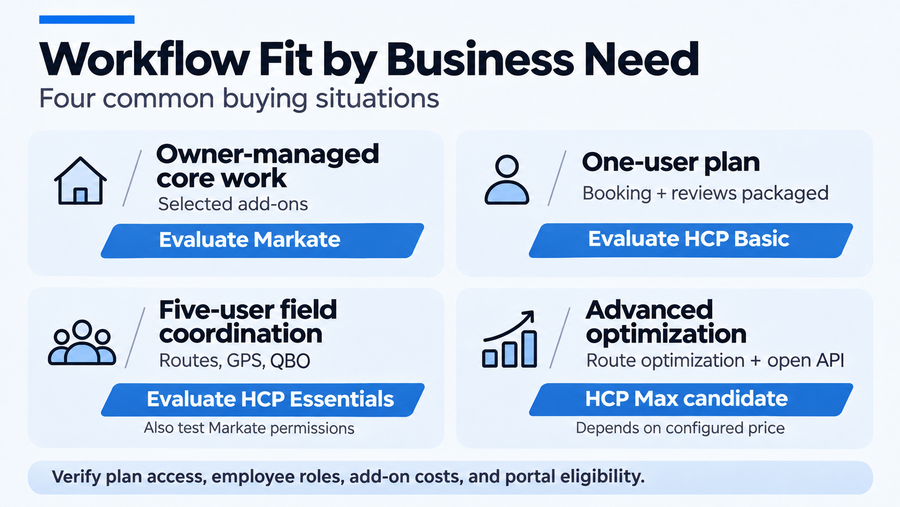
For a three-person crew, reassignment and documentation matter. Markate’s low incremental employee charges may suit a team that needs assignments, work orders, checklists, and location visibility. Permissions should be checked for the person managing estimates or invoices from a desktop.
Housecall Pro Essentials offers five included users, GPS, routes, checklist automations, photo reports, and QuickBooks Online. A crew that relies on those tools to coordinate a busy schedule may find the additional expense justified. Simpler crews may prefer the cheaper configuration.
Five-Person Service Team
Five-person teams may face more dispatch and documentation handoffs. Markate remains a credible option at its published employee rate, provided the chosen modules and assigned roles support the workflow. There is no verified official rule that makes it unsuitable merely because a team adds a fourth technician.
Housecall Pro Essentials matches the published five-user count and may simplify coordination through its routing, GPS, checklists, photo reporting, and accounting connector. Max becomes relevant when drive-time route optimization, API access, or other advanced capabilities are genuinely required. Recurring tasks determine upgrade value.
Switching and Setup Considerations
Before canceling an existing system, request sample exports for customers, service addresses, estimates, unpaid invoices, recurring jobs, and payment records. Check whether photos, attachments, communication history, and field permissions can be preserved in a useful form. Markate advertises migration help; Housecall Pro lists dedicated onboarding with Max. Neither guarantees complete transfer.
Run one representative job from estimate approval through scheduling, employee assignment, documented work, invoice, payment, and QuickBooks reconciliation. Ask the intended technician and office user to perform their respective steps. Also test offline work and the resulting records.
Confirm renewal, export, and add-on conditions; back up and reconcile before cancellation.
Final Verdict: Which Fits Better?
Markate is the stronger first evaluation when the business values a lower published monthly subscription, inexpensive active employee access, and the flexibility to select particular paid modules. Its documented job costing, employee tracking, review automation, and QuickBooks connector are legitimate capabilities, subject to the permissions and integration limits explained above.
Housecall Pro is worth its higher published subscription when Basic’s packaged customer-facing tools or Essentials’ routes, GPS, checklists, photo reporting, and accounting access solve real operational problems. Max is a separate decision for businesses that need capabilities such as drive-time optimization or API access.
For either product, verify the exact configuration before paying: Housecall Pro’s Customer Portal plan eligibility remains a specific open question, while Markate’s annual checkout and add-on billing deserve confirmation. Buyers who decide neither setup addresses their needs can explore other Housecall Pro alternatives without assuming that higher prices or longer feature lists guarantee a better fit.